1. పరిచయం
This manual provides essential information for the safe and effective installation, operation, and maintenance of the Phicus MS-02 Motor Driver Board. This board is a critical spare part designed for use within China Dahao embroidery machine systems, facilitating precise motor control for optimal machine performance.
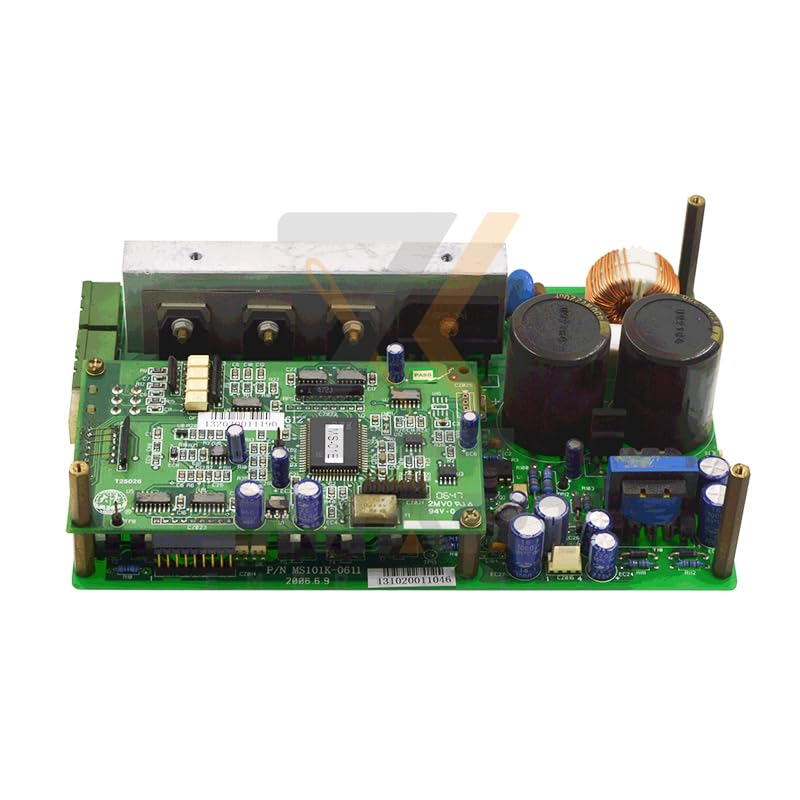
మూర్తి 1: Phicus MS-02 Motor Driver Board. This image displays the compact electronic board with various connectors and components, typical of a motor driver for industrial embroidery machines.
2. సెటప్ మరియు ఇన్స్టాలేషన్
2.1 భద్రతా జాగ్రత్తలు
- Always disconnect power to the embroidery machine before attempting any installation or maintenance.
- Wear appropriate personal protective equipment (PPE), such as anti-static gloves, to prevent electrostatic discharge (ESD) damage to sensitive electronic components.
- పని ప్రాంతం శుభ్రంగా, పొడిగా మరియు బాగా వెలుతురు ఉండేలా చూసుకోండి.
- If you are unfamiliar with electronic component installation, seek assistance from a qualified technician.
2.2 సంస్థాపనా దశలు
- పవర్ డిస్కనెక్ట్: Turn off the main power switch of the Dahao embroidery machine and unplug it from the power source.
- యాక్సెస్ ప్యానెల్ తొలగింపు: Locate and carefully remove the access panel(s) that cover the existing motor driver board within the machine's control cabinet.
- పాత బోర్డు తొలగింపు: Disconnect all cables from the old motor driver board, noting their positions and orientations. Use a camera to take pictures if necessary. Carefully unmount the old board from its housing.
- New Board Installation: Gently place the Phicus MS-02 Motor Driver Board into the designated slot. Ensure it is properly aligned with mounting points.
- బోర్డును భద్రపరచండి: Fasten the new board using the appropriate screws or clips, ensuring it is securely mounted and does not wobble.
- కేబుల్ కనెక్షన్: Reconnect all cables to the new MS-02 board, matching them to their original positions. Double-check all connections for tightness and correct orientation.
- ప్యానెల్ పునఃస్థాపన: Replace the access panel(s) and secure them.
- పవర్ పునరుద్ధరణ: Plug the embroidery machine back into the power source and turn on the main power switch.
3. ఆపరేషన్
The Phicus MS-02 Motor Driver Board operates as an integral component of the Dahao embroidery machine's control system. Once correctly installed, it receives commands from the machine's main controller to precisely manage the speed, direction, and position of the embroidery motors (e.g., X/Y axis motors, needle bar motors). No direct user interaction with the board itself is typically required during normal operation.
3.1 ప్రాథమిక కార్యాచరణ
- మోటార్ నియంత్రణ: Translates digital signals from the machine's CPU into electrical currents to drive stepper or servo motors.
- స్థాన ఖచ్చితత్వం: Ensures motors move to precise positions, critical for accurate embroidery patterns.
- వేగ నియంత్రణ: Controls the rotational speed of motors according to programmed parameters.
- దోష గుర్తింపు: May include basic fault detection capabilities to protect motors and the board from overcurrent or overheating.
4. నిర్వహణ
Proper maintenance extends the lifespan of the motor driver board and ensures consistent machine performance. Always disconnect power before performing any maintenance.
- దుమ్ము తొలగింపు: Periodically (e.g., every 3-6 months, depending on environment) use compressed air to gently remove dust and debris from the board's surface and cooling fins (if present). Ensure the air is dry and oil-free.
- దృశ్య తనిఖీ: Regularly inspect the board for any signs of damage, such as burnt components, loose connections, or corrosion.
- కనెక్షన్ తనిఖీ: Ensure all cable connections remain secure and free from oxidation.
- పర్యావరణ నియంత్రణ: Operate the embroidery machine in a clean, temperature-controlled environment to prevent excessive heat buildup and contamination.
5. ట్రబుల్షూటింగ్
This section outlines common issues that may indicate a problem with the motor driver board and potential solutions. Always ensure the machine's power is off before inspecting internal components.
| సమస్య | సాధ్యమైన కారణం | పరిష్కారం |
|---|---|---|
| మోటారు కదలకపోవడం లేదా అస్థిరమైన కదలిక | Loose cable connection; Faulty motor; Damaged driver board; Incorrect settings in machine controller. | Check all motor and power connections. Test the motor if possible. Consult machine's main manual for controller settings. If other solutions fail, the driver board may need replacement. |
| Overheating of the board | Insufficient ventilation; Excessive motor load; Faulty board component. | Ensure proper airflow around the board. Reduce motor load if possible. Inspect for dust buildup. If overheating persists, the board may be faulty. |
| Machine displays motor error code | Communication error; Motor fault; Driver board fault. | Refer to the Dahao embroidery machine's main error code manual. Check cable integrity. If the error points to a driver issue, consider board replacement. |
| No power to the board | Loose power connection; Blown fuse (if applicable); Power supply unit (PSU) fault. | Verify power connections. Check for any fuses on the board or in the machine's power supply. Test the PSU output. |
6. స్పెసిఫికేషన్లు
Technical specifications for the Phicus MS-02 Motor Driver Board (Model: PHC-C0CD5298EDE4DFCF6F31E2CEB092CF24).
| ఫీచర్ | వివరాలు |
|---|---|
| తయారీదారు | సాధారణమైనది |
| పార్ట్ నంబర్ | PHC-C0CD5298EDE4DFCF6F31E2CEB092CF24 |
| మోడల్ అనుకూలత | China Dahao Embroidery Machine Systems |
| ASIN | B0D4LSV4VP |
| మొదటి తేదీ అందుబాటులో ఉంది | సెప్టెంబర్ 11 2023 |
| చేర్చబడిన భాగాలు | x (Not specified beyond the board itself) |
| కొలత ఖచ్చితత్వం | x (Not specified) |
7. వారంటీ మరియు మద్దతు
For specific warranty information regarding the Phicus MS-02 Motor Driver Board, please refer to the purchase documentation or contact the seller directly. As a spare part, warranty terms may vary. For technical support or further inquiries, please reach out to the original equipment manufacturer (Dahao) or the supplier from whom the board was purchased.


