
పరిచయం
This manual provides detailed instructions for the safe and effective use of your BÉABA Zen Nomad Video Baby Monitor. Please read this manual thoroughly before operating the device and retain it for future reference.
ఉత్పత్తి ముగిసిందిview
The BÉABA Zen Nomad is a portable video baby monitor designed for flexible use at home or while traveling. It connects to your smartphone via a dedicated application, offering a range of features to help you monitor your baby.
ముఖ్య లక్షణాలు:
- వైర్లెస్ కనెక్టివిటీ: Connects directly to your smartphone via a dedicated app.
- పోర్టబుల్ డిజైన్: Lightweight with a versatile clip for easy positioning.
- సుదీర్ఘ బ్యాటరీ జీవితం: Up to 6 hours of autonomy on battery power.
- రాత్రి దృష్టి: Infrared night vision for clear monitoring in low light.
- Two-Way Talk (Walkie-Talkie): Communicate with your baby remotely.
- లాలబీస్: Integrated lullabies to soothe your baby.
- Multi-Color Night Light: Remote-controlled night light for a calming atmosphere.
- పర్యావరణ సెన్సార్లు: Built-in thermometer and humidity detector.
- VOX ఫంక్షన్: Sound and motion detection for continuous monitoring.
- మల్టీ-కెమెరా సపోర్ట్: Connect and monitor multiple cameras simultaneously via the app.
భాగాలు
The BÉABA Zen Nomad Video Baby Monitor includes the following components:
- Zen Nomad Camera Unit
- USB ఛార్జింగ్ కేబుల్
- వినియోగదారు మాన్యువల్ (ఈ పత్రం)

చిత్రం 1: The BÉABA Zen Nomad Video Baby Monitor, showing the camera unit, its versatile clip stand, and the product packaging. A smartphone displaying the live feed is also visible.
సెటప్ సూచనలు
- పరికరాన్ని ఛార్జ్ చేయండి: Before first use, fully charge the Zen Nomad camera using the provided USB cable. The charging port is typically located on the back or side of the unit.
- Download the Mobile Application: కోసం వెతకండి the dedicated BÉABA Zen Nomad application on your smartphone's app store (iOS or Android) and install it.
- ఖాతాను సృష్టించండి: Open the application and follow the on-screen instructions to create a user account or log in if you already have one.
- Add the Camera:
- Power on the Zen Nomad camera.
- In the application, select the option to "Add Device" or "Add Camera."
- Follow the app's instructions to pair the camera with your smartphone. This usually involves scanning a QR code on the camera or connecting to a temporary Wi-Fi network broadcast by the camera.
- జత చేసే ప్రక్రియలో మీ స్మార్ట్ఫోన్ 2.4GHz Wi-Fi నెట్వర్క్కి కనెక్ట్ చేయబడిందని నిర్ధారించుకోండి.
- కెమెరాను ఉంచండి: Use the versatile clip to securely attach the camera to a crib rail, shelf, or other stable surface. Ensure the camera has a clear view మీ శిశువు యొక్క.

చిత్రం 2: The BÉABA Zen Nomad camera unit demonstrating its clip attachment feature on a crib rail. The camera is positioned to monitor the baby.

చిత్రం 3: The BÉABA Zen Nomad camera unit securely clipped to the side of a crib, providing a clear view into the crib.
ఆపరేటింగ్ సూచనలు
Once your BÉABA Zen Nomad is set up, you can access its features through the dedicated mobile application.
Mobile Application Interface:
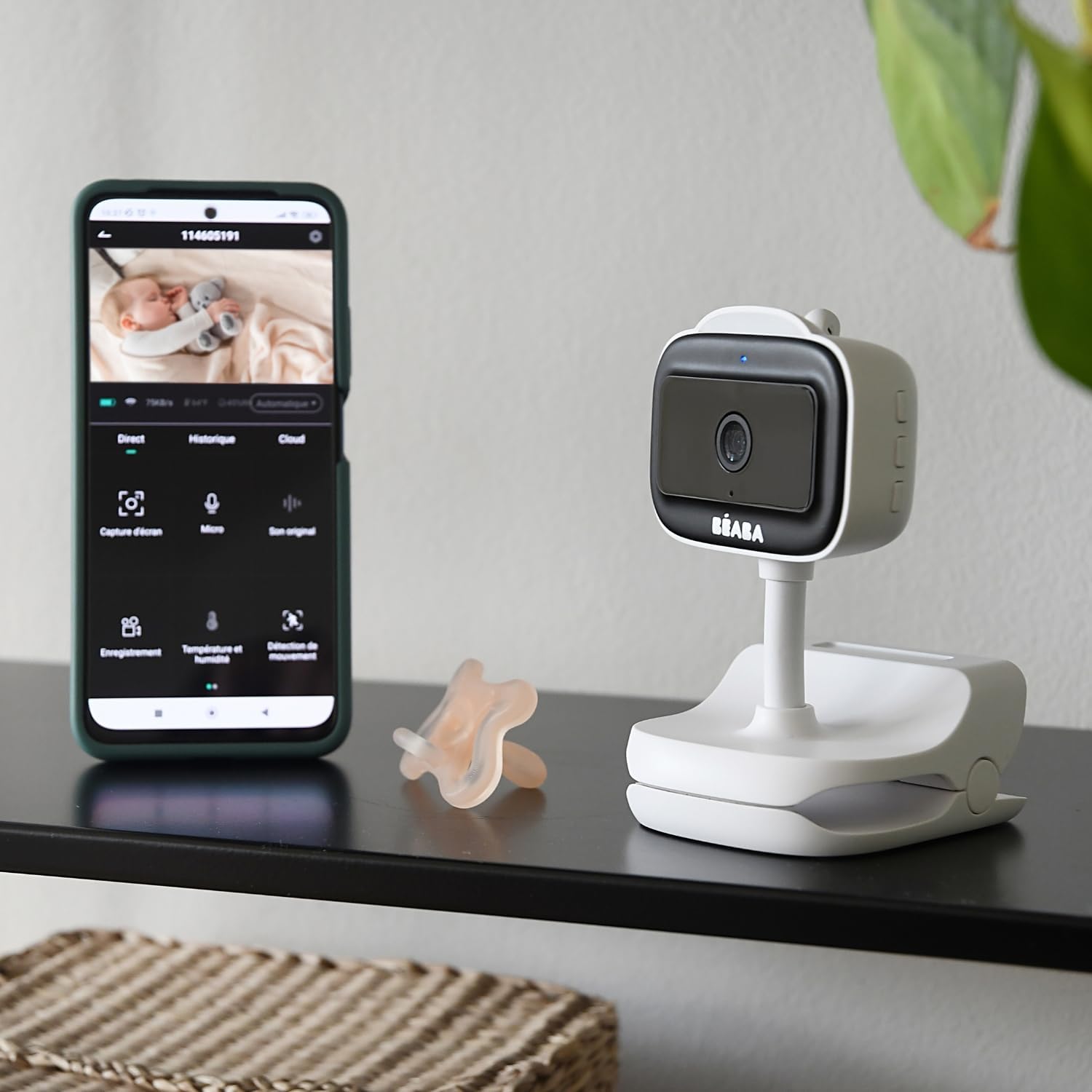
చిత్రం 4: A smartphone displaying the BÉABA Zen Nomad mobile application interface, showing live video feed and various control options like recording, microphone, temperature, and motion detection.
- ప్రత్యక్షం View: Access real-time video and audio from the camera.
- ద్విముఖ చర్చ: Use the microphone icon in the app to speak through the camera to your baby.
- రాత్రి దృష్టి: The camera automatically activates infrared night vision in low-light conditions.
- రాత్రి కాంతి: Control the multi-color night light feature directly from the app to create a soothing environment.
- లాలబీస్: Select and play integrated lullabies through the camera's speaker.
- ఉష్ణోగ్రత మరియు తేమ పర్యవేక్షణ: View real-time temperature and humidity readings of the baby's room within the app.
- VOX Function (Sound and Motion Detection): Activate VOX mode to receive alerts on your smartphone when sound or motion is detected in the baby's room. Adjust sensitivity settings as needed.
- Multi-Camera Monitoring: If you have multiple Zen Nomad cameras, you can view feeds from all connected cameras within the same application.

చిత్రం 5: A smartphone displaying the BÉABA Zen Nomad mobile application, illustrating the capability to monitor multiple camera feeds simultaneously.
- Manual Camera Rotation: The camera unit can be manually rotated to adjust the viewing కోణం.
నిర్వహణ
- శుభ్రపరచడం: Wipe the camera unit with a soft, dry cloth. Do not use abrasive cleaners or solvents.
- నిల్వ: ఉపయోగంలో లేనప్పుడు పరికరాన్ని చల్లని, పొడి ప్రదేశంలో నిల్వ చేయండి.
- బ్యాటరీ సంరక్షణ: బ్యాటరీ జీవితకాలం పొడిగించడానికి, బ్యాటరీని తరచుగా పూర్తిగా డిశ్చార్జ్ చేయకుండా ఉండండి. క్రమం తప్పకుండా ఛార్జ్ చేయండి.
ట్రబుల్షూటింగ్
| సమస్య | సాధ్యమైన కారణం | పరిష్కారం |
|---|---|---|
| కెమెరా పవర్ ఆన్ అవ్వదు. | బ్యాటరీ ఛార్జ్ తక్కువగా ఉంది లేదా లేదు. | Connect the camera to a power source using the USB cable and allow it to charge for at least 30 minutes before attempting to power on again. |
| Unable to pair camera with the app. | Incorrect Wi-Fi network (5GHz instead of 2.4GHz), incorrect password, or camera not in pairing mode. |
|
| No video feed or poor image quality. | Weak Wi-Fi signal, camera too far from router, or network congestion. |
|
| Audio issues (no sound, distorted sound). | Microphone or speaker blocked, app volume settings, or network delay. |
|
స్పెసిఫికేషన్లు
- మోడల్ సంఖ్య: 930373
- కనెక్టివిటీ టెక్నాలజీ: వైర్లెస్ (Wi-Fi)
- శక్తి మూలం: బ్యాటరీ ఆధారితం (రీఛార్జ్ చేయదగినది)
- బ్యాటరీ స్వయంప్రతిపత్తి: 6 గంటల వరకు
- వీడియో రికార్డింగ్ రిజల్యూషన్: 720p
- ప్రత్యేక లక్షణాలు: Motion Detector, Night Vision, Temperature and Humidity Sensor, Two-Way Talk, Lullabies, Multi-Color Night Light, VOX Function
- అనుకూల పరికరాలు: స్మార్ట్ఫోన్
- మెటీరియల్: ప్లాస్టిక్
- రంగు: తెలుపు
- వాల్యూమ్tage: 5 వోల్ట్లు
- శక్తి: 5 వాట్స్
- కొలతలు: సుమారు 20.5 x 12.7 x 9.2 సెం.మీ
- బరువు: సుమారు 453 గ్రాములు
వారంటీ మరియు మద్దతు
The BÉABA Zen Nomad Video Baby Monitor comes with a 2 సంవత్సరాల వారంటీ on spare parts, ensuring support for potential component replacements. For technical assistance, troubleshooting beyond this manual, or warranty claims, please contact BÉABA customer support through their official webమీ కొనుగోలుతో అందించబడిన సైట్ లేదా సంప్రదింపు సమాచారం.
For more information, visit the official BÉABA store: BÉABA Official Store