
పరిచయం
This manual provides detailed instructions for the proper installation, operation, and maintenance of your Starsound SSA-R2-8400.4 Raptor Series 4-Channel Ampలైఫైయర్. సరైన పనితీరు మరియు భద్రతను నిర్ధారించడానికి ఉత్పత్తిని ఉపయోగించే ముందు దయచేసి ఈ మాన్యువల్ను పూర్తిగా చదవండి.
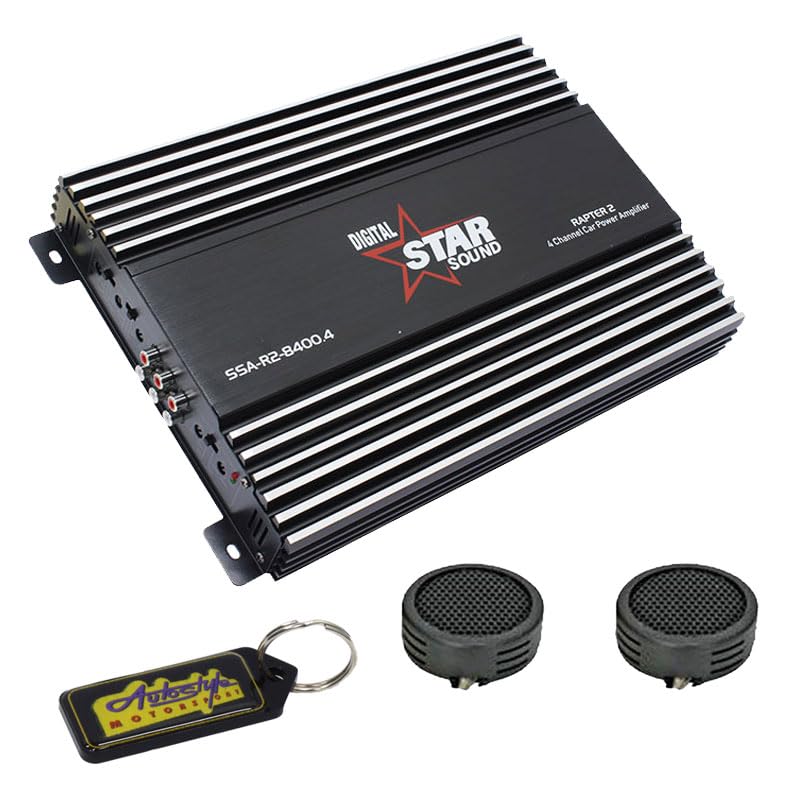
Image: Starsound SSA-R2-8400.4 Raptor Series 4-Channel Amplifier. This image displays the top-down view యొక్క ampలైఫైయర్, షోక్asing అది నల్లగా ఉంది casing with silver fins, the 'DIGITAL STAR SOUND' logo, and the model number 'SSA-R2-8400.4' clearly visible.
భద్రతా జాగ్రత్తలు
- Ensure the vehicle's battery is disconnected before installation to prevent electrical shorts.
- మౌంట్ ది amplifier securely in a dry, well-ventilated area, away from direct sunlight or heat sources.
- ఇన్స్టాలేషన్ విభాగంలో పేర్కొన్న విధంగా పవర్, గ్రౌండ్ మరియు స్పీకర్ కనెక్షన్ల కోసం తగిన గేజ్ వైరింగ్ను ఉపయోగించండి.
- బహిర్గతం చేయవద్దు ampతేమ లేదా విపరీతమైన ఉష్ణోగ్రతలకు జీవక్రియ.
- ఏవైనా ఇన్స్టాలేషన్ దశల గురించి మీకు ఖచ్చితంగా తెలియకపోతే నిపుణుల సహాయం తీసుకోండి.
సెటప్ మరియు ఇన్స్టాలేషన్
1. అన్ప్యాకింగ్
జాగ్రత్తగా తొలగించండి amplifier from its packaging. Verify that all components listed in the package contents are present. The package includes: 1 x Starsound SSA-R2-8400.4 Amplifier, 1 x EvoTuning 300W Super Tweeters, 1 x Gel Key Holder.
2 మౌంటు స్థానం
తగినంత వెంటిలేషన్ అందించే మౌంటు స్థానాన్ని ఎంచుకోండి amplifier's heat sinks. Avoid mounting in enclosed spaces or areas prone to vibration. Common locations include under seats, in the trunk, or behind panels.
3. వైరింగ్ కనెక్షన్లు
పవర్ కనెక్షన్: Connect a heavy-gauge power cable (e.g., 4-gauge) from the vehicle's positive battery terminal to the amplifier's +12V terminal. Install an in-line fuse holder (not included) within 18 inches (45 cm) of the battery.
గ్రౌండ్ కనెక్షన్: Connect a heavy-gauge ground cable of the same length as the power cable from the amplifier's GND terminal to a clean, unpainted metal surface on the vehicle chassis. Ensure a good electrical contact.
రిమోట్ టర్న్-ఆన్: Connect a thin wire from your head unit's remote output to the ampలైఫైయర్ యొక్క REM టెర్మినల్. ఈ వైర్ ampమీ హెడ్ యూనిట్తో లైఫైయర్ను ఆన్ మరియు ఆఫ్ చేయండి.
RCA ఇన్పుట్: మీ హెడ్ యూనిట్ యొక్క ప్రీ- నుండి RCA కేబుల్లను కనెక్ట్ చేయండిamp కు అవుట్పుట్లు ampలైఫైయర్ యొక్క RCA ఇన్పుట్ జాక్లు.
స్పీకర్ అవుట్పుట్: మీ స్పీకర్లను దీనికి కనెక్ట్ చేయండి amplifier's speaker terminals. Ensure correct polarity (+ to + and - to -) for each speaker. This is a 4-channel amplifier, allowing connection of up to four speakers or two speakers in bridged mode.
ఆపరేటింగ్ సూచనలు
1. ప్రారంభ పవర్-అప్
After all connections are made and verified, reconnect the vehicle's battery. Turn on your head unit. The amplifier's power indicator LED should illuminate.
2. సర్దుబాటు పొందండి
తో ప్రారంభించండి amplifier's gain control set to minimum. Play a familiar piece of music at a moderate volume on your head unit. Slowly increase the amplifier's gain until you hear distortion, then back it off slightly. This sets the amplifier's input sensitivity to match your head unit's output.
3. క్రాస్ఓవర్ సెట్టింగులు
The SSA-R2-8400.4 amplifier typically features built-in crossovers (High-Pass Filter, Low-Pass Filter). Adjust these settings based on the type of speakers connected:
- పూర్తి-శ్రేణి స్పీకర్లు: Set to FULL or OFF.
- Tweeters/Mid-Range: Set to HPF (High-Pass Filter) and adjust the frequency to prevent low bass from reaching them.
- సబ్ వూఫర్లు: Set to LPF (Low-Pass Filter) and adjust the frequency to only allow bass frequencies.
4. బాస్ బూస్ట్
Use the bass boost control sparingly. Excessive bass boost can lead to distortion and potential speaker damage. Adjust to taste, ensuring sound clarity.
నిర్వహణ
- శుభ్రపరచడం: కాలానుగుణంగా తుడవండి ampలిఫైయర్ యొక్క బాహ్య భాగాన్ని మృదువైన, పొడి వస్త్రంతో తుడవండి. కఠినమైన రసాయనాలు లేదా రాపిడి క్లీనర్లను ఉపయోగించవద్దు.
- వెంటిలేషన్: అని నిర్ధారించుకోండి ampసరైన వేడి వెదజల్లడాన్ని నిర్వహించడానికి లైఫైయర్ యొక్క శీతలీకరణ రెక్కలు దుమ్ము మరియు శిధిలాల నుండి ఉచితం.
- కనెక్షన్లు: అప్పుడప్పుడు అన్ని వైరింగ్ కనెక్షన్లు బిగుతు మరియు తుప్పు కోసం తనిఖీ చేయండి. వదులుగా ఉన్న కనెక్షన్లు పనితీరు సమస్యలు లేదా నష్టాన్ని కలిగిస్తాయి.
ట్రబుల్షూటింగ్
| సమస్య | సాధ్యమైన కారణం | పరిష్కారం |
|---|---|---|
| శక్తి లేదు / Ampలైఫైయర్ ఆన్ కావడం లేదు | ఎగిరిన ఫ్యూజ్, వదులుగా ఉన్న పవర్/గ్రౌండ్/రిమోట్ వైర్, తప్పు రిమోట్ టర్న్-ఆన్ సిగ్నల్. | Check in-line fuse, verify all power, ground, and remote connections. Test remote wire for 12V signal. |
| సౌండ్ లేదు | Loose RCA cables, incorrect gain settings, speaker wires disconnected, ampరక్షణ మోడ్లో లైఫైయర్. | Check RCA connections, adjust gain, verify speaker wiring, check for protection LED (usually red). |
| వక్రీకరించిన ధ్వని | Gain set too high, incorrect crossover settings, faulty speakers, poor ground connection. | Reduce gain, adjust crossover frequencies, inspect speakers, ensure solid ground connection. |
| Ampలైఫైయర్ వేడెక్కడం | Insufficient ventilation, impedance mismatch (too low), prolonged high volume use. | చుట్టూ సరైన గాలి ప్రసరణ ఉండేలా చూసుకోండి amplifier. Check speaker impedance. Reduce volume or allow cooling time. |
స్పెసిఫికేషన్లు
- మోడల్: SSA-R2-8400.4
- సిరీస్: రాప్టర్ సిరీస్
- ఛానెల్లు: 4-ఛానల్
- గరిష్ట శక్తి అవుట్పుట్: 8400 వాట్స్
- ఉత్పత్తి కొలతలు (L x W x H): 25లీ x 17వా x 9హౌ సెంటీమీటర్లు
- చేర్చబడిన భాగాలు: 1 x Starsound SSA-R2-8400.4 Amplifier, 1 x EvoTuning 300W Super Tweeters, 1 x Gel Key Holder
- UPC: 759649119351
వారంటీ సమాచారం
This Starsound SSA-R2-8400.4 ampఒక తో వస్తుంది 6 నెలలు warranty from the date of purchase. This warranty covers manufacturing defects and faulty workmanship under normal use. It does not cover damage caused by improper installation, abuse, accidents, modifications, or unauthorized repairs. Please retain your proof of purchase for warranty claims.
కస్టమర్ మద్దతు
For technical assistance, troubleshooting, or warranty inquiries, please contact your retailer or the manufacturer's customer support. Refer to your purchase documentation for specific contact details.