
పరిచయం
This user manual provides detailed instructions for the Docooler Wireless Gaming Mouse, featuring a transparent crystal shell, tri-mode connectivity (USB Wired, 2.4G Wireless, and Bluetooth), adjustable DPI settings, and vibrant RGB lighting. Please read this manual thoroughly to ensure proper use and optimal performance of your new gaming mouse.

Image: The Docooler Wireless Gaming Mouse, showcasing its transparent crystal shell and internal RGB lighting.
ఉత్పత్తి లక్షణాలు
- Transparent Crystal Shell: The mouse features a fully transparent PC shell, offering a unique aesthetic and allowing visibility of internal components and lighting.
- ట్రై-మోడ్ కనెక్టివిటీ: Supports three connection methods:
- USB వైర్డు: స్థిరమైన, తక్కువ జాప్యం గల కనెక్షన్ కోసం.
- 2.4G వైర్లెస్: Utilizes a USB receiver for reliable wireless performance.
- బ్లూటూత్: For convenient wireless connection to compatible devices.
- సర్దుబాటు చేయగల DPI: Five adjustable DPI levels (1200-1600-2000-2400-3600DPI) for precise control and adaptability to various tasks and games.
- RGB లైటింగ్: Features multiple RGB lighting backlight effects with 11 light guides, creating an immersive visual experience.
- టైప్-సి ఫాస్ట్ ఛార్జింగ్: Built-in 650mAh lithium battery with Type-C charging port, providing long endurance of up to 30 days on a full charge.
- ఎర్గోనామిక్ డిజైన్: Designed for comfortable use during extended periods, with an upgraded oil-repellent coating for fingerprint resistance.
- నిశ్శబ్ద క్లిక్లు: Equipped with mute buttons for quiet operation.
- విస్తృత అనుకూలత: Compatible with various devices including PCs, laptops, and other commonly used electronic devices.

చిత్రం: ఒక ఓవర్view of the mouse's features, including 3 modes, RGB light, mute button, ergonomic design, transparent shell, 5-step DPI, rechargeable battery, and game engine.

Image: A detailed display of the mouse's components, including the anti-slip roller, transparent body, charging support, and multimedia side keys.
ప్యాకేజీ విషయాలు
దయచేసి ఈ క్రింది అంశాల కోసం ప్యాకేజీని తనిఖీ చేయండి:
- Docooler Wireless Gaming Mouse
- USB రిసీవర్ (2.4G)
- USB టైప్-సి ఛార్జింగ్ కేబుల్
- వినియోగదారు మాన్యువల్
సెటప్ మరియు కనెక్షన్
ప్రారంభ ఛార్జింగ్
Before first use, it is recommended to fully charge the mouse. Connect the supplied USB Type-C charging cable to the mouse's charging port and the other end to a USB power source (e.g., computer USB port, USB wall adapter). The RGB lighting may indicate charging status.
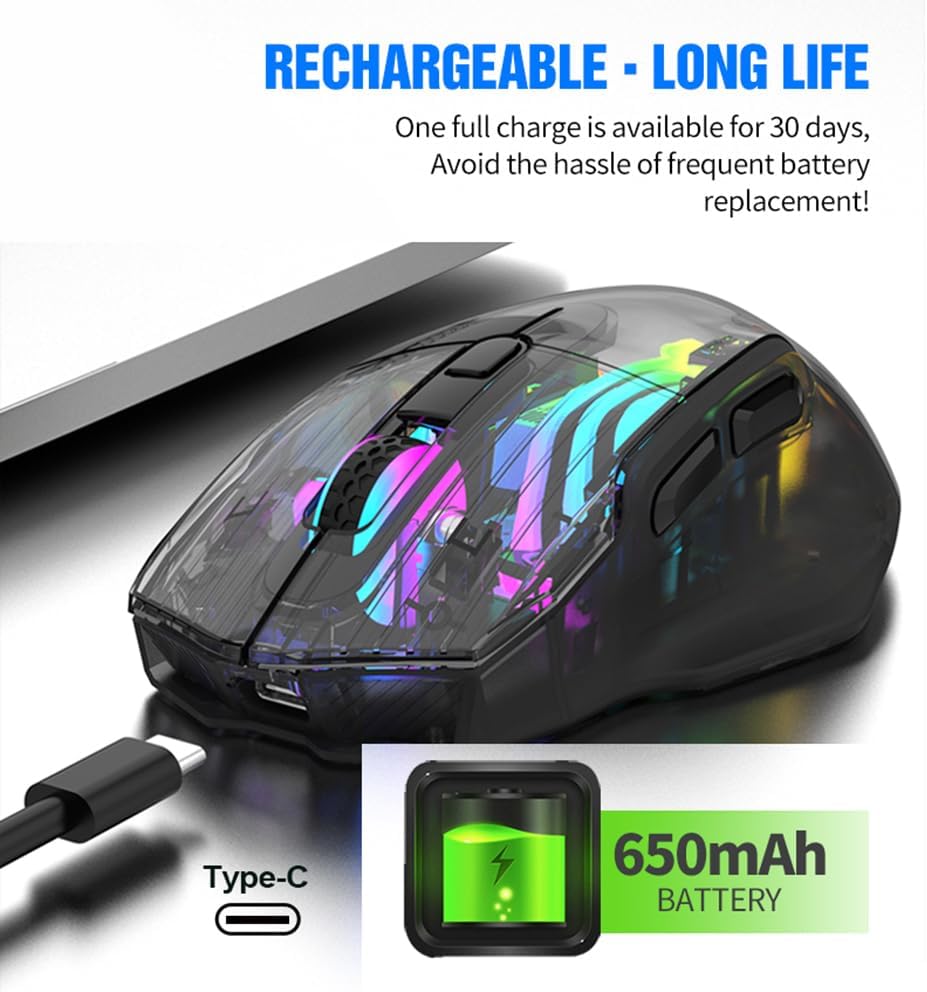
Image: The Docooler Wireless Gaming Mouse connected via its Type-C charging cable, illustrating its rechargeable battery feature.
Connecting via 2.4G Wireless Mode
- USB రిసీవర్ను గుర్తించండి, సాధారణంగా మౌస్ దిగువన ఉన్న కంపార్ట్మెంట్లో నిల్వ చేయబడుతుంది.
- మీ కంప్యూటర్లో అందుబాటులో ఉన్న USB పోర్ట్కి USB రిసీవర్ని ప్లగ్ చేయండి.
- Turn on the mouse using the power switch located on the underside. Ensure the mode switch is set to 2.4G wireless mode (indicated by a specific icon or position).
- మౌస్ స్వయంచాలకంగా మీ కంప్యూటర్కు కనెక్ట్ అవ్వాలి.
Connecting via Bluetooth Mode
- Turn on the mouse and set the mode switch on the underside to Bluetooth mode (indicated by a Bluetooth icon or position).
- మీ కంప్యూటర్ లేదా పరికరంలో, బ్లూటూత్ సెట్టింగ్లను తెరవండి.
- కోసం వెతకండి new devices. The mouse should appear as "Docooler Mouse" or similar.
- Select the mouse to pair. Follow any on-screen prompts if a pairing code is required (usually 0000 or 1234, but often not needed for mice).
Connecting via USB Wired Mode
- Connect the supplied USB Type-C cable to the mouse's port.
- USB కేబుల్ యొక్క మరొక చివరను మీ కంప్యూటర్లో అందుబాటులో ఉన్న USB పోర్ట్కు కనెక్ట్ చేయండి.
- The mouse will function as a wired mouse and will also charge simultaneously.

Image: A diagram illustrating the three connection modes: 2.4G wireless, wired (USB to Type-C), and Bluetooth mode.
ఆపరేటింగ్ మోడ్లు
The Docooler Wireless Gaming Mouse supports three distinct operating modes: 2.4G Wireless, Bluetooth, and USB Wired. You can switch between these modes using the switch located on the underside of the mouse. Select the mode that best suits your current needs and device compatibility.
DPI సర్దుబాటు
The mouse offers five adjustable DPI (Dots Per Inch) levels to customize cursor sensitivity. This allows for precise control for tasks requiring accuracy or rapid movement for gaming. The available DPI settings are 1200, 1600, 2000, 2400, and 3600 DPI.
To adjust the DPI, press the DPI switch button, typically located near the scroll wheel on the top of the mouse. Each press will cycle through the available DPI settings. The RGB lighting may change to indicate the current DPI level.

Image: The Docooler Wireless Gaming Mouse with an arrow pointing to the DPI switch, illustrating its function for adjusting sensitivity.
RGB లైటింగ్
The mouse features dynamic RGB lighting with 16.8 million colors and various effects, enhancing your gaming or work environment. The translucent shell allows the internal LEDs and light guides to create an immersive lighting display.
To switch between different lighting effects, use the dedicated light effect switching button, which is typically located on the underside of the mouse. Pressing this button will cycle through the available RGB modes.

Image: Two Docooler Wireless Gaming Mice (white and black variants) displaying their vibrant RGB illusion lighting, with a close-up of the light effect switching button on the underside.
ఛార్జింగ్
The mouse is equipped with a built-in 650mAh lithium battery, providing extended usage time. A full charge can last up to 30 days, depending on usage patterns and RGB lighting settings.
To charge the mouse, connect the provided USB Type-C cable to the charging port on the front of the mouse and to a USB power source. The mouse can be used while charging in wired mode.
Ergonomics and Compatibility
The Docooler Wireless Gaming Mouse is designed with an ergonomic curve to provide a comfortable grip, reducing strain during long periods of use. Its lightweight construction and oil-repellent coating contribute to a pleasant user experience.
This mouse offers wide compatibility with various operating systems and devices, including but not limited to PCs, laptops, Smart TVs, and All-in-one PCs. For specific device compatibility, please refer to your device's specifications or contact customer support.

Image: The Docooler Wireless Gaming Mouse positioned in front of various compatible devices such as a Smart TV, PC, All-in-one PC, and Notebook, highlighting its wide compatibility.
నిర్వహణ
To ensure the longevity and optimal performance of your Docooler Wireless Gaming Mouse, follow these maintenance guidelines:
- శుభ్రపరచడం: మౌస్ ఉపరితలాన్ని తుడవడానికి మృదువైన, పొడి వస్త్రాన్ని ఉపయోగించండి. మొండి ధూళి కోసం, కొద్దిగా damp cloth can be used, but ensure no liquid enters the mouse. Avoid using harsh chemicals or abrasive cleaners.
- నిల్వ: మౌస్ను ప్రత్యక్ష సూర్యకాంతి మరియు తీవ్రమైన ఉష్ణోగ్రతలకు దూరంగా చల్లని, పొడి ప్రదేశంలో నిల్వ చేయండి.
- బ్యాటరీ సంరక్షణ: Avoid completely draining the battery frequently. Charge the mouse regularly to maintain battery health. If storing for a long period, charge the battery to about 50% and recharge every few months.
- USB రిసీవర్: ఉపయోగంలో లేనప్పుడు, USB రిసీవర్ నష్టాన్ని నివారించడానికి మౌస్పై దాని నియమించబడిన కంపార్ట్మెంట్లో నిల్వ చేయండి.
ట్రబుల్షూటింగ్
| సమస్య | సాధ్యమైన కారణం | పరిష్కారం |
|---|---|---|
| మౌస్ స్పందించడం లేదు. | Low battery; Incorrect connection mode; USB receiver not properly connected (2.4G); Bluetooth not paired. | Charge the mouse; Ensure the mode switch is set correctly (2.4G, BT, or Wired); Re-insert USB receiver; Re-pair Bluetooth. |
| RGB లైట్లు పనిచేయడం లేదు. | లైట్లు ఆపివేయబడ్డాయి; బ్యాటరీ తక్కువగా ఉంది. | Press the light effect switching button on the underside; Charge the mouse. |
| కర్సర్ కదలిక అస్తవ్యస్తంగా లేదా నెమ్మదిగా ఉంది. | Low DPI setting; Dirty sensor; Uneven surface. | Increase DPI using the DPI switch button; Clean the optical sensor with a soft cloth; Use on a clean, flat mouse pad or surface. |
| మౌస్ తరచుగా డిస్కనెక్ట్ అవుతోంది. | జోక్యం; రిసీవర్/పరికరం నుండి దూరం; తక్కువ బ్యాటరీ. | Reduce interference (move away from other wireless devices); Ensure mouse is within range; Charge the mouse. |
స్పెసిఫికేషన్లు
- మోడల్ సంఖ్య: LWE1749742334267PB
- కనెక్టివిటీ: Tri-Mode (2.4G Wireless, Bluetooth, USB Wired)
- DPI స్థాయిలు: 1200 / 1600 / 2000 / 2400 / 3600 DPI
- బ్యాటరీ కెపాసిటీ: 650mAh లిథియం బ్యాటరీ
- ఛార్జింగ్ పోర్ట్: USB టైప్-C
- లైటింగ్: RGB Backlight (16.8 Million Colors)
- బటన్ల సంఖ్య: 7
- ఉత్పత్తి కొలతలు: 5.04 x 3.03 x 0.04 అంగుళాలు
- వస్తువు బరువు: 7 ఔన్సులు
- షెల్ మెటీరియల్: పారదర్శక PC
వారంటీ మరియు మద్దతు
Docooler products are manufactured to the highest quality standards. This product is covered by a manufacturer's warranty against defects in materials and workmanship. For detailed warranty information, please refer to the warranty card included with your product or visit the official Docooler webసైట్.
If you encounter any issues or have questions regarding your Docooler Wireless Gaming Mouse, please contact our customer support team. Provide your product model number (LWE1749742334267PB) and a detailed description of the issue for faster assistance.
Docooler Customer Support:
- Webసైట్: అమెజాన్లో డోకూలర్ స్టోర్ను సందర్శించండి (సాధారణ విచారణలు మరియు ఉత్పత్తి సమాచారం కోసం)
- ఇమెయిల్: ఉత్పత్తి ప్యాకేజింగ్ లేదా అధికారిక ప్యాకేజింగ్ను చూడండి website for direct support email.