
Baseus Inflator-6K
Baseus 4-in-1 Car Jump Starter and Air Inflator User Manual
Model: Inflator-6K
This comprehensive manual provides instructions for the safe and efficient use of your Baseus 4-in-1 device, combining a car jump starter, air inflator, power bank, and LED flashlight.
ఉత్పత్తి ముగిసిందిview
The Baseus 4-in-1 Car Jump Starter and Air Inflator is a versatile and essential tool for roadside emergencies and daily convenience. It integrates four critical functions: a powerful jump starter for vehicles, an efficient air compressor for tires and inflatables, a portable power bank for charging electronic devices, and a bright LED flashlight for illumination.
 ఒక ఫ్రంట్ view of the Baseus 4-in-1 device, showcasing its digital display indicating 100% charge, and control buttons below.
కీ ఫీచర్లు
- 4-ఇన్-1 ఫంక్షనాలిటీ: Combines a power bank, car jump starter, air inflator, and flashlight.
- అధిక పనితీరు: 6000mAh capacity / 3.7V / 22.2Wh power bank with 150 PSI air compressor.
- Jump Start Capability: 12V start voltage, 600A peak current, capable of jump starting a car up to 50 times on a full charge.
- Versatile Inflation: Includes various inflation attachments for different tire types, balls, and other inflatables.
- ఇంటిగ్రేటెడ్ డిస్ప్లే: Built-in screen shows battery charge level for the jump starter.
- Durable Battery Cells: High-performance polymer battery cells resistant to extreme low and high temperatures.
- Low Standby Power: Very low power consumption in standby mode, retaining up to 85% charge after one year of non-use.
- భద్రతా రక్షణలు: Built-in protection prevents damage to connected devices.
- USB అవుట్పుట్: 5V/3A, 9V/3A, 12V/2.5A (Max) for charging external devices.
- టైప్-సి అవుట్పుట్: 45W 9V/5A (Max).
సాంకేతిక లక్షణాలు
| ఫీచర్ | స్పెసిఫికేషన్ |
|---|---|
| బ్రాండ్ | బేసియస్ |
| మోడల్ | Inflator-6K |
| బ్యాటరీ రకం | లిథియం పాలిమర్ |
| బ్యాటరీ కెపాసిటీ | 6000 mAh |
| రేట్ చేయబడిన అవుట్పుట్ కెపాసిటీ | 3700 mAh |
| ఇన్పుట్ (టైప్-సి) | 5V-2.4A |
| అవుట్పుట్ (USB-A) | 5V-3A (గరిష్టంగా) |
| సంపుటాన్ని ప్రారంభించండిtage | 12V |
| కరెంట్ని ప్రారంభించండి | 600A |
| పీక్ కరెంట్ | 600A |
| ఎయిర్ కంప్రెసర్ ప్రెజర్ | 150 PSI |
| ఆపరేటింగ్ ఉష్ణోగ్రత | 35°C వరకు |
| కొలతలు | 10 x 5 x 5 సెం.మీ |
| బరువు | 50 గ్రాములు |
ప్యాకేజీ విషయాలు
ప్యాకేజీలో అన్ని వస్తువులు ఉన్నాయని నిర్ధారించుకోండి:
- 1 x Baseus 4-in-1 Car Jump Starter and Air Inflator
- 4 x Inflation Nozzles (for various tire types and inflatables)
- 1 x టైప్-సి ఛార్జింగ్ కేబుల్
- 1 x Smart Ignition Clip (Jump Start Clamps)
భద్రతా సమాచారం
Read all safety warnings and instructions carefully before using this product. Failure to follow the warnings and instructions may result in electric shock, fire, and/or serious injury.
- పరికరాన్ని విడదీయవద్దు, సవరించవద్దు లేదా రిపేర్ చేయడానికి ప్రయత్నించవద్దు.
- పరికరాన్ని నీరు, తేమ మరియు అధిక ఉష్ణోగ్రతల నుండి దూరంగా ఉంచండి.
- Do not use the device if it is damaged or has been dropped.
- Ensure correct polarity (+ to +, - to -) when connecting jump start clamps to a vehicle battery. Incorrect connection can cause damage.
- పిల్లలకు దూరంగా ఉంచండి.
- బాగా వెంటిలేషన్ చేసిన ప్రదేశంలో వాడండి.
- Avoid over-inflating tires or other items. Follow recommended pressure levels.
- Do not store the device in direct sunlight or in extreme temperatures.
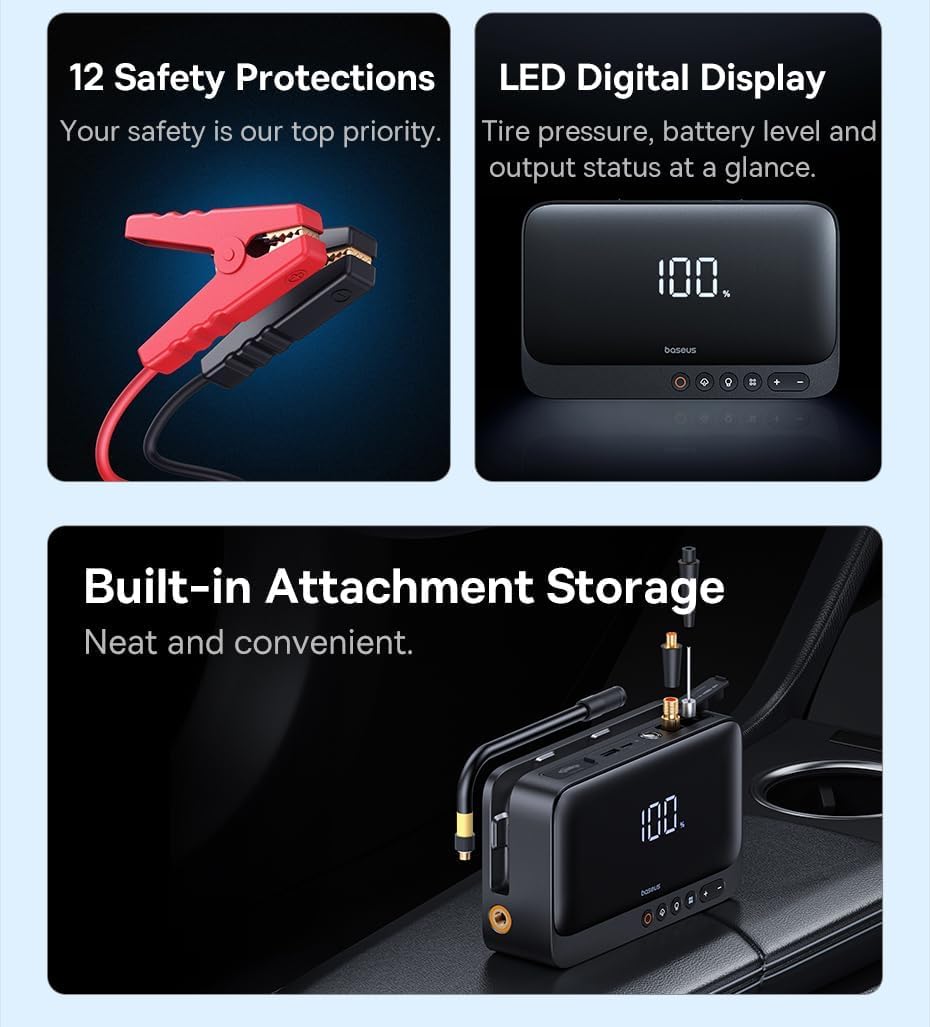 This image highlights the smart safety protections integrated into the jump starter clamps, designed to prevent overcharging, overheating, and short circuits, ensuring safe operation.
సెటప్
పరికరాన్ని ఛార్జ్ చేస్తోంది
Before first use, fully charge the device. It is recommended to fully charge the device after each use to ensure it is ready for emergencies.
- Connect the provided Type-C cable to the device's input port.
- Connect the other end of the Type-C cable to a suitable USB power adapter (not included).
- The digital display on the device will show the charging progress. Charge until the display indicates 100%.
 The device can be charged using the provided Type-C cable. Ensure the device is fully charged before use for optimal performance.
ఆపరేషన్
వాహనాన్ని ప్రారంభించడం జంప్
Use this function to start a dead car battery. Ensure the device has at least 50% charge before attempting a jump start.
- Connect the smart ignition clip (jump start clamps) to the designated jump start port on the device.
- అటాచ్ చేయండి ఎరుపు clamp (+) to the positive terminal of the car battery.
- అటాచ్ చేయండి నలుపు clamp (-) to the negative terminal of the car battery.
- cl రెండింటినీ నిర్ధారించుకోండిamps are securely connected to prevent arcing.
- వాహనం యొక్క ఇంజిన్ను ప్రారంభించండి.
- వాహనం స్టార్ట్ అయిన తర్వాత, వెంటనే cl ని తీసివేయండి.amps from the car battery, starting with the black (-) clamp, ఆపై ఎరుపు (+) clamp.
- Disconnect the smart ignition clip from the device.
This image demonstrates the correct connection of the jump starter clamps to a car battery, showing the device ready to initiate a jump start.
Using the Air Inflator
The built-in air compressor can inflate car tires, bicycle tires, and various sports equipment. Refer to the item's recommended pressure before inflating.
- Select the appropriate inflation nozzle from the included accessories and securely attach it to the air hose.
- Connect the air hose to the device's inflation port.
- Connect the nozzle to the valve of the item to be inflated.
- Use the digital display and control buttons (+ మరియు -) to set the desired pressure (PSI/Bar).
- Press the start button (often indicated by a fan icon) to begin inflation. The device will automatically stop when the preset pressure is reached.
- Disconnect the nozzle and air hose from the item and the device.
 The device actively inflating a car tire, with its digital display showing the current pressure reading, demonstrating its powerful inflation capability.
పవర్ బ్యాంక్గా ఉపయోగించడం
The device can charge your mobile phones, tablets, and other USB-powered devices via its USB-A output port.
- Connect your device's USB charging cable to the USB-A output port on the Baseus 4-in-1 device.
- The device will automatically begin charging the connected electronic device.
- Monitor the charging status on your connected device.
The device is shown charging a smartphone, highlighting its function as a portable power bank for various electronic devices.
LED ఫ్లాష్లైట్ను ఉపయోగించడం
The integrated LED flashlight provides illumination for various situations, including emergencies.
- Press the flashlight button (usually indicated by a light bulb icon) to turn on the LED light.
- Press the button again to cycle through different modes (e.g., steady light, SOS signal, emergency beacon).
- ఫ్లాష్లైట్ ఆఫ్ చేయడానికి బటన్ను నొక్కి పట్టుకోండి.
నిర్వహణ
సరైన నిర్వహణ మీ పరికరం యొక్క దీర్ఘాయువు మరియు సరైన పనితీరును నిర్ధారిస్తుంది.
- శుభ్రపరచడం: మెత్తటి, పొడి గుడ్డతో పరికరాన్ని శుభ్రం చేయండి. కఠినమైన రసాయనాలు లేదా రాపిడి పదార్థాలను ఉపయోగించవద్దు.
- నిల్వ: పరికరాన్ని ప్రత్యక్ష సూర్యకాంతి మరియు తీవ్రమైన ఉష్ణోగ్రతలు లేకుండా చల్లని, పొడి ప్రదేశంలో నిల్వ చేయండి.
- బ్యాటరీ సంరక్షణ: If the device is not in regular use, charge it every 3-6 months to maintain battery health and prevent deep discharge.
- పోర్ట్ నిర్వహణ: Keep all ports (charging, USB, jump start) free of dust and debris.
ట్రబుల్షూటింగ్
If you encounter issues with your Baseus 4-in-1 device, refer to the table below for common problems and solutions.
| సమస్య | సాధ్యమైన కారణం / పరిష్కారం |
|---|---|
| పరికరం ఆన్ చేయడం లేదు. | Check the battery level. Recharge the device if the battery is low. |
| Vehicle not jump starting. | Ensure the jump start clamps are correctly connected (positive to positive, negative to negative). Verify the device has sufficient charge (at least 50%). The vehicle battery might be severely damaged and require professional assistance. |
| Air inflator not working or not reaching desired pressure. | Check that the inflation nozzle is securely attached to the item and the air hose is firmly connected to the device. Verify the preset pressure is correctly set. Ensure the device has sufficient power. |
| Device not charging external devices (power bank function). | Ensure the USB charging cable is securely connected to both the device and the external device. Verify the Baseus device has sufficient charge. Try a different USB cable. |
వారంటీ మరియు మద్దతు
This Baseus product comes with a standard manufacturer's warranty. For detailed warranty information, technical support, or service inquiries, please refer to the warranty card included in your package or visit the official Baseus webసైట్. వారంటీ క్లెయిమ్ల కోసం మీ కొనుగోలు రసీదుని ఉంచండి.
Ask a question about this manual
Ask about setup, troubleshooting, compatibility, parts, safety, or missing instructions. Manuals+ will review the question and use this page’s manual context to help answer it.