పరిచయం
This manual provides essential information for the setup, operation, and maintenance of your new Tucus replacement remote control. This remote is designed to be compatible with various JVC Micro COMPACT COMPONENT Stereo Systems, including models RM-SUXQ30UW, RM-SUXQ30US, UX-Q30S, UX-Q30B, UX-Q30P, and UX-Q30W. While it is a replacement remote and not the original device's remote, common functions are expected to operate normally. Please review this guide thoroughly to ensure proper use and longevity of your remote control.
సెటప్
1. బ్యాటరీ ఇన్స్టాలేషన్
The remote control requires two (2) AA batteries (not included) for operation. Follow these steps to install them:
- రిమోట్ కంట్రోల్ వెనుక బ్యాటరీ కంపార్ట్మెంట్ను గుర్తించండి.
- బ్యాటరీ కంపార్ట్మెంట్ కవర్ను తెరవడానికి దాన్ని క్రిందికి లేదా బయటికి జారండి.
- రెండు AA బ్యాటరీలను చొప్పించండి, పాజిటివ్ (+) మరియు నెగటివ్ (-) టెర్మినల్స్ కంపార్ట్మెంట్ లోపల ఉన్న గుర్తులతో సరిగ్గా సమలేఖనం చేయబడ్డాయని నిర్ధారించుకోండి.
- బ్యాటరీ కంపార్ట్మెంట్ కవర్ సురక్షితంగా క్లిక్ అయ్యే వరకు దాన్ని తిరిగి స్థానంలోకి స్లైడ్ చేయండి.

Figure 1: Back of the remote control showing the battery compartment cover.
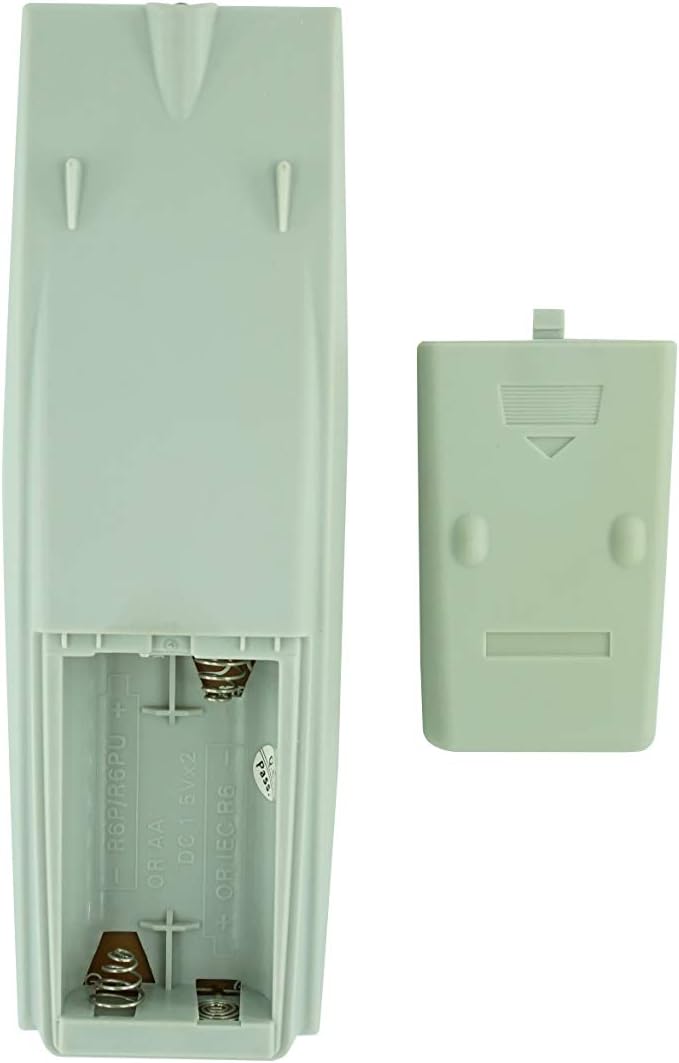
Figure 2: Battery compartment with cover removed, ready for battery insertion.
2. ప్రారంభ ఉపయోగం
Once batteries are installed, the remote control is ready for use. Point the remote directly at your JVC Micro COMPACT COMPONENT Stereo System. No additional programming is typically required for this replacement remote for the listed compatible models.
ఆపరేటింగ్ సూచనలు
This remote control provides access to the primary functions of your JVC stereo system. Below is a general overview of common button functions. Please note that while the functionality is guaranteed, the exact button layout may differ slightly from your original remote.

మూర్తి 3: ముందు view బటన్ లేఅవుట్తో రిమోట్ కంట్రోల్.
ముఖ్య విధులు:
- స్టాండ్బై/ఆన్: Powers the stereo system on or off.
- ప్రదర్శన: Changes or shows display information.
- గడియారం/టైమర్: Accesses clock and timer settings.
- నిద్ర: Sets a sleep timer for automatic power off.
- Number Buttons (0-9, +10): Direct input for track numbers, radio frequencies, etc.
- BASS / TREBLE: బాస్ మరియు ట్రెబుల్ స్థాయిలను సర్దుబాటు చేస్తుంది.
- Navigation (UP, DOWN, LEFT, RIGHT, SET): మెనూ నావిగేషన్ మరియు ఎంపిక కోసం ఉపయోగించబడుతుంది.
- Playback Controls (PLAY/PAUSE, STOP, FAST FORWARD, REWIND, SKIP): మీడియా ప్లేబ్యాక్ను నియంత్రిస్తుంది.
- Source Selection (CD, TAPE, FM/AM, AUX/MD): ఆడియో ఇన్పుట్ మూలాన్ని ఎంచుకుంటుంది.
- FM MODE / REV.MODE: Toggles FM stereo/mono or tape reverse mode.
- AUTO PRESET: Automatically scans and saves radio stations.
- PRGM / RANDOM / REPEAT: Controls program, random, and repeat playback modes.
- PTY SEARCH / PTY SELECT: For Program Type search and selection on radio.
- DISPLAY / TA/News / Info: Provides additional display information or traffic/news announcements.
- AHB PRO: Activates or deactivates Active Hyper-Bass PRO.
- వాల్యూమ్ (+/-): మాస్టర్ వాల్యూమ్ స్థాయిని సర్దుబాటు చేస్తుంది.
For specific advanced functions, please refer to the original instruction manual of your JVC Micro COMPACT COMPONENT Stereo System.
నిర్వహణ
రిమోట్ కంట్రోల్ క్లీనింగ్
రిమోట్ కంట్రోల్ యొక్క రూపాన్ని మరియు కార్యాచరణను నిర్వహించడానికి, దానిని క్రమం తప్పకుండా శుభ్రం చేయండి:
- మృదువైన, పొడి వస్త్రంతో ఉపరితలాన్ని తుడవండి.
- మొండి ధూళికి, కొద్దిగా dampగుడ్డను నీటితో లేదా తేలికపాటి, రాపిడి లేని క్లీనర్తో రుద్దండి. క్లీనర్ను నేరుగా రిమోట్పై స్ప్రే చేయవద్దు.
- కఠినమైన రసాయనాలు, ద్రావకాలు లేదా రాపిడి శుభ్రపరిచే ప్యాడ్లను ఉపయోగించడం మానుకోండి, ఎందుకంటే ఇవి రిమోట్ ముగింపు లేదా అంతర్గత భాగాలను దెబ్బతీస్తాయి.
బ్యాటరీ భర్తీ
Replace batteries when the remote's response becomes sluggish or it stops functioning. Always replace both batteries at the same time with new ones of the same type (AA). Do not mix old and new batteries, or different types of batteries.
నిల్వ
రిమోట్ కంట్రోల్ ఎక్కువ కాలం ఉపయోగించబడకపోతే, లీకేజీని నివారించడానికి మరియు రిమోట్కు సంభావ్య నష్టం జరగకుండా బ్యాటరీలను తీసివేయండి.
ట్రబుల్షూటింగ్
- రిమోట్ స్పందించడం లేదు:
- బ్యాటరీలు సరైన ధ్రువణతతో (+/-) సరిగ్గా చొప్పించబడ్డాయో లేదో తనిఖీ చేయండి.
- పాత బ్యాటరీలను కొత్త వాటితో భర్తీ చేయండి.
- Ensure there are no obstructions between the remote control and the stereo system's infrared receiver.
- Make sure you are within the effective range of the remote control.
- Some buttons not working or unexpected behavior:
- This remote is a replacement and while common functions are supported, the button layout or specific advanced functions might not perfectly match your original remote. Refer to the button layout image in the Operating Instructions section.
- Ensure the stereo system is powered on and set to the correct input source.
- Remote appears damaged:
- If the remote has been dropped or exposed to liquids, internal damage may have occurred. In such cases, replacement may be necessary.
స్పెసిఫికేషన్లు
| బ్రాండ్ | సాధారణమైనది |
| తయారీదారు | TUCUS |
| మోడల్ సంఖ్య | DVT-C9F24992D65E215A7DD6011D34514A46 |
| అనుకూల నమూనాలు | JVC RM-SUXQ30UW, RM-SUXQ30US, UX-Q30S, UX-Q30B, UX-Q30P, UX-Q30W Micro COMPACT COMPONENT Stereo SYSTEM |
| మెటీరియల్ రకం | ఇతర |
| శక్తి మూలం | 2 x AA బ్యాటరీలు (చేర్చబడలేదు) |
| ASIN | B0D79958PW |
| మొదటి తేదీ అందుబాటులో ఉంది | జూన్ 17 2024 |
వారంటీ సమాచారం
This product comes with a 3-month warranty from the date of purchase. This warranty covers manufacturing defects and ensures the remote control functions as intended for compatible models. Please retain your proof of purchase for any warranty claims.
కస్టమర్ మద్దతు
If you have any questions regarding the compatibility or functionality of this remote control, or if your specific device model is not listed, please contact the seller directly for assistance. The seller stocks a wide range of remote controls and parts and can confirm suitability for your needs.
For general inquiries or to provide feedback, please refer to the contact information provided by your retailer or the seller.


