
లీట్జ్ 83600000
Leitz IQ OptiMax Office P5 మైక్రో ష్రెడర్ యూజర్ మాన్యువల్
మోడల్: 83600000
1. పరిచయం
This manual provides essential information for the safe and efficient operation, maintenance, and troubleshooting of your Leitz IQ OptiMax Office P5 Micro Shredder. Please read this manual thoroughly before using the shredder and retain it for future reference.
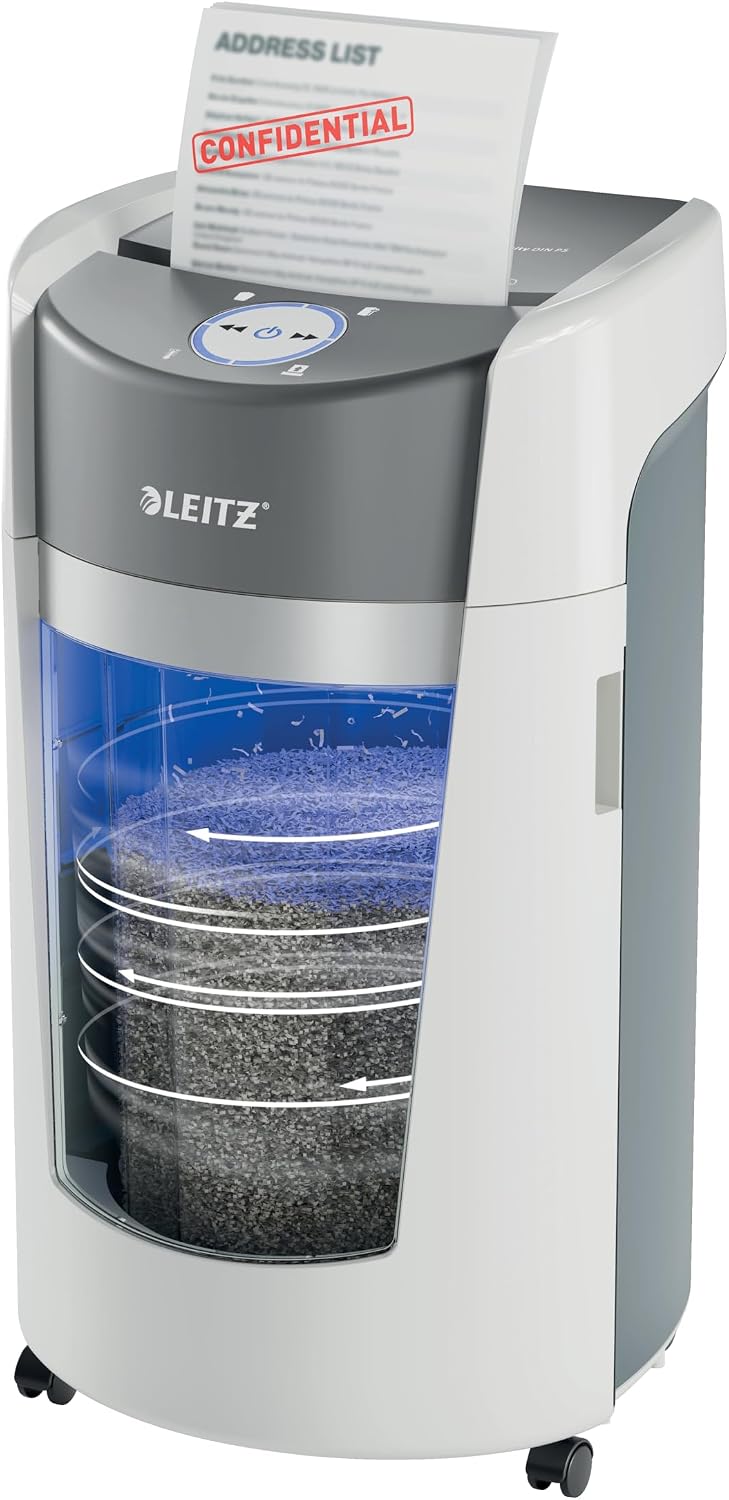
Image 1.1: The Leitz IQ OptiMax Office P5 Micro Shredder in operation, showing a document being fed into the shredder and the shredded paper accumulating in the bin.
2. భద్రతా సమాచారం
అగ్ని ప్రమాదం, విద్యుత్ షాక్ లేదా గాయం ప్రమాదాన్ని తగ్గించడానికి ఈ ఉపకరణాన్ని ఉపయోగిస్తున్నప్పుడు ఎల్లప్పుడూ ప్రాథమిక భద్రతా జాగ్రత్తలను అనుసరించండి.
- Keep fingers, loose clothing, hair, and jewelry away from the paper entry slot.
- వ్యర్థాల బిన్ను తరలించడానికి, శుభ్రం చేయడానికి లేదా ఖాళీ చేయడానికి ముందు ష్రెడర్ను అన్ప్లగ్ చేయండి.
- ష్రెడర్ దగ్గర పిల్లలు లేదా పెంపుడు జంతువులను అనుమతించవద్దు.
- లోహ వస్తువులను, పెద్ద పేపర్ క్లిప్లను లేదా అంటుకునే లేబుల్లను ముక్కలు చేయవద్దు.
- Do not use aerosol cleaners or lubricants on the shredder.
- ష్రెడర్ స్థిరమైన, సమతల ఉపరితలంపై ఉంచబడిందని నిర్ధారించుకోండి.
3. పెట్టెలో ఏముంది
అన్ప్యాక్ చేసిన తర్వాత, దయచేసి అన్ని భాగాలు ఉన్నాయని ధృవీకరించండి:
- Leitz IQ OptiMax Office P5 Micro Shredder Unit
- చెత్త డబ్బా (35లీ సామర్థ్యం)
- వినియోగదారు మాన్యువల్ (ఈ పత్రం)
4. సెటప్
- అన్ప్యాకింగ్: ష్రెడర్ను దాని ప్యాకేజింగ్ నుండి జాగ్రత్తగా తొలగించండి.
- ప్లేస్మెంట్: Position the shredder on a flat, stable surface near a power outlet. Ensure adequate ventilation around the unit. The circular design allows for space-saving placement.
- బిన్ ఇన్స్టాలేషన్: Ensure the 35L waste bin is correctly inserted into the shredder unit. The shredder will not operate if the bin is not properly seated.
- పవర్ కనెక్షన్: పవర్ కార్డ్ను గ్రౌన్దేడ్ ఎలక్ట్రికల్ అవుట్లెట్లోకి ప్లగ్ చేయండి.

Image 4.1: The Leitz IQ OptiMax shredder positioned in an office setting, demonstrating its compact footprint and mobility with swivel wheels.
5. ఆపరేటింగ్ సూచనలు
5.1 ప్రాథమిక ముక్కలు చేయడం
- Ensure the shredder is plugged in and the waste bin is correctly inserted.
- The LED display will illuminate, indicating readiness.
- Insert up to 10 sheets of A4 paper (70-80g) into the paper entry slot. The shredder will automatically start shredding.
- ష్రెడర్ స్టేపుల్స్ మరియు చిన్న పేపర్ క్లిప్లను కూడా ముక్కలు చేయగలదు.
- The shredder operates quietly, promoting a calm working environment.

Image 5.1: The control panel of the shredder, highlighting its P5 security level, capacity to shred up to 10 sheets, and ability to handle staples and paper clips.

Image 5.2: Visual representation of the shredder's quiet operation and its capability for 120 minutes of continuous shredding, ideal for office use.
5.2 Bin Rotation Technology (BRT)
The unique Bin Rotation Technology (BRT) ensures an even distribution of shredded paper within the 35L bin, increasing its effective capacity by 33% (up to 550 A4 sheets). This technology prevents paper chips from forming a peak, allowing more shredding before the bin needs emptying.

Image 5.3: A visual comparison demonstrating how Bin Rotation Technology (BRT) optimizes bin capacity by evenly distributing shredded paper, allowing for 33% more capacity compared to traditional bins.

Image 5.4: The shredder with its waste bin open, illustrating the large 35L capacity and the benefit of 33% increased capacity due to Bin Rotation Technology, holding up to 550 A4 sheets.
5.3 LED డిస్ప్లే సూచికలు
The intuitive LED display provides important status updates:
- పూర్తి బిన్ సూచిక: Illuminates when the 35L collection container is full and requires emptying.
- Open Flap Indicator: Illuminates if the shredder head or bin is not properly closed.
- ఓవర్ హీట్ ఇండికేటర్: Illuminates if the shredder has been used continuously for too long and needs to cool down.
- Jam Indicator: Illuminates if a paper jam occurs.
6. నిర్వహణ
6.1 వ్యర్థ బిన్ను ఖాళీ చేయడం
When the "collection container full" indicator illuminates, the bin needs to be emptied. Simply pull out the bin from the front of the shredder and dispose of the shredded material. Reinsert the bin firmly until it clicks into place.
6.2 Oiling the Shredder
To maintain optimal performance and extend the life of your shredder, it is recommended to oil the cutting blades regularly, especially after emptying the bin multiple times or after heavy use. Use shredder oil sheets or liquid shredder oil specifically designed for paper shredders. Follow the instructions provided with the shredder oil product.
6.3 శుభ్రపరచడం
ష్రెడర్ యొక్క బాహ్య భాగాన్ని మృదువైన, పొడి వస్త్రంతో తుడవండి. రాపిడి క్లీనర్లను లేదా ద్రావకాలను ఉపయోగించవద్దు. శుభ్రపరిచే ముందు ష్రెడర్ను అన్ప్లగ్ చేసి ఉందని నిర్ధారించుకోండి.
7. ట్రబుల్షూటింగ్
| సమస్య | సాధ్యమైన కారణం | పరిష్కారం |
|---|---|---|
| ష్రెడర్ ఆన్ అవ్వదు. | Not plugged in; waste bin not properly inserted; power switch off. | Ensure power cord is securely plugged in; reinsert waste bin correctly; turn power switch to ON. |
| ఆపరేషన్ సమయంలో ష్రెడర్ ఆగిపోతుంది. | Overheated; paper jam; waste bin full. | Allow shredder to cool down (approx. 30 minutes); clear paper jam (see below); empty waste bin. |
| పేపర్ జామ్. | Too many sheets inserted; paper not fed straight. | Press the reverse button to clear the jam. If unsuccessful, unplug the shredder and carefully remove paper manually. |
| ష్రెడర్ శబ్దం చేస్తుంది. | బ్లేడ్లకు నూనె రాయాలి. | నిర్వహణ సూచనల ప్రకారం ష్రెడర్ బ్లేడ్లకు నూనె రాయండి. |

Image 7.1: The Anti-Jam feature logo, indicating the shredder's capability to prevent and resolve paper jams for smoother operation.
8. స్పెసిఫికేషన్లు
| ఫీచర్ | వివరాలు |
|---|---|
| మోడల్ సంఖ్య | 83600000 |
| ముక్కలు రకం | Micro Cut (DIN P5) |
| షీట్ కెపాసిటీ | Up to 10 sheets (70-80g A4) |
| బిన్ కెపాసిటీ | 35 Liters (approx. 550 A4 sheets with BRT) |
| నిరంతర రన్ టైమ్ | 120 నిమిషాల |
| కొలతలు (HxWxD) | 589 x 406 x 320 మిమీ (23.19 x 15.98 x 12.6 అంగుళాలు) |
| వస్తువు బరువు | 32.4 పౌండ్లు (14.7 కిలోలు) |
| రంగు | తెలుపు |
| ఫీచర్లు | Bin Rotation Technology (BRT), Anti-Jam, Quiet Operation, Swivel Wheels, LED Display |

Image 8.1: Technical drawing showing the dimensions (height, width, depth) of the Leitz IQ OptiMax Office P5 Micro Shredder.
9. వారంటీ మరియు మద్దతు
The Leitz IQ OptiMax Office P5 Micro Shredder comes with a standard 2-year guarantee. An additional 1-year guarantee can be obtained by registering your product. Please refer to the official Leitz website for registration details and further support information.
For technical support or warranty claims, please contact Leitz customer service through their official channels.
Image 9.1: Graphic illustrating the 2+1 year guarantee (by registering) and the Anti-Jam feature of the shredder.
Ask a question about this manual
Ask about setup, troubleshooting, compatibility, parts, safety, or missing instructions. Manuals+ will review the question and use this page’s manual context to help answer it.