
SPC Discovery 2 ME
SPC Discovery 2 ME Smartphone User Manual
మోడల్: 25246256D
1. పరిచయం
This manual provides essential information for the safe and efficient use of your SPC Discovery 2 ME smartphone. Please read this guide thoroughly before operating the device to ensure proper functionality and to prevent damage.
2. భద్రతా సమాచారం
- బ్యాటరీ భద్రత: Do not disassemble, puncture, or modify the battery. Use only approved chargers and cables. Avoid extreme temperatures.
- నీటి నిరోధకత: ఈ పరికరం నీటి నిరోధకతను కలిగి లేదు. ద్రవాలకు గురికాకుండా ఉండండి.
- వినికిడి రక్షణ: వినికిడి దెబ్బతినకుండా ఉండటానికి అధిక వాల్యూమ్ స్థాయిలో ఎక్కువసేపు వినడం మానుకోండి.
- డ్రైవింగ్ భద్రత: Do not use your phone while driving. Follow local laws and regulations regarding mobile device use.
- వైద్య పరికరాలు: Maintain a safe distance between the phone and medical implants like pacemakers. Consult your physician and medical device manufacturer for specific guidelines.
- పారవేయడం: Dispose of the device and battery responsibly according to local regulations. Do not dispose of with household waste.
3. ప్యాకేజీ విషయాలు
మీ ఉత్పత్తి ప్యాకేజీలో అన్ని అంశాలు ఉన్నాయని ధృవీకరించండి:
- SPC Discovery 2 ME Smartphone
- USB-C నుండి USB-C కేబుల్
- SIM ఎజెక్టర్ సాధనం
- త్వరిత ప్రారంభ మార్గదర్శి (వర్తిస్తే)
Note: A power adapter is not included and must be purchased separately. For optimal charging, use an 18W USB Power Delivery (PD) compatible charger.
4 పరికర లేఅవుట్
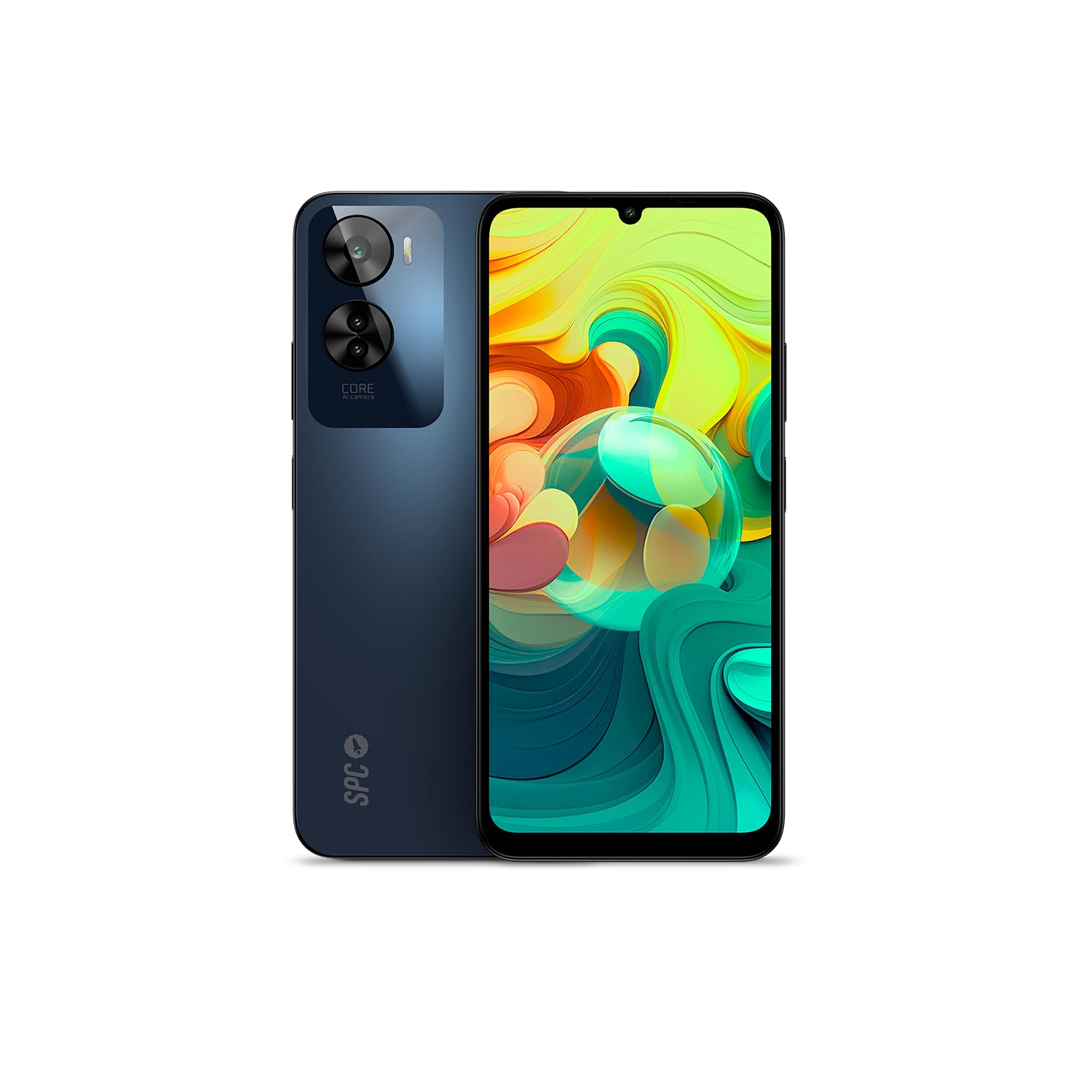
మూర్తి 4.1: ముందు view of the SPC Discovery 2 ME, showing the display and front camera.

మూర్తి 4.2: వెనుకకు view of the SPC Discovery 2 ME, highlighting the triple camera module and fingerprint sensor.

మూర్తి 4.3: కోణీయ view of the SPC Discovery 2 ME, showing both front and back, and side buttons.
- ముందు కెమెరా: డిస్ప్లే మధ్యలో ఎగువన ఉంది.
- ప్రదర్శన: 6.75-అంగుళాల HD+ IPS InCell స్క్రీన్.
- వాల్యూమ్ బటన్లు: On the right side of the device.
- పవర్ బటన్/ఫింగర్ప్రింట్ సెన్సార్: On the right side, below the volume buttons.
- USB-C పోర్ట్: ఛార్జింగ్ మరియు డేటా బదిలీ కోసం దిగువన.
- 3.5mm ఆడియో జాక్: హెడ్ఫోన్ల కోసం.
- SIM/మైక్రో SD కార్డ్ ట్రే: On the left side of the device.
- ట్రిపుల్ రియర్ కెమెరా: వెనుక ప్యానెల్ యొక్క ఎగువ ఎడమ వైపున ఉంది.
5. సెటప్
5.1. SIM మరియు మైక్రో SD కార్డ్లను చొప్పించడం
- Locate the SIM/MicroSD card tray on the left side of the phone.
- ట్రేలోని చిన్న రంధ్రంలోకి సిమ్ ఎజెక్టర్ సాధనాన్ని చొప్పించి, ట్రే బయటకు వచ్చే వరకు గట్టిగా నొక్కండి.
- Place your Nano-SIM card(s) and/or MicroSD card into the designated slots on the tray. Ensure the gold contacts face downwards. The device supports dual SIM and MicroSD expansion up to 512GB.
- ట్రేని ఫోన్లోకి క్లిక్ అయ్యే వరకు జాగ్రత్తగా మళ్లీ చొప్పించండి.
5.2. ప్రారంభ పవర్ ఆన్ మరియు ప్రాథమిక సెటప్
- Press and hold the Power button on the right side of the device until the SPC logo appears.
- ప్రారంభ సెటప్ను పూర్తి చేయడానికి స్క్రీన్పై ఉన్న ప్రాంప్ట్లను అనుసరించండి:
- మీ భాషను ఎంచుకోండి.
- Wi-Fi నెట్వర్క్కి కనెక్ట్ చేయండి.
- Review మరియు నిబంధనలు మరియు షరతులను అంగీకరించండి.
- మీ Google ఖాతాతో సైన్ ఇన్ చేయండి లేదా కొత్తదాన్ని సృష్టించండి.
- Set up screen lock (PIN, pattern, password) and biometric security (fingerprint, facial recognition).
6. ఆపరేటింగ్ సూచనలు
6.1. ప్రాథమిక నావిగేషన్
- స్పర్శ సంజ్ఞలు: ఎంచుకోవడానికి నొక్కండి, స్క్రోల్ చేయడానికి స్వైప్ చేయండి, జూమ్ చేయడానికి పించ్ చేయండి.
- హోమ్ స్క్రీన్: యాప్లు, విడ్జెట్లు మరియు నోటిఫికేషన్లను యాక్సెస్ చేయండి.
- నోటిఫికేషన్ ప్యానెల్: స్క్రీన్ పై నుండి క్రిందికి స్వైప్ చేయండి view నోటిఫికేషన్లు మరియు త్వరిత సెట్టింగ్లు.
- యాప్ డ్రాయర్: ఇన్స్టాల్ చేయబడిన అన్ని అప్లికేషన్లను యాక్సెస్ చేయడానికి స్క్రీన్ దిగువ నుండి పైకి స్వైప్ చేయండి.
6.2. కాల్స్ చేయడం మరియు సందేశాలు పంపడం
- కాల్లు: Open the "Phone" app, enter the number, and tap the call icon.
- సందేశాలు: Open the "Messages" app, tap the new message icon, enter the recipient and your message.
- ద్వంద్వ సిమ్: If using two SIM cards, you can select which SIM to use for calls or messages from the respective app settings.
6.3. కెమెరా వినియోగం
The SPC Discovery 2 ME features a triple AI camera system, including a 50MP main sensor.
- "కెమెరా" యాప్ను తెరవండి.
- మీకు కావలసిన మోడ్ను ఎంచుకోండి (ఫోటో, వీడియో, పోర్ట్రెయిట్, మాక్రో, మొదలైనవి).
- చిత్రాన్ని క్యాప్చర్ చేయడానికి లేదా వీడియో రికార్డింగ్ను ప్రారంభించడానికి/ఆపడానికి షట్టర్ బటన్ను నొక్కండి.
- Use the AI scene detection for optimized settings.
- For close-up shots, switch to Macro mode.
6.4. NFC for Contactless Payments
Your device supports NFC (Near Field Communication) for secure contactless payments.
- Ensure NFC is enabled in your phone's settings (Settings > Connected devices > Connection preferences > NFC).
- Set up your preferred payment app (e.g., Google Pay) and add your credit/debit cards.
- To make a payment, unlock your phone and hold the back of the device near the contactless payment terminal.
6.5. Biometric Unlock
The device offers both fingerprint and facial recognition for secure unlocking.
- వేలిముద్ర సెన్సార్: Located on the side power button. Register your fingerprints via Settings > Security & privacy > Device unlock > Fingerprint unlock.
- ముఖ గుర్తింపు: Register your face via Settings > Security & privacy > Device unlock > Face unlock. Ensure good lighting when setting up and using this feature.
6.6. బ్యాటరీ నిర్వహణ
The 5000 mAh battery provides extended usage. For optimal battery life:
- Charge your device using the provided USB-C cable and an 18W PD compatible charger.
- బ్యాటరీని తరచుగా పూర్తిగా డిశ్చార్జ్ చేయడాన్ని నివారించండి.
- బ్యాటరీ తక్కువగా ఉన్నప్పుడు బ్యాటరీ సేవర్ మోడ్ను ప్రారంభించండి.
- నేపథ్యంలో నడుస్తున్న ఉపయోగించని యాప్లను మూసివేయండి.
7. నిర్వహణ
- శుభ్రపరచడం: స్క్రీన్ మరియు బాడీని శుభ్రం చేయడానికి మృదువైన, మెత్తటి బట్టను ఉపయోగించండి. రాపిడి పదార్థాలు లేదా కఠినమైన రసాయనాలను నివారించండి.
- సాఫ్ట్వేర్ అప్డేట్లు: Regularly check for and install system updates (Settings > System > System update) to ensure optimal performance and security. The device runs on Android 14.
- నిల్వ: Manage your 256GB internal storage by regularly deleting unnecessary files or moving them to the expandable MicroSD card (up to 512GB).
8. ట్రబుల్షూటింగ్
| సమస్య | సాధ్యమైన పరిష్కారం |
|---|---|
| పరికరం ఆన్ చేయదు. | Ensure the battery is charged. Connect to a charger for at least 15 minutes, then try powering on again. |
| బ్యాటరీ త్వరగా అయిపోతుంది. | Reduce screen brightness, close background apps, disable unused features like GPS or Bluetooth, or enable battery saver mode. |
| యాప్లు క్రాష్ అవుతున్నాయి లేదా స్తంభించిపోతున్నాయి. | Clear the app's cache (Settings > Apps > [App Name] > Storage & cache > Clear cache). If the issue persists, restart the device. |
| Wi-Fiకి కనెక్ట్ చేయడం సాధ్యపడదు. | Restart your router and phone. Forget the network and reconnect. Ensure Wi-Fi is enabled on your device. |
| వేలిముద్ర సెన్సార్ పనిచేయడం లేదు. | మీ వేలు శుభ్రంగా మరియు పొడిగా ఉందని నిర్ధారించుకోండి. సెట్టింగ్లలో మీ వేలిముద్రలను తిరిగి నమోదు చేయండి. |
9. స్పెసిఫికేషన్లు
| ఫీచర్ | వివరాలు |
|---|---|
| మోడల్ పేరు | Discovery 2 ME |
| మోడల్ సంఖ్య | 25246256D |
| ఆపరేటింగ్ సిస్టమ్ | ఆండ్రాయిడ్ 14 |
| ప్రదర్శన పరిమాణం | 6.75 అంగుళాలు |
| డిస్ప్లే రిజల్యూషన్ | 1600 x 720 (HD+) |
| రిఫ్రెష్ రేట్ | 90 Hz |
| CPU వేగం | 1.6 GHz (Octa-core) |
| RAM | 6 GB (expandable up to 14 GB virtual RAM) |
| అంతర్గత నిల్వ | 256 GB |
| విస్తరించదగిన నిల్వ | 512 GB వరకు మైక్రో SD |
| వెనుక కెమెరా రిజల్యూషన్ | 50 Megapixels (Main) |
| బ్యాటరీ కెపాసిటీ | 5000 mAh (లిథియం-అయాన్) |
| ఛార్జింగ్ | 18W Fast Charge (USB PD) |
| కనెక్టివిటీ | 4G, Bluetooth, Wi-Fi, NFC |
| ఓడరేవులు | USB టైప్-C, 3.5mm జాక్ |
| ప్రత్యేక లక్షణాలు | Dual SIM, Integrated GPS, Expandable Memory, USB OTG Support, Biometric Unlock (Fingerprint, Facial Recognition) |
10. వారంటీ మరియు మద్దతు
Your SPC Discovery 2 ME smartphone is covered by a standard manufacturer's warranty. For detailed warranty terms and conditions, please refer to the warranty card included in your package or visit the official SPC webసైట్.
For technical support, troubleshooting assistance, or service requests, please contact SPC customer support through their official channels. Contact information can typically be found on the SPC webసైట్ లేదా క్విక్ స్టార్ట్ గైడ్లో.
Ask a question about this manual
Ask about setup, troubleshooting, compatibility, parts, safety, or missing instructions. Manuals+ will review the question and use this page’s manual context to help answer it.