
1. పరిచయం
This manual provides detailed instructions for the safe and efficient use of your Beuiouer Portable USB Sport Mini MP3 Music Player. Please read this manual thoroughly before operating the device and retain it for future reference.
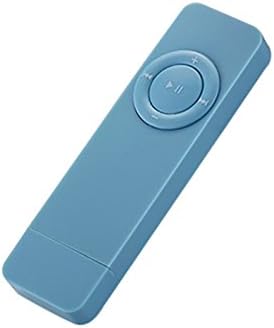
Image 1.1: The Beuiouer Portable USB Sport Mini MP3 Music Player, shown in blue. This compact device features a central control pad with play/pause and navigation buttons.
ముఖ్య లక్షణాలు:
- MP3 మరియు WMA ఆడియో ఫార్మాట్లను సపోర్ట్ చేస్తుంది.
- Built-in rechargeable lithium battery for extended playback.
- Compact and lightweight design, suitable for sports and travel.
- Functions as a USB disk and TF card reader.
- Supports TF/SD cards up to 32GB (card not included).
2. ప్యాకేజీ విషయాలు
దయచేసి మీ ప్యాకేజీలో అన్ని అంశాలు ఉన్నాయని ధృవీకరించండి:
- 1 x Beuiouer MP3 Player
- 1 x Rope (Lanyard)
Note: Other products, such as headphones or a TF card, are not included unless specified.
3. సెటప్
3.1 పరికరాన్ని ఛార్జ్ చేస్తోంది
- Locate the USB port on the MP3 player.
- Connect the MP3 player to a computer's USB port or a USB wall adapter (not included) using a compatible USB cable (not included).
- The device will begin charging. A full charge provides approximately 10 hours of playback time.

Image 3.1: Several Beuiouer MP3 players in various colors connected to a laptop via USB, illustrating the charging or data transfer process.
3.2 Inserting a TF/SD Card
- Ensure the MP3 player is powered off.
- Locate the TF/SD card slot on the side of the device.
- Gently insert a compatible TF/SD card (up to 32GB, not included) into the slot until it clicks into place. Ensure the card is inserted in the correct orientation.
Note: The device does not include internal storage; a TF/SD card is required for music playback.
3.3 హెడ్ఫోన్లను కనెక్ట్ చేస్తోంది
- Locate the 3.5mm headphone jack on the device.
- Insert your 3.5mm headphones (not included) firmly into the jack.
4. ఆపరేటింగ్ సూచనలు
4.1 పవర్ ఆన్/ఆఫ్
- To power on: Press and hold the Play/Pause button (central button) for a few seconds until the device activates.
- To power off: Press and hold the Play/Pause button for a few seconds until the device shuts down.
4.2 మ్యూజిక్ ప్లేబ్యాక్
- Ensure a TF/SD card with MP3 or WMA music files చొప్పించబడింది.
- పరికరాన్ని ఆన్ చేయండి.
- Press the Play/Pause button to start or pause music playback.
- "మునుపటి ట్రాక్" ని ఉపయోగించండి (<<) మరియు "తదుపరి ట్రాక్" (>>) buttons to navigate between songs.

Image 4.1: A person wearing the blue Beuiouer MP3 player with a lanyard, demonstrating its portability and ease of access during use.
4.3 వాల్యూమ్ నియంత్రణ
- Press the "+" button to increase the volume.
- Press the "-" button to decrease the volume.
4.4 Using as a USB Disk / Card Reader
- Connect the MP3 player to your computer via a USB cable.
- కంప్యూటర్ పరికరాన్ని తొలగించగల డిస్క్గా గుర్తిస్తుంది.
- You can now transfer music files to the inserted TF/SD card or use the device to read fileకార్డు నుండి s.
- USB కేబుల్ను డిస్కనెక్ట్ చేసే ముందు మీ కంప్యూటర్ నుండి పరికరాన్ని సురక్షితంగా బయటకు తీయండి.
5. నిర్వహణ
- శుభ్రపరచడం: పరికరాన్ని శుభ్రం చేయడానికి మృదువైన, పొడి వస్త్రాన్ని ఉపయోగించండి. ద్రవ క్లీనర్లు లేదా ద్రావకాలను ఉపయోగించవద్దు.
- నిల్వ: పరికరాన్ని ప్రత్యక్ష సూర్యకాంతి మరియు తీవ్రమైన ఉష్ణోగ్రతలు లేకుండా చల్లని, పొడి ప్రదేశంలో నిల్వ చేయండి.
- బ్యాటరీ సంరక్షణ: బ్యాటరీ జీవితకాలాన్ని పొడిగించడానికి, బ్యాటరీని తరచుగా పూర్తిగా డిశ్చార్జ్ చేయకుండా ఉండండి. ఎక్కువసేపు ఉపయోగంలో లేనప్పటికీ, పరికరాన్ని క్రమం తప్పకుండా ఛార్జ్ చేయండి.
- నీటి బహిర్గతం: ఈ పరికరం నీటి నిరోధకం కాదు. నీటికి లేదా అధిక తేమకు గురికాకుండా ఉండండి.
6. ట్రబుల్షూటింగ్
6.1 పరికరం పవర్ ఆన్ అవ్వదు
- బ్యాటరీ ఛార్జ్ అయ్యిందని నిర్ధారించుకోండి. పరికరాన్ని పవర్ సోర్స్కి కనెక్ట్ చేసి, మళ్లీ పవర్ ఆన్ చేయడానికి ప్రయత్నించే ముందు కనీసం 30 నిమిషాలు ఛార్జ్ చేయడానికి అనుమతించండి.
- పవర్ బటన్ సరిగ్గా నొక్కి ఉంచబడిందని ధృవీకరించండి.
6.2 ధ్వని లేదు
- Check if headphones are properly connected to the 3.5mm jack.
- Increase the volume using the "+" button.
- సంగీతాన్ని నిర్ధారించుకోండి files on the TF/SD card are not corrupted and are in a supported format (MP3, WMA).
- Try different headphones to rule out a headphone issue.
6.3 బదిలీ చేయలేము Files to TF/SD Card
- Ensure the device is properly connected to the computer via USB.
- Verify that the TF/SD card is correctly inserted and not damaged.
- Check if the TF/SD card has sufficient free space.
- Try formatting the TF/SD card (Note: This will erase all data on the card.).
6.4 తక్కువ బ్యాటరీ లైఫ్
- ఉపయోగం ముందు పరికరం పూర్తిగా ఛార్జ్ చేయబడిందని నిర్ధారించుకోండి.
- పదే పదే ఛార్జ్ చేయడం వల్ల బ్యాటరీ పనితీరు కాలక్రమేణా క్షీణించవచ్చు.
- Extreme temperatures can affect battery life.
7. స్పెసిఫికేషన్లు
| ఫీచర్ | స్పెసిఫికేషన్ |
|---|---|
| మోడల్ | 56306A4 |
| ప్లే టైమ్ | సుమారు 10 గంటలు |
| స్టాండ్బై సమయం | 48 గంటలు |
| కొలతలు | 8.5 x 2.5 x 0.9 సెం.మీ (3.35 x 0.98 x 0.71 అంగుళాలు) |
| బరువు | 17.9 గ్రా (0.776 ఔన్సులు) |
| బ్యాటరీ కెపాసిటీ | 260 mA (Built-in special lithium battery) |
| మెమరీ మద్దతు | 2/4/8/16GB/32GB SD/TF card (not included) |
| ఆపరేషన్ మోడ్ | కీస్ట్రోక్ |
| ఇంటర్ఫేస్ | USB 2.0 |
| హెడ్ఫోన్ ఇంటర్ఫేస్ | 3.5మి.మీ |
| మద్దతు ఉన్న ఆడియో ఫార్మాట్లు | MP3, WMA |
| తయారీదారు | బ్యూయుయర్ |
8. వారంటీ మరియు మద్దతు
వారంటీ సమాచారం మరియు కస్టమర్ మద్దతు కోసం, దయచేసి కొనుగోలు సమయంలో అందించిన డాక్యుమెంటేషన్ను చూడండి లేదా మీ రిటైలర్ను సంప్రదించండి. ఏవైనా వారంటీ క్లెయిమ్ల కోసం మీ కొనుగోలు రుజువును ఉంచండి.
For further assistance, you may also visit the official Beuiouer webసైట్ లేదా వారి కస్టమర్ సేవా విభాగాన్ని సంప్రదించండి.