USB 3.0 Mobile Hard Disk PCB Board G003250A
వినియోగదారు మాన్యువల్
1. పరిచయం
This manual provides essential information for the installation, operation, and maintenance of the Generic USB 3.0 Mobile Hard Disk PCB Board G003250A. This PCB board is designed as a replacement or repair component for specific Toshiba MQ01UBD series mobile hard drives, including models MQ01UBD100, MQ01UBD075, MQ01UBD050, and compatible 500GB, 750GB, 1TB, and 2TB variants. It facilitates the conversion of the internal hard drive interface to a standard USB 3.0 connection, enabling external use.
2. సెటప్ మరియు ఇన్స్టాలేషన్
Proper installation of the PCB board is crucial for its functionality and the safety of your data. This process typically involves replacing an existing PCB on a compatible hard drive.
2.1. ప్రీ-ఇన్స్టాలేషన్ చెక్లిస్ట్
- Ensure the G003250A PCB board is compatible with your specific hard drive model (e.g., MQ01UBD series).
- Gather necessary tools: small Phillips head screwdriver, anti-static wrist strap or mat.
- శుభ్రమైన, స్థిర-రహిత వాతావరణంలో పని చేయండి.
2.2. సంస్థాపనా దశలు
- వేరుచేయడం: Carefully open the enclosure of your existing mobile hard drive. Locate and identify the original PCB board.
- Static Precautions: Before handling the new PCB, ensure you are grounded using an anti-static wrist strap or by touching a grounded metal object.
- పాత PCB ని తొలగించండి: Gently unscrew and detach the old PCB board from the hard drive. Note the orientation and connection points.
- కొత్త PCB ని ఇన్స్టాల్ చేయండి: Align the G003250A PCB board with the hard drive's connectors. Ensure all pins are correctly seated. Secure the new PCB with the screws removed earlier. Do not overtighten.
- తిరిగి కలపడం: Carefully close the hard drive enclosure, ensuring all components are properly seated and secured.
- ప్రారంభ కనెక్షన్: Connect the USB 3.0 cable from the newly assembled external drive to a USB 3.0 port on your computer.

This image displays the top side of the G003250A PCB board, highlighting the main controller chip, USB 3.0 port, and various surface-mounted components. This is the side that interfaces with the hard drive's internal components and provides the external USB connection.
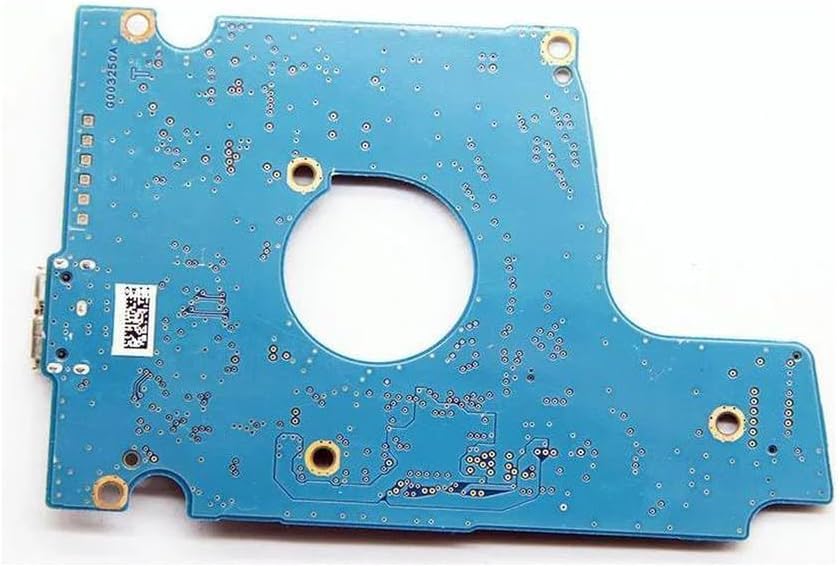
This image shows the underside of the G003250A PCB board, revealing the solder points and circuit traces. This side typically connects to the hard drive's motor and read/write head assembly.
3. ఆపరేటింగ్ సూచనలు
Once the G003250A PCB board is correctly installed and the hard drive is reassembled, it functions as a standard USB 3.0 external hard drive.
3.1. కంప్యూటర్కు కనెక్ట్ చేస్తోంది
- Plug the USB 3.0 cable into the port on the PCB board.
- Connect the other end of the USB 3.0 cable to an available USB 3.0 port on your computer for optimal performance. The device is backward compatible with USB 2.0 ports, but data transfer speeds will be limited.
- The operating system should automatically detect and install the necessary drivers. The drive will appear as an external storage device.
3.2. డేటా బదిలీ
మీరు ఇప్పుడు బదిలీ చేయవచ్చు files to and from the external hard drive as you would with any other storage device. Drag and drop files, or use copy/paste functions.
3.3. Safe Removal
Always safely eject the hard drive before disconnecting it from your computer to prevent data corruption. On Windows, use the "Safely Remove Hardware and Eject Media" icon in the system tray. On macOS, drag the drive icon to the Trash or use the Eject option in Finder.
4. నిర్వహణ
To ensure the longevity and reliable performance of your PCB board and the associated hard drive, follow these maintenance guidelines:
- శుభ్రముగా ఉంచు: Regularly clean the exterior of the hard drive enclosure with a soft, dry cloth. Avoid using liquid cleaners directly on the PCB or connectors.
- Avoid Static: Always handle the PCB board with anti-static precautions to prevent damage from electrostatic discharge.
- పర్యావరణ పరిస్థితులు: Store and operate the drive in a cool, dry environment, away from direct sunlight, extreme temperatures, and high humidity.
- భౌతిక రక్షణ: Protect the external drive from drops, impacts, and excessive vibration, as these can damage the internal hard drive components.
- ఫర్మ్వేర్: While PCB boards typically do not require user-updatable firmware, ensure your operating system's USB drivers are up to date.
5. ట్రబుల్షూటింగ్
If you encounter issues with your USB 3.0 Mobile Hard Disk PCB Board G003250A, refer to the following common problems and solutions:
- డ్రైవ్ గుర్తించబడలేదు:
- USB కేబుల్ డ్రైవ్ మరియు కంప్యూటర్ రెండింటికీ సురక్షితంగా కనెక్ట్ చేయబడిందని నిర్ధారించుకోండి.
- మీ కంప్యూటర్లో వేరే USB పోర్ట్ని ప్రయత్నించండి.
- వేరే USB కేబుల్తో పరీక్షించండి.
- Verify that the internal hard drive is properly seated and connected to the PCB board.
- Check Device Manager (Windows) or System Information (macOS) to see if the drive is listed, even if it doesn't appear in 'My Computer'/'Finder'.
- నెమ్మది డేటా బదిలీ వేగం:
- మీ కంప్యూటర్లోని USB 3.0 పోర్ట్కు కనెక్ట్ అయ్యారని నిర్ధారించుకోండి. USB 2.0 పోర్ట్ల వల్ల వేగం తగ్గుతుంది.
- మీ కంప్యూటర్ యొక్క USB 3.0 డ్రైవర్లు తాజాగా ఉన్నాయని ధృవీకరించండి.
- Try a different USB 3.0 cable, as some cables may not support full USB 3.0 speeds.
- Drive Makes Unusual Noises:
- If the hard drive itself is making clicking, grinding, or unusual noises, this indicates a potential mechanical failure of the hard drive, not the PCB board. Immediately back up any accessible data and consider professional data recovery services.
- డేటా అవినీతి:
- డ్రైవ్ను డిస్కనెక్ట్ చేసే ముందు ఎల్లప్పుడూ "సురక్షితంగా హార్డ్వేర్ను తీసివేయి" ఎంపికను ఉపయోగించండి.
- Ensure the drive is not subjected to sudden power loss during operation.
- Run disk error checking utilities provided by your operating system.
If problems persist after following these steps, it may indicate an issue with the hard drive itself or a more complex problem requiring professional assistance.
6. స్పెసిఫికేషన్లు
| ఫీచర్ | వివరణ |
|---|---|
| మోడల్ సంఖ్య | G003250A |
| అనుకూలత | Toshiba MQ01UBD100, MQ01UBD075, MQ01UBD050 (and compatible 500G, 750G, 1TB, 2TB variants) |
| కనెక్టివిటీ టెక్నాలజీ | USB 3.0 (USB 2.0తో వెనుకకు అనుకూలమైనది) |
| సంస్థాపన రకం | Internal PCB for External Hard Drive Conversion |
| ప్రత్యేక ఫీచర్ | Portable (when installed in a mobile hard drive) |
| తయారీదారు | సాధారణమైనది |
| ASIN | B0DB8B7TC2 |
| మొదటి తేదీ అందుబాటులో ఉంది | జూలై 26, 2024 |
7. వారంటీ మరియు మద్దతు
As a generic replacement component, specific warranty terms may vary depending on your place of purchase. Please refer to the seller's return and warranty policy at the time of purchase.
For technical support or inquiries regarding this PCB board, it is recommended to contact the seller or retailer from whom you purchased the product. They can provide assistance with compatibility, installation, and troubleshooting specific to your purchase.
మీరు ఎల్లప్పుడూ కొనుగోలు చేస్తున్నారని నిర్ధారించుకోండిasing from a reputable source to guarantee product authenticity and support.