
1. పరిచయం
The LOQRON Smart Key Lock Box is an advanced security solution designed for convenient and secure key management. It offers multiple unlocking methods including Bluetooth APP control (Tuya/TT-Lock), fingerprint recognition, passcode entry, access card, and a traditional manual key. Built with rugged durability, this lock box is suitable for various environments, from homes and offices to real estate and Airbnb rentals.
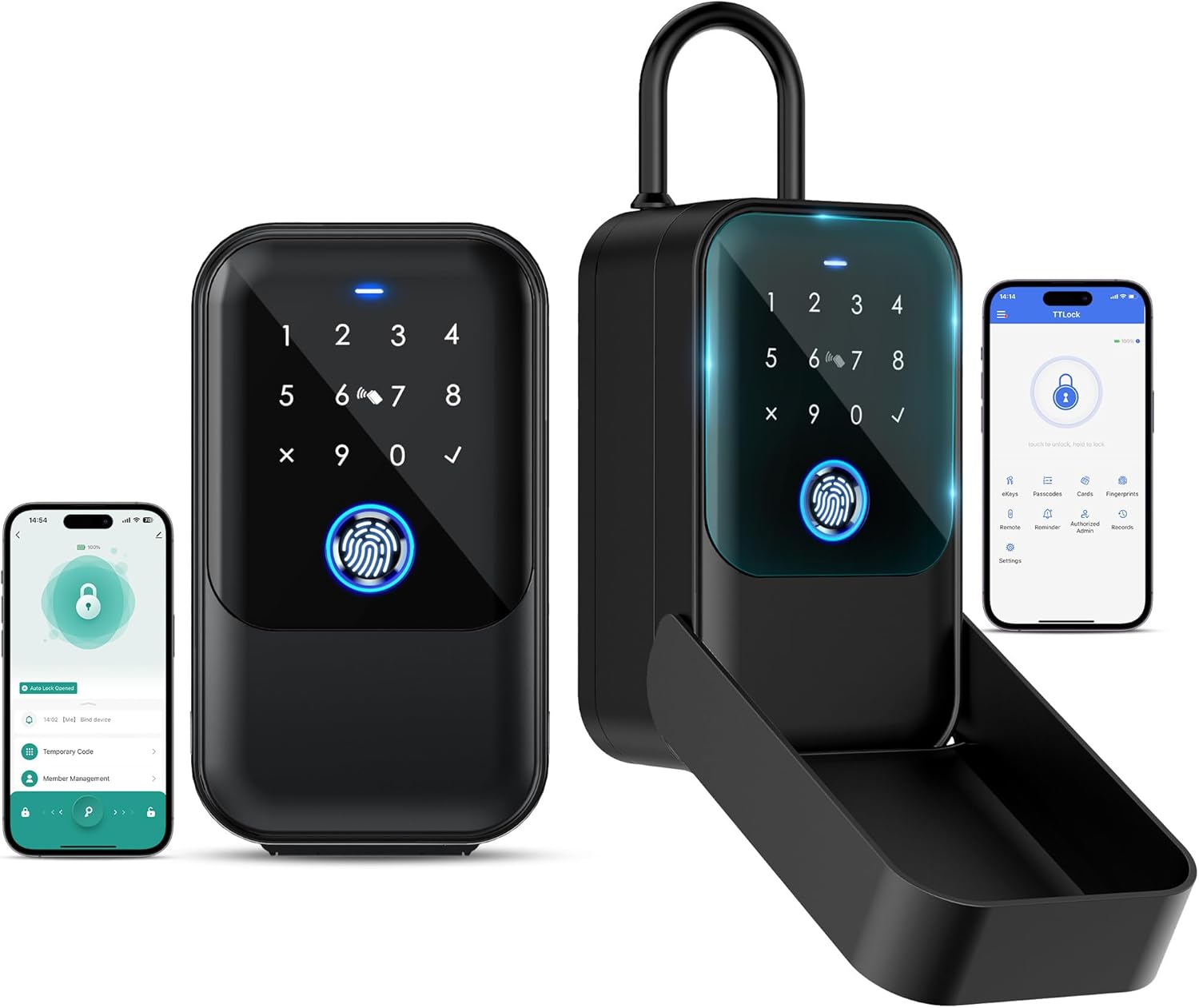
Image 1.1: The LOQRON Smart Key Lock Box shown in both closed and open configurations, alongside smartphone screens displaying the associated Tuya/TT-Lock application interfaces for remote management.

Image 1.2: Various application scenarios for the LOQRON Smart Key Lock Box, including home gates, garage doors, store entrances, and Airbnb properties, highlighting its versatility.
2. సెటప్
2.1 ప్యాకేజీ విషయాలు
ప్రారంభించడానికి ముందు, అన్ని భాగాలు ఉన్నాయని నిర్ధారించుకోండి:
- LOQRON Smart Key Lock Box
- Four Access Cards
- USB Cable (for emergency power only)
- 4 AAA Alkaline Batteries (non-rechargeable)
- మాన్యువల్ కీ
- వినియోగదారు మాన్యువల్ (ఈ పత్రం)
2.2 బ్యాటరీ ఇన్స్టాలేషన్
- Open the battery compartment located on the inside of the lock box.
- Insert 4 AAA Alkaline batteries, ensuring correct polarity (+/-).
- బ్యాటరీ కంపార్ట్మెంట్ను సురక్షితంగా మూసివేయండి.
2.3 యాప్ డౌన్లోడ్ మరియు ప్రారంభ జత చేయడం
The LOQRON Smart Key Lock Box supports both Tuya and TT-Lock applications. Choose the app version specified for your device or preferred ecosystem.
- Download the Tuya Smart App or TT-Lock App from your smartphone's app store (Google Play Store for Android, Apple App Store for iOS).
- ఖాతాను సృష్టించండి లేదా మీకు ఇప్పటికే ఒకటి ఉంటే లాగిన్ చేయండి.
- మీ స్మార్ట్ఫోన్లో బ్లూటూత్ని ప్రారంభించండి.
- Follow the in-app instructions to add a new device. The app will guide you through the pairing process with your lock box via Bluetooth.
2.4 ప్లేస్మెంట్ ఎంపికలు
The lock box offers flexible installation methods to suit your needs:
- తలుపు వేలాడదీయడం: The lock box can be easily hung over a doorknob or handle.
- వాల్ మౌంట్: For a more permanent installation, the lock box can be securely mounted to a wall or fence using appropriate hardware (not included).
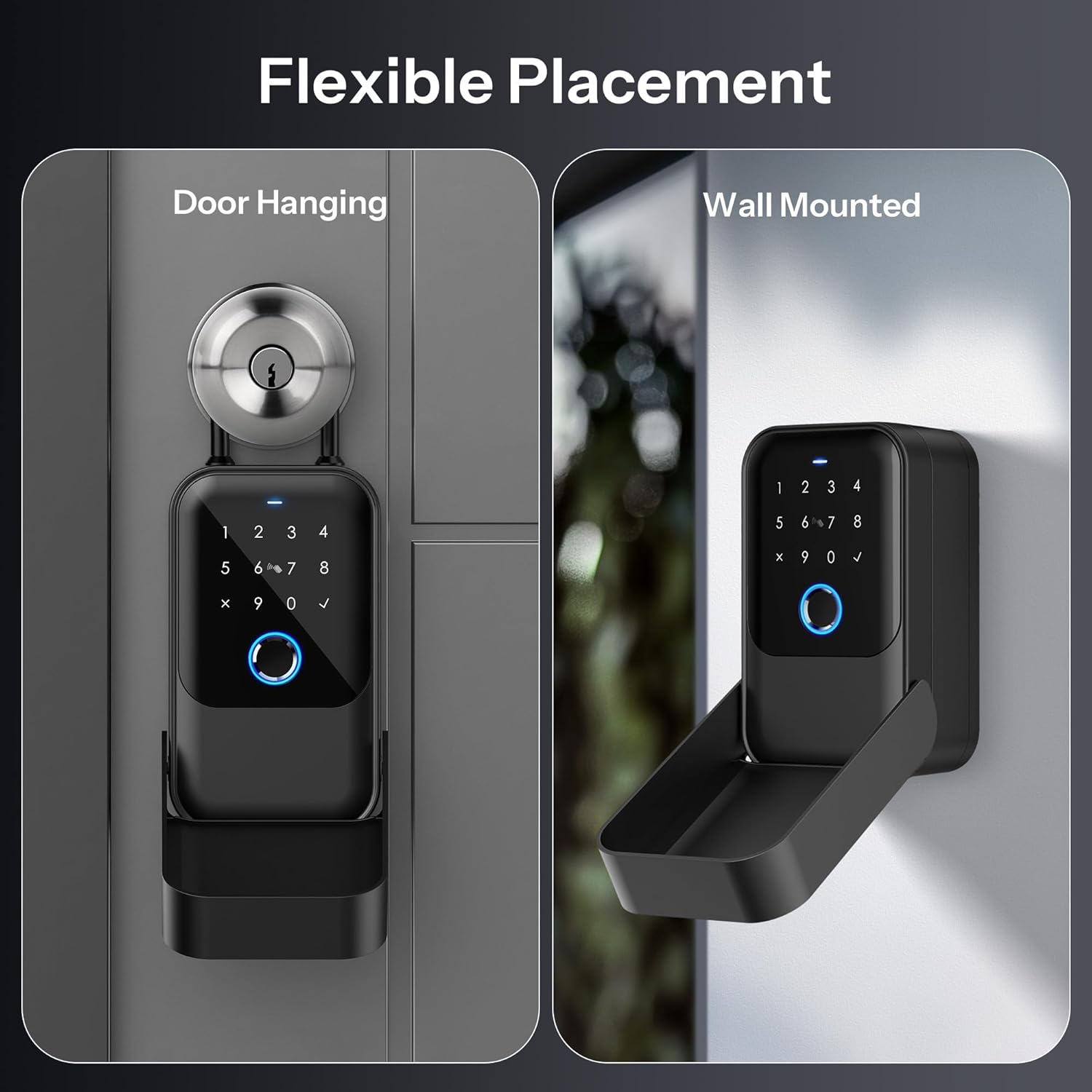
Image 2.1: Depiction of the LOQRON Smart Key Lock Box's flexible placement options, showing it both hanging on a door handle and securely mounted to a wall.
3. ఆపరేటింగ్ సూచనలు
The LOQRON Smart Key Lock Box provides five distinct methods for unlocking, ensuring versatile access control.

Image 3.1: A visual representation illustrating the five primary methods to unlock the LOQRON Smart Key Lock Box: Passcode, Fingerprint, Access Card, App Control, and Manual Key.

Image 3.2: A detailed close-up of the LOQRON Smart Key Lock Box's keypad, highlighting the fingerprint sensor and numeric pad, with icons representing the five unlocking methods.
3.1 APP Control (Tuya/TT-Lock)
Unlock and manage your lock box remotely via the dedicated smartphone application.
- బ్లూటూత్ అన్లాక్: With your smartphone near the lock box and Bluetooth enabled, open the Tuya/TT-Lock app and tap the unlock icon.
- Remote Unlock (with Gateway): For unlocking from anywhere, the lock box can be paired with a Tuya Gateway (sold separately). Once connected, you can unlock the box remotely via the app, regardless of your proximity.
- యాక్సెస్ నిర్వహణ: The app allows you to generate and manage various types of access, including temporary passcodes, scheduled access, and one-time codes. You can also share access privileges with family members or trusted individuals.

Image 3.3: An illustration demonstrating the remote access capability of the LOQRON Smart Key Lock Box when paired with a Tuya gateway, allowing unlocking from any location via the smartphone app.
3.2 ఫింగర్ప్రింట్ అన్లాక్
The lock box features a semiconductor fingerprint sensor for quick and secure access.
- నమోదు: Up to 200 fingerprints can be enrolled. Follow the instructions within the Tuya/TT-Lock app to add new fingerprints.
- అన్లాక్ చేస్తోంది: Place your enrolled finger firmly on the fingerprint sensor. The lock box will unlock within approximately 0.3 seconds upon successful recognition.
3.3 Passcode Unlock
Access the lock box using a personalized numeric passcode.
- Setting Passcodes: Passcodes are generated and managed through the Tuya/TT-Lock app. You can set permanent, temporary, or one-time passcodes.
- అన్లాక్ చేస్తోంది: Enter your valid passcode on the numeric keypad and press the '✓' (check) button to confirm.
3.4 Access Card Unlock
The package includes four access cards for convenient unlocking.
- నమోదు: Access cards are enrolled via the Tuya/TT-Lock app. Follow the in-app instructions to register each card.
- అన్లాక్ చేస్తోంది: Simply swipe an enrolled access card over the designated card reader area on the lock box.
3.5 Manual Key Unlock
A traditional manual key is provided for emergency access or as an alternative unlocking method.
- అన్లాక్ చేస్తోంది: Insert the manual key into the keyhole (typically located discreetly on the device) and turn to unlock.
4. నిర్వహణ
4.1 బ్యాటరీ నిర్వహణ
The lock box is powered by 4 AAA Alkaline batteries. These batteries are non-rechargeable.
- తక్కువ బ్యాటరీ హెచ్చరిక: The Tuya/TT-Lock app will provide timely notifications when the battery level is low, prompting you to replace the batteries.
- భర్తీ: Replace all four AAA Alkaline batteries simultaneously when the low battery alert is received to ensure optimal performance.
4.2 మన్నిక మరియు పర్యావరణ పరిస్థితులు
The LOQRON Smart Key Lock Box is designed for rugged durability and outdoor use.
- IP65 సర్టిఫైడ్: The lock box is IP65 certified, meaning it is dustproof and protected against water jets from any direction. This ensures your keys remain secure and protected from the elements.
- ఉష్ణోగ్రత పరిధి: It operates effectively in temperatures ranging from -20°C to 55°C.

Image 4.1: Visual representation of the LOQRON Smart Key Lock Box's IP65 certification, demonstrating its resistance to dust and water, suitable for outdoor environments.
4.3 శుభ్రపరచడం
To maintain the appearance and functionality of your lock box:
- ఒక మృదువైన, d తో బాహ్య తుడవడంamp గుడ్డ.
- Avoid using abrasive cleaners or solvents, as these may damage the finish or electronic components.
- Keep the fingerprint sensor and keypad clean and free of debris for optimal performance.
5. ట్రబుల్షూటింగ్
5.1 Emergency Unlock
In situations where the battery is completely depleted or other electronic issues prevent unlocking, emergency options are available:
- USB కేబుల్: Connect a USB cable (included) to the USB-C port on the lock box and to a power bank or USB power source. This provides temporary power for unlocking. Note: The USB cable is for emergency unlocking only and does not charge the internal batteries.
- మాన్యువల్ కీ: Use the provided manual key to physically unlock the box.

Image 5.1: A visual guide to emergency unlocking methods for the LOQRON Smart Key Lock Box, illustrating the use of a USB cable for temporary power and the manual key.
5.2 సాధారణ సమస్యలు
- లాక్ బాక్స్ స్పందించడం లేదు: Check battery levels. If batteries are low or dead, use the emergency USB power or manual key.
- వేలిముద్ర గుర్తించబడలేదు: Ensure your finger is clean and dry. Try re-enrolling your fingerprint if the issue persists.
- Passcode Not Working: Double-check the passcode entered. Ensure no temporary restrictions are active via the app.
- యాప్ కనెక్టివిటీ సమస్యలు: Ensure Bluetooth is enabled on your phone and the lock box is within range. Restart the app or your phone if necessary. For remote access, verify your Tuya Gateway is properly connected and online.
6. స్పెసిఫికేషన్లు
Detailed technical specifications for the LOQRON Smart Key Lock Box.

చిత్రం 6.1: పేలిన view diagram of the LOQRON Smart Key Lock Box, labeling key internal and external components such as the numeric keypad, fingerprint sensor, card reader area, USB-C port, and manual key access.
| ఫీచర్ | స్పెసిఫికేషన్ |
|---|---|
| బ్రాండ్ | LOQRON |
| మోడల్ సంఖ్య | LOQRON-SKLB-TUYA |
| లాక్ రకం | Custom Digital Lock with Multiple Unlocking Methods |
| ప్రత్యేక ఫీచర్ | వేలిముద్ర |
| అంశం కొలతలు (L x W x H) | 7.05 x 5.35 x 2.72 అంగుళాలు |
| మెటీరియల్ | అల్లాయ్ స్టీల్, స్టెయిన్లెస్ స్టీల్ |
| రంగు | నలుపు |
| శక్తి మూలం | 4 AAA Alkaline batteries (Non-Rechargeable) |
| అత్యవసర శక్తి | USB కేబుల్ (టైప్-C) |
| కనెక్టివిటీ ప్రోటోకాల్ | బ్లూటూత్ |
| నియంత్రణ పద్ధతి | App (Tuya/TT-Lock), Fingerprint, Passcode, Access Card, Manual Key |
| సిఫార్సు చేసిన ఉపయోగాలు | Outdoor use, real estate agents, Airbnb rentals, sharing access with family and friends |
| చేర్చబడిన భాగాలు | Four access cards, USB cable, 4 AAA Alkaline batteries, manual key |
| ఆపరేటింగ్ ఉష్ణోగ్రత | -20°C నుండి 55°C |
| IP రేటింగ్ | IP65 (దుమ్ము నిరోధక, జలనిరోధక) |
7. వారంటీ మరియు మద్దతు
అందించిన ఉత్పత్తి డేటాలో ఉత్పత్తి వారంటీ మరియు కస్టమర్ మద్దతుకు సంబంధించిన సమాచారం అందుబాటులో లేదు. దయచేసి ఉత్పత్తి ప్యాకేజింగ్ లేదా తయారీదారు అధికారిక website for the most current warranty details and support contact information.