
1. సెటప్
1.1 అన్బాక్సింగ్ మరియు భాగాలు
Carefully unpack all items from the box. Ensure all components are present before proceeding with assembly.
- టర్న్టబుల్ యూనిట్
- పారదర్శక డస్ట్కవర్
- కనెక్షన్ కేబుల్
- యూనివర్సల్ పవర్ అడాప్టర్
- అమరిక ప్రోట్రాక్టర్
- సింగిల్ అడాప్టర్

ముందు view of the Pro-Ject Debut EVO 2 turntable.
1.2 ప్లాటర్ మరియు బెల్ట్ ఇన్స్టాలేషన్
- Carefully place the heavy aluminum platter onto the spindle in the center of the turntable.
- Locate the drive belt. Gently stretch the belt around the inner rim of the platter and around the motor pulley.
- Rotate the platter manually a few times clockwise to ensure the belt is properly seated.
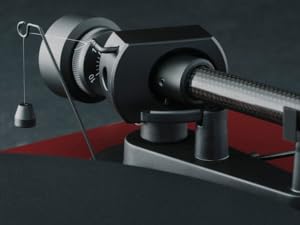
Image showing the platter with the drive belt correctly installed around the motor pulley.
1.3 Tonearm Assembly
- కౌంటర్ వెయిట్ను టోన్ ఆర్మ్ వెనుక వైపుకు జారండి.
- Attach the pre-mounted Pick it MM EVO cartridge to the tonearm headshell.

వివరంగా view కార్బన్ ఫైబర్ టోన్ ఆర్మ్ మరియు ముందుగా అమర్చబడిన పిక్ ఇట్ MM EVO కార్ట్రిడ్జ్.

Diagram illustrating the TPE counterweight and premium bearing block for the tonearm.
1.4 Dustcover Installation
Carefully insert the hinges of the transparent dustcover into the corresponding slots on the turntable base.

The Pro-Ject Debut EVO 2 turntable with its transparent dustcover in place.
1.5 Leveling the Turntable
Place the turntable on a stable, level surface. Use a bubble level (not included) to ensure the turntable is perfectly horizontal. Adjust the turntable's feet as necessary to achieve a level position.
1.6 Balancing the Tonearm
This critical step ensures proper tracking force and prevents damage to your records and stylus. Follow the detailed instructions in the included manual for precise tonearm balancing and anti-skating adjustment.

Detail of the tonearm showing the anti-skating mechanism.
1.7 ఆడియో సిస్టమ్కు కనెక్ట్ చేయడం
మీ టర్న్ టేబుల్ని కనెక్ట్ చేయండి amplifier or receiver using the provided connection cable. Ensure your amplifier has a phono input, or use an external phono preamplifier if necessary. Connect the ground wire to the ground terminal on your ampజీవితకాలం/ముందుamp to minimize hum.
Video: Fluance Reference Turntable First Time Setup. This video provides a general guide for turntable setup, including platter, belt, tonearm, and dust cover installation, as well as leveling and balancing.
Video: How to Connect a Fluance Turntable to a Stereo Amplifier. This video offers a general guide on connecting a turntable to an amplifier, which can be helpful for the Pro-Ject Debut EVO 2.
2. ఆపరేటింగ్ సూచనలు
2.1 పవర్ ఆన్/ఆఫ్ మరియు స్పీడ్ ఎంపిక
To power on the turntable, rotate the power knob. The Debut EVO 2 features electronic speed selection for 33 and 45 RPM. Use the dedicated button to switch between these speeds. For 78 RPM records, a special stylus and pulley may be required (sold separately).
2.2 రికార్డును ప్లే చేయడం
- మీ రికార్డును పళ్ళెం మీద ఉంచండి.
- Select the correct playback speed (33 or 45 RPM).
- క్యూయింగ్ లివర్ ఉపయోగించి టోన్ ఆర్మ్ను సున్నితంగా ఎత్తండి.
- టోన్ ఆర్మ్ను రికార్డ్లోని కావలసిన ట్రాక్పై ఉంచండి.
- Slowly lower the cueing lever to allow the stylus to descend onto the record groove.
- At the end of the record, lift the tonearm using the cueing lever and return it to its rest.
3. నిర్వహణ
3.1 శుభ్రపరచడం
- Regularly clean the dustcover and turntable plinth with a soft, dry cloth.
- Use a carbon fiber brush to gently clean your records before each play to remove dust and static.
- Clean the stylus carefully with a dedicated stylus brush, moving from back to front.
3.2 స్టైలస్ కేర్
The stylus is a delicate component. Avoid touching it with your fingers. Replace the stylus when signs of wear appear, typically after 500-1000 hours of playback, to maintain sound quality and prevent record damage.
4. ట్రబుల్షూటింగ్
4.1 ధ్వని లేదు
- Check all cable connections between the turntable, preamplifier (if used), and ampలిఫైయర్/రిసీవర్.
- మీలో సరైన ఇన్పుట్ ఎంచుకోబడిందని నిర్ధారించుకోండి ampలిఫైయర్/రిసీవర్.
- Verify the stylus is properly seated in the cartridge and the tonearm is balanced.
4.2 దాటవేయడం లేదా వక్రీకరించడం
- టర్న్ టేబుల్ స్థిరమైన, స్థాయి ఉపరితలంపై ఉందని నిర్ధారించుకోండి.
- Re-check tonearm balance and anti-skating settings.
- Clean the record and stylus.
- Inspect the stylus for damage or wear.
4.3 Humming Noise
- Ensure the ground wire is securely connected between the turntable and your ampజీవితకాలం/ముందుamp.
- Check for any loose connections in the audio cables.
- Move the turntable away from other electronic devices that might cause interference.
5. స్పెసిఫికేషన్లు
- ఉత్పత్తి కొలతలు: 1.26 x 1.63 x 0.44 అంగుళాలు
- వస్తువు బరువు: 17.6 పౌండ్లు (8 కిలోగ్రాములు)
- అంశం మోడల్ సంఖ్య: 9120129864954
- బ్రాండ్: ప్రో-జెక్ట్
- గరిష్ట భ్రమణ వేగం: 45 RPM (supports 33 and 45 RPM electronically)
- చేర్చబడిన భాగాలు: Turntable, transparent dustcover, connection cable, universal power adapter, alignment protractor, single adapter
- ప్రత్యేక ఫీచర్: Adjustable 8.6" carbon tonearm, Aluminium diecast platter, Built-in speed control, Precision machined MDF plinth
- మెటీరియల్: Carbon Fibre (tonearm)
- రంగు: బ్లాక్ శాటిన్
- మోడల్ పేరు: తొలి EVO 2
- అనుకూల పరికరాలు: AV Receiver, Audio Component with Analog or Digital Inputs, Integrated Amplifier, Powered Speaker
6. వారంటీ మరియు మద్దతు
6.1 విడిభాగాల లభ్యత
Pro-Ject offers a 25-year spare parts availability guarantee for this turntable, ensuring its longevity and continued performance.
6.2 కస్టమర్ మద్దతు
For further assistance, technical support, or warranty claims, please refer to the contact information provided in your product packaging or visit the official Pro-Ject Audio Systems webసైట్.