
Cillso H97
Cillso H97 Wireless Earbuds
వినియోగదారు సూచనల మాన్యువల్
ముఖ్యమైన భద్రతా సమాచారం
Please read all safety instructions carefully before using this product. Failure to follow these instructions may result in injury or damage.
- ఇయర్బడ్లు లేదా ఛార్జింగ్ కేసును తీవ్రమైన ఉష్ణోగ్రతలు, ప్రత్యక్ష సూర్యకాంతి లేదా మంటలకు గురిచేయవద్దు.
- Avoid using the product in environments with high humidity or water, beyond its IP7 waterproof rating.
- Do not disassemble, repair, or modify the product. This will void the warranty.
- ఉత్పత్తిని పిల్లలు మరియు పెంపుడు జంతువులకు దూరంగా ఉంచండి.
- Use only the provided charging cable or a certified standard charger (5V/1A; 5V/2A) to charge the case.
- వినికిడి దెబ్బతినకుండా నిరోధించడానికి ఎక్కువ కాలం పాటు అధిక వాల్యూమ్ స్థాయిలలో వినడం మానుకోండి.
ప్యాకేజీ విషయాలు
మీ ప్యాకేజీలో అన్ని అంశాలు ఉన్నాయని ధృవీకరించండి:
- 2x Bluetooth Earbuds (Left and Right)
- 1x పోర్టబుల్ ఛార్జింగ్ కేస్
- 1x టైప్-సి ఛార్జింగ్ కేబుల్
- 1x వినియోగదారు మాన్యువల్
ఉత్పత్తి ముగిసిందిview
Familiarize yourself with the components of your Cillso H97 Wireless Earbuds.
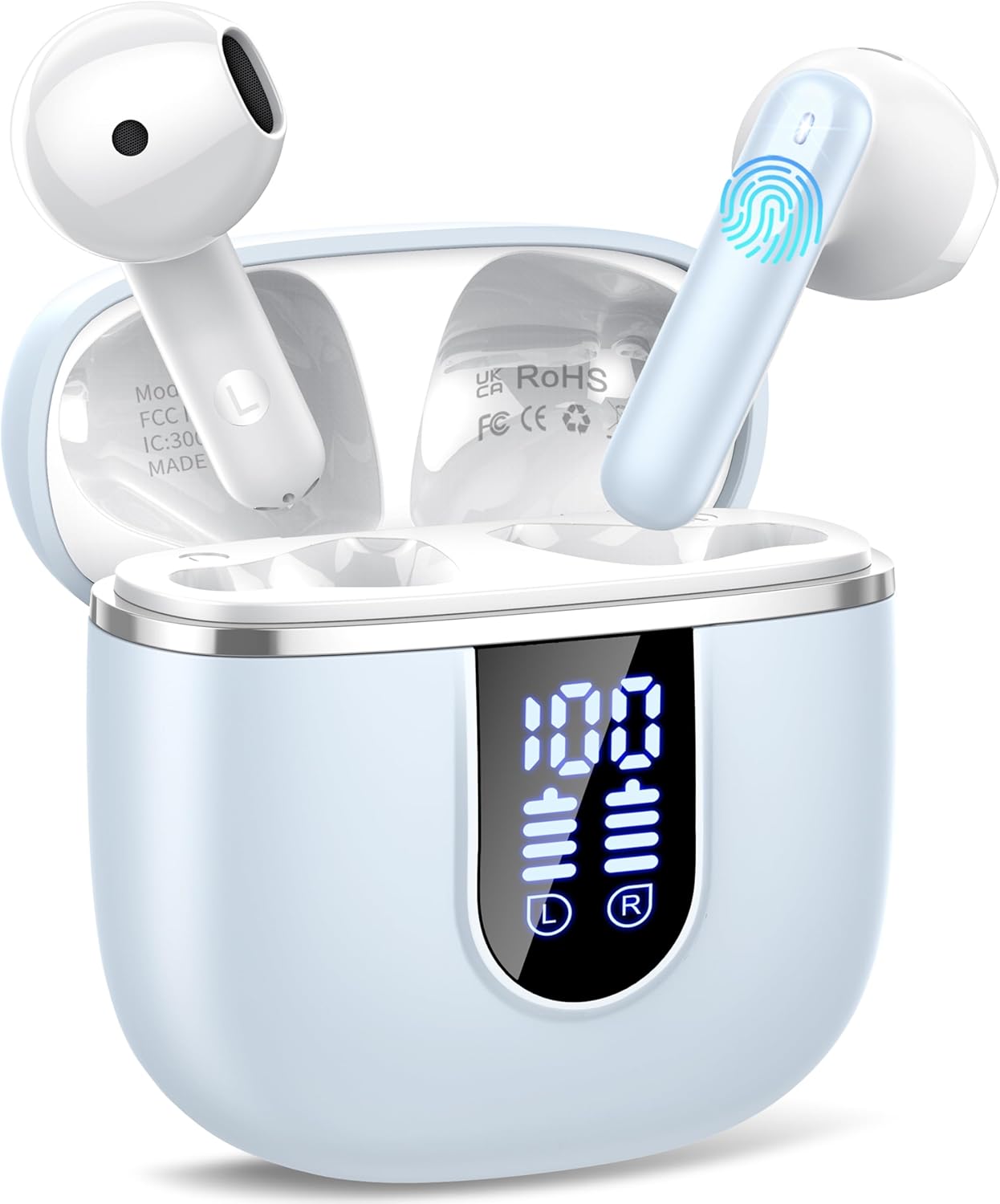
Image: The Cillso H97 Wireless Earbuds are shown inside their open charging case. The case features a dual LED display indicating battery percentages for the case and individual earbuds. The earbuds are white with a sleek design, and the charging case is a light azure color.
The image above displays the earbuds within their charging case. Key features include the dual LED display on the charging case, which shows the battery status for both the case and each earbud. The earbuds themselves are designed for in-ear comfort and feature touch control areas.
సెటప్
1. ఇయర్బడ్లు మరియు కేస్ను ఛార్జ్ చేయడం
మొదటిసారి ఉపయోగించే ముందు, ఇయర్బడ్లు మరియు ఛార్జింగ్ కేసును పూర్తిగా ఛార్జ్ చేయండి.
- Connect the provided Type-C charging cable to the charging port on the case and to a standard USB power adapter (5V/1A or 5V/2A).
- The dual LED display on the charging case will show the charging progress. A full charge for the case takes approximately 1.5 hours.
- Place the earbuds into the charging case. They will automatically begin charging. The LED display will indicate their charging status.
- The earbuds provide up to 8 hours of playback on a single charge, and the charging case provides an additional 32 hours of playtime.
2. మీ పరికరంతో జత చేయడం
The H97 earbuds utilize Bluetooth 5.4 for a stable and efficient connection.
- ప్రారంభ జత:
- మీ పరికరం యొక్క బ్లూటూత్ ఆన్ చేయబడిందని నిర్ధారించుకోండి.
- ఛార్జింగ్ కేస్ మూత తెరవండి. ఇయర్బడ్లు ఆటోమేటిక్గా పవర్ ఆన్ అవుతాయి మరియు పెయిరింగ్ మోడ్లోకి ప్రవేశిస్తాయి.
- On your device, search for Bluetooth devices and select "H97" from the list.
- కనెక్ట్ అయిన తర్వాత, మీరు నిర్ధారణ ప్రాంప్ట్ వింటారు మరియు ఇయర్బడ్లు ఉపయోగం కోసం సిద్ధంగా ఉంటాయి.
- ఆటోమేటిక్ రీకనెక్షన్: After the initial pairing, the earbuds will automatically connect to the last paired device when the charging case lid is opened.
- సింగిల్ ఇయర్బడ్ మోడ్: Either earbud can be used independently. Simply take one out of the case, and it will connect.
ఆపరేటింగ్ సూచనలు
1. ఇయర్బడ్స్ ధరించడం
The H97 earbuds are designed for an ergonomic and secure fit.

Image: A diagram illustrating the correct angle and position for wearing the earbud in the ear canal for optimal comfort and sound.
- ప్రతి ఇయర్బడ్ను మీ చెవి కాలువలోకి సున్నితంగా చొప్పించండి.
- Adjust the earbud until it feels snug and comfortable. A proper fit ensures optimal sound quality and noise isolation.
- Each earbud weighs only 3.5 grams, providing lightweight comfort for extended wear.
2. టచ్ నియంత్రణలు
The earbuds feature sensitive touch sensors for easy control of various functions:
| చర్య | ఫంక్షన్ |
|---|---|
| సింగిల్ ట్యాప్ (ఎడమ/కుడి) | సంగీతాన్ని ప్లే చేయండి/పాజ్ చేయండి, సమాధానం ఇవ్వండి/కాల్ని ముగించండి |
| రెండుసార్లు నొక్కండి (ఎడమవైపు) | మునుపటి పాట |
| రెండుసార్లు నొక్కండి (కుడివైపు) | తదుపరి పాట |
| ట్రిపుల్ ట్యాప్ (ఎడమ) | వాల్యూమ్ డౌన్ |
| ట్రిపుల్ ట్యాప్ (కుడి) | వాల్యూమ్ అప్ |
| లాంగ్ ప్రెస్ (2 సెకన్లు) | కాల్ తిరస్కరించండి, వాయిస్ అసిస్టెంట్ను యాక్టివేట్ చేయండి |
3. పవర్ ఆన్/ఆఫ్
- పవర్ ఆన్: Open the charging case lid, or long-press the touch area on both earbuds for 3 seconds if they are outside the case and off.
- పవర్ ఆఫ్: Place the earbuds back into the charging case and close the lid. Alternatively, long-press the touch area on both earbuds for 5 seconds.
4. కాల్స్ చేయడం మరియు స్వీకరించడం
The H97 earbuds are equipped with 4 ENC (Environmental Noise Cancelling) microphones to ensure clear call quality.
- సమాధానం కాల్: ఏ ఇయర్బడ్నైనా ఒకసారి నొక్కండి.
- కాల్ ముగించు: కాల్ చేస్తున్నప్పుడు ఇయర్బడ్లలో దేనినైనా ఒకసారి నొక్కండి.
- కాల్ని తిరస్కరించండి: ఇయర్బడ్ని 2 సెకన్ల పాటు ఎక్కువసేపు నొక్కండి.
5. ఆడియో ప్లేబ్యాక్
Experience immersive HiFi stereo sound with deep bass, delivered by 14.2mm diaphragm drivers and AAC/SBC audio encoding.
- ప్లే/పాజ్: ఏ ఇయర్బడ్నైనా ఒకసారి నొక్కండి.
- తదుపరి పాట: కుడి ఇయర్బడ్ని రెండుసార్లు నొక్కండి.
- మునుపటి పాట: ఎడమ ఇయర్బడ్ని రెండుసార్లు నొక్కండి.
నిర్వహణ
Proper care will extend the lifespan of your earbuds.
- శుభ్రపరచడం: ఇయర్బడ్లు మరియు ఛార్జింగ్ కేసును శుభ్రం చేయడానికి మృదువైన, పొడి, మెత్తటి బట్టను ఉపయోగించండి. కఠినమైన రసాయనాలు లేదా రాపిడి పదార్థాలను ఉపయోగించవద్దు.
- నిల్వ: ఉపయోగంలో లేనప్పుడు, ఇయర్బడ్లను రక్షించడానికి మరియు వాటిని ఛార్జ్లో ఉంచడానికి వాటి ఛార్జింగ్ కేసులో నిల్వ చేయండి. చల్లని, పొడి ప్రదేశంలో నిల్వ చేయండి.
- నీటి నిరోధకత: The earbuds feature IP7 nano-coating technology, protecting them from daily splashes, sweat, and rain. Do not submerge them in water or expose them to strong jets of water. Ensure they are dry before placing them back in the charging case.
ట్రబుల్షూటింగ్
మీరు ఏవైనా సమస్యలను ఎదుర్కొంటే, ఈ క్రింది సాధారణ సమస్యలు మరియు పరిష్కారాలను చూడండి:
| సమస్య | సాధ్యమైన పరిష్కారం |
|---|---|
| ఇయర్బడ్లు పరికరంతో జత కావడం లేదు |
|
| ఒక ఇయర్బడ్ మాత్రమే పని చేస్తోంది |
|
| ఛార్జింగ్ కేసు ఛార్జింగ్ కాదు |
|
| పేలవమైన ధ్వని నాణ్యత లేదా అడపాదడపా కనెక్షన్ |
|
స్పెసిఫికేషన్లు
Key technical details of the Cillso H97 Wireless Earbuds:
- మోడల్: H97
- బ్లూటూత్ వెర్షన్: 5.4
- ఆడియో ఎన్కోడింగ్: AAC/SBC
- డ్రైవర్ పరిమాణం: 14.2mm Diaphragm Driver
- ఇయర్బడ్ ప్లేటైమ్: 8 గంటల వరకు (ఒకసారి ఛార్జ్ చేస్తే)
- మొత్తం ప్లేటైమ్ (ఛార్జింగ్ కేసుతో): 40 గంటల వరకు
- ఛార్జింగ్ సమయం (కేసు): దాదాపు 1.5 గంటలు (టైప్-సి)
- జలనిరోధిత రేటింగ్: IP7
- ఇయర్బడ్ బరువు: 3.5 గ్రాములు (ఒక్కొక్కటి)
- ఛార్జింగ్ కేస్ బరువు: 32 గ్రాములు
- ఉత్పత్తి కొలతలు: 0.79 x 0.79 x 0.79 అంగుళాలు (ఇయర్బడ్లు, సుమారుగా)
- వస్తువు బరువు: 3.2 ఔన్సులు (మొత్తం ప్యాకేజీ బరువు)
- బ్యాటరీలు: 2 A బ్యాటరీలు అవసరం (చేర్చబడి)
- అనుకూలత: Most Bluetooth devices (Android 4.4+, iOS 8.0+, Bluetooth 4.0+)
వారంటీ మరియు మద్దతు
Cillso products are designed for reliability and performance. This product comes with a standard manufacturer's warranty against defects in materials and workmanship.
- For warranty claims or technical support, please refer to the contact information provided with your purchase or visit the official Cillso webసైట్.
- దయచేసి వారంటీ సేవ కోసం మీ కొనుగోలు రుజువును ఉంచుకోండి.
Ask a question about this manual
Ask about setup, troubleshooting, compatibility, parts, safety, or missing instructions. Manuals+ will review the question and use this page’s manual context to help answer it.