
PIOOCAN S10Pro
PIOOCAN S10Pro Rechargeable Flashlight Instruction Manual
Model: S10Pro | Brand: PIOOCAN
పరిచయం
This manual provides detailed instructions for the safe and effective use of your PIOOCAN S10Pro Rechargeable Flashlight. Please read this manual thoroughly before operating the device and retain it for future reference.
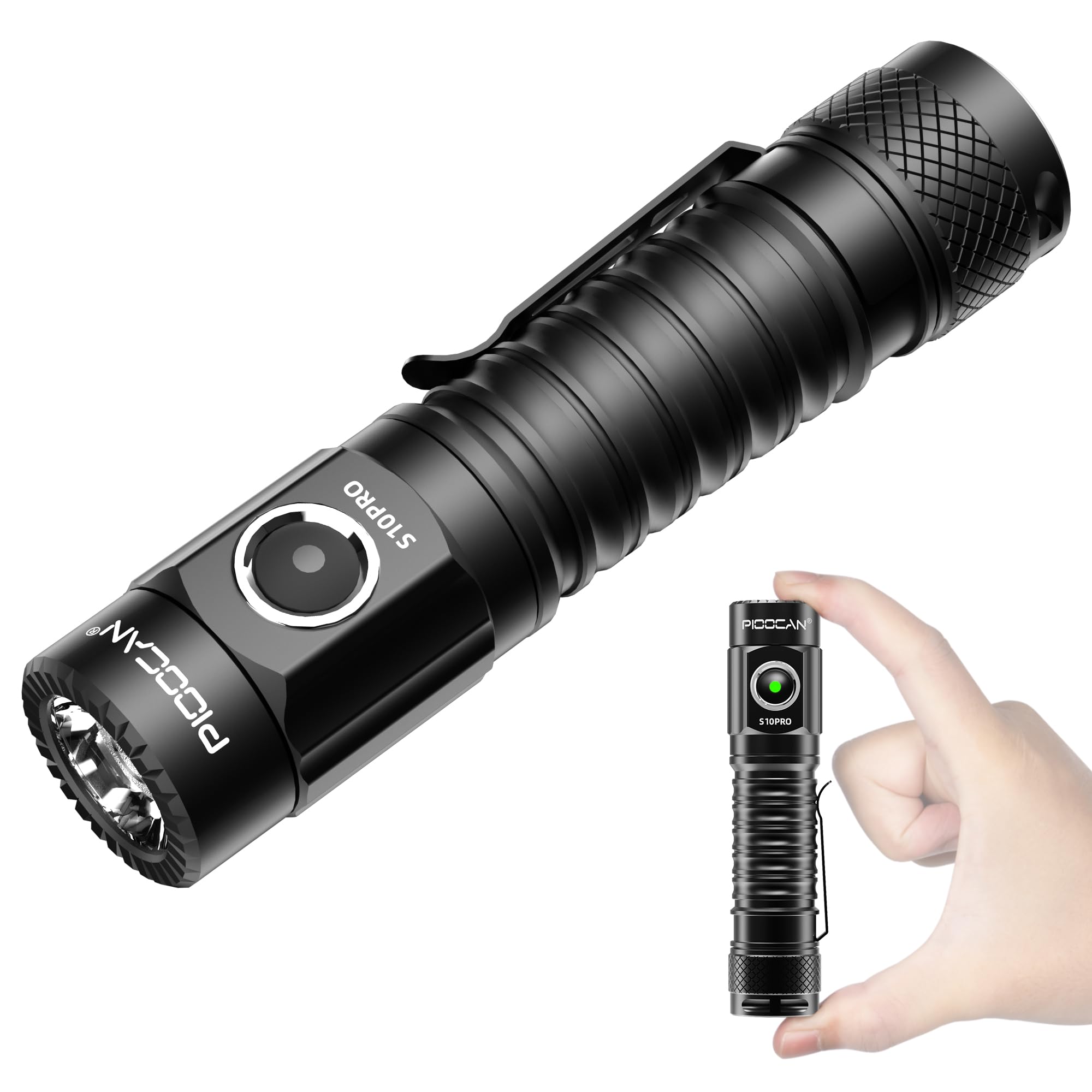
Image: The PIOOCAN S10Pro Rechargeable Flashlight, a compact and powerful illumination tool.
భద్రతా సమాచారం
సురక్షితమైన ఆపరేషన్ను నిర్ధారించడానికి మరియు నష్టాన్ని నివారించడానికి, ఈ క్రింది జాగ్రత్తలను గమనించండి:
- Do not point the flashlight directly into eyes. The high lumen output can cause temporary vision impairment.
- The flashlight may become warm during prolonged use, especially on higher brightness settings. Handle with care. If it becomes dangerously hot, turn it off immediately and allow it to cool.
- పిల్లలకు దూరంగా ఉంచండి.
- Use only the specified rechargeable battery and charging cable.
- నీటి నిరోధకతను నిర్వహించడానికి ఛార్జింగ్ పోర్ట్ కవర్ సురక్షితంగా మూసివేయబడిందని నిర్ధారించుకోండి.
ప్యాకేజీ విషయాలు
ప్యాకేజీలో అన్ని అంశాలు ఉన్నాయని నిర్ధారించుకోండి:
- PIOOCAN S10Pro Flashlight
- రీఛార్జబుల్ బ్యాటరీ (ముందే ఇన్స్టాల్ చేయబడినది లేదా విడిగా)
- USB టైప్-సి ఛార్జింగ్ కేబుల్
- లాన్యార్డ్
- వినియోగదారు మాన్యువల్ (ఈ పత్రం)
Video: An unboxing demonstration of the PIOOCAN S10Pro Flashlight, showing the flashlight, charging cable, lanyard, and user manual included in the package.
సెటప్
బ్యాటరీ సంస్థాపన
The S10Pro flashlight uses a rechargeable battery. If the battery is not pre-installed or has a protective film, follow these steps:
- ఫ్లాష్లైట్ను అపసవ్య దిశలో తిప్పడం ద్వారా దాని టెయిల్ క్యాప్ను విప్పు.
- Remove any protective film or disc from the battery if present.
- Insert the battery with the positive (+) end facing towards the flashlight head (LED).
- Screw the tail cap back on clockwise until it is secure.

Image: The PIOOCAN S10Pro flashlight with its tail cap unscrewed and battery removed, illustrating the battery compartment.
బ్యాటరీని ఛార్జ్ చేస్తోంది
The S10Pro features a convenient USB Type-C charging port:
- ఫ్లాష్లైట్ బాడీపై USB టైప్-C ఛార్జింగ్ పోర్ట్ను గుర్తించండి.
- Open the rubber cover protecting the charging port.
- Connect the provided USB Type-C cable to the flashlight and a compatible USB power source (e.g., wall adapter, power bank, computer).
- The indicator light on the flashlight will show ఎరుపు ఛార్జింగ్ మరియు మలుపు సమయంలో ఆకుపచ్చ పూర్తిగా ఛార్జ్ అయినప్పుడు.
- Charging typically takes 3-4 hours.
- ఛార్జింగ్ పూర్తయిన తర్వాత, నీటి నిరోధకతను నిర్వహించడానికి కేబుల్ను డిస్కనెక్ట్ చేసి, రబ్బరు కవర్ను సురక్షితంగా మూసివేయండి.

Image: The S10Pro flashlight connected to a USB-C charger, showing the red light indicating charging and the green light for a full charge.
ఆపరేటింగ్ సూచనలు
పవర్ ఆన్/ఆఫ్
Press the side switch button to turn the flashlight on or off.
మోడ్ స్విచింగ్
The S10Pro features 5 lighting modes: Turbo, High, Medium, Low, and SOS.
- When the flashlight is on, press and hold the side switch to cycle through Low, Medium, and High modes. Release the button to select the desired mode.
- టర్బో మోడ్: Double-click the side switch from any state (on or off) to activate Turbo mode. Double-click again to return to the previous mode.
- SOS మోడ్: Triple-click the side switch from any state (on or off) to activate SOS mode. Triple-click again to return to the previous mode.

Image: Visual representation of the S10Pro's five lighting modes: SOS, Low, Med, High, and Turbo.
మెమరీ ఫంక్షన్
The flashlight will remember the last used brightness mode (Low, Medium, or High) and will turn on in that mode the next time it is activated.
బ్యాటరీ సూచిక
The indicator light on the side switch provides battery status:
- గ్రీన్ లైట్: Full power (briefly illuminates for three seconds upon activation).
- రెడ్ లైట్ ఫ్లాషింగ్: తక్కువ వాల్యూమ్tage, indicating the battery needs recharging. The flashlight will eventually shut off.
ఫీచర్లు
- Magnetic Tail Cap: The S10Pro features a strong magnetic tail cap, allowing it to be attached to metal surfaces for hands-free illumination.
- IPX8 జలనిరోధిత: Designed to be waterproof, the flashlight can withstand immersion in water up to 2 meters for 30 minutes, making it suitable for use in various weather conditions.
- పాకెట్ క్లిప్: A solid and flexible two-way pocket clip is included for secure attachment to pockets, backpacks, or belts, enhancing portability.
- మన్నికైన నిర్మాణం: Made from high-quality aviation-grade aluminum alloy with a black anodized surface, ensuring durability and impact resistance.

Image: The S10Pro flashlight demonstrating its magnetic tail cap feature, allowing it to be attached to a metal surface for hands-free use.

Image: The S10Pro flashlight partially submerged in water, illustrating its IPX8 waterproof capability.

Image: The S10Pro flashlight securely clipped to a backpack strap, showcasing its portability and hands-free carrying option.
నిర్వహణ
- శుభ్రపరచడం: ఫ్లాష్లైట్ బాడీని మృదువైన, d తో తుడవండిamp గుడ్డ. రాపిడి క్లీనర్లు లేదా ద్రావకాలు ఉపయోగించవద్దు.
- సరళత: నీటి నిరోధకత మరియు సజావుగా పనిచేయడానికి O-రింగులు మరియు దారాలకు క్రమానుగతంగా సిలికాన్ గ్రీజును పూయండి.
- బ్యాటరీ సంరక్షణ: If storing the flashlight for an extended period, remove the battery or ensure it is partially charged (around 50%) to prolong its lifespan. Recharge the battery every 3-6 months if not in use.
- ఛార్జింగ్ పోర్ట్: Keep the USB-C charging port clean and free of debris. Always ensure the rubber cover is sealed when not charging.
ట్రబుల్షూటింగ్
| సమస్య | సాధ్యమైన కారణం | పరిష్కారం |
|---|---|---|
| ఫ్లాష్లైట్ ఆన్ అవ్వడం లేదు. | బ్యాటరీ ఖాళీగా ఉంది లేదా తప్పుగా ఇన్స్టాల్ చేయబడింది. | Charge the battery. Ensure the battery is inserted with the positive (+) end towards the head. Check if the tail cap is fully tightened. |
| ఫ్లాష్లైట్ విపరీతంగా వేడెక్కుతుంది. | Prolonged use on Turbo or High mode. | This is normal for high-output flashlights. Reduce brightness mode or turn off to allow cooling. Avoid prolonged use on highest settings. |
| Button is unresponsive or difficult to press. | Debris under the button or manufacturing variation. | Clean around the button. If the issue persists, contact customer support. |
| Charging indicator does not light up. | Loose cable connection or faulty cable/charger. | Ensure the USB-C cable is firmly connected to both the flashlight and the power source. Try a different cable or charger. |
| నీటి ప్రవేశం. | Charging port cover not sealed or damaged O-rings. | Always ensure the charging port cover is fully closed. Check O-rings for damage and lubricate them. |
స్పెసిఫికేషన్లు
| ఫీచర్ | వివరాలు |
|---|---|
| మోడల్ సంఖ్య | S10ప్రో |
| బ్రాండ్ | PIOOCAN |
| కాంతి మూలం రకం | LED |
| తెల్లని ప్రకాశం | అప్ 2500 లు |
| లైట్ పాత్ దూరం | 259 మీటర్ల వరకు |
| శక్తి మూలం | బ్యాటరీ ఆధారితం (పునర్వినియోగపరచదగినది) |
| బ్యాటరీ రకం | Lithium Ion (Built-in, 2600mAh) |
| రన్టైమ్ | Up to 160 hours (Low mode) |
| ఛార్జింగ్ | USB టైప్-C |
| నీటి నిరోధక స్థాయి | IPX8 |
| మెటీరియల్ | Aluminum (Aviation Grade) |
| ఉత్పత్తి కొలతలు | 11.6L x 2.5W x 2.5H సెంటీమీటర్లు |
| వస్తువు బరువు | 117.93 గ్రా (0.26 పౌండ్లు) |
| ప్రత్యేక లక్షణాలు | High Lumens, Impact Resistant, Lightweight, Portable, Weatherproof, Magnetic Tail Cap, 5 Modes |

Image: The S10Pro flashlight with its compact dimensions (115.1mm length, 29.42mm head diameter, 117.70g weight) highlighted.
ఉత్పత్తి వినియోగ వీడియో
Video: A demonstration of the PIOOCAN S10Pro Flashlight in various outdoor scenarios, showcasing its brightness, different modes (low, medium, high), waterproof feature, and Type-C recharging capability.
వారంటీ మరియు మద్దతు
The PIOOCAN S10Pro Flashlight comes with a limited warranty. For specific warranty details, please refer to the warranty card included in your package or contact PIOOCAN customer support.
If you encounter any issues or have questions regarding your flashlight, please contact PIOOCAN customer service through their official webమీరు ఉత్పత్తిని కొనుగోలు చేసిన సైట్ లేదా రిటైలర్.
Manufacturer Contact Information: PIOOCAN
Ask a question about this manual
Ask about setup, troubleshooting, compatibility, parts, safety, or missing instructions. Manuals+ will review the question and use this page’s manual context to help answer it.