
Tecno KL8 256+8
Tecno Spark 30 User Manual
Model: KL8 256+8
పరిచయం
Welcome to the user manual for your new Tecno Spark 30 smartphone. This guide provides comprehensive instructions on how to set up, operate, and maintain your device. Please read this manual carefully to ensure optimal performance and longevity of your phone.
The Tecno Spark 30 is a powerful 5G smartphone designed for seamless connectivity and high-performance tasks. It features a MediaTek Dimensity 6300 5G processor, a high-resolution 108MP main camera, and a smooth 120Hz display, offering an exceptional user experience.
భద్రతా సమాచారం
Before using your device, please read all safety information to ensure safe and proper use. Failure to follow these safety instructions may result in injury, damage to your device, or other property damage.
- బ్యాటరీ భద్రత: Do not disassemble, impact, squeeze, or put the battery into fire. If the battery swells, stop using it immediately.
- ఛార్జింగ్: Use only Tecno-approved chargers and cables. Unapproved chargers may cause fire, explosion, or other hazards.
- నీరు మరియు ధూళి నిరోధకత: While the device has an IP54 rating for dust and splash resistance, it is not waterproof. Avoid submerging the device in water.
- ఆపరేటింగ్ ఉష్ణోగ్రత: పరికరాన్ని 0°C నుండి 35°C (32°F నుండి 95°F) ఉష్ణోగ్రత పరిధిలో ఆపరేట్ చేయండి.
- పారవేయడం: Dispose of the device and its battery responsibly according to local regulations. Do not dispose of them with household waste.
ప్యాకేజీ విషయాలు
దయచేసి మీ ఉత్పత్తి పెట్టెలోని విషయాలను తనిఖీ చేయండి. ఏవైనా వస్తువులు తప్పిపోయినా లేదా దెబ్బతిన్నా, మీ రిటైలర్ను సంప్రదించండి.
- Tecno Spark 30 Smartphone
- పవర్ అడాప్టర్
- USB టైప్-సి కేబుల్
- SIM ఎజెక్టర్ సాధనం
- రక్షణ కేసు (ప్రాంతాన్ని బట్టి మారవచ్చు)
- త్వరిత ప్రారంభ గైడ్
- వారంటీ కార్డ్
ఉత్పత్తి ముగిసిందిview
Familiarize yourself with the physical components of your Tecno Spark 30.

ముందు మరియు వెనుక view of the Tecno Spark 30 smartphone, showcasing దాని కెమెరా మాడ్యూల్ మరియు డిస్ప్లే.
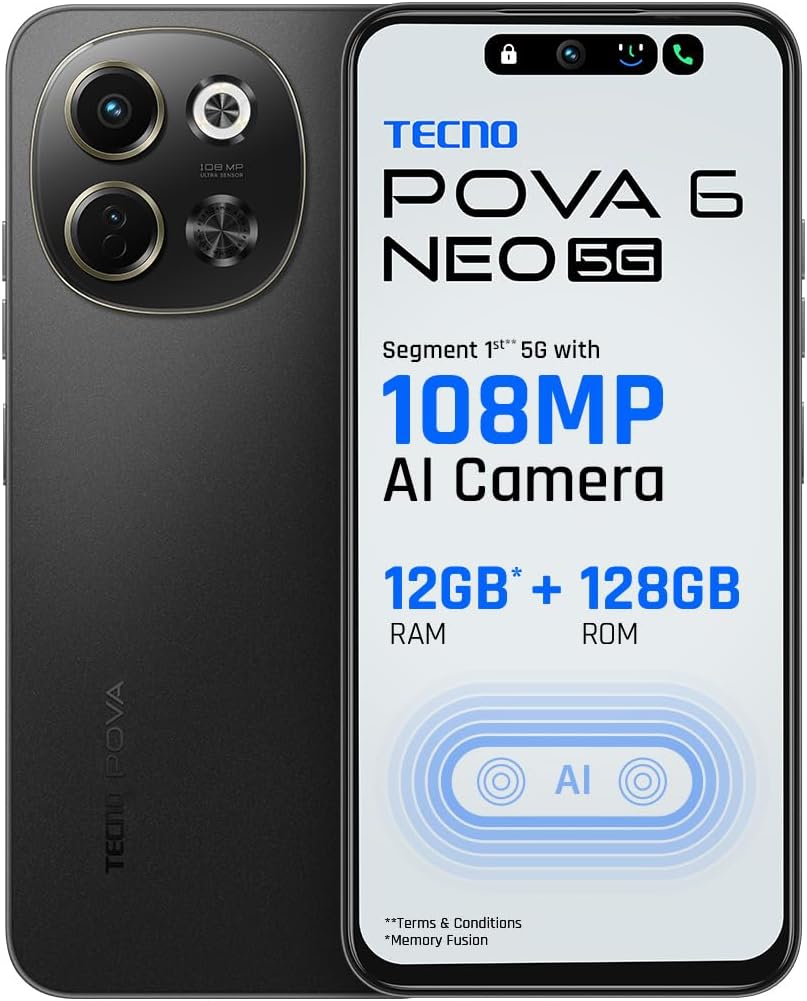
ముందు view of the Tecno Spark 30, highlighting the display and front camera.

దిగువన view of the Tecno Spark 30, showing the USB-C port, headphone jack, and speaker grille.
ముఖ్య భాగాలు:
- ముందు కెమెరా: సెల్ఫీలు మరియు వీడియో కాల్స్ కోసం.
- ప్రదర్శన: 6.67-inch screen with 120Hz refresh rate.
- వాల్యూమ్ బటన్లు: మీడియా వాల్యూమ్ మరియు రింగ్టోన్ వాల్యూమ్ను సర్దుబాటు చేయండి.
- పవర్ బటన్: Turn on/off the device, lock/unlock screen.
- SIM కార్డ్ ట్రే: నానో-సిమ్ కార్డ్లను చొప్పించండి.
- USB టైప్-సి పోర్ట్: ఛార్జింగ్ మరియు డేటా బదిలీ కోసం.
- స్పీకర్: ఆడియో అవుట్పుట్.
- Main Camera Module: Includes 108MP main camera and other sensors.
సెటప్
1. సిమ్ కార్డు(లు) చొప్పించడం
- మీ ఫోన్ పక్కన సిమ్ కార్డ్ ట్రేని గుర్తించండి.
- ట్రే పక్కన ఉన్న చిన్న రంధ్రంలోకి సిమ్ ఎజెక్టర్ సాధనాన్ని చొప్పించి, ట్రే బయటకు వచ్చే వరకు సున్నితంగా నెట్టండి.
- మీ నానో-సిమ్ కార్డ్(లు)ను ట్రేలోని నిర్దేశించిన స్లాట్లలో ఉంచండి. బంగారు కాంటాక్ట్లు క్రిందికి ఉండేలా చూసుకోండి.
- ట్రే సరైన స్థానంలోకి వచ్చే వరకు జాగ్రత్తగా దాన్ని తిరిగి ఫోన్లోకి నెట్టండి.
2 బ్యాటరీని ఛార్జ్ చేస్తోంది
- మీ ఫోన్ దిగువన ఉన్న ఛార్జింగ్ పోర్ట్కి USB టైప్-C కేబుల్ని కనెక్ట్ చేయండి.
- కేబుల్ యొక్క మరొక చివరను పవర్ అడాప్టర్కు కనెక్ట్ చేయండి.
- పవర్ అడాప్టర్ను వాల్ అవుట్లెట్లోకి ప్లగ్ చేయండి.
- The charging indicator will appear on the screen. Allow the phone to fully charge before first use.
3. పవర్ చేయడం ఆన్/ఆఫ్
- పవర్ ఆన్ చేయడానికి: Press and hold the Power button until the Tecno logo appears.
- పవర్ ఆఫ్ చేయడానికి: పవర్ బటన్ను నొక్కి పట్టుకోండి, ఆపై స్క్రీన్పై ఉన్న ఎంపికల నుండి "పవర్ ఆఫ్" ఎంచుకోండి.
4. ప్రారంభ సెటప్ విజార్డ్
Upon first power-on, follow the on-screen instructions to complete the initial setup, including language selection, Wi-Fi connection, Google account setup, and security settings.
మీ పరికరాన్ని ఆపరేట్ చేస్తోంది
కాల్స్ చేస్తోంది
- ఫోన్ యాప్ను తెరవండి.
- Enter the phone number using the dial pad or select a contact from your Contacts list.
- కాల్ని ప్రారంభించడానికి కాల్ బటన్ను నొక్కండి.
సందేశాలను పంపుతోంది
- సందేశాల యాప్ను తెరవండి.
- Tap the "Start chat" or "New message" button.
- గ్రహీత ఫోన్ నంబర్ను నమోదు చేయండి లేదా పరిచయాల నుండి ఎంచుకోండి.
- Type your message in the text field and tap the send button.
కెమెరాను ఉపయోగించడం
The Tecno Spark 30 features a 108MP AI Camera for high-quality photos.
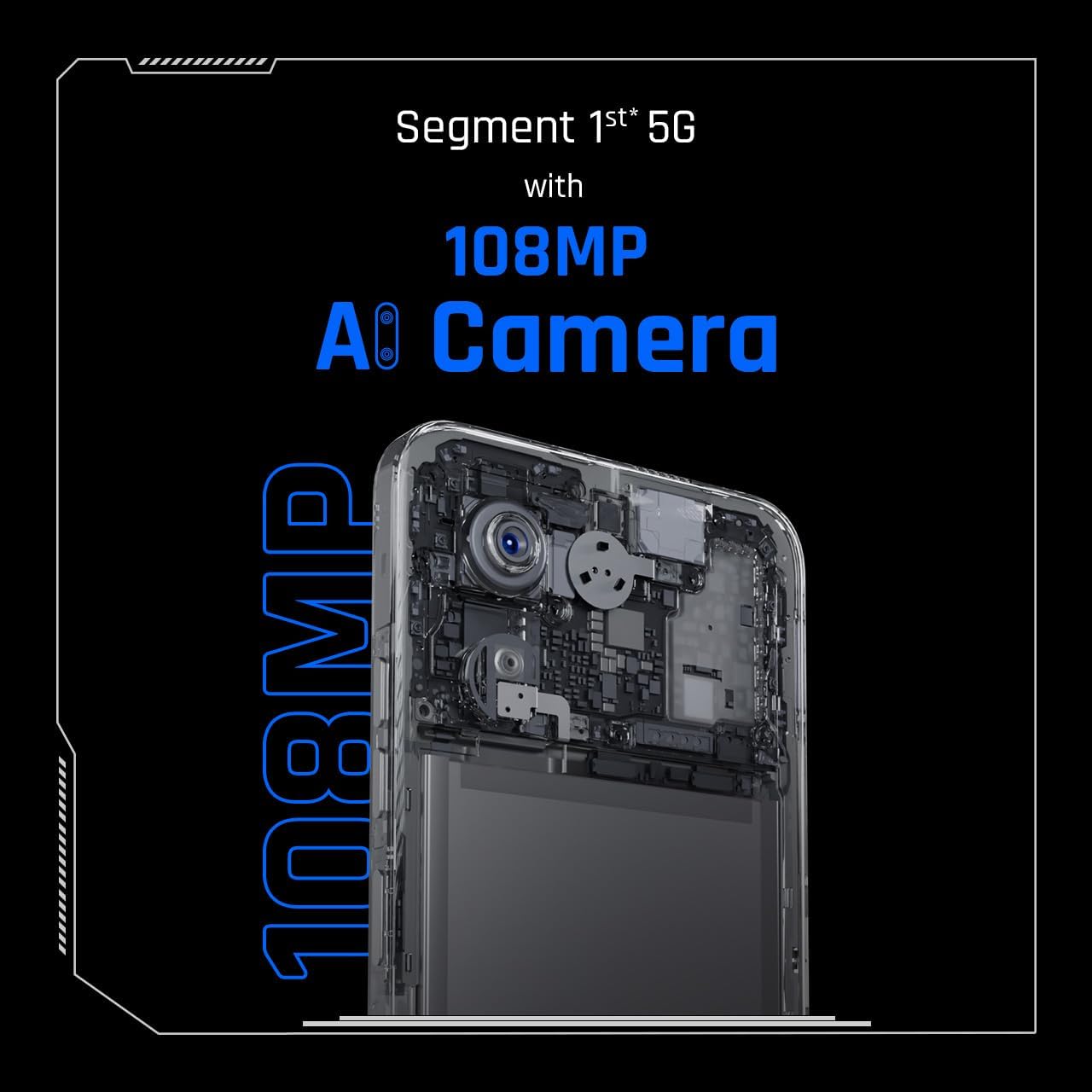
Close-up of the Tecno Spark 30's 108MP AI camera module.
- కెమెరా యాప్ను తెరవండి.
- Select your desired mode (e.g., Photo, Video, Portrait).
- Frame your shot and tap the shutter button to capture.
Wi-Fiకి కనెక్ట్ చేస్తోంది
- Go to Settings > Network & internet > Wi-Fi.
- Wi-Fiని ఆన్ చేయండి.
- జాబితా నుండి మీకు కావలసిన నెట్వర్క్ను ఎంచుకుని, ప్రాంప్ట్ చేయబడితే పాస్వర్డ్ను నమోదు చేయండి.
పరారుణ రిమోట్ నియంత్రణ
Your device includes an in-built infrared blaster, allowing it to function as a universal remote control for compatible home appliances.
- Open the pre-installed 'IR Remote' or 'Smart Remote' app.
- Follow the app's instructions to add and configure your home appliances (e.g., TV, AC, DVD player).
- Point the top of your phone towards the appliance and use the on-screen controls.
నిర్వహణ
Proper maintenance ensures the longevity and optimal performance of your Tecno Spark 30.
- శుభ్రపరచడం: ఫోన్ స్క్రీన్ మరియు బాడీని శుభ్రం చేయడానికి మృదువైన, మెత్తటి బట్టను ఉపయోగించండి. కఠినమైన రసాయనాలు లేదా రాపిడి పదార్థాలను ఉపయోగించకుండా ఉండండి.
- సాఫ్ట్వేర్ అప్డేట్లు: Regularly check for and install system updates to ensure your device has the latest features and security patches. Go to Settings > System > System update.
- బ్యాటరీ సంరక్షణ: Avoid extreme temperatures. Do not let the battery drain completely often. For long-term storage, keep the battery charged to around 50%.
- నిల్వ నిర్వహణ: కాలానుగుణంగా అనవసరమైన వాటిని క్లియర్ చేయండి fileనిల్వ స్థలాన్ని ఖాళీ చేయడానికి మరియు పనితీరును మెరుగుపరచడానికి లు మరియు యాప్లను ఉపయోగించండి.
- Protecting the Screen: గీతలు మరియు నష్టాన్ని నివారించడానికి స్క్రీన్ ప్రొటెక్టర్ మరియు ప్రొటెక్టివ్ కేస్ని ఉపయోగించడాన్ని పరిగణించండి.
ట్రబుల్షూటింగ్
Here are solutions to some common issues you might encounter.
| సమస్య | సాధ్యమైన పరిష్కారం |
|---|---|
| ఫోన్ ఆన్ అవ్వదు | బ్యాటరీ ఛార్జ్ అయ్యిందని నిర్ధారించుకోండి. ఛార్జర్కు కనెక్ట్ చేసి, మళ్లీ పవర్ ఆన్ చేయడానికి ప్రయత్నించే ముందు కొన్ని నిమిషాలు వేచి ఉండండి. |
| యాప్లు క్రాష్ అవుతున్నాయి లేదా స్తంభించిపోతున్నాయి | Close the problematic app and reopen it. Clear the app's cache (Settings > Apps > [App Name] > Storage > Clear cache). Restart the phone. |
| పేలవమైన బ్యాటరీ జీవితం | Reduce screen brightness, disable unused features (Wi-Fi, Bluetooth, GPS), close background apps, and check for power-intensive apps in battery usage settings. |
| Wi-Fiకి కనెక్ట్ చేయడం సాధ్యపడదు | Ensure Wi-Fi is enabled. Restart your phone and the Wi-Fi router. Forget the network and reconnect. |
| Network connectivity issues (calls/data) | Check if SIM card is properly inserted. Ensure you have network coverage. Restart the phone. Reset network settings (Settings > System > Reset options > Reset Wi-Fi, mobile & Bluetooth). |
స్పెసిఫికేషన్లు
Detailed technical specifications for the Tecno Spark 30.
| ఫీచర్ | స్పెసిఫికేషన్ |
|---|---|
| మోడల్ పేరు | స్పార్క్ 30 |
| మోడల్ సంఖ్య | KL8 256+8 |
| బ్రాండ్ | టెక్నో |
| ఆపరేటింగ్ సిస్టమ్ | ఆండ్రాయిడ్ 14 |
| RAM పరిమాణం | 8 GB |
| నిల్వ సామర్థ్యం | 256 GB |
| CPU మోడల్ | Cortex (MediaTek Dimensity 6300 5G) |
| CPU వేగం | 1.8 GHz |
| స్క్రీన్ పరిమాణం | 6.67 అంగుళాలు |
| రిజల్యూషన్ | 720 x 1600 పిక్సెల్లు |
| రిఫ్రెష్ రేట్ | 120 Hz |
| కొలతలు | 16.5 x 7.68 x 0.82 సెం.మీ; 192 గ్రాములు |
| బ్యాటరీ | 1 లిథియం పాలిమర్ బ్యాటరీ (చేర్చబడింది) |
| మొదట అందుబాటులో ఉన్న తేదీ | నవంబర్ 4, 2024 |
వారంటీ మరియు మద్దతు
Your Tecno Spark 30 comes with a standard manufacturer's warranty. Please refer to the warranty card included in your package for specific terms and conditions, including warranty period and coverage details.
కస్టమర్ మద్దతు:
For technical assistance, troubleshooting, or warranty claims, please contact Tecno customer support through their official webసైట్ లేదా మీ వారంటీ డాక్యుమెంటేషన్లో అందించిన సంప్రదింపు సమాచారం.
You can also visit the official Tecno store on Amazon for more information and support: Tecno Store
Ask a question about this manual
Ask about setup, troubleshooting, compatibility, parts, safety, or missing instructions. Manuals+ will review the question and use this page’s manual context to help answer it.