
COOLGEEK B0DD41WKCH
వినియోగదారు మాన్యువల్
COOLGEEK Portable Stereo CD Player Boombox
Model: B0DD41WKCH
1. పరిచయం
ధన్యవాదాలు, ధన్యవాదాలు.asing the COOLGEEK Portable Stereo CD Player Boombox. This manual provides essential information for the safe and efficient operation of your device. Please read it thoroughly before use and retain it for future reference.
2. ఉత్పత్తి ముగిసిందిview
2.1 ముఖ్య లక్షణాలు
- 3-ఇన్-1 ఫంక్షనాలిటీ: Combines a vertical CD player, Bluetooth speaker, and FM radio.
- విన్tage & Fashion Design: Blends leather hues with brushed aluminum for a unique aesthetic.
- పోర్టబుల్ డిజైన్: Features a leather handle for easy carrying.
- పొడిగించిన బ్యాటరీ జీవితం: Up to 18 hours of wireless playback on a single charge (approx. 2.5 hours charging time).
- స్టీరియో స్పీకర్లు: Built-in stereo speakers with an aluminum grille for enhanced audio.
- Versatile CD Compatibility: Supports various types of CDs with simple operation and 360° surround sound.
- బ్లూటూత్ 5.0: Fast and stable wireless connection.
- FM రేడియో: Tunable from 87.5 to 108 MHz.
- Inverted Phase Hole: Designed for powerful and booming bass experience.

Figure 2.1: The COOLGEEK Portable Stereo CD Player Boombox in green, showcasinజి ఇట్స్ విన్tage design and portable handle.

Figure 2.2: Visual representation of the boombox's key features, including its 3-in-1 functionality, Bluetooth 5.0, FM radio, vertical CD playback, and long battery life.
2.2 పెట్టెలో ఏముంది
- విన్tage CD Player (1 unit)
- పవర్ అడాప్టర్ (1 యూనిట్)
- సూచనల మాన్యువల్ (ఈ పత్రం)
3. సెటప్
- అన్ప్యాకింగ్: ప్యాకేజింగ్ నుండి అన్ని భాగాలను జాగ్రత్తగా తొలగించండి. భవిష్యత్తులో రవాణా లేదా నిల్వ కోసం ప్యాకేజింగ్ను ఉంచండి.
- పవర్ కనెక్షన్: Connect the provided power adapter to the DC IN port on the back of the boombox and plug it into a standard wall outlet.
- ప్రారంభ ఛార్జ్: For optimal battery performance, fully charge the device before first use. A full charge takes approximately 2.5 hours. The device can operate wirelessly for over 18 hours on a full charge.
- ప్లేస్మెంట్: Place the boombox on a stable, flat surface. Its portable leather handle allows for easy relocation.

Figure 3.1: The portable design of the boombox, highlighting its leather handle for easy transport and versatile placement.
4. ఆపరేటింగ్ సూచనలు
4.1 నియంత్రణలు ఓవర్view
Familiarize yourself with the control buttons and knob located on the top panel of the boombox. Refer to Figure 4.1 for a visual guide.
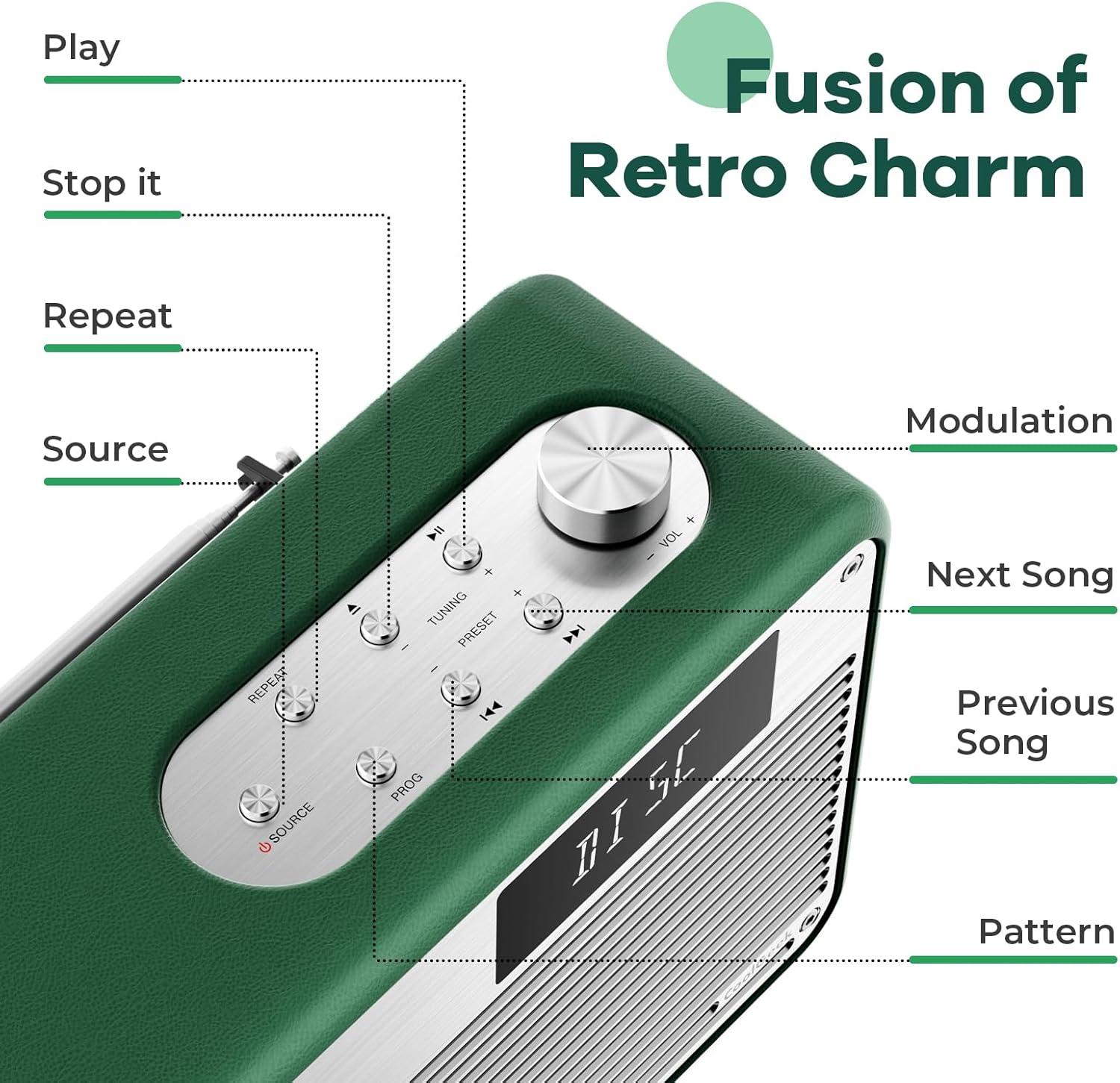
మూర్తి 4.1: వివరంగా view of the control panel, indicating the function of each button and the modulation knob.
4.2 CD ప్లేబ్యాక్
- CD చొప్పించు: Gently slide your CD into the vertical CD slot on the front of the boombox. The player is designed for simple disc insertion.
- మూలాన్ని ఎంచుకోండి: Press the 'SOURCE' button until 'CD' mode is displayed.
- ప్లే/పాజ్: Press the 'PLAY/PAUSE' button to start or pause playback.
- ట్రాక్లను దాటవేయి: Use the 'NEXT SONG' or 'PREVIOUS SONG' buttons to navigate between tracks.
- వాల్యూమ్ నియంత్రణ: Rotate the 'MODULATION' knob to adjust the volume.
- ప్లేబ్యాక్ ఆపు: Press the 'STOP' button to end CD playback.
4.3 బ్లూటూత్ మోడ్
- మూలాన్ని ఎంచుకోండి: Press the 'SOURCE' button until 'BT' (Bluetooth) mode is displayed. The device will enter pairing mode, indicated by a flashing Bluetooth icon or specific audio prompt.
- జత చేయడం: On your mobile device (smartphone, tablet, etc.), enable Bluetooth and search for available devices. Select 'COOLGEEK Boombox' (or similar name) from the list.
- కనెక్షన్: Once paired, the boombox will indicate a successful connection. You can now play audio from your mobile device through the boombox.
- ప్లేబ్యాక్ని నియంత్రించండి: Use the boombox's 'PLAY/PAUSE', 'NEXT SONG', and 'PREVIOUS SONG' buttons, or control playback directly from your paired device.
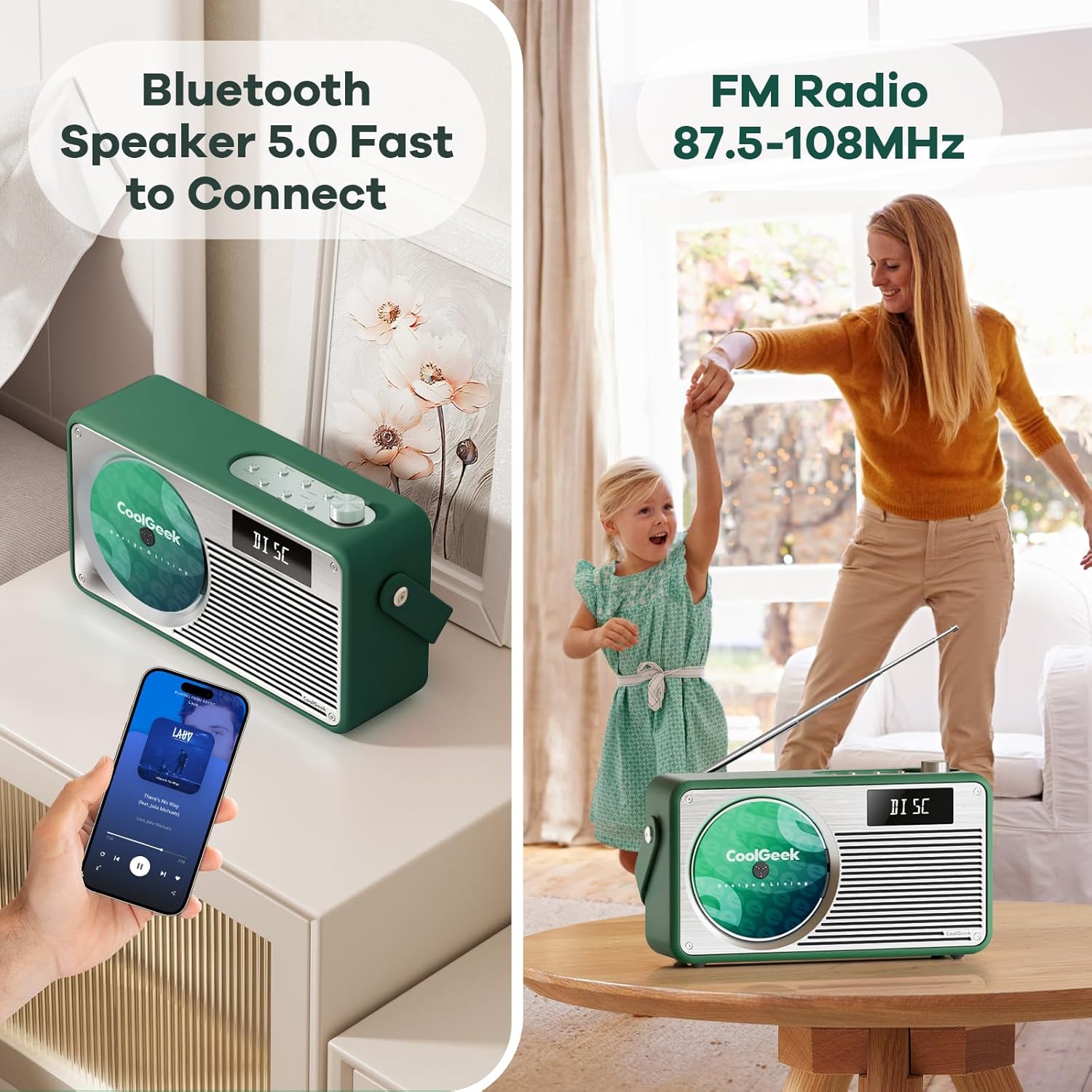
Figure 4.2: The boombox demonstrating its Bluetooth connectivity with a smartphone and its FM radio antenna extended.
4.4 FM రేడియో
- మూలాన్ని ఎంచుకోండి: Press the 'SOURCE' button until 'FM' mode is displayed.
- ట్యూన్ స్టేషన్లు: Use the 'TUNING' buttons (often combined with 'NEXT SONG'/'PREVIOUS SONG' or a dedicated tuning knob) to scan for radio stations. The frequency range is 87.5 to 108 MHz.
- యాంటెన్నా: Extend the telescopic antenna on the back of the unit for better reception. Adjust its position for clearer sound.
- ప్రీసెట్ స్టేషన్లు: Some models allow saving favorite stations. Refer to the specific button (e.g., 'PRESET' or 'PROG') for instructions.
5. నిర్వహణ
- శుభ్రపరచడం: Use a soft, dry cloth to clean the exterior of the boombox. Do not use liquid cleaners or abrasive materials.
- CD కేర్: CDలను వాటి అంచుల దగ్గర పట్టుకోండి. మురికిగా ఉన్న CDలను మృదువైన, మెత్తటి గుడ్డతో శుభ్రం చేసి, మధ్య నుండి బయటికి తుడవండి.
- బ్యాటరీ సంరక్షణ: To prolong battery life, avoid fully discharging the battery frequently. If storing the device for an extended period, charge it to about 50% every few months.
- నిల్వ: పరికరాన్ని ప్రత్యక్ష సూర్యకాంతి మరియు తీవ్రమైన ఉష్ణోగ్రతలు లేకుండా చల్లని, పొడి ప్రదేశంలో నిల్వ చేయండి.
6. ట్రబుల్షూటింగ్
| సమస్య | సాధ్యమైన కారణం | పరిష్కారం |
|---|---|---|
| శక్తి లేదు | బ్యాటరీ ఖాళీ అయింది; పవర్ అడాప్టర్ సరిగ్గా కనెక్ట్ కాలేదు. | Charge the battery; Ensure power adapter is securely connected to both the boombox and the outlet. |
| శబ్దం లేదు | Volume too low; Incorrect source selected; Device muted. | Increase volume; Press 'SOURCE' to select correct mode (CD, BT, FM); Check if device is muted. |
| CD స్కిప్ అవుతోంది లేదా ప్లే కావడం లేదు | CD మురికిగా లేదా గీతలుగా ఉంది; CD తప్పుగా చొప్పించబడింది. | Clean the CD; Ensure CD is inserted correctly into the vertical slot. |
| బ్లూటూత్ కనెక్ట్ కావడం లేదు | Boombox not in pairing mode; Device too far; Bluetooth disabled on mobile device. | Ensure boombox is in BT mode and flashing; Move devices closer; Enable Bluetooth on your mobile device. |
| FM రిసెప్షన్ పేలవంగా ఉంది | యాంటెన్నా పొడిగించబడలేదు లేదా సరిగ్గా ఉంచబడలేదు; బలహీనమైన సిగ్నల్ ప్రాంతం. | Fully extend and adjust the telescopic antenna; Try moving the boombox to a different location. |
7. స్పెసిఫికేషన్లు
| ఫీచర్ | వివరాలు |
|---|---|
| ఉత్పత్తి కొలతలు (L x W x H) | 17 x 9.5 x 6.7 అంగుళాలు |
| వస్తువు బరువు | 8.5 పౌండ్లు |
| మోడల్ నంబర్ (ASIN) | B0DD41WKCH |
| బ్యాటరీలు | 1 లిథియం అయాన్ బ్యాటరీ (చేర్చబడింది) |
| బ్రాండ్ | COOLGEEK |
| కనెక్టివిటీ టెక్నాలజీ | బ్లూటూత్ |
| రంగు | ఆకుపచ్చ |
| స్పీకర్ రకం | స్టీరియో |
| తయారీదారు | COOLGEEK |
| మొదటి తేదీ అందుబాటులో ఉంది | ఆగస్టు 14, 2024 |
8. వారంటీ మరియు మద్దతు
COOLGEEK is committed to providing excellent customer service. If you encounter any issues with your product or have questions, please contact us directly. We will do our best to resolve any problems you may experience.
For support, please refer to the contact information provided with your purchase or visit the official COOLGEEK webసైట్.
Ask a question about this manual
Ask about setup, troubleshooting, compatibility, parts, safety, or missing instructions. Manuals+ will review the question and use this page’s manual context to help answer it.