
పరిచయం
This manual provides detailed instructions for the setup, operation, and maintenance of your Porodo 4-in-1 Ultimate Gaming Kit. This comprehensive kit includes an RGB membrane gaming keyboard, a high-precision adjustable DPI gaming mouse, a surround sound gaming headset with a microphone, and an XL mouse pad. Please read this manual thoroughly before using the product to ensure optimal performance and longevity.

చిత్రం: పైగాview of the Porodo 4-in-1 Ultimate Gaming Kit, showcasing the keyboard, mouse, headset, and mouse pad.
ఉత్పత్తి భాగాలు
1. RGB Membrane Gaming Keyboard
- Membrane Gaming Switches: Designed for durability with a lifespan of up to 10 million keystrokes.
- Arabic Keys: Provides localized support for Arabic language input.
- అనుకూలీకరించదగిన బటన్లు: Features 8 programmable buttons for personalized control.
- కనెక్టివిటీ: Connects via USB with a 1.5-meter PVC cable.
- అనుకూలత: Compatible with Windows and Linux operating systems.

చిత్రం: వివరణాత్మక view of the RGB membrane gaming keyboard, highlighting the Arabic key layout and colorful backlighting.
2. High-Precision Adjustable DPI Gaming Mouse
- DPI పరిధి: Adjustable DPI from 800 to 7200 for precise sensitivity control.
- RGB లైటింగ్: Features 13 vibrant RGB lighting modes.
- బటన్లు: Equipped with 8 programmable buttons.
- డిజైన్: సౌకర్యవంతమైన దీర్ఘకాలిక ఉపయోగం కోసం ఎర్గోనామిక్ డిజైన్.
- కేబుల్: 1.5-meter cable for flexible movement.
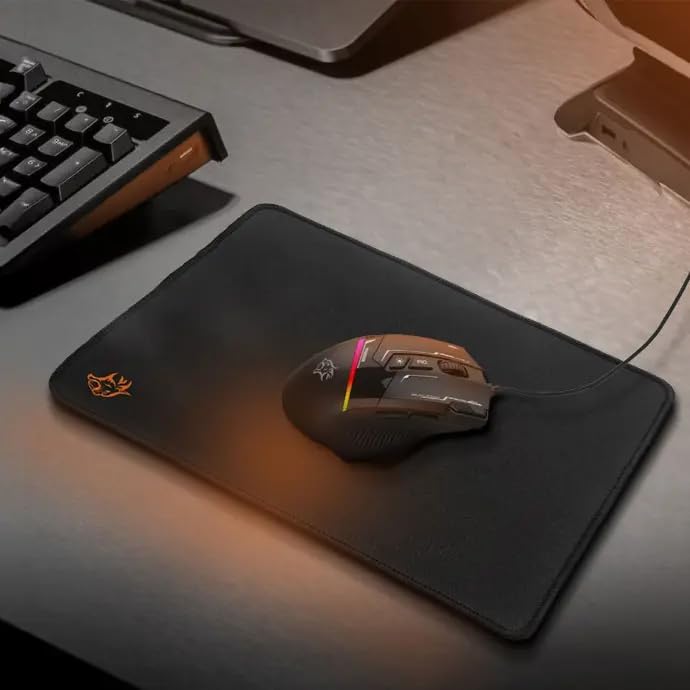
Image: The gaming mouse resting on the mouse pad, showcasing its ergonomic shape and illuminated RGB elements.
3. Surround Sound Gaming Headset with Microphone
- డ్రైవర్లు: 40mm drivers for immersive audio experience.
- మైక్రోఫోన్: Omnidirectional microphone for clear voice communication.
- కనెక్టివిటీ: Dual 3.5mm jacks and a USB connection for RGB lighting.
- కేబుల్: 2.1-meter cable for ample movement.
- సౌకర్యం: Combination of fabric and rubber for comfortable long gaming sessions.

Image: A user wearing the Porodo gaming headset, demonstrating its fit and the RGB lighting on the earcups.
4. XL Mouse Pad
- కొలతలు: 250 x 350 x 3 mm (XL size).
- మెటీరియల్: Made from durable fabric and rubber for smooth and precise tracking.
- ఉపరితలం: Provides an optimal surface for gaming mouse control.

Image: The XL gaming mouse pad, showing its texture and size, designed for smooth mouse movement.
సెటప్ సూచనలు
- భాగాలను అన్ప్యాక్ చేయండి: Carefully remove all items from the packaging: keyboard, mouse, headset, and mouse pad.
- Position Mouse Pad: Place the XL mouse pad on a flat, stable surface.
- కీబోర్డ్ను కనెక్ట్ చేయండి: Plug the keyboard's USB cable into an available USB port on your computer. The keyboard is plug-and-play and does not require driver installation.
- మౌస్ను కనెక్ట్ చేయండి: Plug the mouse's USB cable into another available USB port on your computer. The mouse is also plug-and-play.
- Connect Headset:
- Plug the two 3.5mm audio jacks (one for audio, one for microphone) into the corresponding audio ports on your computer.
- Plug the headset's USB cable into an available USB port for RGB lighting functionality.
- ప్రారంభ తనిఖీ: Verify that all devices are recognized by your computer and that their RGB lighting is active.
ఆపరేటింగ్ సూచనలు
కీబోర్డ్ ఆపరేషన్
- టైపింగ్: Use the standard QWERTY layout with integrated Arabic keys for text input.
- ఫంక్షన్ కీలు: Utilize F1-F12 keys for various system functions, often in combination with the 'Fn' key.
- అనుకూలీకరించదగిన బటన్లు: Refer to your operating system's peripheral settings or third-party software (if applicable) to program the 8 customizable buttons for macros or specific commands.
- RGB లైటింగ్: The keyboard features dynamic RGB lighting. Specific key combinations (e.g., Fn + Scroll Lock) may cycle through lighting modes or adjust brightness. Consult the keyboard's quick start guide for exact controls.
మౌస్ ఆపరేషన్
- ఉద్యమం: Glide the mouse smoothly over the mouse pad for cursor control.
- DPI సర్దుబాటు: Use the dedicated DPI button (usually located near the scroll wheel) to cycle through the 6 adjustable DPI levels (800-7200 DPI). Select the sensitivity that best suits your task or game.
- RGB లైటింగ్ మోడ్లు: Press the RGB lighting button (often near the DPI button or on the underside) to switch between the 13 available RGB lighting modes. There is also an option to turn off the lighting.
- ప్రోగ్రామబుల్ బటన్లు: The mouse has 8 buttons. Use your computer's mouse settings or dedicated software to assign functions to these buttons.
హెడ్సెట్ ఆపరేషన్
- ఆడియో ప్లేబ్యాక్: Ensure the 3.5mm audio jack is correctly connected. Adjust volume using your computer's sound settings or the inline volume control on the headset cable.
- మైక్రోఫోన్ వినియోగం: Position the omnidirectional microphone appropriately for clear voice capture. Ensure the 3.5mm microphone jack is connected and the microphone is enabled in your computer's sound settings. An inline mute switch may be present on the cable.
- RGB లైటింగ్: The headset's RGB lighting is powered via the USB connection. It will illuminate automatically when connected.
నిర్వహణ
- శుభ్రపరచడం:
- Use a soft, dry cloth to wipe down the surfaces of the keyboard, mouse, and headset.
- కీబోర్డ్ కోసం, కీల మధ్య నుండి దుమ్ము మరియు చెత్తను తొలగించడానికి కంప్రెస్డ్ ఎయిర్ను ఉపయోగించండి.
- Do not use harsh chemicals or abrasive cleaners on any component.
- కేబుల్ కేర్: కేబుల్స్ దెబ్బతినకుండా ఉండటానికి పదునైన వంపులు లేదా ఎక్కువగా లాగడం మానుకోండి.
- నిల్వ: Store the kit in a cool, dry place away from direct sunlight and extreme temperatures when not in use.
ట్రబుల్షూటింగ్
| సమస్య | పరిష్కారం |
|---|---|
| కీబోర్డ్/మౌస్ స్పందించడం లేదు |
|
| Headset audio not working |
|
| మైక్రోఫోన్ పని చేయడం లేదు |
|
| RGB లైటింగ్ పని చేయడం లేదు |
|
స్పెసిఫికేషన్లు
- మోడల్ సంఖ్య: 6849108443906
- కీబోర్డ్ రకం: Membrane Gaming Keyboard with Arabic Keys
- Keyboard Lifespan: 10 మిలియన్ల వరకు కీస్ట్రోక్లు
- మౌస్ DPI: 800-7200 DPI (సర్దుబాటు)
- Mouse RGB Modes: 13
- Headset Driver Size: 40మి.మీ
- హెడ్సెట్ మైక్రోఫోన్: ఓమ్నిడైరెక్షనల్
- కీబోర్డ్ కేబుల్ పొడవు: 1.5మీ పివిసి
- మౌస్ కేబుల్ పొడవు: 1.5మీ
- Headset Cable Length: 2.1మీ
- మౌస్ ప్యాడ్ కొలతలు: 250 x 350 x 3 mm (XL)
- కనెక్టివిటీ: USB (Keyboard, Mouse, Headset RGB), Dual 3.5mm (Headset Audio/Mic)
- అనుకూలత: Windows, Linux
- షిప్పింగ్ కొలతలు: 48.4 x 19.8 x 13.6 సెం.మీ
- వస్తువు బరువు: 1.1 కిలోలు
వారంటీ మరియు మద్దతు
Your Porodo 4-in-1 Ultimate Gaming Kit is covered by a manufacturer's warranty against defects in materials and workmanship. For specific warranty details, including duration and terms, please refer to the warranty card included in your product packaging or visit the official Porodo website. For technical support, troubleshooting assistance, or to inquire about replacement parts, please contact Porodo customer service through their official channels. Keep your purchase receipt as proof of purchase for warranty claims.
అదనపు మద్దతు కోసం, మీరు సందర్శించవచ్చు Porodo Store on Amazon.