
1. పరిచయం
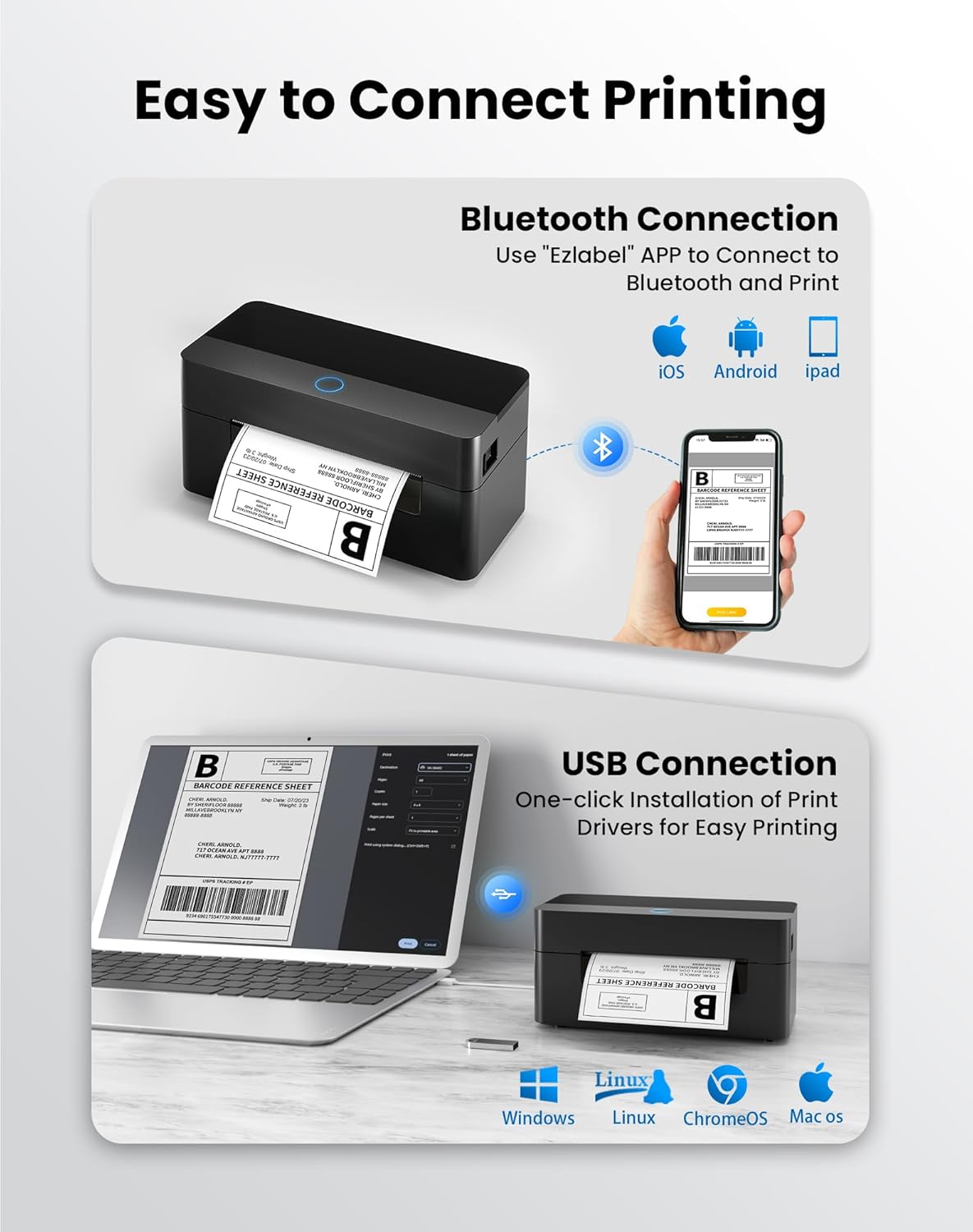
This manual provides detailed instructions for the setup, operation, and maintenance of your BPXX Bluetooth Thermal Shipping Label Printer, Model D463B. This printer is designed for efficient and clear printing of various thermal labels, including 4x6 inch shipping labels, with a resolution of 203 DPI. It supports both Bluetooth connectivity via the 'Ezlabel' mobile application and USB connection to computers.
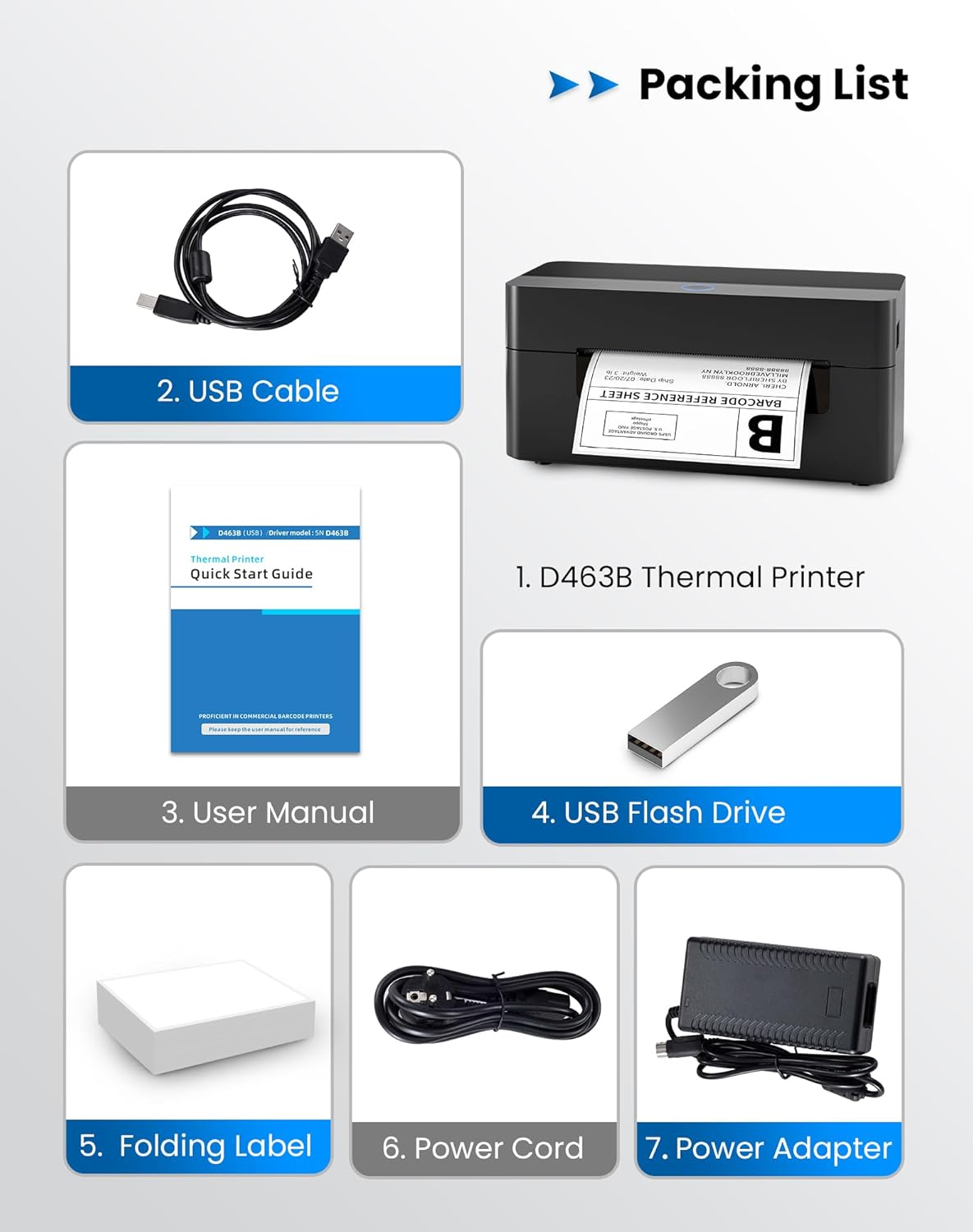
2. ప్యాకింగ్ జాబితా
క్రింద జాబితా చేయబడిన అన్ని వస్తువులు మీ ప్యాకేజీలో చేర్చబడ్డాయని దయచేసి ధృవీకరించండి:
- 1 x BPXX D463B Thermal Printer
- 1 x USB కేబుల్
- 1 x వినియోగదారు మాన్యువల్
- 1 x USB Flash Drive (containing drivers)
- 1 x Folding Label (sampలే రోల్)
- 1 x పవర్ కార్డ్
- 1 x పవర్ అడాప్టర్
3. సెటప్ గైడ్
3.1 హార్డ్వేర్ కనెక్షన్
- Connect the power adapter to the printer's power port and plug the power cord into an electrical outlet.
- Open the printer cover and load the thermal labels. Ensure the labels are facing the correct direction for printing and are properly aligned within the guide rails.
- ప్రింటర్ కవర్ను సురక్షితంగా మూసివేయండి.

3.2 సాఫ్ట్వేర్ మరియు డ్రైవర్ ఇన్స్టాలేషన్
3.2.1 Mobile App (Bluetooth Connection)
For mobile printing, download the 'Ezlabel' application from your device's app store (available for iOS and Android).
- కోసం వెతకండి 'Ezlabel' in the App Store (iOS) or Google Play Store (Android).
- అప్లికేషన్ను డౌన్లోడ్ చేసి, ఇన్స్టాల్ చేయండి.
- మీ మొబైల్ పరికరంలో బ్లూటూత్ని ప్రారంభించండి.
- Open the 'Ezlabel' app and follow the in-app instructions to connect to your BPXX D463B printer via Bluetooth.
3.2.2 Computer Driver (USB Connection)
For computer printing, install the appropriate drivers for your operating system (Windows, Mac OS, Linux, ChromeOS). Drivers are provided on the included USB flash drive or can be downloaded from the official webసైట్.
- Insert the provided USB flash drive into your computer.
- Locate and run the installer for your operating system.
- డ్రైవర్ ఇన్స్టాలేషన్ను పూర్తి చేయడానికి ఆన్-స్క్రీన్ ప్రాంప్ట్లను అనుసరించండి.
- Alternatively, download drivers from: BPXX Driver Download
4. ఆపరేటింగ్ సూచనలు
4.1 లేబుల్లను లోడ్ చేస్తోంది
Ensure the thermal labels are loaded correctly for optimal printing. The printer supports thermal labels with widths ranging from 1 to 4.5 inches, including standard 4x6 inch shipping labels.
- ప్రింటర్ పై కవర్ని తెరవండి.
- Place the roll of thermal labels into the label compartment, ensuring the printable side faces upwards.
- Feed the first label through the printer's output slot until it is slightly extended.
- లేబుల్ గైడ్లను చాలా గట్టిగా లేకుండా, మీ లేబుల్ల వెడల్పుకు సరిగ్గా సరిపోయేలా సర్దుబాటు చేయండి.
- Close the top cover. The printer will automatically detect the label size and calibrate.

4.2 Printing via Bluetooth (Mobile App)
- Ensure the printer is powered on and connected to the 'Ezlabel' app via Bluetooth.
- Open the 'Ezlabel' app on your mobile device.
- Select or create your desired label design. The app includes preset templates for various label sizes.
- Confirm print settings such as label size and quantity.
- యాప్ నుండి ప్రింట్ కమాండ్ను ప్రారంభించండి.
4.3 Printing via USB (Computer)
- అందించిన USB కేబుల్ ఉపయోగించి ప్రింటర్ను మీ కంప్యూటర్కు కనెక్ట్ చేయండి.
- ప్రింటర్ డ్రైవర్లు సరిగ్గా ఇన్స్టాల్ చేయబడ్డాయని నిర్ధారించుకోండి.
- Open the document or application from which you wish to print (e.g., a PDF viewer, shipping software).
- Select the BPXX D463B printer from your printer options.
- Adjust print settings as needed (e.g., paper size to 4x6 inches for shipping labels).
- Send the print command.
4.4 Supported Platforms and Print Quality
The BPXX D463B printer is compatible with major shipping carriers and e-commerce platforms, facilitating the printing of shipping labels, return labels, and postagఇ లేబుల్స్.
- Shipping Carriers: FedEx, UPS, USPS, DHL, EasyPost, etc.
- E-commerce Platforms: Amazon, Shopify, Etsy, eBay, Walmart, etc.
The printer utilizes a high-quality thermal print head and advanced algorithms to deliver clear and sharp barcodes and text at 203 DPI resolution. It achieves a high-speed output of 152mm/s, capable of printing approximately 72 4x6 inch shipping labels per minute.


5. నిర్వహణ
క్రమం తప్పకుండా నిర్వహణ ఉత్తమ పనితీరును నిర్ధారిస్తుంది మరియు మీ ప్రింటర్ యొక్క జీవితకాలాన్ని పొడిగిస్తుంది.
- ప్రింట్ హెడ్ క్లీనింగ్: Use an alcohol swab or a specialized thermal printer cleaning pen to gently wipe the print head. Ensure the printer is off and cooled down before cleaning.
- బాహ్య క్లీనింగ్: ప్రింటర్ యొక్క బాహ్య భాగాన్ని మృదువైన, d శుభ్రముపరచుతో తుడవండి.amp వస్త్రం. కఠినమైన రసాయనాలు లేదా రాపిడి పదార్థాలను ఉపయోగించడం మానుకోండి.
- దుమ్ము తొలగింపు: Periodically use compressed air to clear any dust or paper debris from inside the label compartment.
6. ట్రబుల్షూటింగ్
If you encounter issues with your BPXX D463B printer, refer to the following common problems and solutions:
- ప్రింటర్ స్పందించడం లేదు:
- పవర్ కార్డ్ సురక్షితంగా కనెక్ట్ చేయబడిందని మరియు ప్రింటర్ ఆన్ చేయబడిందని నిర్ధారించుకోండి.
- For Bluetooth connection, verify that Bluetooth is enabled on your device and the printer is paired within the 'Ezlabel' app.
- For USB connection, check the USB cable connection and ensure drivers are correctly installed. Try a different USB port or cable.
- Poor Print Quality (Faint/Streaky Prints):
- నిర్వహణ విభాగంలో వివరించిన విధంగా ప్రింట్ హెడ్ను శుభ్రం చేయండి.
- Ensure you are using high-quality thermal labels.
- Check print density settings in the 'Ezlabel' app or printer preferences on your computer.
- సరిగ్గా ఆహారం ఇవ్వడం లేదని లేబుల్స్:
- Verify that labels are loaded correctly and aligned with the guide rails.
- Ensure there are no obstructions in the label path.
- Perform a label calibration from the printer settings or app if available.
- Printer Offline Error:
- ప్రింటర్ మరియు మీ కంప్యూటర్/మొబైల్ పరికరం రెండింటినీ పునఃప్రారంభించండి.
- Re-establish the Bluetooth or USB connection.
- Check printer status in your operating system's printer settings.
7. ఉత్పత్తి లక్షణాలు
| మోడల్ పేరు | D463B |
| బ్రాండ్ | BPXX |
| ప్రింటింగ్ టెక్నాలజీ | థర్మల్ |
| కనెక్టివిటీ టెక్నాలజీ | బ్లూటూత్, USB |
| గరిష్ట ప్రింట్ రిజల్యూషన్ | 203 x 203 Dots Per Inch (DPI) |
| గరిష్ట ముద్రణ వేగం | 152 mm/s (72 labels per minute) |
| గరిష్ట మీడియా పరిమాణం | 4 x 6 అంగుళాలు |
| మద్దతు ఉన్న లేబుల్ వెడల్పు | 1 - 4.5 అంగుళాలు |
| అనుకూల పరికరాలు | PC (Windows, Mac OS, Linux, ChromeOS), Smartphones (iOS, Android) |
| నియంత్రణ పద్ధతి | App ('Ezlabel'), USB |
| ఉత్పత్తి కొలతలు | 7.3"డి x 3.3"వా x 3.3"హ |
| వస్తువు బరువు | 1.6 పౌండ్లు |
| చేర్చబడిన భాగాలు | Printer, USB Cable, User Manual, USB Flash Drive, Sample Labels, Power Cord, Power Adapter |
8. వారంటీ మరియు మద్దతు
The BPXX D463B Thermal Shipping Label Printer comes with a limited warranty. For specific warranty terms and conditions, please refer to the documentation included with your product or contact BPXX customer support.
For technical assistance, troubleshooting, or any inquiries regarding your product, please contact BPXX customer support through the official webసైట్ లేదా మీ ఉత్పత్తి ప్యాకేజింగ్లో అందించిన సంప్రదింపు సమాచారం.