
iZEEKER iG220, iG500
iZEEKER Solar Trail Camera iG220 & 4G LTE Cellular Trail Camera iG500 User Manual
Models: iG220, iG500
1. పరిచయం
This manual provides detailed instructions for the iZEEKER Solar Trail Camera iG220 and the iZEEKER 4G LTE Cellular Trail Camera iG500. This bundle offers advanced features for capturing wildlife and monitoring remote areas, combining solar power efficiency with cellular connectivity for comprehensive surveillance.

Figure 1: The iZEEKER iG220 Solar Trail Camera (left) and iG500 4G LTE Cellular Trail Camera (right) bundle, including a SIM card and 32GB SD card.
2. ప్యాకేజీ విషయాలు
iG220 Package:
- 1 x iG220 Trail Camera
- 1 x USB కేబుల్
- 1 x వినియోగదారు మాన్యువల్
- 1 x పట్టీ
iG500 Package:
- 1 x iG500 Trail Camera
- 1 x SIM Card
- 1 x మైక్రో SD కార్డ్
- XXx x సోలార్ ప్యానెల్
- 1 x వినియోగదారు మాన్యువల్
- 1 x USB కేబుల్
- 1 x Outdoor Mount
- 1 x Positioning Sticker
- 1 x ఇన్స్టాలేషన్ బ్రాకెట్
3. స్పెసిఫికేషన్లు
iG220 Specifications:
| ఫీచర్ | వివరాలు |
|---|---|
| ట్రిగ్గర్ వేగం | 0.1సె~0.3సె |
| ఫోటో రిజల్యూషన్ | 36MP |
| వీడియో రిజల్యూషన్ | 1520P, 1080P, 720P, 480P |
| రాత్రి దృష్టి దూరం | 65 అడుగులు (20 మీ) |
| IR ఫ్లాష్ | 36 no glow LEDs (940nm) |
| డిటెక్షన్ యాంగిల్ | 90° |
| లెన్స్ యాంగిల్ | 55° |
| స్క్రీన్ | 2.0'' LCD Screen |
| జలనిరోధిత రేటింగ్ | IP66 |
iG500 Specifications:
| ఫీచర్ | వివరాలు |
|---|---|
| ట్రిగ్గర్ వేగం | 0.1~0.3సె |
| వీడియో రిజల్యూషన్ | 2కే (15ఎఫ్పిఎస్) |
| IR ఫ్లాష్ | 940nm Low Glow Infrared LEDs |
| డిటెక్షన్ యాంగిల్ | 336° పాన్, 90° వంపు |
| లెన్స్ యాంగిల్ | 360° |
| బ్యాటరీలు | 2 లిథియం అయాన్ బ్యాటరీలు (చేర్చబడినవి) |
| జలనిరోధిత రేటింగ్ | IP65 |

Figure 2: The iG220 camera offers 36MP photo resolution and 1520P video resolution, providing clear images in both day and night conditions.

Figure 3: The iG500 camera provides a 360-degree panoramic view with 336-degree pan and 90-degree tilt functionality, allowing for extensive coverage.
4. సెటప్ గైడ్
4.1 బ్యాటరీ ఇన్స్టాలేషన్
Both cameras are designed for efficient power usage. The iG220 uses standard AA batteries (not included), while the iG500 includes two Lithium Ion batteries. Ensure batteries are inserted with correct polarity.

Figure 4: Both iG220 and iG500 models can utilize solar power for extended battery life, reducing the need for frequent battery replacement.
4.2 SD కార్డ్ చొప్పించడం
Insert the provided Micro SD card (for iG500) or your own SD card (for iG220) into the designated slot. Ensure the card is formatted before first use for optimal performance. The iG220 supports continuous loop recording, overwriting old fileకార్డు నిండినప్పుడు s.
4.3 SIM Card Installation (iG500 Only)
For the iG500 cellular trail camera, insert the provided SIM card into its slot. The camera is designed to auto-connect to cellular networks with strong signals (Verizon, T-Mobile, AT&T compatible).

Figure 5: The iG500 camera features 4G Auto Connect Technology, allowing it to automatically connect to cellular networks without requiring Wi-Fi.
4.4 కెమెరా మౌంటు
Use the provided strap (iG220) or outdoor mount and installation bracket (iG500) to secure the camera to a tree or pole. Position the camera to capture the desired area, considering the detection and lens angles.

Figure 6: The iG500 can be paired with its solar panel for continuous charging, extending battery life significantly.
5. ఆపరేటింగ్ సూచనలు
5.1 Powering On and Basic Modes
Turn on the camera using the power switch. Navigate through the menu on the LCD screen (iG220) or via the mobile app (iG500) to select desired modes: Photo, Video, or Photo+Video. Adjust settings such as resolution, trigger speed, and PIR sensitivity.

Figure 7: Both cameras feature a rapid 0.1-0.3 second trigger speed, ensuring minimal delay in capturing fast-moving subjects.
5.2 నైట్ విజన్ ఆపరేషన్
Both cameras are equipped with 940nm no-glow infrared LEDs for discreet night vision. The iG500 also features 4 white LEDs for color images at night. Ensure the camera is positioned to avoid obstructions that might reflect IR light.

Figure 8: The 940nm no-glow infrared LEDs ensure the camera remains stealthy during night operation, preventing disturbance to wildlife.
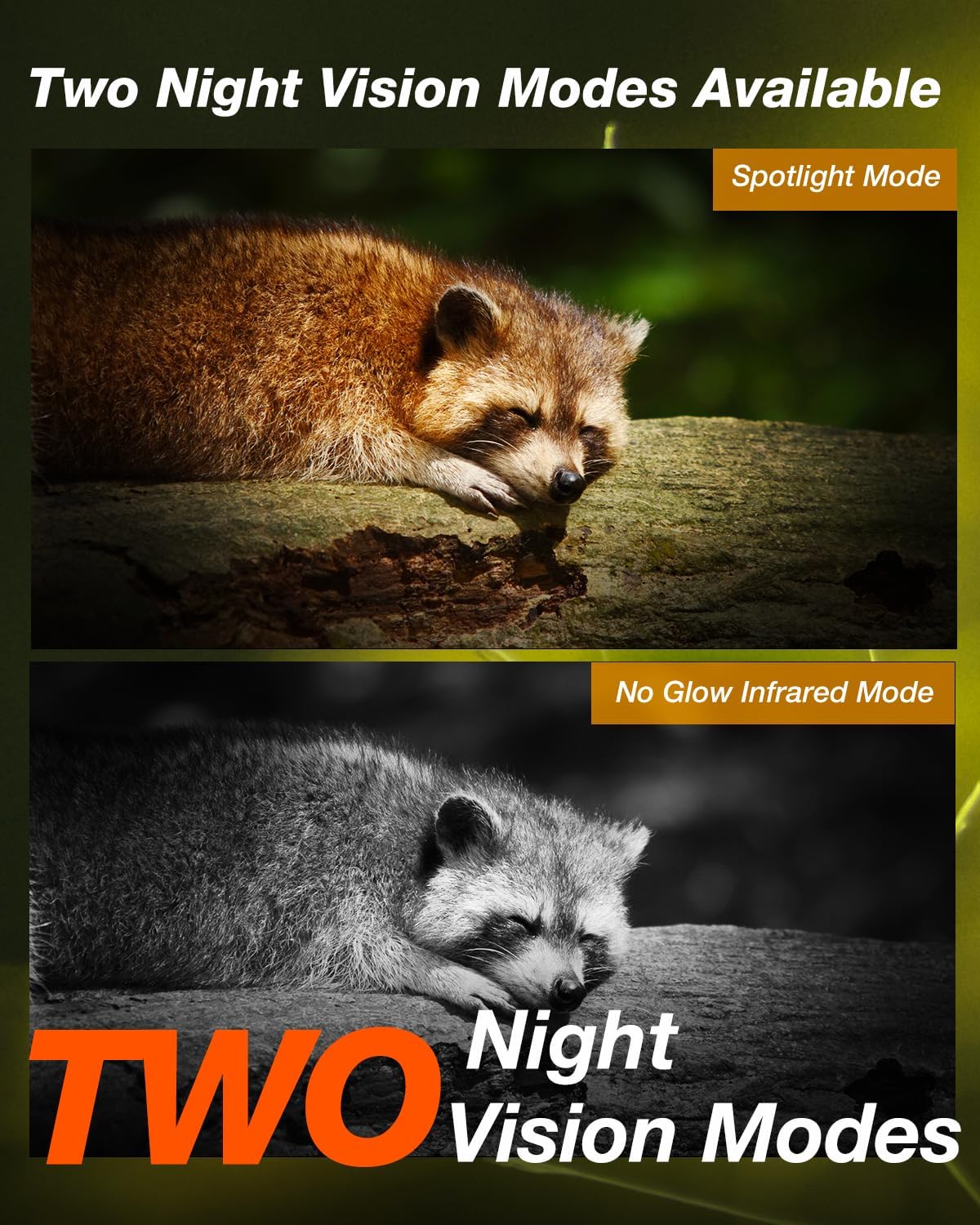
Figure 9: The iG500 offers two night vision modes: a spotlight mode for color images and a no-glow infrared mode for discreet black and white capture.
5.3 Advanced Features (iG220)
- సమయ విరామం: Set the delay between consecutive triggers.
- టైమర్: Schedule the camera to operate only during specific hours.
- టైమ్ లాప్స్: Capture images at set intervals over a long period.
- లూప్ రికార్డింగ్: పాత వాటిని ఆటోమేటిక్గా ఓవర్రైట్ చేయండి fileSD కార్డ్ నిండినప్పుడు.
- PIR సున్నితత్వం: Adjust the motion sensor's sensitivity to prevent false triggers.
- పాస్వర్డ్ రక్షణ: Secure your camera settings with a password.
5.4 Advanced Features (iG500)
- Remote Access & Control: Use your smartphone to access and control the camera remotely.
- రెండు-మార్గం ఇంటర్కామ్: Communicate through the camera (if supported by app/firmware).
- బహుళ-వినియోగదారు భాగస్వామ్యం: Share camera access with multiple users.
- అలారం టైమర్: Set specific times for alerts.
- నిల్వ విధానం: Choose between SD card and cloud storage options.
- పాన్ & టిల్ట్: కెమెరాలను రిమోట్గా సర్దుబాటు చేయండి viewing angle (336° pan, 90° tilt).
6. నిర్వహణ
- శుభ్రపరచడం: Regularly clean the camera lens and PIR sensor window with a soft, dry cloth. Avoid abrasive materials.
- బ్యాటరీ తనిఖీ: Periodically check battery levels, especially if not using solar charging. Replace or recharge as needed.
- SD కార్డ్ నిర్వహణ: Format the SD card regularly to maintain optimal performance and prevent data corruption. Back up important fileఫార్మాటింగ్ ముందు s.
- ఫర్మ్వేర్ నవీకరణలు: Check the iZEEKER website for any available firmware updates to ensure your camera has the latest features and bug fixes.
- నిల్వ: When not in use, store the camera in a cool, dry place, away from direct sunlight and extreme temperatures. Remove batteries if storing for extended periods.
7. ట్రబుల్షూటింగ్
కెమెరా ఆన్ చేయడం లేదు:
- సరైన ధ్రువణతతో బ్యాటరీలు సరిగ్గా చొప్పించబడ్డాయని నిర్ధారించుకోండి.
- Check battery charge level. Replace or recharge batteries.
- పవర్ స్విచ్ "ఆన్" స్థానంలో ఉందని ధృవీకరించండి.
చిత్రం/వీడియో నాణ్యత బాగా లేదు:
- కెమెరా లెన్స్ను శుభ్రం చేయండి.
- కెమెరా స్థిరంగా ఉందని మరియు కంపనాలకు లోబడి ఉండదని నిర్ధారించుకోండి.
- Check resolution settings in the camera menu.
- For night vision, ensure no reflective surfaces are too close to the camera.
మోషన్ డిటెక్షన్ లేదు:
- Adjust PIR sensitivity settings (increase if needed).
- Ensure the PIR sensor window is clean and unobstructed.
- Verify the camera is positioned within the detection angle.
- Check for environmental factors like extreme heat or cold that might affect sensor performance.
iG500 Cellular Connectivity Issues:
- SIM కార్డ్ సరిగ్గా చొప్పించబడిందని మరియు డేటా ప్లాన్తో యాక్టివేట్ చేయబడిందని నిర్ధారించుకోండి.
- Check cellular signal strength in the camera's location. Relocate if signal is weak.
- కెమెరాను పునఃప్రారంభించండి.
- Verify APN settings if manual configuration is required (refer to your cellular provider's instructions).
8. వారంటీ & సపోర్ట్
iZEEKER products come with a standard manufacturer's warranty. For specific warranty details, technical support, or service inquiries, please visit the official iZEEKER webసైట్లో లేదా వారి కస్టమర్ సపోర్ట్ను నేరుగా సంప్రదించండి. వారంటీ క్లెయిమ్ల కోసం కొనుగోలు రుజువుగా మీ కొనుగోలు రసీదును ఉంచండి.
You can visit the iZEEKER Store on Amazon for more information: iZEEKER అమెజాన్ స్టోర్
Ask a question about this manual
Ask about setup, troubleshooting, compatibility, parts, safety, or missing instructions. Manuals+ will review the question and use this page’s manual context to help answer it.