
1. ఉత్పత్తి ముగిసిందిview
The ErGear Height Adjustable Desk is an electric standing desk designed for computer workplaces, offering excellent stability and ergonomic flexibility. It features a sturdy steel frame with aviation lifting column connections, ensuring a firm foundation even at full height. The desk includes a memory function for convenient height adjustments and comes with a practical storage bag.

Image 1.1: The ErGear Height Adjustable Desk in a typical office setup, showcasing దాని సొగసైన డిజైన్ మరియు ample workspace for multiple monitors and accessories.
2. భద్రతా సమాచారం
ముఖ్యమైన భద్రతా హెచ్చరిక: సురక్షితమైన ఆపరేషన్ను నిర్ధారించడానికి మరియు నష్టాన్ని నివారించడానికి, దయచేసి ఈ క్రింది మార్గదర్శకాలను పాటించండి:
- గరిష్ట బరువు సామర్థ్యాన్ని మించకూడదు 80 కిలోలు (176 lbs) on the desk surface. Overloading can lead to instability and potential damage to the lifting mechanism.
- ప్రమాదాలను నివారించడానికి ఆపరేషన్ సమయంలో పిల్లలు మరియు పెంపుడు జంతువులను డెస్క్ నుండి దూరంగా ఉంచండి.
- Ensure there are no obstructions in the desk's path when adjusting height. Check for cables, chairs, or other objects that could be pinched or damaged.
- డెస్క్ మీద కూర్చోవద్దు లేదా నిలబడవద్దు.
- ఏదైనా నిర్వహణ లేదా శుభ్రపరిచే ముందు డెస్క్ను పవర్ అవుట్లెట్ నుండి అన్ప్లగ్ చేయండి.
- If the desk malfunctions or makes unusual noises, discontinue use immediately and consult the troubleshooting section or contact customer support.

Image 2.1: Illustration demonstrating the desk's robust 80KG load capacity, emphasizing the importance of not exceeding this limit for safe and reliable performance.
3. ప్యాకేజీ విషయాలు
Before assembly, please verify that all components listed below are present and undamaged. If any parts are missing or damaged, contact customer support.
- Desktop Surface (1)
- Lifting Columns/Legs (2)
- Feet/Bases (2)
- నియంత్రణ ప్యానెల్ (1)
- నియంత్రణ పెట్టె (1)
- Power Adapter & Cable (1)
- నిల్వ బ్యాగ్ (1)
- Hardware Kit (Screws, Allen wrenches, Cable ties)
- సూచనల మాన్యువల్ (ఈ పత్రం)
4. సెటప్ మరియు అసెంబ్లీ
Assembly typically requires two people. Follow these general steps. Refer to the included assembly diagram for detailed instructions specific to your model.
- కార్యస్థలాన్ని సిద్ధం చేయండి: Clear a large, flat area for assembly. Lay down a blanket or cardboard to protect the desktop surface from scratches.
- డెస్క్టాప్కు లిఫ్టింగ్ నిలువు వరుసలను అటాచ్ చేయండి: Carefully place the desktop upside down. Attach the lifting columns to the pre-drilled holes on the underside of the desktop using the provided screws.
- Attach Feet to Lifting Columns: Secure the feet/bases to the bottom of the lifting columns.
- Install Control Box and Control Panel: Mount the control box to the designated area under the desktop. Connect the control panel to the control box, and then connect the lifting columns to the control box. Ensure all cables are securely connected and routed neatly.
- స్టోరేజ్ బ్యాగ్ని ఇన్స్టాల్ చేయండి: Attach the storage bag to the side of the desk as desired, typically using hooks or clips provided.
- పవర్ కనెక్ట్ చేయండి: Plug the power adapter into the control box and then into a wall outlet.
- ప్రారంభ క్రమాంకనం (అవసరమైతే): Some models may require an initial calibration. Refer to the specific assembly diagram for your model for details on how to perform this. Typically, this involves pressing and holding the "Down" button until the desk reaches its lowest point and slightly retracts.

చిత్రం 4.1: క్లోజప్ view of the desk's side storage pockets, demonstrating their capacity for organizing various office supplies and documents. These pockets are typically attached during assembly.
5. ఆపరేటింగ్ సూచనలు
5.1 ఎత్తు సర్దుబాటు
The ErGear Height Adjustable Desk features an electric lifting system for smooth and precise height adjustments.
- డెస్క్ పైకి లేపడానికి: నొక్కండి మరియు పట్టుకోండి "పైకి" arrow button (▲ ▲ తెలుగు) on the control panel. The desk will move upwards. Release the button when the desired height is reached.
- డెస్క్ కిందకు దించడానికి: నొక్కండి మరియు పట్టుకోండి "డౌన్" arrow button (▼) on the control panel. The desk will move downwards. Release the button when the desired height is reached.
5.2. మెమరీ ఫంక్షన్
The desk's memory function allows you to save and recall preferred sitting and standing heights.
- To Save a Height Setting:
- పైకి/క్రిందికి బటన్లను ఉపయోగించి డెస్క్ను మీకు కావలసిన ఎత్తుకు సర్దుబాటు చేయండి.
- నొక్కండి "ఎం" (Memory) button. The display may flash or show "S-".
- Within a few seconds, press one of the numbered preset buttons (1, 2, 3, లేదా 4) to save the current height to that position. The display will confirm the save (e.g., "S-1").
- To Recall a Saved Height:
- సంబంధిత సంఖ్యా ప్రీసెట్ బటన్ను నొక్కండి (1, 2, 3, లేదా 4). డెస్క్ స్వయంచాలకంగా సేవ్ చేసిన ఎత్తుకు కదులుతుంది.

Image 5.1: Visual representation of the desk's adjustable height range, illustrating movement from a minimum of 71cm to a maximum of 119cm, allowing users to set ideal sit or stand positions.
6. నిర్వహణ
Regular maintenance helps ensure the longevity and smooth operation of your ErGear desk.
- శుభ్రపరచడం: Wipe the desktop surface and legs with a soft, damp వస్త్రం. ముగింపును దెబ్బతీసే కఠినమైన రసాయనాలు లేదా రాపిడి క్లీనర్లను నివారించండి.
- కేబుల్ నిర్వహణ: Periodically check and organize cables to prevent tangling or interference with the lifting mechanism. Use the provided cable ties if necessary.
- తనిఖీ: Regularly inspect all screws and connections to ensure they are tight. Retighten if necessary.
- బరువు పంపిణీ: Distribute weight evenly on the desktop to prevent strain on the lifting mechanism.
7. ట్రబుల్షూటింగ్
If you encounter issues with your ErGear desk, refer to the following common troubleshooting steps:
| సమస్య | సాధ్యమైన కారణం | పరిష్కారం |
|---|---|---|
| డెస్క్ కదలదు. | Power cable disconnected; Overload; Motor protection activated. | పవర్ కనెక్షన్లను తనిఖీ చేయండి. డెస్క్పై బరువు తగ్గించండి. 20 నిమిషాలు అన్ప్లగ్ చేసి, ఆపై తిరిగి ప్లగ్ చేయండి. |
| డెస్క్ అసమానంగా కదులుతుంది లేదా అసాధారణ శబ్దం చేస్తుంది. | వదులైన కనెక్షన్లు; అవరోధం; అసమాన బరువు పంపిణీ. | Check all screws and connections. Remove any obstructions. Redistribute weight evenly. |
| Error code displayed (e.g., E01, E02). | నిర్దిష్ట పనిచేయకపోవడం లేదా సెన్సార్ సమస్య. | Refer to the specific error code in your detailed assembly manual or contact customer support. Often, a power cycle (unplug, wait 20s, plug in) can resolve temporary errors. |
| మెమరీ ఫంక్షన్ పనిచేయడం లేదు. | తప్పు పొదుపు విధానం. | Ensure you press "M" then the preset number within the specified time. Repeat the saving process. |
If the problem persists after trying these solutions, please contact ErGear customer support.
8. స్పెసిఫికేషన్లు
| ఫీచర్ | వివరాలు |
|---|---|
| బ్రాండ్ | ఎర్గేర్ |
| మోడల్ సంఖ్య | 7B-N1-UK |
| ఉత్పత్తి కొలతలు | 120 cm (Width) x 60 cm (Depth) x 70-119 cm (Height) |
| బరువు | 17.86 కిలోలు |
| మెటీరియల్ | టెంపర్డ్ గ్లాస్, అల్లాయ్ స్టీల్ |
| రంగు | నలుపు |
| గరిష్ట లోడ్ కెపాసిటీ | 80 కిలోలు (176 పౌండ్లు) |
| ప్రత్యేక లక్షణాలు | Adjustable height, Memory function |
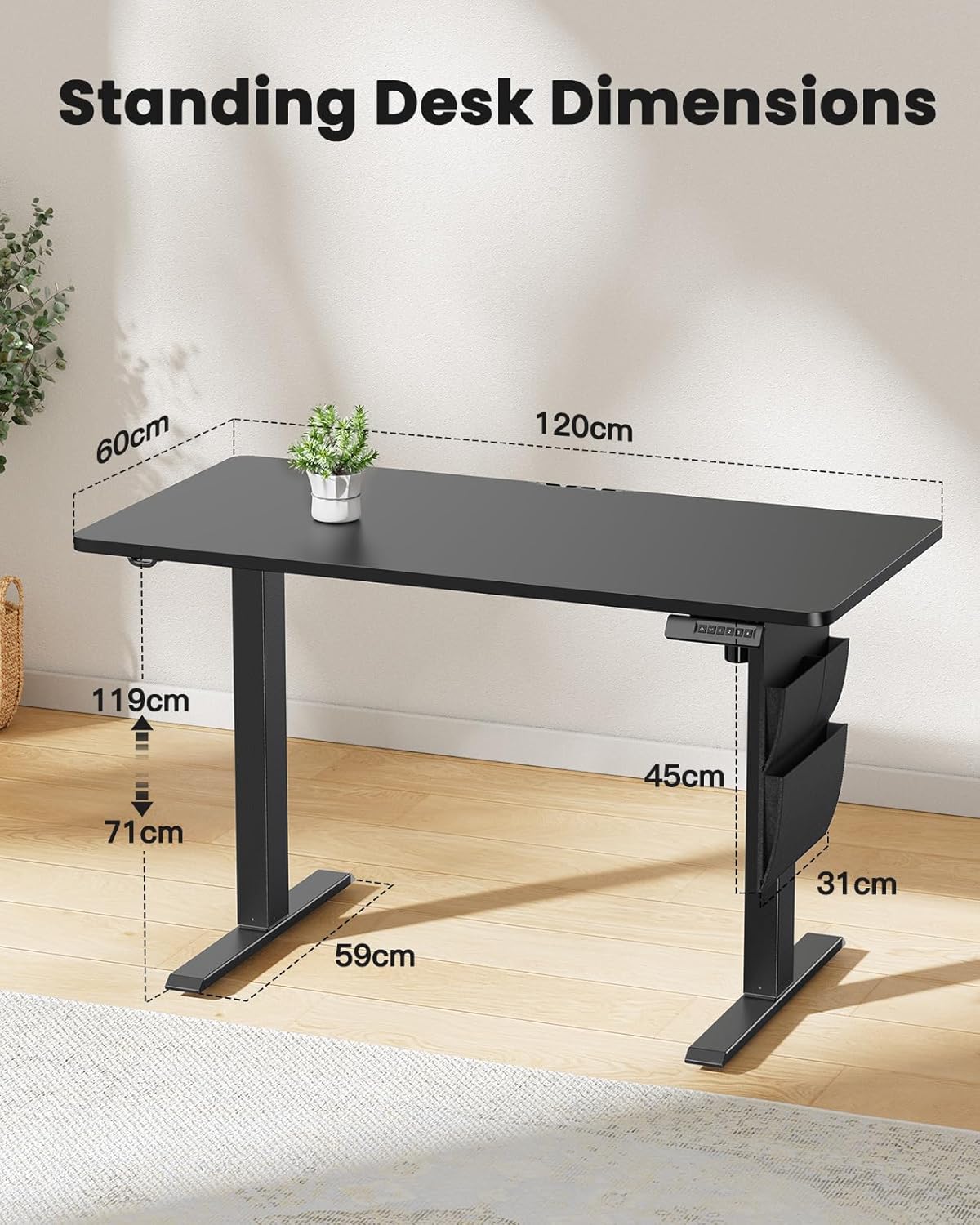
Image 8.1: Detailed diagram illustrating the key dimensions of the ErGear standing desk, including desktop width (120cm), depth (60cm), and height range (71cm to 119cm).
9. వారంటీ మరియు మద్దతు
ErGear products are designed for durability and performance. For any questions, technical assistance, or warranty claims, please contact ErGear customer support.
- రిటర్న్ పాలసీ: This product is eligible for a refund or replacement within 30 days of purchase, as per standard policy.
- సంప్రదింపు సమాచారం: Please refer to the contact details provided on the ErGear official website or your purchase documentation for the most up-to-date support channels.