
పరిచయం
This manual provides detailed instructions for the setup, operation, and maintenance of your LeadsaiL K786 White Wireless Keyboard and Mouse Combo. This full-sized ergonomic combo offers a stable 2.4GHz wireless connection, quiet typing, and an optical mouse for precise control. Please read this manual thoroughly before use to ensure optimal performance and longevity of your device.
ప్యాకేజీ విషయాలు
- 1 x LeadsaiL K786 Wireless Keyboard (White)
- 1 x LeadsaiL Wireless Mouse (White)
- 1 x USB Receiver (stored inside the mouse)
- 1 x వినియోగదారు మాన్యువల్

Image: LeadsaiL K786 White Wireless Keyboard and Mouse Combo, showing both devices and the USB receiver.
సెటప్
1. బ్యాటరీ ఇన్స్టాలేషన్
- కీబోర్డ్ కోసం: Open the battery compartment on the underside of the keyboard. Insert 1 AAA battery (not included), ensuring correct polarity. Close the compartment.
- మౌస్ కోసం: Open the battery compartment on the underside of the mouse. Insert 1 AA battery (not included), ensuring correct polarity. The USB receiver is conveniently stored within this compartment. Remove the USB receiver before closing the compartment.
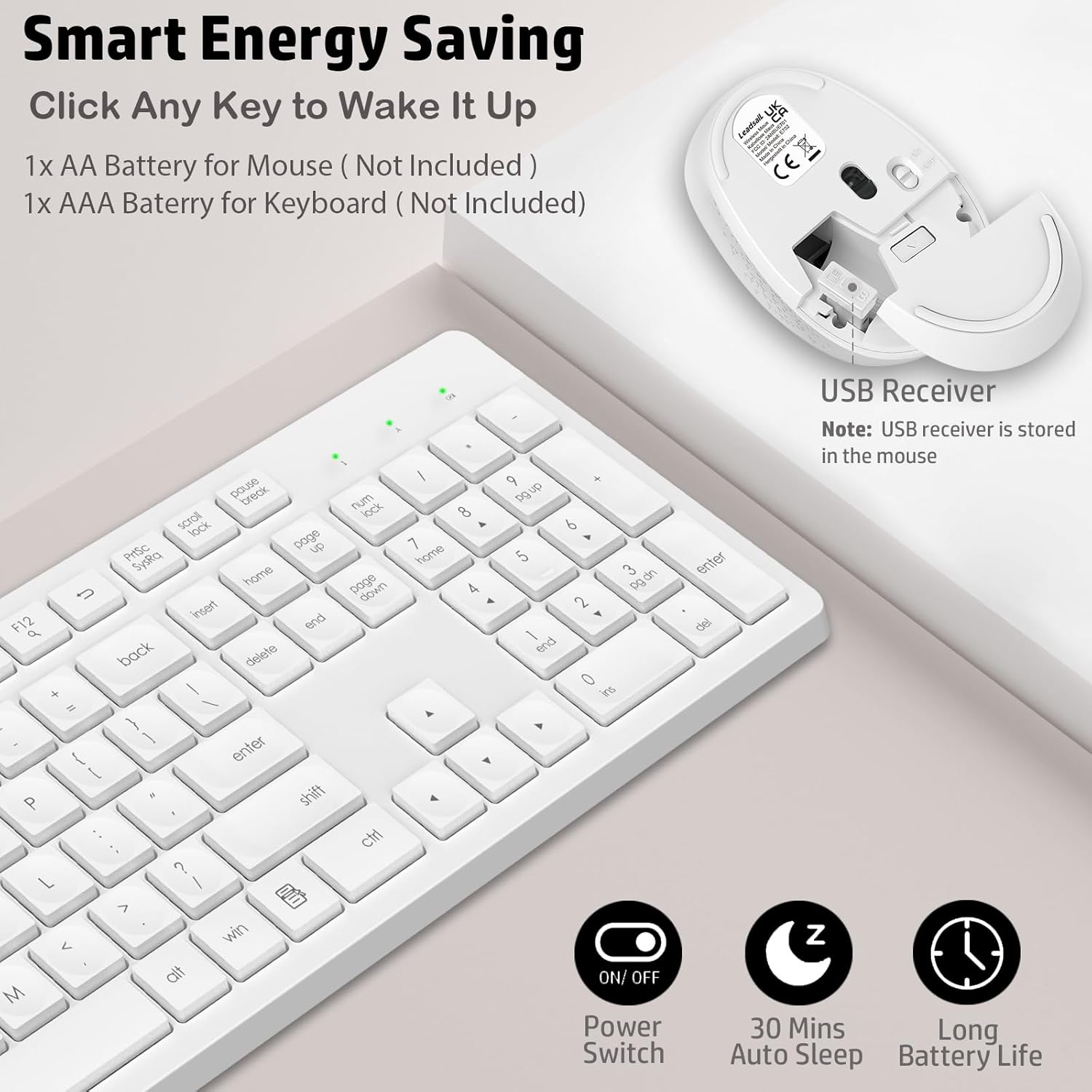
చిత్రం: వివరణాత్మకం view of the battery compartments for both the keyboard and mouse, highlighting where to insert batteries and locate the USB receiver.
2. USB రిసీవర్ను కనెక్ట్ చేయండి
- Locate the USB receiver stored in the mouse's battery compartment.
- Plug the USB receiver into an available USB port on your computer (desktop, laptop, Chromebook, MacBook, iMac).
- The keyboard and mouse are plug-and-play and should connect automatically within a few seconds. No additional software or drivers are required.

Image: The USB receiver being inserted into a computer, demonstrating the simple plug-and-play setup for the wireless keyboard and mouse.
ఆపరేటింగ్ సూచనలు
ఎర్గోనామిక్ డిజైన్
The keyboard features adjustable tilt legs on the underside. Flip these legs out to raise the keyboard to a comfortable typing angle, reducing wrist strain during prolonged use.

Image: A user's hands typing on the LeadsaiL keyboard with its foldable stand extended, illustrating the ergonomic tilt.
మల్టీమీడియా సత్వరమార్గం కీలు
The keyboard includes 12 multimedia shortcut keys (F1-F12) that can be accessed by pressing the Fn key simultaneously with the desired F-key. These shortcuts provide quick access to functions such as play/pause, volume control, email, and more.
- Fn+F1: మీడియా ప్లేయర్
- Fn+F2: వాల్యూమ్ డౌన్
- Fn+F3: వాల్యూమ్ అప్
- Fn+F4: మ్యూట్ చేయండి
- Fn+F5: మునుపటి ట్రాక్
- Fn+F6: తదుపరి ట్రాక్
- Fn+F7: ప్లే/పాజ్ చేయండి
- Fn+F8: ఆపు
- Fn+F9: హోమ్ పేజీ
- Fn+F10: ఇమెయిల్
- Fn+F11: నా కంప్యూటర్
- Fn+F12: శోధన

Image: The LeadsaiL keyboard with visual indicators for the 12 multimedia function keys, demonstrating their quick access capabilities.
సైలెంట్ ఆపరేషన్
The keyboard features soft membrane keys designed for a comfortable and nearly silent typing experience. The mouse utilizes silent micro-click technology, ensuring quiet operation suitable for shared environments.

Image: A silent LeadsaiL mouse positioned near a sleeping child, emphasizing its low-noise design for focused work without disturbance.
Auto Power-Saving
To conserve battery life, both the keyboard and mouse automatically enter sleep mode after 10 minutes of inactivity. To wake them up, simply click any key on the keyboard or move/click the mouse.

Image: The LeadsaiL keyboard and mouse illustrating their automatic energy-saving features, including a power switch and 10-second auto standby.
మౌస్ ఫీచర్లు
The optical mouse is designed for comfort and offers smooth, precise tracking with 1600 DPI sensitivity, suitable for various tasks.
నిర్వహణ
బ్యాటరీ భర్తీ
- Replace the keyboard battery with a new AAA battery when the low battery indicator light (located above the numeric keypad) illuminates.
- Replace the mouse battery with a new AA battery when mouse performance degrades or the indicator light (if present) signals low power.
క్లీనింగ్
కీబోర్డ్ మరియు మౌస్ శుభ్రం చేయడానికి, మృదువైన, d క్లీనర్ను ఉపయోగించండి.amp cloth. Avoid using harsh chemicals or abrasive cleaners. Ensure devices are powered off before cleaning.
ట్రబుల్షూటింగ్
- No connection/Unresponsive:
- బ్యాటరీలు సరిగ్గా ఇన్స్టాల్ చేయబడ్డాయని మరియు అవి అయిపోకుండా చూసుకోండి. అవసరమైతే భర్తీ చేయండి.
- USB రిసీవర్ మీ కంప్యూటర్లోని పనిచేసే USB పోర్ట్కి సురక్షితంగా ప్లగ్ చేయబడిందని ధృవీకరించండి.
- USB రిసీవర్ని వేరే USB పోర్ట్కి ప్లగ్ చేసి ప్రయత్నించండి.
- Ensure the keyboard and mouse are powered on (check the power switch on the mouse).
- మీ కంప్యూటర్ని పునఃప్రారంభించండి.
- వెనుకబడిన లేదా అడపాదడపా కనెక్షన్:
- Ensure the devices are within the 33-foot (10m) operating range of the USB receiver.
- ఇతర వైర్లెస్ పరికరాల (ఉదా. Wi-Fi రౌటర్లు, కార్డ్లెస్ ఫోన్లు) నుండి అంతరాయాన్ని తగ్గించండి.
- Avoid placing the receiver near large metal objects.
- Mouse cursor erratic:
- మౌస్ కింద ఉన్న ఆప్టికల్ సెన్సార్ను శుభ్రం చేయండి.
- మౌస్ను శుభ్రమైన, ప్రతిబింబించని ఉపరితలంపై లేదా మౌస్ ప్యాడ్లో ఉపయోగించండి.
స్పెసిఫికేషన్లు
| ఉత్పత్తి కొలతలు | 16.93 x 5.04 x 0.98 అంగుళాలు |
| వస్తువు బరువు | 1.57 పౌండ్లు |
| మోడల్ సంఖ్య | K786 |
| బ్యాటరీలు అవసరం | 1 AA (Mouse), 1 AAA (Keyboard) |
| కనెక్టివిటీ టెక్నాలజీ | 2.4GHz USB వైర్లెస్ |
| అనుకూల పరికరాలు | Windows 11/10/8/7, Mac OS, Chrome OS, Linux (Desktops, Laptops, Notebooks, Chromebooks, MacBooks, iMacs) |
| ప్రత్యేక ఫీచర్ | Lightweight, Portable, Ergonomic, Silent Click |

Image: Technical drawing of the LeadsaiL keyboard and mouse with key dimensions indicated.
అధికారిక ఉత్పత్తి వీడియో
వీడియో: అధికారిక ఉత్పత్తి వీడియో ప్రదర్శనasing the LeadsaiL K786 Wireless Keyboard and Mouse Combo, highlighting its features and design.
వారంటీ మరియు మద్దతు
The LeadsaiL K786 Wireless Keyboard and Mouse Combo is backed by a 12-month warranty. For any support inquiries, please contact LeadsaiL customer service via email. Refer to the contact information provided in the original product packaging or on the LeadsaiL official webసైట్.