
1. పరిచయం
This manual provides essential information for the safe and efficient operation of your elecsung 43-inch Smart Mirror Bathroom TV. This device integrates a 4K UHD television with a mirror, designed for environments such as bathrooms and kitchens due to its IPX6 waterproof rating. It features ATSC DTV, voice control, Wi-Fi, and Bluetooth connectivity, running on Android 11.0.
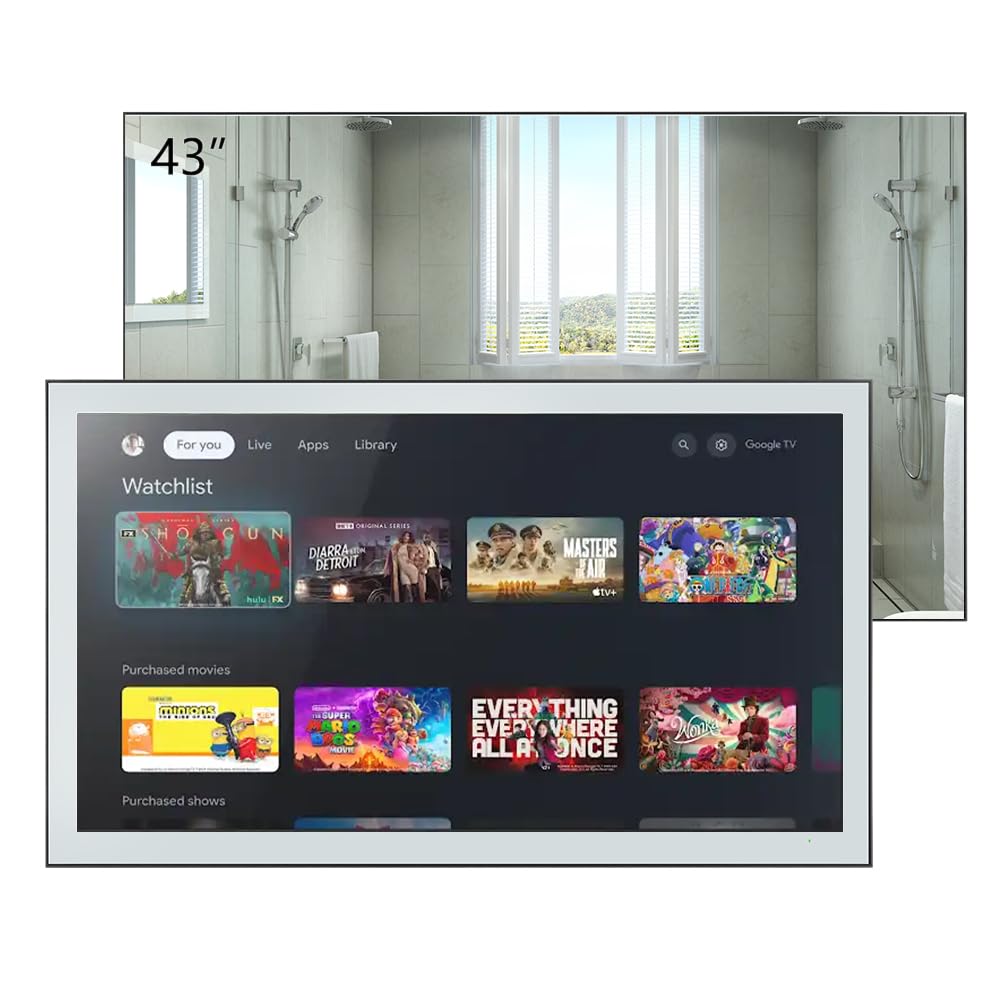
Figure 1.1: elecsung 43-inch Smart Mirror Bathroom TV with its smart interface.
2. భద్రతా సమాచారం
- విద్యుత్ భద్రత: విద్యుత్ సరఫరా వాల్యూమ్తో సరిపోలుతుందని నిర్ధారించుకోండిtage requirements (100-240 VAC, 50-60 Hz). Do not expose the power cord to excessive heat or moisture.
- నీటి నిరోధకత: The TV is IPX6 waterproof, meaning it is protected against powerful water jets. However, it is not designed for submersion. Do not spray water directly onto the connections.
- సంస్థాపన: Professional installation is recommended for wall mounting to ensure stability and safety. Follow all mounting instructions carefully.
- శుభ్రపరచడం: శుభ్రపరిచే ముందు విద్యుత్తును డిస్కనెక్ట్ చేయండి. మృదువైన, డి-క్లాకర్ను ఉపయోగించండి.amp వస్త్రం. రాపిడి క్లీనర్లు లేదా ద్రావకాలను నివారించండి.
- వెంటిలేషన్: యూనిట్ చుట్టూ తగినంత వెంటిలేషన్ ఉండేలా చూసుకోండి. వెంటిలేషన్ ఓపెనింగ్లను బ్లాక్ చేయవద్దు.
3. ప్యాకేజీ విషయాలు
ప్యాకేజీలో అన్ని అంశాలు ఉన్నాయని నిర్ధారించుకోండి:
- elecsung 43-inch Smart Mirror Bathroom TV
- రిమోట్ కంట్రోల్
- వాల్-మౌంట్ బ్రాకెట్
- పవర్ అడాప్టర్/కేబుల్
- వినియోగదారు మాన్యువల్ (ఈ పత్రం)
- Blu-ray (as listed in included components, may refer to Blu-ray playback capability rather than a physical disc)
4. ఉత్పత్తి ముగిసిందిview
4.1 ముఖ్య లక్షణాలు
- ప్రదర్శన: 43-inch 4K Ultra HD (3840x2160) LED display with 75 Hz refresh rate.
- జలనిరోధిత రేటింగ్: IPX6 for protection against powerful water jets.
- ఆడియో: Dolby Vision & Atmos support, 2.0 channel, 10W x 2 speakers.
- కనెక్టివిటీ: Dual-band Wi-Fi (2.4G/5G), Bluetooth 5.0, HDMI, USB, Ethernet.
- నియంత్రణ: Voice control and remote control.
- ఆపరేటింగ్ సిస్టమ్: Android 11.0 for smart TV functionality and app access.
- ట్యూనర్: ATSC DTV tuner.

Figure 4.1: Product features and included remote control.
4.2 Physical Description and Dimensions
The TV features a sleek design with a mirror finish. When off, it functions as a mirror. The unit dimensions are 994.8mm (39.2") W x 580.1mm (22.8") H x 62.2mm (2.5") D. Recessed dimensions for in-wall installation are 521mm (20.5") W x 476mm (18.7") H x 35mm (1.4") D.

Figure 4.2: Product dimensions with bracket.
4.3 Ports and Connections
The rear panel of the TV provides various input and output ports:
- HDMI పోర్ట్లు (x4): For connecting external devices like Blu-ray players, gaming consoles, or set-top boxes. Supports CEC, ARC, eARC.
- USB పోర్ట్లు (x2): USB నిల్వ పరికరాలను కనెక్ట్ చేయడానికి.
- ఈథర్నెట్ (RJ45): వైర్డు నెట్వర్క్ కనెక్షన్ కోసం.
- ఆప్టికల్ ఆడియో అవుట్: బాహ్య ఆడియో సిస్టమ్లకు కనెక్ట్ చేయడానికి.
- AV ఇన్పుట్: పాత అనలాగ్ పరికరాలను కనెక్ట్ చేయడానికి.
- యాంటెన్నా ఇన్పుట్: For connecting an ATSC antenna.
- ఉపగ్రహ ఇన్పుట్: For connecting satellite dish.
- AC సాకెట్: విద్యుత్ కనెక్షన్ కోసం.

చిత్రం 4.3: వెనుక ప్యానెల్ కనెక్షన్లు.
5. సెటప్
5.1 టీవీని అమర్చడం
The TV can be mounted on or in a wall using the supplied wall-mount bracket or a compatible VESA bracket. The VESA mount standard is 400 x 400 mm for the 43-inch model, requiring M6 x 12mm screws.
- స్థానాన్ని ఎంచుకోండి: Select a suitable wall location, ensuring it can support the TV's weight and has access to power and necessary connections.
- బ్రాకెట్ను ఇన్స్టాల్ చేయండి: Securely attach the wall-mount bracket to the wall according to the bracket's specific instructions. Use appropriate wall anchors for your wall type.
- Attach TV: Carefully lift the TV and attach it to the installed wall bracket. Ensure it is securely fastened.
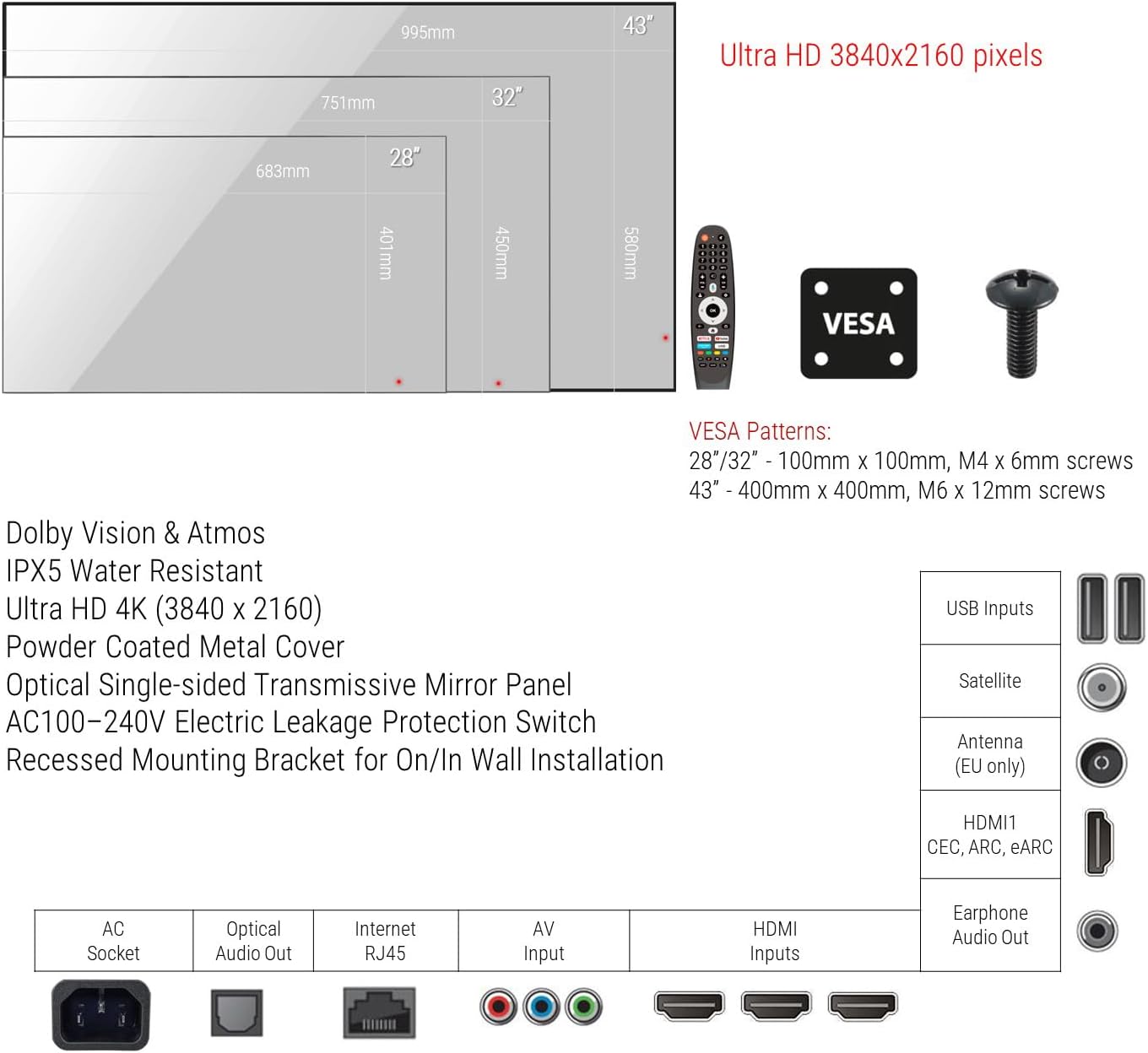
Figure 5.1: VESA mounting patterns and port overview.
5.2 ప్రారంభ కనెక్షన్లు
- శక్తి: Connect the power cable to the AC socket on the TV and then to a power outlet.
- యాంటెన్నా/కేబుల్: Connect your ATSC antenna or cable TV feed to the Antenna input.
- బాహ్య పరికరాలు: Connect any external devices (e.g., Blu-ray player, game console) to the HDMI ports.
- నెట్వర్క్: For wired internet, connect an Ethernet cable to the RJ45 port. For wireless, you will configure Wi-Fi during initial setup.
6. ఆపరేటింగ్ సూచనలు
6.1 పవర్ ఆన్/ఆఫ్
Press the power button on the remote control to turn the TV on or off. The TV will display the smart interface when powered on.
6.2 రిమోట్ కంట్రోల్
Use the provided remote control to navigate the TV's interface, adjust volume, change channels, and access smart features. Refer to the remote control diagram for specific button functions.
6.3 వాయిస్ నియంత్రణ
The TV supports voice control for hands-free operation. Activate voice control by pressing the dedicated voice button on your remote or by saying the wake word (if configured). You can then issue commands such as "Change channel to CNN," "Open Netflix," or "కోసం వెతకండి action movies."
6.4 Smart TV Functions (Android 11.0)
Your TV runs on Android 11.0, providing access to a wide range of applications and streaming services. Navigate the home screen to find installed apps, browse content, and customize settings.
- యాప్ యాక్సెస్: Download and install apps from the integrated app store.
- స్ట్రీమింగ్: Access popular streaming platforms for movies, TV shows, and videos.
- సెట్టింగ్లు: Adjust network settings, display options, audio preferences, and more through the settings menu.
6.5 కంటెంట్ కాస్టింగ్
Stream content from your smartphone, tablet, or laptop directly to the TV using its casting feature. Ensure your device and the TV are connected to the same Wi-Fi network. Look for the casting icon within compatible apps on your mobile device to initiate screen mirroring.
7. నిర్వహణ
Proper maintenance ensures the longevity and performance of your Smart Mirror TV.
- Cleaning the Screen/Mirror: Disconnect the TV from power. Use a soft, lint-free cloth slightly dampened with water or a non-abrasive, ammonia-free glass cleaner. Spray cleaner onto the cloth, not directly onto the screen. Wipe gently to avoid streaks.
- ఫ్రేమ్ క్లీనింగ్: Use a soft, dry cloth to wipe the frame. Avoid harsh chemicals.
- వెంటిలేషన్: Periodically check that the ventilation openings are free from dust and debris.
8. ట్రబుల్షూటింగ్
మీరు సమస్యలను ఎదుర్కొంటే, ఈ క్రింది సాధారణ ట్రబుల్షూటింగ్ దశలను చూడండి:
| సమస్య | సాధ్యమైన కారణం | పరిష్కారం |
|---|---|---|
| పవర్ లేదు | విద్యుత్ కేబుల్ డిస్కనెక్ట్ చేయబడింది; విద్యుత్ అవుట్లెట్ లోపభూయిష్టంగా ఉంది. | పవర్ కేబుల్ సురక్షితంగా కనెక్ట్ చేయబడిందని నిర్ధారించుకోండి. మరొక పరికరంతో అవుట్లెట్ను పరీక్షించండి. |
| చిత్రం/ధ్వని లేదు | తప్పు ఇన్పుట్ సోర్స్; వదులుగా ఉన్న HDMI/AV కేబుల్; పరికరం ఆన్ చేయబడలేదు. | Select correct input source. Check cable connections. Power on external device. |
| Wi-Fi కనెక్షన్ లేదు | Router issue; Incorrect password; Out of range. | Restart router. Re-enter Wi-Fi password. Move TV closer to router or use Ethernet. |
| వాయిస్ కంట్రోల్ స్పందించడం లేదు | Microphone blocked; Feature disabled; Remote battery low. | Ensure microphone is clear. Check voice control settings. Replace remote batteries. |
ఈ పరిష్కారాలను ప్రయత్నించిన తర్వాత కూడా సమస్య కొనసాగితే, కస్టమర్ సపోర్ట్ను సంప్రదించండి.
9. స్పెసిఫికేషన్లు
| ఫీచర్ | స్పెసిఫికేషన్ |
|---|---|
| స్క్రీన్ పరిమాణం | 43 అంగుళాలు |
| ప్రదర్శన సాంకేతికత | LED |
| రిజల్యూషన్ | 4K (3840x2160) |
| రిఫ్రెష్ రేట్ | 75 Hz |
| జలనిరోధిత రేటింగ్ | IPX6 |
| ఆపరేటింగ్ సిస్టమ్ | ఆండ్రాయిడ్ 11.0 |
| కనెక్టివిటీ | Wi-Fi (Dual-band), Bluetooth 5.0, HDMI (x4), USB (x2), Ethernet, Optical Audio Out, AV Input, Antenna, Satellite |
| ఆడియో ఫీచర్లు | Dolby Vision & Atmos, 2.0 channel, 10W x 2 speakers |
| నియంత్రణ పద్ధతి | రిమోట్ కంట్రోల్, వాయిస్ కంట్రోల్ |
| ఉత్పత్తి కొలతలు (D x W x H) | 2.5"D x 39.2"W x 22.8"H (62.2మిమీ x 994.8మిమీ x 580.1మిమీ) |
| Recessed Dimensions (D x W x H) | 1.4"D x 20.5"W x 18.7"H (35మిమీ x 521మిమీ x 476మిమీ) |
| VESA మౌంట్ స్టాండర్డ్ | 400 x 400 మి.మీ |
| విద్యుత్ వినియోగం | 46 వాట్స్ |
| లైన్ వాల్యూమ్tage | 100-240 VAC 50-60 Hz |
| మోడల్ పేరు | HYM43A-0BLS11052 |
10. వారంటీ మరియు మద్దతు
This product comes with a Full Warranty. For specific warranty terms and conditions, please refer to the documentation included with your purchase or visit the elecsung official website. For technical support, troubleshooting assistance, or service inquiries, please contact elecsung customer support through their official channels.
ఆన్లైన్ మద్దతు: సందర్శించండి elecsung Store on Amazon ఉత్పత్తి సమాచారం మరియు మద్దతు వనరుల కోసం.