
పరిచయం
Thank you for choosing the Yoidesu Cordless Phone System. This system combines a corded base unit with a cordless handset, offering advanced features such as a digital answering machine, photo dialing, smart call blocking, and an expandable design. This manual will guide you through the setup, operation, and maintenance of your new phone system to ensure optimal performance.
ప్యాకేజీ విషయాలు
క్రింద జాబితా చేయబడిన అన్ని వస్తువులు మీ ప్యాకేజీలో చేర్చబడ్డాయని దయచేసి ధృవీకరించండి. ఏవైనా వస్తువులు తప్పిపోయినా లేదా దెబ్బతిన్నా, దయచేసి కస్టమర్ మద్దతును సంప్రదించండి.
- Corded Base Unit with Handset
- కార్డ్లెస్ హ్యాండ్సెట్
- Cordless Handset Charging Base
- AC Power Adapters (2)
- టెలిఫోన్ లైన్ కార్డ్
- కార్డ్లెస్ హ్యాండ్సెట్ కోసం రీఛార్జబుల్ బ్యాటరీ
- వినియోగదారు మాన్యువల్ (ఈ పత్రం)
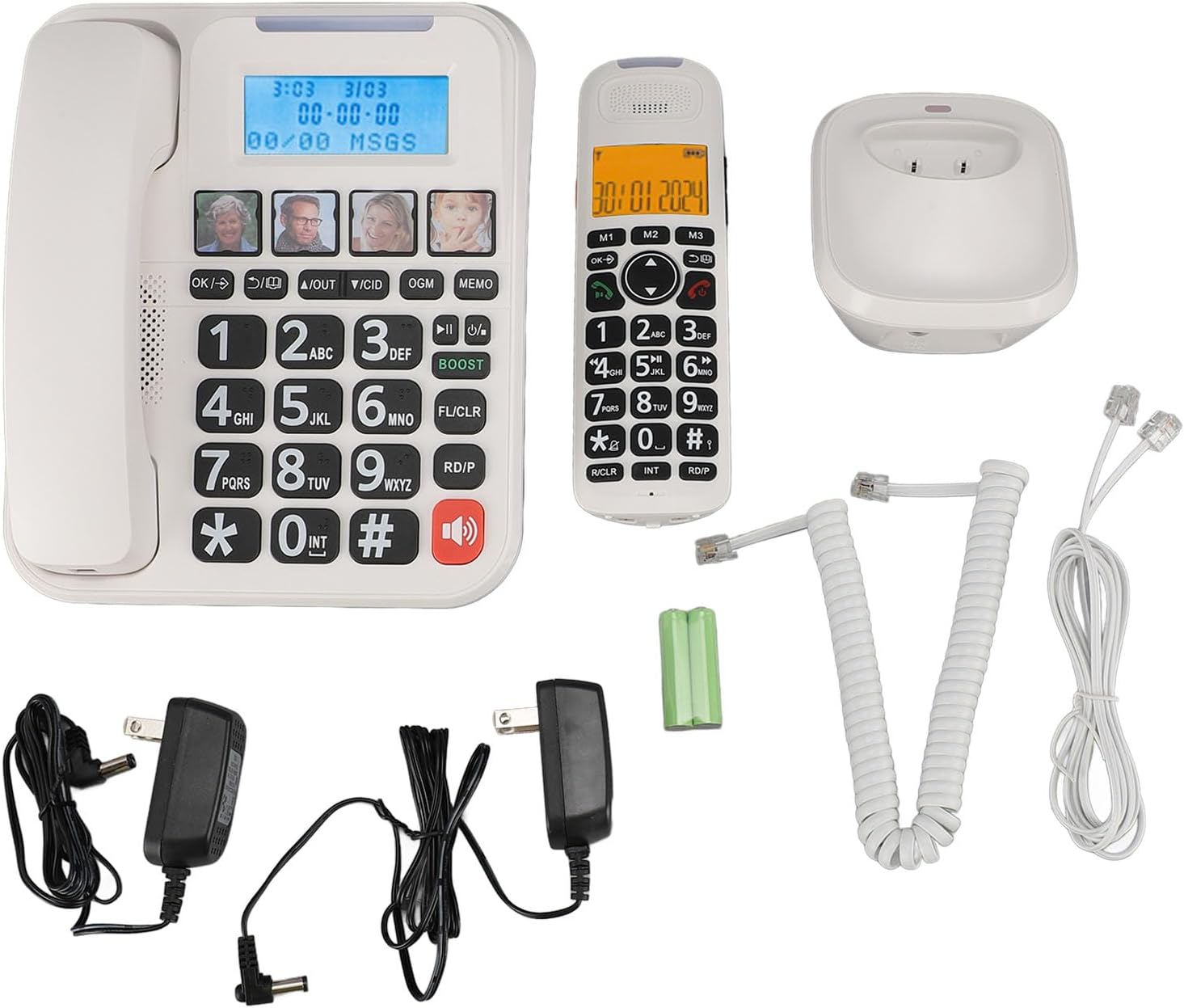
మూర్తి 1: Complete package contents of the Yoidesu Cordless Phone System.
ఉత్పత్తి ముగిసిందిview
Corded Base Unit
The base unit serves as the central hub for your phone system, featuring a large display, keypad, and dedicated buttons for answering machine functions and photo dialing.
- పెద్ద 2-అంగుళాల స్క్రీన్: Displays caller ID, call history, and answering machine status with high-contrast text.
- పెద్ద కీప్యాడ్: Oversized buttons for easy dialing, especially in low-light conditions.
- Photo Dialing Buttons: Four customizable buttons for quick access to frequently dialed numbers with associated photos.
- AMP బటన్: Enhances call volume by up to 28dB for improved clarity.
- Answering Machine Controls: Play/Stop, Skip, Record, and Memo functions.

మూర్తి 2: ముందు view of the Corded Base Unit.
కార్డ్లెస్ హ్యాండ్సెట్
The cordless handset provides mobility and convenience, allowing you to make and receive calls away from the base unit.
- డిస్ప్లే స్క్రీన్: Shows caller information, menu options, and battery status.
- నావిగేషన్ బటన్లు: For menu navigation and volume adjustment.
- Talk/End Buttons: కాల్స్ ప్రారంభించడానికి మరియు ముగించడానికి.
- Intercom (INT) Button: For internal calls between handsets or base unit.

మూర్తి 3: ముందు view of the Cordless Handset.
సెటప్
1. బేస్ యూనిట్ను కనెక్ట్ చేయడం
- టెలిఫోన్ లైన్ త్రాడు యొక్క ఒక చివరను బేస్ యూనిట్ వెనుక భాగంలో ఉన్న టెల్ లైన్ జాక్కి కనెక్ట్ చేయండి.
- టెలిఫోన్ లైన్ త్రాడు యొక్క మరొక చివరను మీ గోడ టెలిఫోన్ జాక్కి కనెక్ట్ చేయండి.
- Plug one AC power adapter into the DC IN 6V jack on the back of the base unit.
- AC పవర్ అడాప్టర్ యొక్క మరొక చివరను ప్రామాణిక ఎలక్ట్రికల్ అవుట్లెట్లోకి ప్లగ్ చేయండి.

మూర్తి 4: Rear connections of the Base Unit.
2. Installing the Handset Battery
- కార్డ్లెస్ హ్యాండ్సెట్ వెనుక భాగంలో ఉన్న బ్యాటరీ కంపార్ట్మెంట్ కవర్ను తెరవండి.
- Insert the supplied rechargeable battery, ensuring correct polarity (+/-).
- బ్యాటరీ కంపార్ట్మెంట్ కవర్ను మూసివేయండి.
3. హ్యాండ్సెట్ను ఛార్జ్ చేయడం
- Plug the second AC power adapter into the DC IN 6V jack on the cordless handset charging base.
- AC పవర్ అడాప్టర్ యొక్క మరొక చివరను ప్రామాణిక ఎలక్ట్రికల్ అవుట్లెట్లోకి ప్లగ్ చేయండి.
- Place the cordless handset onto its charging base. The charging indicator on the handset should illuminate.
- పూర్తి బ్యాటరీ సామర్థ్యాన్ని నిర్ధారించుకోవడానికి ప్రారంభ వినియోగానికి ముందు కనీసం 12 గంటలు హ్యాండ్సెట్ను ఛార్జ్ చేయడానికి అనుమతించండి.

మూర్తి 5: Cordless Handset on Charging Base.
4. Registering Additional Handsets (Optional)
The system supports up to five handsets. Refer to the specific instructions provided with additional handsets for registration procedures. Typically, this involves placing the base unit in registration mode and then initiating registration from the new handset.
ఆపరేటింగ్ సూచనలు
కాల్స్ చేయడం మరియు స్వీకరించడం
- కాల్ చేయడానికి: త్రాడు హ్యాండ్సెట్ను ఎత్తండి లేదా నొక్కండి మాట్లాడండి కార్డ్లెస్ హ్యాండ్సెట్లోని బటన్ను నొక్కి, ఆపై నంబర్ను డయల్ చేయండి.
- కాల్ స్వీకరించడానికి: త్రాడు హ్యాండ్సెట్ను ఎత్తండి లేదా నొక్కండి మాట్లాడండి ఫోన్ మోగినప్పుడు కార్డ్లెస్ హ్యాండ్సెట్లోని బటన్.
- కాల్ ముగించడానికి: Place the corded handset back on the base or press the ముగింపు కార్డ్లెస్ హ్యాండ్సెట్లోని బటన్.
కాల్ వాల్యూమ్ను సర్దుబాటు చేస్తోంది
కాల్ సమయంలో, నొక్కండి AMP button on the base unit to increase the volume by 28dB. On the cordless handset, use the navigation buttons to adjust the earpiece volume.
Using the Digital Answering Machine
The integrated answering machine can record up to 60 minutes of messages, outgoing announcements, and memos.
- ప్లే సందేశాలు: నొక్కండి ప్లే/ఆపు బేస్ యూనిట్లోని బటన్.
- Record Outgoing Message (OGM): నొక్కండి OGM button and follow the voice prompts.
- Record Memo: నొక్కండి మెమో button and speak after the tone.
Photo Dialing
Set up four frequently dialed numbers with associated photos for quick access.
- కార్యక్రమానికి: Select an empty photo slot on the base unit. Follow the on-screen prompts to enter the contact's name and phone number. You can then insert a printed photo into the designated slot.
- డయల్ చేయడానికి: Simply press the desired photo button on the base unit.

మూర్తి 6: Using the Photo Dialing feature.
Smart Call Blocker and Caller ID
The system can store up to 30 incoming call numbers on handsets and 29 on the base unit. The call block function helps prevent unwanted calls.
- కాలర్ ID: Incoming call numbers are displayed on both the base unit and handset screens.
- కాల్ బ్లాక్: Access the call block menu to add numbers manually or block numbers from the caller ID history. You can set it to manual or automatic mode, allowing only calls from saved contacts.
Phonebook and Call History
Store up to 50 phonebook entries. Review 10 outgoing call numbers and incoming call numbers (30 on handset, 29 on base).
- పరిచయం జోడించడం: Navigate to the phonebook menu and enter the name and number.
- Review చరిత్ర: ఇన్కమింగ్ మరియు అవుట్గోయింగ్ కాల్ జాబితాల ద్వారా స్క్రోల్ చేయడానికి నావిగేషన్ బటన్లను ఉపయోగించండి.
Intercom and 3-Way Calling
The expandable system allows for internal communication and conference calls.
- ఇంటర్కామ్: నొక్కండి INT button on a handset or base unit to call another registered handset or the base unit.
- 3-మార్గం కాలింగ్: Supports conference calls between a landline, a sub-phone (handset), and a third-party phone. Refer to the system menu for initiating this feature.
నిర్వహణ
క్లీనింగ్
Wipe the phone system with a soft, damp వస్త్రం. కఠినమైన రసాయనాలు లేదా రాపిడి క్లీనర్లను ఉపయోగించవద్దు. శుభ్రం చేయడానికి ముందు యూనిట్ అన్ప్లగ్ చేయబడిందని నిర్ధారించుకోండి.
బ్యాటరీ సంరక్షణ
To prolong battery life, always return the cordless handset to its charging base when not in use. If the phone will be unused for an extended period, remove the battery from the handset.
ట్రబుల్షూటింగ్
| సమస్య | సాధ్యమైన కారణం | పరిష్కారం |
|---|---|---|
| డయల్ టోన్ లేదు | టెలిఫోన్ లైన్ త్రాడు డిస్కనెక్ట్ చేయబడింది లేదా తప్పుగా ఉంది. | Ensure the telephone line cord is securely connected to both the base unit and the wall jack. Test with another phone if possible. |
| హ్యాండ్సెట్ ఛార్జింగ్ కావడం లేదు | Handset not properly seated on charging base; charging base not powered; faulty battery. | Ensure the handset is correctly placed on the charging base. Check that the charging base's power adapter is plugged in. Replace battery if necessary. |
| సమాధానమిచ్చే యంత్రం రికార్డ్ చేయడం లేదు | Answering machine is off; memory is full. | Ensure the answering machine is turned on. Delete old messages to free up memory. |
| కాల్ నాణ్యత సరిగా లేదు/స్టాటిక్ గా ఉంది | ఇతర ఎలక్ట్రానిక్ పరికరాల నుండి జోక్యం; బేస్ యూనిట్ నుండి హ్యాండ్సెట్ చాలా దూరంలో ఉంది. | Move the base unit away from other electronics. Ensure the handset is within range of the base unit. |
స్పెసిఫికేషన్లు
- మోడల్ సంఖ్య: Yoidesuav12iq6wt4-14
- సమాధానమిచ్చే యంత్రం రికార్డింగ్ సమయం: 60 నిమిషాల వరకు
- Handset Expansion: Up to 5 handsets per base unit
- రింగ్టోన్ వాల్యూమ్: 90dB వరకు (సర్దుబాటు)
- Call Volume Boost: +28dB via AMP బటన్
- స్క్రీన్ పరిమాణం: 2 inches (handset and base unit)
- Caller ID Storage: 30 incoming calls (handset), 29 incoming calls (base unit)
- Phonebook Entries: 50
- అవుట్గోయింగ్ కాల్ స్టోరేజ్: 10
- ప్యాకేజీ కొలతలు: 12.99 x 9.06 x 3.94 అంగుళాలు
- వస్తువు బరువు: 2.84 పౌండ్లు
వారంటీ మరియు మద్దతు
For warranty information or technical assistance, please contact Yoidesu customer support. Keep your purchase receipt as proof of purchase for any warranty claims.
తయారీదారు: యొయిదేసు
మొదటి తేదీ అందుబాటులో ఉంది: సెప్టెంబర్ 5, 2024