
పరిచయం
The Anmite 15.6 inch 4K Portable Monitor is designed to enhance your visual experience, offering stunning 3840x2160 UHD resolution with excellent color reproduction. Its lightweight and ultra-thin design make it an ideal companion for work, gaming, and entertainment on the go. This manual provides detailed instructions to help you set up, operate, and maintain your portable monitor for optimal performance.
పెట్టెలో ఏముంది
Please ensure all items listed below are included in your package. If any items are missing or damaged, please contact customer support.
- Anmite Portable Monitor x 1
- Mini-HDMI to HDMI cable x 1
- టైప్-సి నుండి టైప్-సి కేబుల్ x 1
- Type-C to USB-A cable x 1
- వినియోగదారు గైడ్ x 1
ఉత్పత్తి ముగిసిందిview
The Anmite 15.6 inch 4K Portable Monitor features a sleek design with multiple connectivity options and integrated speakers.
ముఖ్య లక్షణాలు:
- Type-C and Mini HDMI Interface: Equipped with versatile ports for high-definition video signal transmission.
- IPS FHD LED Screen: Delivers stunning 3840x2160 UHD resolution visuals with awesome color reproduction and wide viewing కోణాలు.
- పోర్టబుల్ డిజైన్: Ultra-thin (0.39 inches) and lightweight (1.76 pounds) for easy portability and mobile extensibility.
- ద్వంద్వ స్పీకర్లు: Built-in dual speakers provide an immersive audio experience.
Physical Layout and Dimensions:

The monitor's physical dimensions are approximately 360mm x 225mm x 5-10mm. The visual area is 344.16mm x 194.59mm.

The monitor includes an integrated kickstand for flexible positioning. It also features VESA mounting holes (7.5cm x 7.5cm) for alternative mounting solutions.
పోర్టులు మరియు నియంత్రణలు:
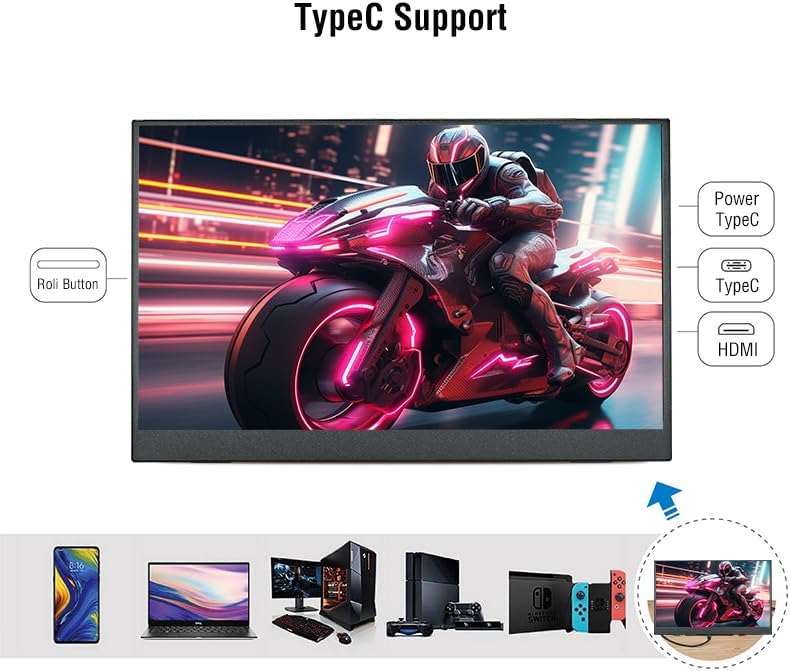
The monitor is equipped with the following interfaces:
- Mini-HDMI Input
- Type-C (Full Function) Input/Power x 1
- Type-C (Power Only) Input x 1
- 3.5mm Audio Interface Output
- Control buttons (e.g., power, menu navigation)
సెటప్ సూచనలు
Follow these steps to set up your Anmite Portable Monitor:
- మానిటర్ను ఉంచడం:
- Unfold the integrated kickstand on the back of the monitor to your desired viewing కోణం.
- Alternatively, use a VESA-compatible mount (75x75mm, M4*4mm screws) for a more permanent setup.
- పవర్ సోర్స్కి కనెక్ట్ చేస్తోంది:
- Connect the provided Type-C to USB-A cable to the monitor's Type-C (Power Only) port and to a compatible USB power adapter or device.
- For optimal brightness and stable power supply, especially when using 4K resolution, it is recommended to use a dedicated power adapter.
- పరికరానికి కనెక్ట్ చేస్తోంది:
- Using Type-C (Full Function): If your device (laptop, smartphone, game console) has a full-featured Type-C port that supports video output, connect the provided Type-C to Type-C cable directly between your device and the monitor's Type-C (Full Function) port. This single cable can transmit both video and power.
- Using Mini-HDMI: Connect the provided Mini-HDMI to HDMI cable between your device's HDMI output and the monitor's Mini-HDMI input. If using HDMI, ensure the monitor is also connected to a power source via the Type-C (Power Only) port.
- పవర్ ఆన్: Press the power button on the monitor to turn it on. The monitor should automatically detect the input signal.
ఆపరేటింగ్ సూచనలు
The Anmite Portable Monitor offers various settings and modes to customize your viewing అనుభవం.
ప్రదర్శన మోడ్లు:
- డూప్లికేట్ మోడ్: Displays the same content on both your primary device and the portable monitor.
- పొడిగింపు మోడ్: Extends your desktop across both screens, providing more workspace.
- Second Screen Only Mode: Displays content only on the portable monitor.
To switch between display modes, use your device's display settings (e.g., Windows Key + P on Windows, Display Settings on macOS).
ఆన్-స్క్రీన్ డిస్ప్లే (OSD) మెను:
Use the 'Roli Button' (roller button) on the side of the monitor to navigate the OSD menu. Press the button to enter the menu, scroll up/down to select options, and press again to confirm. Long press to go back to the previous step.
- ప్రకాశం/కాంట్రాస్ట్: డిస్ప్లే యొక్క ప్రకాశం మరియు కాంట్రాస్ట్ స్థాయిలను సర్దుబాటు చేయండి.
- రంగు సెట్టింగ్లు: Customize color temperature, hue, and saturation for optimal visual fidelity.
- కారక నిష్పత్తి: Select between 16:9 or other available aspect ratios.
- ఇన్పుట్ మూలం: Manually select the input source (Type-C or HDMI) if auto-detection fails.
- వాల్యూమ్: Adjust the volume of the built-in dual speakers.
వీడియో ప్రదర్శనలు:
నిర్వహణ
సరైన నిర్వహణ మీ మానిటర్ యొక్క దీర్ఘాయువు మరియు సరైన పనితీరును నిర్ధారిస్తుంది.
- స్క్రీన్ క్లీనింగ్: కొద్దిగా మెత్తని, మెత్తని బట్టను ఉపయోగించండి dampనీరు లేదా స్క్రీన్ క్లీనర్తో నానబెట్టండి. కఠినమైన రసాయనాలు లేదా రాపిడి పదార్థాలను నివారించండి.
- శరీరాన్ని శుభ్రపరచడం: Wipe the monitor's body with a soft, dry cloth.
- నిల్వ: When not in use, store the monitor in a cool, dry place. Use the protective cover to prevent scratches and dust accumulation.
- విపరీతమైన పరిస్థితులను నివారించండి: Do not expose the monitor to extreme temperatures, humidity, or direct sunlight for prolonged periods.
ట్రబుల్షూటింగ్
If you encounter any issues with your Anmite Portable Monitor, refer to the following common solutions:
- No Signal / Monitor Not Turning On:
- Ensure the Type-C port of your device is a full-featured Type-C port if using a single Type-C cable.
- Verify that all cables are securely connected.
- Ensure the monitor is receiving sufficient power. If using HDMI, a separate power supply via Type-C is required.
- Try connecting to a different device or using different cables to rule out cable or device issues.
- Screen Flickering / Unstable Display:
- Ensure the monitor is receiving adequate power. Insufficient power can cause display instability, especially at 4K resolution.
- Try using the included power adapter for a stable power supply.
- Check the cable connections for any looseness or damage.
- Incorrect Resolution / Stretched Image:
- Adjust the display resolution settings on your connected device. For optimal viewing, set the resolution to 3840x2160.
- If the image appears stretched, check the aspect ratio settings in the monitor's OSD menu or your device's display settings.
- ఆడియో లేదు:
- Check the volume settings on both the monitor (via OSD menu) and your connected device.
- మీ పరికరం యొక్క సౌండ్ సెట్టింగ్లలో ఆడియో అవుట్పుట్ మానిటర్కు సరిగ్గా మళ్లించబడిందని నిర్ధారించుకోండి.
- If using external headphones, ensure they are properly connected to the 3.5mm audio interface.
స్పెసిఫికేషన్లు
| ఫీచర్ | వివరాలు |
|---|---|
| నికర బరువు | 0.7 కిలోలు (1.54 పౌండ్లు) |
| కొలతలు | 360 x 225 x 5-10 mm (14.17 x 8.86 x 0.2-0.39 అంగుళాలు) |
| స్క్రీన్ పరిమాణం | 15.6 అంగుళాలు |
| ప్యానెల్ రకం | IPS |
| కారక నిష్పత్తి | 16:9 |
| రిజల్యూషన్ | 3840x2160 (4K UHD) |
| డిస్ప్లే రంగు | 16.7M |
| రంగు ఉష్ణోగ్రత | 6800K |
| విజువల్ యాంగిల్ | H:178° V:178° |
| కాంట్రాస్ట్ రేషియో | 1000:1 |
| ప్రకాశం | 280cd/m² |
| రంగు స్వరసప్తకం | 100% |
| రిఫ్రెష్ రేట్ | 60Hz |
| ఇన్పుట్ ఇంటర్ఫేస్ | Mini-HDMI, Type-C (Full Function), Type-C (Power Only) |
| అవుట్పుట్ ఇంటర్ఫేస్ | 3.5mm ఆడియో ఇంటర్ఫేస్ |
| స్పీకర్ | Built-in speakers (1W*2) |
| వెసా మౌంట్ | 75x75mm, M4*4mm |
వారంటీ మరియు మద్దతు
Anmite offers a 12-month warranty for any quality issues. For support, inquiries, or to report any problems, please refer to the contact information provided in your User Guide or on the product packaging. Please retain your purchase receipt for warranty claims.