
Geometric Future GEO-EP-36B
Eskimo Pro 360mm AIO CPU Liquid Cooler User Manual
Model: GEO-EP-36B | Brand: Geometric Future
పరిచయం
Thank you for choosing the Geometric Future Eskimo Pro 360mm AIO CPU Liquid Cooler. This manual provides comprehensive instructions for the proper installation, operation, and maintenance of your new liquid cooling system. Please read this manual thoroughly before installation to ensure optimal performance and longevity of your product.
The Eskimo Pro 360 is designed to provide efficient and quiet cooling for high-performance CPUs, featuring an advanced K6 liquid pump, a large copper base, and pre-installed Squama 2501 ARGB fans. It is compatible with a wide range of Intel and AMD sockets.

Image: The Eskimo Pro 360mm AIO Liquid Cooler, showcasing its radiator, three RGB fans, and the illuminated CPU block.
భద్రతా సమాచారం
- Ensure all power is disconnected from your computer before installation or maintenance.
- భాగాలకు నష్టం జరగకుండా జాగ్రత్తగా నిర్వహించండి.
- లిక్విడ్ కూలింగ్ లూప్ను తెరవవద్దు; ఇది సీలు చేయబడిన వ్యవస్థ.
- పిల్లలకు దూరంగా ఉంచండి.
- Refer to your motherboard and CPU manuals for additional compatibility and installation guidelines.
ప్యాకేజీ విషయాలు
ఇన్స్టాలేషన్ ప్రారంభించే ముందు అన్ని భాగాలు ఉన్నాయని నిర్ధారించుకోండి:
- Eskimo Pro 360mm Radiator with Integrated Pump/CPU Block
- 3 x Squama 2501 ARGB Fans
- Intel Mounting Brackets (LGA1700/1200/115X/2011/2066)
- AMD మౌంటింగ్ బ్రాకెట్లు (AM5/AM4)
- Backplate for Intel Sockets
- మౌంటు స్క్రూలు మరియు స్టాండ్ఆఫ్లు
- Thermal Paste (GF10 high-conductivity syringe applicator)
- ఫ్యాన్ స్ప్లిటర్ కేబుల్
- ARGB Controller (if included with specific model variant)
- వినియోగదారు మాన్యువల్
సెటప్ మరియు ఇన్స్టాలేషన్
1. మీ వ్యవస్థను సిద్ధం చేయండి
- మీ కంప్యూటర్ను పవర్ ఆఫ్ చేసి, అన్ని కేబుల్లను డిస్కనెక్ట్ చేయండి.
- Open your PC case and remove any existing CPU cooler. Clean the CPU surface thoroughly of any old thermal paste.
2. మౌంటు హార్డ్వేర్ను ఇన్స్టాల్ చేయండి
Select the appropriate mounting brackets and backplate for your CPU socket (Intel or AMD). Refer to the image below for bracket identification.

Image: Various mounting brackets for Intel and AMD CPUs, ensuring universal compatibility.
- For Intel sockets, attach the backplate to the motherboard from the rear. Secure the standoffs from the front.
- For AMD sockets, use the existing AMD backplate and attach the appropriate standoffs.
- Attach the correct CPU block mounting arms to the pump unit.
3. థర్మల్ పేస్ట్ వేయండి
Apply a small amount of the included GF10 thermal paste to the center of your CPU's integrated heat spreader (IHS). A pea-sized dot is generally sufficient.

Image: Illustration of applying high-conductivity thermal paste to a CPU before cooler installation.
4. Mount the CPU Block/Pump
Carefully place the CPU block onto the CPU, aligning the mounting holes with the standoffs. Secure it with the provided thumb screws, tightening them in a diagonal pattern until snug.

Image: Close-up of the Eskimo Pro CPU block, highlighting its unique ARGB lighting and design.
5. రేడియేటర్ మరియు ఫ్యాన్లను ఇన్స్టాల్ చేయండి
Mount the radiator to an available fan mounting location in your PC case (e.g., top, front, or rear). Ensure proper airflow direction (intake or exhaust) based on your case's cooling design. Attach the three Squama 2501 ARGB fans to the radiator using the long screws provided.
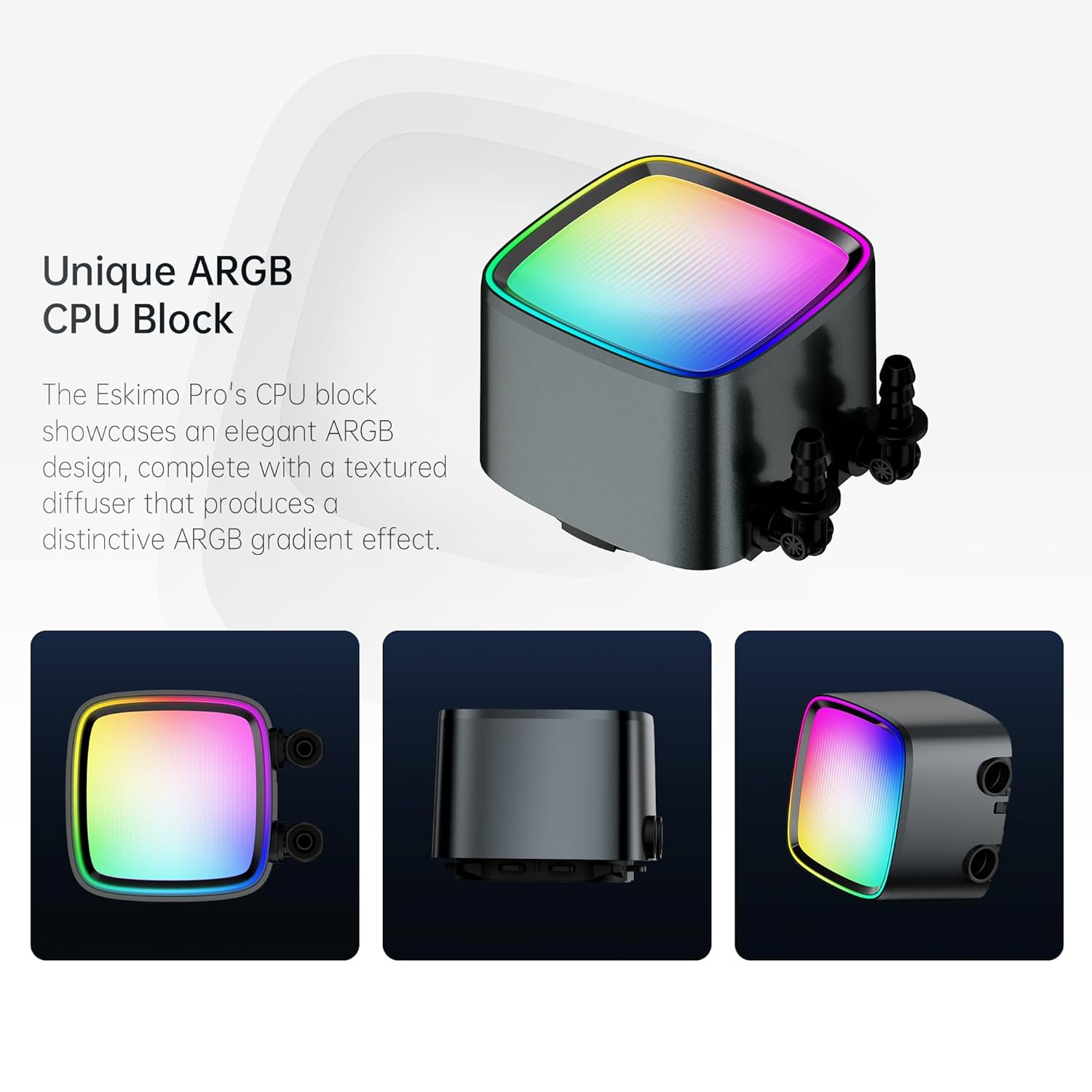
Image: The Eskimo Pro 360mm radiator assembly with three Squama 2501 ARGB fans attached.
6. కేబుల్స్ కనెక్ట్ చేయండి
- పంప్ యొక్క 3-పిన్ లేదా 4-పిన్ కనెక్టర్ను మీ మదర్బోర్డ్లోని CPU_FAN లేదా AIO_PUMP హెడర్కు కనెక్ట్ చేయండి.
- Connect the fan power cables to the fan headers on your motherboard or use the included fan splitter cable to connect them to a single header.
- Connect the ARGB cables from the fans and CPU block to your motherboard's 5V ARGB header or to the included ARGB controller (if applicable). Ensure correct pin alignment to avoid damage.
ఆపరేటింగ్ సూచనలు
ప్రారంభ పవర్-ఆన్
After installation, close your PC case and reconnect all external cables. Power on your system. The pump and fans should start operating, and the ARGB lighting should illuminate. Monitor CPU temperatures using system monitoring software to ensure proper cooling.
ARGB లైటింగ్ నియంత్రణ
If connected to your motherboard's ARGB header, lighting effects can be controlled via your motherboard's RGB software (e.g., ASUS Aura Sync, MSI Mystic Light Sync, GIGABYTE RGB Fusion, ASRock Polychrome Sync). If using a standalone ARGB controller, refer to its specific instructions for lighting adjustments.
Fan and Pump Speed Control
Fan and pump speeds are typically controlled by your motherboard's BIOS/UEFI settings or through desktop software provided by your motherboard manufacturer. It is recommended to set the CPU_FAN/AIO_PUMP header to full speed or a performance profile to ensure the pump receives consistent power.
నిర్వహణ
- దుమ్ము శుభ్రపరచడం: Periodically clean dust from the radiator fins and fan blades using compressed air or a soft brush. Excessive dust can impede airflow and reduce cooling performance.
- కేబుల్ నిర్వహణ: Ensure all cables are neatly routed and do not obstruct airflow within the case.
- ద్రవ స్థాయి: The Eskimo Pro is a closed-loop system and does not require coolant refills. Do not attempt to open the loop.
- థర్మల్ పేస్ట్: Re-applying thermal paste is generally not necessary unless the cooler is removed from the CPU. If re-installation occurs, clean old paste and apply new paste.
ట్రబుల్షూటింగ్
| సమస్య | సాధ్యమైన కారణం | పరిష్కారం |
|---|---|---|
| అధిక CPU ఉష్ణోగ్రతలు |
|
|
| Fans/ARGB not lighting up |
|
|
| Pump noise/gurgling sound |
|
|
స్పెసిఫికేషన్లు

Image: Detailed specifications table for the Eskimo Pro 360 liquid cooler.
| ఫీచర్ | వివరాలు |
|---|---|
| మోడల్ | Eskimo Pro 36 B/W |
| Intel® Socket Compatibility | LGA2066/2011v3/2011/1200/1156/1155/1151/1150/1700/1851 |
| AMD® Socket Compatibility | AM4/AM5 |
| రేడియేటర్ కొలతలు (పొ x వెడల్పు x ఎత్తు) | 397 x 120 x 27 మిమీ |
| రేడియేటర్ మెటీరియల్ | అల్యూమినియం |
| థర్మల్ పేస్ట్ | GF10 High thermal conductivity paste, syringe applicator |
| Pump Dimensions (LxWxH) | 71.5 x 71.5 x 54 మిమీ |
| పంప్ శబ్దం | 28.2 dBA |
| ARGB నియంత్రణ | Motherboard synchronized lighting effects |
| శీతలకరణి పంపు | Three-phase, nine-stage |
| మోటార్ వేగం | 3200 RPM (+/-10%) |
| బేరింగ్ రకం | సిరామిక్ |
| గరిష్ట ప్రవాహం | 1.5 లీ/నిమి |
| ఇన్పుట్ వాల్యూమ్tage | 12V |
| Input Current (without fan) | 0.55A |
| Rated Power (without fan) | 4.2W |
| ట్యూబ్ పొడవు | 450 మి.మీ |
| ట్యూబ్ మెటీరియల్ | Low-Volatility Polymer tubing, Nylon-braided mesh rubber casing |
| ట్యూబ్ కనెక్టర్ | Aluminum pagoda head |
| MTTF | >40000 గంటలు |
| ఫ్యాన్ మోడల్ | Squama 2501 B/W Fan x 3 |
| అభిమాని కొలతలు | 120 x 120 x 25 మిమీ |
| ఫ్యాన్ నియంత్రణ | ARGB control, PWM control |
| ఫ్యాన్ శబ్దం | 34.2 dBA |
| ఫ్యాన్ వేగం | 2000 RPM (+/-10%) |
| ఫ్యాన్ గాలి ప్రవాహం | 80.81 CFM |
| ఫ్యాన్ ఒత్తిడి | 2.78 mmH₂O |
| ARGB రేటెడ్ వాల్యూమ్tage | 5V |
| ARGB రేటెడ్ కరెంట్ | 0.18A |
| ARGB రేటెడ్ పవర్ | 0.9W |
| ఫ్యాన్ రేటెడ్ వాల్యూమ్tage | 12V |
| ఫ్యాన్ రేటెడ్ కరెంట్ | 0.36A |
| Fan Rated Power | 4.32W |
| వారంటీ | 3 సంవత్సరాలు |
వారంటీ మరియు మద్దతు
The Geometric Future Eskimo Pro 360mm AIO CPU Liquid Cooler comes with a 3 సంవత్సరాల వారంటీ కొనుగోలు చేసిన తేదీ నుండి. ఈ వారంటీ సాధారణ ఉపయోగంలో మెటీరియల్స్ మరియు పనితనంలో లోపాలను కవర్ చేస్తుంది.
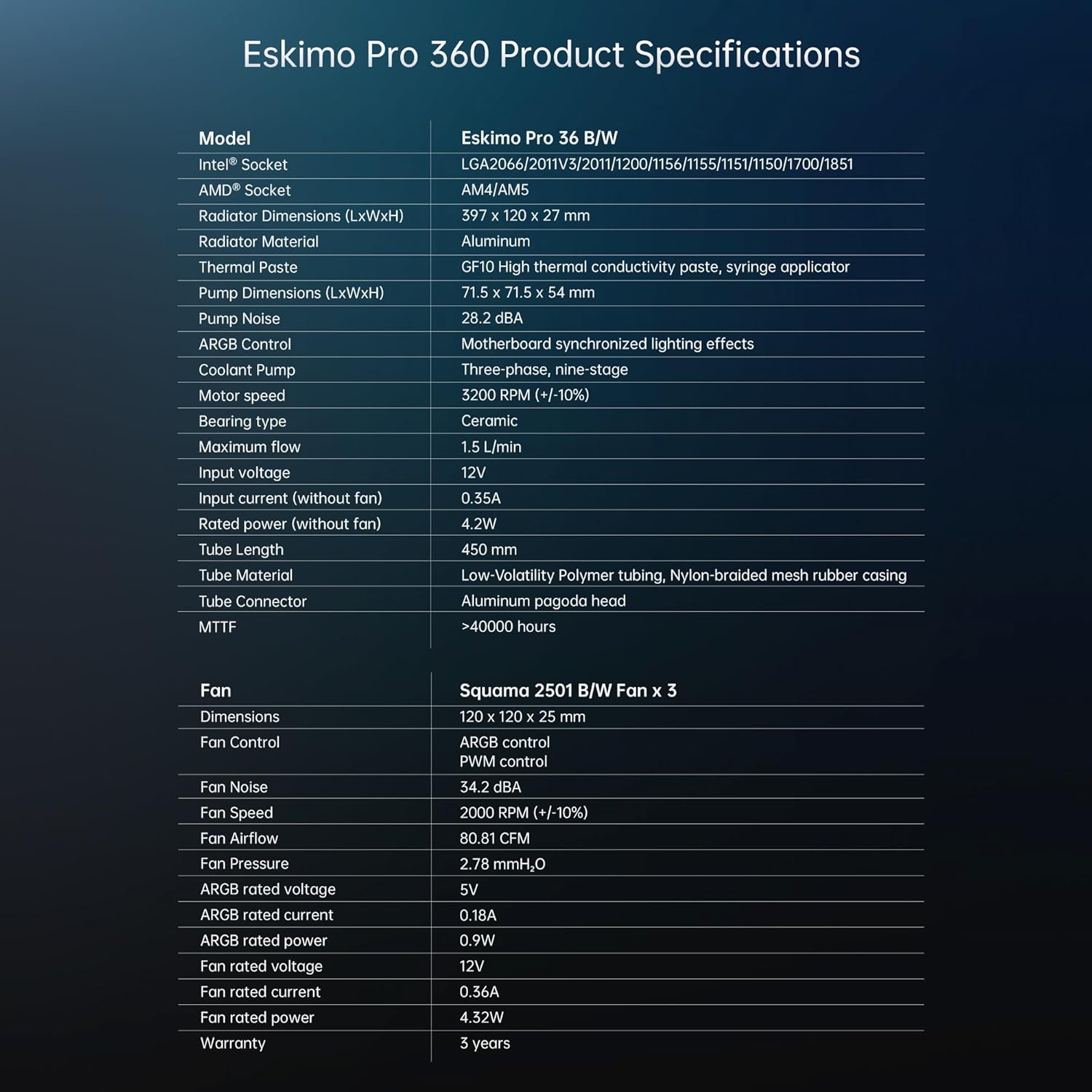
Image: Icons representing Quality Assurance, After-Sales Support, Service Commitment, and various certifications (CE, FC, RoHS, UKCA).
మినహాయింపులు:
- Damage caused by improper installation, accident, abuse, misuse, natural disaster, or unauthorized modification.
- Damage caused by operating the product outside the published guidelines.
- సాధారణ దుస్తులు మరియు కన్నీటి.
కస్టమర్ మద్దతు:
For technical support, warranty claims, or general inquiries, please visit the official Geometric Future webసైట్ లేదా వారి కస్టమర్ సర్వీస్ విభాగాన్ని సంప్రదించండి. వారంటీ ధ్రువీకరణ కోసం మీ కొనుగోలు రుజువును ఉంచండి.
Webసైట్: www.geometricfuture.com
Ask a question about this manual
Ask about setup, troubleshooting, compatibility, parts, safety, or missing instructions. Manuals+ will review the question and use this page’s manual context to help answer it.