
1. ఉత్పత్తి ముగిసిందిview
The Ulefone Armor 27T is a rugged smartphone designed for durability and advanced functionality, featuring thermal imaging, a high-resolution camera system, and a robust battery. This manual provides essential information for setting up, operating, maintaining, and troubleshooting your device.
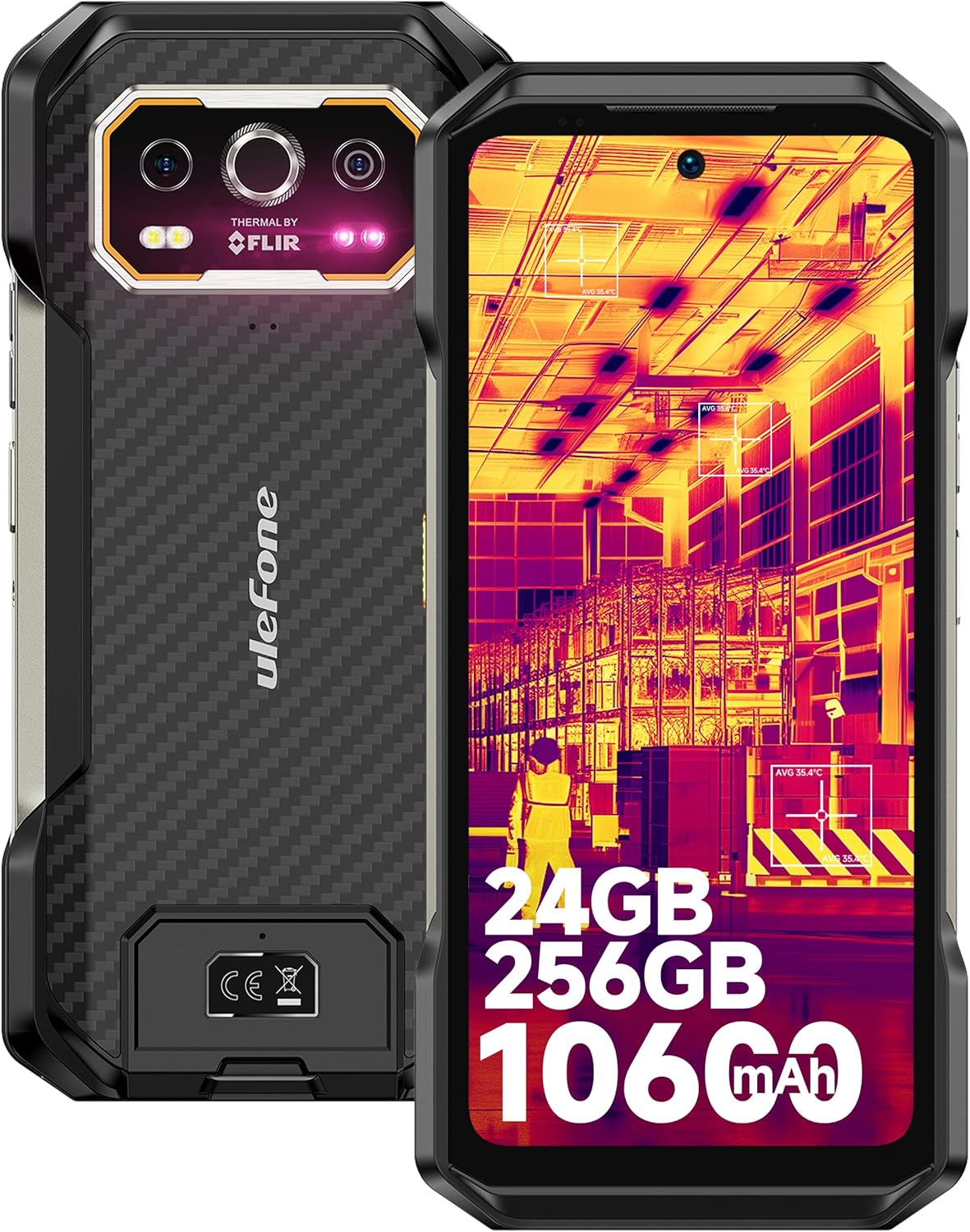
చిత్రం 1.1: ముందు మరియు వెనుక view of the Ulefone Armor 27T, showcasing its rugged design and thermal camera module.
2. ప్యాకేజీ విషయాలు
మీ ఉత్పత్తి ప్యాకేజీలో అన్ని అంశాలు ఉన్నాయని ధృవీకరించండి:
- Ulefone Armor 27T Smartphone
- AC power charger (33W)
- టైప్-సి నుండి టైప్-సి డేటా కేబుల్ (100సెం.మీ)
- స్క్రీన్ ప్రొటెక్టర్ (ముందుగా వర్తింపజేయబడింది లేదా పెట్టెలో)
- SIM ట్రే ఎజెక్టర్
- లాన్యార్డ్
- వినియోగదారు మాన్యువల్ (ఈ పత్రం)

Image 2.1: The Ulefone Armor 27T and its included accessories.
3. సెటప్ గైడ్
3.1. SIM కార్డ్ మరియు TF కార్డ్ ఇన్స్టాలేషన్
- పరికరం వైపున SIM కార్డ్ ట్రేని గుర్తించండి.
- ట్రే పక్కన ఉన్న చిన్న రంధ్రంలోకి సిమ్ ట్రే ఎజెక్టర్ సాధనాన్ని చొప్పించి, ట్రే బయటకు వచ్చే వరకు గట్టిగా నొక్కండి.
- Place your Nano-SIM card(s) and/or TF card into the designated slots on the tray. Ensure the gold contacts face downwards. The device supports a 3-card slot configuration.
- పరికర బాడీతో ఫ్లష్ అయ్యే వరకు ట్రేని ఫోన్లోకి జాగ్రత్తగా తిరిగి చొప్పించండి.
3.2. ప్రారంభ ఛార్జింగ్
Before first use, fully charge your Ulefone Armor 27T.
- Connect the Type-C cable to the charging port at the bottom of the phone.
- Connect the other end of the cable to the 33W AC power charger.
- ఛార్జర్ను పవర్ అవుట్లెట్లోకి ప్లగ్ చేయండి. ఛార్జింగ్ సూచిక స్క్రీన్పై కనిపిస్తుంది.
- For wireless charging, place the phone on a compatible 30W Qi wireless charging pad (sold separately).

Image 3.1: The Ulefone Armor 27T undergoing 33W fast charging.
3.3. పవర్ చేయడం ఆన్/ఆఫ్
- పవర్ ఆన్ చేయడానికి: Ulefone లోగో కనిపించే వరకు పవర్ బటన్ (కుడి వైపున ఉంది) నొక్కి పట్టుకోండి.
- పవర్ ఆఫ్ చేయడానికి: పవర్ బటన్ను నొక్కి పట్టుకోండి, ఆపై స్క్రీన్పై ఉన్న ఎంపికల నుండి 'పవర్ ఆఫ్' ఎంచుకోండి.
- పునఃప్రారంభించడానికి: పవర్ బటన్ను నొక్కి పట్టుకోండి, ఆపై ఎంపికల నుండి 'పునఃప్రారంభించు' ఎంచుకోండి.
4. ఆపరేటింగ్ సూచనలు
4.1. ప్రాథమిక నావిగేషన్
The Ulefone Armor 27T runs on Android 14. Navigate the interface using touch gestures:
- నొక్కండి: ఒక అంశాన్ని ఎంచుకోండి.
- స్వైప్: స్క్రీన్లు లేదా జాబితాల ద్వారా స్క్రోల్ చేయండి.
- చిటికెడు: చిత్రాలను జూమ్ ఇన్ లేదా అవుట్ చేయండి మరియు web పేజీలు.
- లాంగ్ ప్రెస్: సందర్భోచిత మెనూలను యాక్సెస్ చేయండి లేదా చిహ్నాలను తరలించండి.

Image 4.1: Android 14 OS interface exampలెస్.
4.2. Thermal Imaging Camera (FLIR Lepton)
The integrated FLIR Lepton thermal micro-camera allows you to detect infrared light and visualize heat signatures. This is useful for various applications such as:
- Detecting heat loss in buildings.
- Identifying electrical issues.
- Locating objects in low visibility conditions (darkness, smoke).
- Monitoring temperature changes in mechanical systems.
The camera features MSX and VividlR image processing for enhanced clarity. Temperature measurement range is -10°C to 450°C.

Image 4.2: Key technologies in the thermal camera, including FLIR Lepton.

చిత్రం 4.3: ఉదాamples of thermal camera applications.
4.3. కెమెరా వ్యవస్థ
The Armor 27T features a versatile camera setup:
- 50MP ప్రధాన వెనుక కెమెరా: Equipped with a Samsung ISOCELL GN1 sensor (1/1.31" ultra-large, 1.2um pixel size, F/1.65 aperture) for high-quality photos.
- 64MP నైట్ విజన్ కెమెరా: OMNIVISION'S OV64B sensor with two infrared LEDs and upgraded Ulefone NightElf Ultra 3.0 algorithm for clear images in complete darkness.
- 32MP ఫ్రంట్ కెమెరా: Samsung GD1 Sensor with a 5P lens and 80.4° field of view సెల్ఫీలు మరియు వీడియో కాల్ల కోసం.

Image 4.4: Using the 64MP Night Vision Camera.
4.4. uSmart విస్తరణ కనెక్టర్
The custom uSmart Expansion Connector allows for integration with professional accessories (sold separately), such as endoscopes, microscopes, or external night vision cameras, extending the phone's utility.

Image 4.5: uSmart Expansion Connector and compatible accessories.
4.5. ఇతర ఫీచర్లు
- NFC: కాంటాక్ట్లెస్ చెల్లింపులు మరియు డేటా బదిలీ కోసం.
- అనుకూల కీ: A programmable button for quick access to specific functions or apps.
- IR బ్లాస్టర్: అనుకూల పరారుణ పరికరాలను నియంత్రించండి.
- హెడ్సెట్ రహిత FM రేడియో: యాంటెన్నాగా హెడ్ఫోన్లు అవసరం లేకుండానే FM రేడియో వినండి.
- అవుట్డోర్ టూల్బాక్స్: A suite of utility apps for outdoor activities.
- GPS + GLONASS + Beidou + Galileo: Multiple navigation systems for accurate positioning.
- Fingerprint Unlock & Face Unlock: Biometric security options.

చిత్రం 4.6: ముగిసిందిview of additional features.
5. నిర్వహణ
5.1. మీ పరికరాన్ని శుభ్రపరచడం
సరైన పనితీరు మరియు రూపాన్ని నిర్వహించడానికి:
- స్క్రీన్ మరియు బాడీని మృదువైన, మెత్తటి బట్టతో తుడవండి.
- మొండి ధూళికి, కొద్దిగా dampen నీటితో వస్త్రం లేదా స్క్రీన్ క్లీనర్.
- కఠినమైన రసాయనాలు, రాపిడి క్లీనర్లు లేదా సంపీడన గాలిని ఉపయోగించడం మానుకోండి.
- Ensure all port covers are securely closed before cleaning with liquids.
5.2. బ్యాటరీ సంరక్షణ
10600mAh బ్యాటరీ ఎక్కువ కాలం ఉపయోగించడానికి రూపొందించబడింది. దాని జీవితకాలం పొడిగించడానికి:
- Avoid exposing the device to extreme temperatures (below -30°C or above 55°C) for prolonged periods.
- Use only the provided charger or certified compatible chargers.
- Do not fully discharge the battery regularly; partial discharges are generally better for lithium-ion batteries.
5.3. నీరు మరియు ధూళి నిరోధకత
The Armor 27T is certified IP68/IP69K and MIL-STD-810H, making it resistant to water, dust, and drops. However, proper care is still necessary:
- ఫోన్ను నీరు లేదా దుమ్ముకు గురిచేసే ముందు అన్ని పోర్ట్ కవర్లను గట్టిగా మూసివేయాలని నిర్ధారించుకోండి.
- Do not intentionally submerge the phone in water beyond the specified depth (1.5m) or duration (30 minutes).
- Rinse the phone with clean water if exposed to saltwater or other corrosive liquids, then dry thoroughly.
- Avoid dropping the phone from excessive heights, as extreme impacts can compromise its seals.

Image 5.1: Ruggedness and environmental resistance features.
6. ట్రబుల్షూటింగ్
If you encounter issues with your Ulefone Armor 27T, try the following steps:
6.1. సాధారణ సమస్యలు
- పరికరం ఆన్ చేయడం లేదు: బ్యాటరీ ఛార్జ్ అయ్యిందని నిర్ధారించుకోండి. పవర్ ఆన్ చేయడానికి ప్రయత్నించే ముందు కనీసం 10 నిమిషాలు ఛార్జర్కు కనెక్ట్ చేయండి.
- ఛార్జింగ్ సమస్యలు: Check the charging cable and adapter for damage. Ensure the charging port is clean and free of debris. Try a different outlet.
- పేలవమైన నెట్వర్క్ సిగ్నల్: మీ SIM కార్డ్ సరిగ్గా చొప్పించబడిందో లేదో తనిఖీ చేయండి. మెరుగైన నెట్వర్క్ కవరేజ్ ఉన్న ప్రాంతానికి వెళ్లండి. సమస్య కొనసాగితే మీ సర్వీస్ ప్రొవైడర్ను సంప్రదించండి.
- యాప్లు క్రాష్ అవుతున్నాయి లేదా స్తంభించిపోతున్నాయి: యాప్ను మూసివేసి తిరిగి తెరవండి. సెట్టింగ్లు > యాప్లలో యాప్ కాష్ మరియు డేటాను క్లియర్ చేయండి. ఫోన్ను రీస్టార్ట్ చేయండి.
- టచ్స్క్రీన్ స్పందించడం లేదు: Restart the device by holding the power button. If unresponsive, force restart by holding the power button for an extended period (usually 10-15 seconds).
6.2. ఫ్యాక్టరీ రీసెట్ (చివరి ప్రయత్నం)
ఫ్యాక్టరీ రీసెట్ చేయడం వలన మీ ఫోన్ నుండి మొత్తం డేటా తొలగించబడుతుంది మరియు దానిని దాని అసలు ఫ్యాక్టరీ సెట్టింగ్లకు పునరుద్ధరిస్తుంది. కొనసాగే ముందు అన్ని ముఖ్యమైన డేటాను బ్యాకప్ చేయండి.
- వెళ్ళండి సెట్టింగ్లు.
- నావిగేట్ చేయండి వ్యవస్థ > రీసెట్ ఎంపికలు.
- ఎంచుకోండి మొత్తం డేటాను తొలగించండి (ఫ్యాక్టరీ రీసెట్).
- మీ నిర్ణయాన్ని నిర్ధారించండి మరియు ప్రాంప్ట్ చేయబడితే మీ పిన్/పాస్వర్డ్ను నమోదు చేయండి.
7. స్పెసిఫికేషన్లు
| ఫీచర్ | స్పెసిఫికేషన్ |
|---|---|
| మోడల్ పేరు | Ulefone Armor 27T |
| ఆపరేటింగ్ సిస్టమ్ | ఆండ్రాయిడ్ 14 |
| ప్రాసెసర్ | MediaTek Helio G99 (8-Core, up to 2.2 GHz) |
| RAM | 24 GB (12GB భౌతిక + 12GB వర్చువల్) |
| అంతర్గత నిల్వ | 256 GB |
| విస్తరించదగిన నిల్వ | Up to 2TB via TF card |
| ప్రదర్శన పరిమాణం | 6.78 అంగుళాలు |
| డిస్ప్లే రిజల్యూషన్ | 2460x1080 (FHD+) |
| రిఫ్రెష్ రేట్ | 120 Hz |
| ప్రదర్శన రక్షణ | కార్నింగ్ గొరిల్లా గ్లాస్ విక్టస్ |
| ప్రధాన వెనుక కెమెరా | 50 ఎంపీ |
| నైట్ విజన్ కెమెరా | 64 ఎంపీ |
| ఫ్రంట్ కెమెరా | 32 ఎంపీ |
| థర్మల్ కెమెరా | FLIR Lepton (80x60 pixels, -10°C to 450°C) |
| బ్యాటరీ కెపాసిటీ | 10600 mAh |
| వైర్డ్ ఛార్జింగ్ | 33W ఫ్లాష్ ఛార్జ్ |
| వైర్లెస్ ఛార్జింగ్ | 30W Qi Wireless Charging, Wireless Reverse Charging |
| మన్నిక రేటింగ్లు | IP68, IP69K, MIL-STD-810H |
| కనెక్టివిటీ | 4G LTE, Wi-Fi 6, Bluetooth, NFC, GPS (GLONASS, Beidou, Galileo) |
| కొలతలు | 7.19 x 3.4 x 0.73 అంగుళాలు |
| బరువు | 15.6 ఔన్సులు (441 గ్రాములు) |
| ఆడియో జాక్ | 3.5 మి.మీ |
8. వారంటీ మరియు మద్దతు
8.1. వారంటీ సమాచారం
The Ulefone Armor 27T comes with a 12-month manufacturer warranty service in the US. This warranty covers defects in materials and workmanship under normal use. It does not cover damage caused by misuse, accidents, unauthorized modifications, or normal wear and tear.
8.2. కస్టమర్ మద్దతు
For any questions, technical assistance, or warranty claims regarding your Ulefone Armor 27T, please contact Ulefone customer support. You can typically find contact information on the official Ulefone webసైట్ లేదా విక్రేత మద్దతు ఛానెల్ల ద్వారా.

Image 8.1: Ulefone Exclusive Service Center representation.