
పరిచయం
The AlphaTheta HP-TX01 is a dedicated transmitter designed for professional wireless DJ headphones, enabling ultra-low latency sound transfer. It connects to any DJ mixer equipped with a PHONE or 3.5 mm stereo mini jack monitor output, providing a seamless wireless audio experience. This compact and lightweight device is engineered for portability and reliable performance in professional DJ environments.
భద్రతా సమాచారం
Please read all safety instructions before using the AlphaTheta HP-TX01 transmitter. Keep this manual for future reference.
- పరికరాన్ని వర్షం, తేమ లేదా తీవ్రమైన ఉష్ణోగ్రతలకు గురిచేయవద్దు.
- పరికరాన్ని వదలడం లేదా బలమైన ప్రభావాలకు గురి చేయడం మానుకోండి.
- Use only the provided USB-C charging cable or a compatible certified cable.
- యూనిట్ను విడదీయడానికి లేదా సవరించడానికి ప్రయత్నించవద్దు. అన్ని సర్వీసింగ్లను అర్హత కలిగిన సిబ్బందికి సూచించండి.
- పిల్లలకు దూరంగా ఉంచండి.
ప్యాకేజీ విషయాలు
ప్యాకేజీలో అన్ని అంశాలు ఉన్నాయని నిర్ధారించుకోండి:
- AlphaTheta HP-TX01 Transmitter Unit
- USB-C ఛార్జింగ్ కేబుల్
- వినియోగదారు మాన్యువల్ (ఈ పత్రం)
ఉత్పత్తి ముగిసిందిview
Familiarize yourself with the components of your HP-TX01 transmitter.
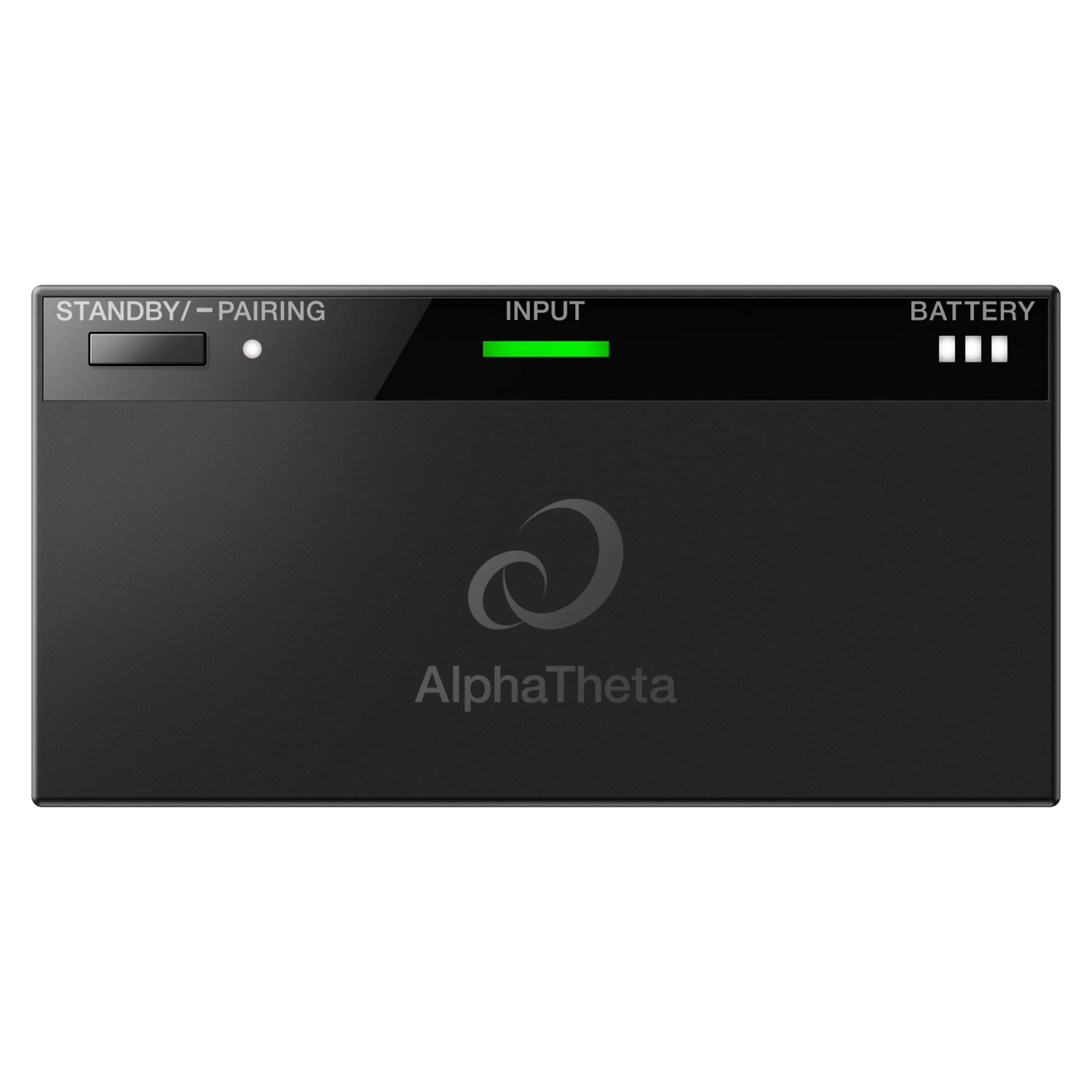
మూర్తి 1: టాప్ View of HP-TX01 Transmitter. This image displays the top surface of the AlphaTheta HP-TX01 transmitter, highlighting the STANDBY/PAIRING button, the INPUT indicator light, and the BATTERY level indicator.

చిత్రం 2: వెనుక View of HP-TX01 Transmitter. This image shows the rear panel of the transmitter, featuring the 3.5mm audio INPUT jack and the DC 5V USB-C charging port.
నియంత్రణలు మరియు సూచికలు:
- STANDBY/PAIRING Button: Used to power on/off the device and initiate pairing with compatible headphones.
- INPUT Indicator: Illuminates to show an active audio input signal.
- BATTERY Indicator: Displays the current battery charge level.
- INPUT Jack (3.5mm): Connects to the audio output of a DJ mixer.
- DC 5V (USB-C) Port: Used for charging the transmitter's internal battery.
సెటప్
1. Charging the Transmitter
- Connect the supplied USB-C charging cable to the DC 5V port on the transmitter.
- USB-C కేబుల్ యొక్క మరొక చివరను USB పవర్ అడాప్టర్ (చేర్చబడలేదు) లేదా పవర్డ్ USB పోర్ట్కి కనెక్ట్ చేయండి.
- The BATTERY indicator will show charging status. Charge fully before first use.
2. Connecting to a DJ Mixer
- Ensure your DJ mixer is powered off or its monitor output volume is set to minimum.
- Connect a 3.5mm stereo audio cable (not included) from the PHONE or 3.5 mm stereo mini jack monitor output of your DJ mixer to the INPUT jack on the HP-TX01 transmitter.
- Power on your DJ mixer and adjust the monitor output volume as needed.

Figure 3: Transmitter Connected to DJ Mixer. This image illustrates the HP-TX01 transmitter connected to a DJ mixer, with a pair of professional DJ headphones positioned next to it, demonstrating a typical setup.
ఆపరేటింగ్ సూచనలు
1. పవర్ చేయడం ఆన్/ఆఫ్
- పవర్ ఆన్ చేయడానికి: Press and hold the STANDBY/PAIRING button for approximately 2 seconds until the indicators light up.
- పవర్ ఆఫ్ చేయడానికి: Press and hold the STANDBY/PAIRING button for approximately 3 seconds until the indicators turn off.
2. Pairing with Headphones
The HP-TX01 transmitter is designed to work with compatible AlphaTheta professional wireless DJ headphones (e.g., HDJ-F10) using SonicLink technology.
- ట్రాన్స్మిటర్ పవర్ ఆన్ చేయబడిందని నిర్ధారించుకోండి.
- Place your compatible AlphaTheta wireless DJ headphones into pairing mode (refer to your headphone's user manual for specific instructions).
- On the HP-TX01 transmitter, press and hold the STANDBY/PAIRING button for approximately 5 seconds until the STANDBY/PAIRING indicator begins to flash rapidly. This indicates the transmitter is in pairing mode.
- Once the headphones and transmitter successfully pair, the STANDBY/PAIRING indicator on the transmitter will change to a solid light, and the headphones will indicate a successful connection.
గమనిక: The HP-TX01 is specifically designed for AlphaTheta professional wireless DJ headphones. Compatibility with other brands or models is not guaranteed.
3. ఆడియో ట్రాన్స్మిషన్
- After successful pairing and connection to a DJ mixer, audio from the mixer will be wirelessly transmitted to your headphones.
- The INPUT indicator on the transmitter will illuminate when an audio signal is detected.
- Adjust the volume directly on your connected headphones.
నిర్వహణ
క్లీనింగ్
- ట్రాన్స్మిటర్ యొక్క బాహ్య భాగాన్ని మృదువైన, పొడి వస్త్రంతో తుడవండి.
- రాపిడి క్లీనర్లు, మైనపులు లేదా ద్రావకాలను ఉపయోగించవద్దు.
- Ensure no liquids enter the ports or openings.
నిల్వ
- ట్రాన్స్మిటర్ను ప్రత్యక్ష సూర్యకాంతి మరియు తీవ్రమైన ఉష్ణోగ్రతలకు దూరంగా చల్లని, పొడి ప్రదేశంలో నిల్వ చేయండి.
- ఎక్కువ కాలం నిల్వ చేస్తే, బ్యాటరీ ఆరోగ్యాన్ని కాపాడుకోవడానికి కాలానుగుణంగా ఛార్జ్ చేయండి.
ట్రబుల్షూటింగ్
| సమస్య | సాధ్యమైన కారణం | పరిష్కారం |
|---|---|---|
| శక్తి లేదు | బ్యాటరీ క్షీణించింది. | Charge the transmitter using the USB-C cable. |
| No audio output to headphones |
|
|
| Poor audio quality / Dropouts |
|
|
| Transmitter not pairing |
|
|
స్పెసిఫికేషన్లు
| మోడల్ సంఖ్య | HP-TX01 |
| బ్రాండ్ | ఆల్ఫాతీటా |
| కనెక్టివిటీ టెక్నాలజీ | Wireless (SonicLink) |
| ఇన్పుట్ జాక్ | 3.5 మిమీ స్టీరియో మినీ జాక్ |
| ఛార్జింగ్ పోర్ట్ | USB-C (DC 5V) |
| వస్తువు బరువు | 10.08 ఔన్సులు (సుమారు 285.8 గ్రాములు) |
| ఎన్క్లోజర్ మెటీరియల్ | ప్లాస్టిక్ |
| ఉత్పత్తి కోసం నిర్దిష్ట ఉపయోగాలు | Professional DJing |
వారంటీ సమాచారం
The AlphaTheta HP-TX01 Transmitter comes with a 2-సంవత్సరం తయారీదారు వారంటీ. This warranty covers defects in materials and workmanship under normal use. Please retain your proof of purchase for warranty claims. For full terms and conditions, please refer to the official AlphaTheta webసైట్ లేదా కస్టమర్ సపోర్ట్ని సంప్రదించండి.
మద్దతు
For further assistance, technical support, or warranty inquiries, please visit the official AlphaTheta webసైట్ లేదా వారి కస్టమర్ సేవా విభాగాన్ని సంప్రదించండి.
- అధికారిక Webసైట్: www.alphatheta.com
- కస్టమర్ సేవ: అధికారిక పేజీలోని కాంటాక్ట్ విభాగాన్ని చూడండి. webఫోన్ నంబర్లు లేదా ఇమెయిల్ మద్దతు కోసం సైట్.