
పరిచయం
ఈ మాన్యువల్ మీ కొత్త ఎలక్ట్రిక్ చిల్డ్రన్స్ బగ్గీ కెన్-యామ్ మావెరిక్ యొక్క సురక్షితమైన ఆపరేషన్, అసెంబ్లీ, నిర్వహణ మరియు ట్రబుల్షూటింగ్ కోసం అవసరమైన సమాచారాన్ని అందిస్తుంది. సరైన పనితీరు మరియు భద్రతను నిర్ధారించడానికి అసెంబ్లీ మరియు ఉపయోగం ముందు దయచేసి ఈ మాన్యువల్ను పూర్తిగా చదవండి.
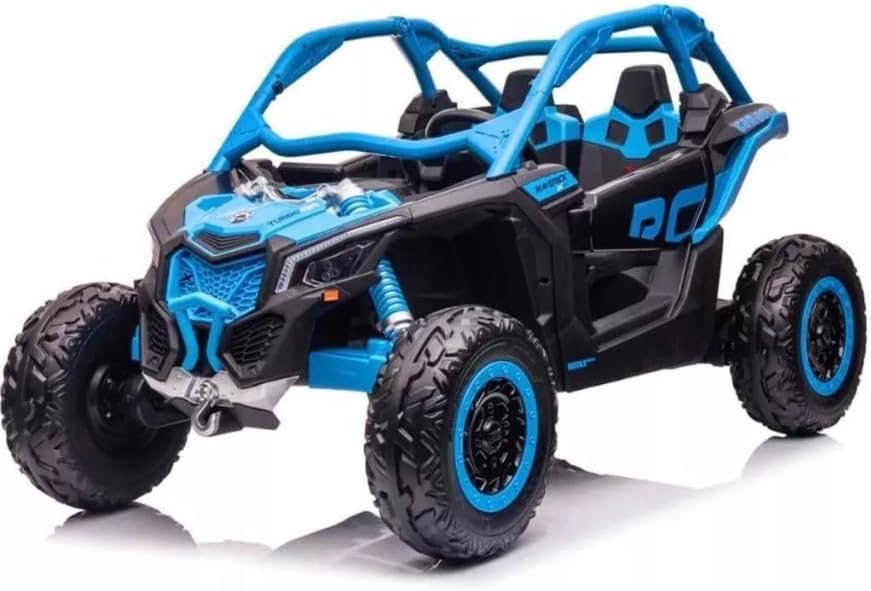
చిత్రం: ఒక డైనమిక్ వైపు view ఎలక్ట్రిక్ చిల్డ్రన్స్ బగ్గీ కాన్-యామ్ మావెరిక్, షోక్asing దాని దృఢమైన డిజైన్ మరియు శక్తివంతమైన నీలం మరియు నలుపు రంగుల పథకం.
ముఖ్యమైన భద్రతా సమాచారం
గాయాల ప్రమాదాన్ని తగ్గించడానికి, పెద్దల పర్యవేక్షణ ఎల్లప్పుడూ అవసరం. రోడ్లపై, కార్ల దగ్గర, నిటారుగా ఉన్న వాలులు లేదా మెట్లపై ఈ వాహనాన్ని ఎప్పుడూ ఉపయోగించవద్దు. వాహనాన్ని నీటిలో లేదా ఇతర ద్రవాలలో ముంచవద్దు.
- పిల్లవాడు ఎల్లప్పుడూ హెల్మెట్ వంటి తగిన భద్రతా గేర్ను ధరించాడని నిర్ధారించుకోండి.
- ప్రతి ఉపయోగం ముందు అన్ని ఫాస్టెనర్లు సురక్షితంగా బిగించబడ్డాయని నిర్ధారించుకోండి.
- ప్రమాదాలకు దూరంగా ఉన్న చదునైన, పొడి ఉపరితలాలపై మాత్రమే పనిచేయండి.
- చేతులు, జుట్టు మరియు దుస్తులను కదిలే భాగాలకు దూరంగా ఉంచండి.
సెటప్ మరియు అసెంబ్లీ
ఈ ఉత్పత్తికి అసెంబ్లీ అవసరం. దయచేసి క్రింద ఉన్న దశలను జాగ్రత్తగా అనుసరించండి.
అన్ప్యాకింగ్ మరియు ప్రారంభ తనిఖీ
ప్యాకేజింగ్ నుండి అన్ని భాగాలను జాగ్రత్తగా తొలగించండి. ప్యాకింగ్ జాబితాలో జాబితా చేయబడిన అన్ని భాగాలు ఉన్నాయని మరియు పాడైపోలేదని ధృవీకరించండి. ఏవైనా భాగాలు తప్పిపోయినా లేదా దెబ్బతిన్నా, అసెంబ్లీని కొనసాగించవద్దు మరియు కస్టమర్ మద్దతును సంప్రదించండి.
అసెంబ్లీ దశలు
- చక్రాల సంస్థాపన: అందించిన హార్డ్వేర్తో అవి సురక్షితంగా బిగించబడ్డాయని నిర్ధారించుకుని, చక్రాలను ఇరుసులకు అటాచ్ చేయండి.
- స్టీరింగ్ వీల్ అసెంబ్లీ: స్టీరింగ్ వీల్ను స్టీరింగ్ కాలమ్కి కనెక్ట్ చేయండి. అది క్లిక్ అయ్యేలా చూసుకోండి లేదా నియమించబడిన స్క్రూతో భద్రపరచబడిందని నిర్ధారించుకోండి.
- సీటు ఇన్స్టాలేషన్: సీట్లను నిర్దేశించిన స్లాట్లలో ఉంచి, వాటిని భద్రపరచండి. సీట్ బెల్టులు అందుబాటులో ఉన్నాయని మరియు క్రియాత్మకంగా ఉన్నాయని నిర్ధారించుకోండి.
- బ్యాటరీ కనెక్షన్: బ్యాటరీ టెర్మినల్స్ను కనెక్ట్ చేయండి. నిర్దిష్ట సూచనల కోసం బ్యాటరీ కంపార్ట్మెంట్ను చూడండి. కనెక్షన్ గట్టిగా ఉందని నిర్ధారించుకోండి.
- మొదటి ఛార్జ్: మొదటిసారి ఉపయోగించే ముందు, బ్యాటరీని 8-12 గంటలు పూర్తిగా ఛార్జ్ చేయండి. ఎక్కువ ఛార్జ్ చేయవద్దు.

చిత్రం: వెనుక view తలుపు తెరిచి ఉన్న ఎలక్ట్రిక్ బగ్గీ యొక్క దృశ్యం, విశాలమైన ఇంటీరియర్ మరియు బలమైన వెనుక సస్పెన్షన్ భాగాలను హైలైట్ చేస్తుంది.
ఆపరేటింగ్ సూచనలు
పైగా నియంత్రణలుview

చిత్రం: ఎలక్ట్రిక్ బగ్గీ యొక్క డాష్బోర్డ్, స్టీరింగ్ వీల్, డిజిటల్ స్పీడోమీటర్ డిస్ప్లే మరియు మల్టీమీడియా స్క్రీన్ను కలిగి ఉంది.
- ప్రారంభం/ఆపు బటన్: కీ స్లాట్ దగ్గర ఉంది, వాహనాన్ని ఆన్ లేదా ఆఫ్ చేయడానికి నొక్కండి.
- యాక్సిలరేటర్ పెడల్: ముందుకు కదలడానికి నొక్కండి. బ్రేక్ చేయడానికి విడుదల చేయండి.
- స్టీరింగ్ వీల్: వాహనాన్ని నడపడానికి ఎడమ లేదా కుడి వైపుకు తిరగండి.
- గేర్ సెలెక్టర్: (వర్తిస్తే) ఫార్వర్డ్, న్యూట్రల్ మరియు రివర్స్ మధ్య మారండి.
- మల్టీమీడియా స్క్రీన్: వినోదం మరియు వాహన సమాచారాన్ని అందిస్తుంది.
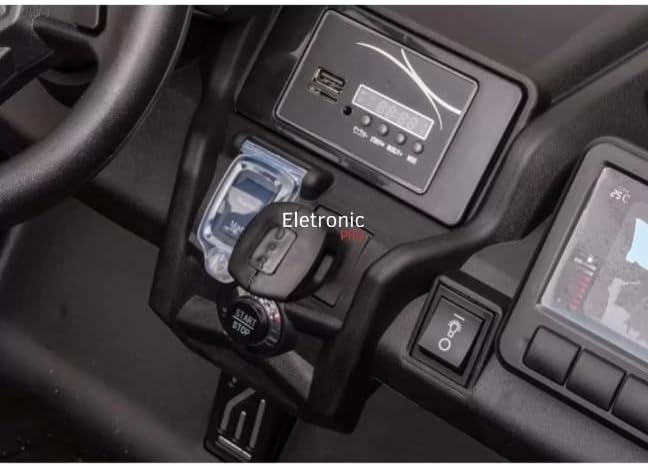
చిత్రం: క్లోజప్ view ఎలక్ట్రిక్ బగ్గీ సెంట్రల్ కన్సోల్ యొక్క స్టార్ట్/స్టాప్ బటన్ మరియు కీ ఇగ్నిషన్ స్లాట్ను చూపిస్తుంది.
వాహనం నడపడం
- బిడ్డను సరిగ్గా కూర్చోబెట్టి, సీట్ బెల్ట్ బిగించారని నిర్ధారించుకోండి.
- వాహనాన్ని ఆన్ చేయడానికి స్టార్ట్/స్టాప్ బటన్ను నొక్కండి.
- ముందుకు కదలడానికి యాక్సిలరేటర్ పెడల్ను సున్నితంగా నొక్కండి. ఆపడానికి పెడల్ను విడుదల చేయండి.
- నావిగేట్ చేయడానికి స్టీరింగ్ వీల్ ఉపయోగించండి.
- ఆపరేషన్ సమయంలో బిడ్డను ఎల్లప్పుడూ పర్యవేక్షించండి.

చిత్రం: ఎలక్ట్రిక్ బగ్గీ లోపలి భాగం, భద్రతా సీట్బెల్ట్లతో కూడిన రెండు నల్లటి, కాంటౌర్డ్ సీట్లను కలిగి ఉంది.
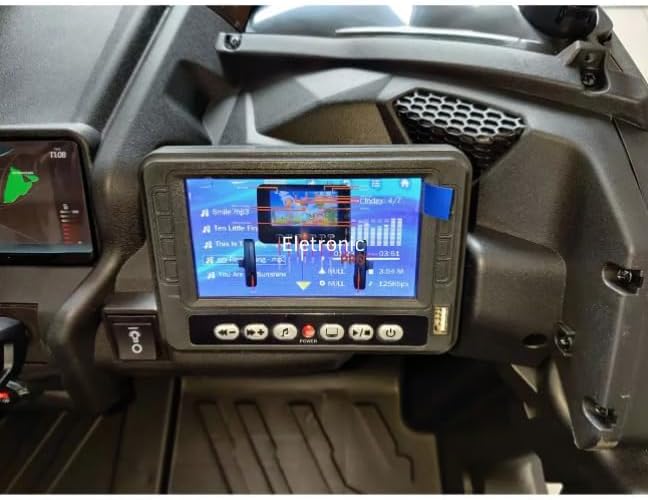
చిత్రం: ఎలక్ట్రిక్ బగ్గీ యొక్క మల్టీమీడియా స్క్రీన్ యొక్క క్లోజప్, పాట శీర్షికలతో కూడిన మ్యూజిక్ ప్లేబ్యాక్ ఇంటర్ఫేస్ మరియు ఈక్వలైజర్ డిస్ప్లేను చూపిస్తుంది.
నిర్వహణ
బ్యాటరీ సంరక్షణ
- ప్రతి ఉపయోగం తర్వాత బ్యాటరీని ఛార్జ్ చేయండి.
- బ్యాటరీ పూర్తిగా విడుదలయ్యేలా అనుమతించవద్దు.
- ఎక్కువసేపు నిల్వ చేస్తే, నెలకు ఒకసారి బ్యాటరీని ఛార్జ్ చేయండి.
- వాహనంతో పాటు అందించిన ఛార్జర్ను మాత్రమే ఉపయోగించండి.
శుభ్రపరచడం మరియు నిల్వ చేయడం
- ప్రకటనతో వాహనాన్ని తుడవండిamp గుడ్డ. రాపిడి క్లీనర్లను ఉపయోగించవద్దు.
- వాహనాన్ని ప్రత్యక్ష సూర్యకాంతి మరియు తేమ నుండి దూరంగా పొడి, చల్లని ప్రదేశంలో నిల్వ చేయండి.
- వాహనాన్ని తీవ్రమైన ఉష్ణోగ్రతల నుండి రక్షించండి.
ట్రబుల్షూటింగ్
| సమస్య | సాధ్యమైన కారణం | పరిష్కారం |
|---|---|---|
| వాహనం కదలదు | బ్యాటరీ తక్కువగా ఉంది లేదా డిస్కనెక్ట్ చేయబడింది; వైర్ కనెక్షన్ వదులుగా ఉంది; ఫ్యూజ్ ఎగిరిపోయింది. | బ్యాటరీని ఛార్జ్ చేయండి; బ్యాటరీ కనెక్షన్లను తనిఖీ చేయండి; ఫ్యూజ్ను తనిఖీ చేయండి మరియు అవసరమైతే భర్తీ చేయండి. |
| వాహనం నెమ్మదిగా నడుస్తుంది | బ్యాటరీ తక్కువగా ఉంది; ఓవర్లోడ్ వాహనం; కఠినమైన భూభాగంలో పనిచేయడం. | బ్యాటరీని రీఛార్జ్ చేయండి; లోడ్ తగ్గించండి; మృదువైన ఉపరితలాలపై పనిచేయండి. |
| మల్టీమీడియా స్క్రీన్ నుండి శబ్దం లేదు | వాల్యూమ్ చాలా తక్కువగా ఉంది; ఆడియో కేబుల్ డిస్కనెక్ట్ చేయబడింది. | వాల్యూమ్ పెంచండి; ఆడియో కనెక్షన్లను తనిఖీ చేయండి. |
స్పెసిఫికేషన్లు
- మోడల్: డికె-సిఎ 001
- బ్రాండ్: సాధారణమైనది
- సిఫార్సు చేసిన వయస్సు: 36 నెలలు - 8 సంవత్సరాలు
- మెటీరియల్స్: ప్లాస్టిక్, రబ్బరు, స్టీల్ మిశ్రమం
- ఉత్పత్తి కొలతలు: 145 x 84 x 79 సెం.మీ
- ఉత్పత్తి బరువు: 42 కిలోలు
- అసెంబ్లీ అవసరం: అవును
- ధృవీకరణ: వర్తించదు
వారంటీ మరియు మద్దతు
ఈ ఉత్పత్తి కొనుగోలు చేసిన తేదీ నుండి 7 రోజుల వాపసు పాలసీతో వస్తుంది. ఏవైనా సమస్యలు, ప్రశ్నలు ఉంటే లేదా వారంటీ మద్దతును క్లెయిమ్ చేయడానికి, దయచేసి విక్రేతను నేరుగా సంప్రదించండి. ఏవైనా వారంటీ క్లెయిమ్ల కోసం దయచేసి మీ కొనుగోలు రుజువును ఉంచుకోండి.
విక్రేత: ఎలక్ట్రానిక్ ప్రో లిమిటెడ్


