
1. ఉత్పత్తి ముగిసిందిview
The Bewinner 2-Way Video Calling Camera is designed for indoor home security and communication. Featuring a 2.8-inch HD screen and 3-megapixel resolution, it enables clear two-way video and voice calls. This device includes AI detection capabilities, night vision, and supports wireless connectivity for convenient monitoring and interaction with family members, especially the elderly and children.
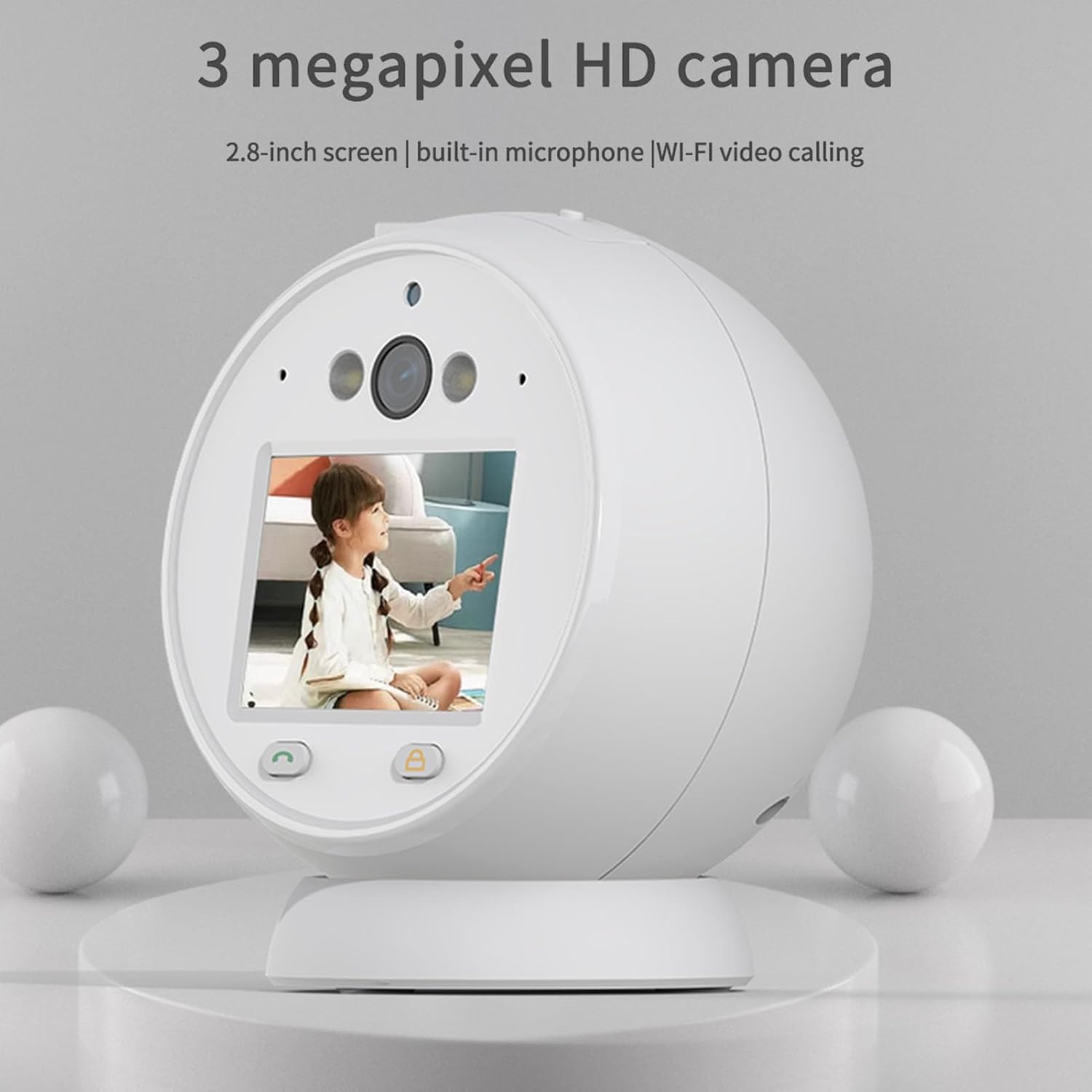
Image: The Bewinner 2-Way Video Calling Camera, showcasing its 2.8-inch screen and compact design.
2 కీ ఫీచర్లు
- HD వీడియో కాలింగ్: Supports 2.8-inch horizontal screen technology with 3 million real pixels for ultra-high-definition two-way video and voice communication.
- ఇంటెలిజెంట్ నాయిస్ తగ్గింపు: Built-in microphone with intelligent ambient noise reduction ensures clear audio during calls.
- 2.4GHz Wireless Connectivity: Provides clear picture quality and supports cloud storage or a Micro SD card (up to 128GB, not included) for recording.
- Real-Time Video Surveillance: Features white infrared double light night viewing using LED display technology for efficient application in low-light conditions.
- భద్రతా పర్యవేక్షణ: Allows remote viewing anytime, anywhere, enhancing the safety of elderly individuals and children.
- AI గుర్తింపు: Includes human-like detection and alarm push notifications for enhanced security.
- PTZ నియంత్రణ: Offers Pan-Tilt-Zoom control for adjusting the camera's viewing కోణం.
- 360° Resolution: Provides a wide viewసమగ్ర కవరేజ్ కోసం కోణం.

Image: Visual representation of key features including human detection, alarm push, night vision, one-touch call, video call, voice call, PTZ control, 3MP HD, and 360° resolution.
3. స్పెసిఫికేషన్లు
| మోడల్ పేరు | Bewinnerfzq6sepu2w |
| స్క్రీన్ పరిమాణం | 2.8 అంగుళాల HD |
| రిజల్యూషన్ | 3 మెగాపిక్సెల్స్ |
| కనెక్టివిటీ | 2.4GHz Wireless (Wi-Fi) |
| నిల్వ మద్దతు | క్లౌడ్ స్టోరేజ్, మైక్రో SD కార్డ్ (128GB వరకు) |
| నైట్ విజన్ | White Infrared Double Light |
| ఆడియో | Two-way voice, Intelligent Noise Reduction |
| శక్తి మూలం | AC/DC |
| సిఫార్సు ఉపయోగం | ఇండోర్ |
| కంట్రోలర్ రకం | Android (via compatible app) |
4. సెటప్ గైడ్
4.1 అన్బాక్సింగ్ మరియు ప్రారంభ తనిఖీ
Carefully remove all components from the packaging. Verify that all items listed in the packing list are present and undamaged. The typical package includes the camera unit, a power supply cord, and this user manual.
4.2 పవర్ కనెక్షన్
- Connect the provided power supply cord to the camera's power input port.
- Plug the other end of the power supply cord into a standard AC power outlet.
- The camera will power on automatically, indicated by an LED light or screen activation.
4.3 యాప్ ఇన్స్టాలేషన్ మరియు నెట్వర్క్ కనెక్షన్
To utilize the camera's full features, including remote viewing and video calls, you must connect it to your home Wi-Fi network via a compatible mobile application.
- Download the designated mobile application (refer to the packaging or included quick start guide for app name) from your device's app store (e.g., Google Play Store for Android).
- యాప్ తెరిచి కొత్త యూజర్ ఖాతాను సృష్టించండి లేదా మీకు ఇప్పటికే ఒకటి ఉంటే లాగిన్ అవ్వండి.
- Follow the in-app instructions to add a new device. This typically involves scanning a QR code on the camera or manually entering its device ID.
- When prompted, connect the camera to your 2.4GHz Wi-Fi network. Ensure your mobile device is also connected to the same 2.4GHz network during the setup process.
- Once connected, the camera's status indicator will confirm successful pairing, and you will be able to view the live feed through the app.
4.4 మైక్రో SD కార్డ్ ఇన్స్టాలేషన్ (ఐచ్ఛికం)
For local video storage, install a Micro SD card (up to 128GB, not included).
- Locate the Micro SD card slot on the camera (usually on the side or bottom).
- మైక్రో SD కార్డ్ని స్లాట్లోకి క్లిక్ చేసే వరకు దాన్ని సున్నితంగా చొప్పించండి.
- Format the Micro SD card through the camera's settings in the mobile application for optimal performance.

Image: The Bewinner camera unit shown alongside its power cable, illustrating the components for setup.
5. ఆపరేటింగ్ సూచనలు
5.1 ప్రత్యక్ష ప్రసారం View మరియు రిమోట్ పర్యవేక్షణ
Open the mobile application on your smartphone or tablet. Select the camera from your device list to access the live video feed. You can monitor your home in real-time from anywhere with an internet connection.

Image: The camera monitoring a child, illustrating its use for remote safety and peace of mind.
5.2 Two-Way Video and Voice Calling
To initiate a video call, tap the video call icon within the app's live view interface. The camera's screen will display the incoming call. To speak, use the microphone icon in the app. The camera's built-in microphone and speaker allow for clear two-way communication.
5.3 Night Vision Activation
The camera automatically switches to night vision mode in low-light conditions. The white infrared double light technology provides clear black and white video footage at night. You can typically adjust night vision settings (auto/on/off) within the mobile application.

Image: Depiction of the camera's white infrared double light night vision in action, providing visibility in darkness.
5.4 మోషన్ డిటెక్షన్ మరియు అలారాలు
Configure motion detection settings in the app to receive alerts on your mobile device when movement is detected. You can customize detection zones, sensitivity levels, and alarm schedules.
5.5 PTZ నియంత్రణ
If your camera model supports PTZ (Pan-Tilt-Zoom), use the directional controls within the mobile app to remotely adjust the camera's viewing angle horizontally and vertically.
5.6 నిల్వ నిర్వహణ
Recorded videos can be stored on a Micro SD card or in the cloud (subscription may be required for cloud services). Access and manage recordings through the mobile application. You can view playback, download clips, or delete old footage.

Image: The camera displaying a family, highlighting its 360° resolution and storage capabilities (up to 128GB Micro SD and cloud).
6. నిర్వహణ
6.1 కెమెరాను శుభ్రపరచడం
To maintain optimal performance, regularly clean the camera lens and body. Use a soft, dry, lint-free cloth. For stubborn smudges on the lens, slightly dampen the cloth with a lens cleaning solution. Avoid harsh chemicals or abrasive materials.
6.2 సాఫ్ట్వేర్ నవీకరణలు
Periodically check the mobile application for firmware updates for your camera. Keeping the firmware updated ensures access to the latest features, security enhancements, and bug fixes. Follow the in-app instructions for updating the camera's software.
6.3 నిల్వ నిర్వహణ
క్రమం తప్పకుండా రీview మరియు మీ నిల్వ చేసిన foo ని నిర్వహించండిtage. Delete unnecessary recordings to free up space on your Micro SD card or cloud storage. Ensure your Micro SD card is in good condition; replace it if you notice any data corruption or read/write errors.
7. ట్రబుల్షూటింగ్
- కెమెరా పవర్ చేయడం లేదు:
Ensure the power cord is securely connected to both the camera and a working power outlet. Try a different outlet. - Wi-Fiకి కనెక్ట్ చేయడం సాధ్యం కాలేదు:
Verify that your Wi-Fi network is 2.4GHz. Ensure the camera is within range of your Wi-Fi router. Restart your router and the camera, then attempt to reconnect through the app. Double-check your Wi-Fi password. - No Live Video Feed:
Check your internet connection. Ensure the camera is powered on and connected to Wi-Fi. Restart the mobile app. - పేలవమైన వీడియో నాణ్యత:
Ensure the camera lens is clean. Check your Wi-Fi signal strength; a weak signal can affect video quality. Reduce the distance between the camera and the router if possible. - రెండు-మార్గం ఆడియో పని చేయడం లేదు:
Check the microphone and speaker settings in the mobile app. Ensure your phone's volume is up. Make sure there are no obstructions blocking the camera's microphone or speaker. - రాత్రి దృష్టి సమస్యలు:
Ensure the camera is in a dark environment for night vision to activate automatically. Check night vision settings in the app. - SD కార్డ్ రికార్డ్ కావడం లేదు:
Ensure the Micro SD card is correctly inserted and formatted through the app. Check if the card is full; delete old recordings or replace the card.
8. వారంటీ మరియు మద్దతు
Bewinner products are covered by a limited warranty. For specific warranty terms and conditions, please refer to the warranty card included with your product or visit the official Bewinner website. If you encounter any issues that cannot be resolved using the troubleshooting guide, please contact Bewinner customer support for assistance. Contact information can typically be found on the product packaging, the official website, or within the mobile application.
వారంటీ క్లెయిమ్ల కోసం దయచేసి మీ కొనుగోలు రుజువును ఉంచుకోండి.