
KOFIRE UG-06
KOFIRE UG-06 Wireless Gaming Headset Instruction Manual
మోడల్: UG-06 | బ్రాండ్: కోఫైర్
పరిచయం
Thank you for choosing the KOFIRE UG-06 Wireless Gaming Headset. This manual provides detailed instructions for setup, operation, and maintenance to ensure you get the best experience from your new headset. The UG-06 is designed to deliver superior audio performance and comfort for gaming, work, and entertainment across multiple platforms.
పెట్టెలో ఏముంది
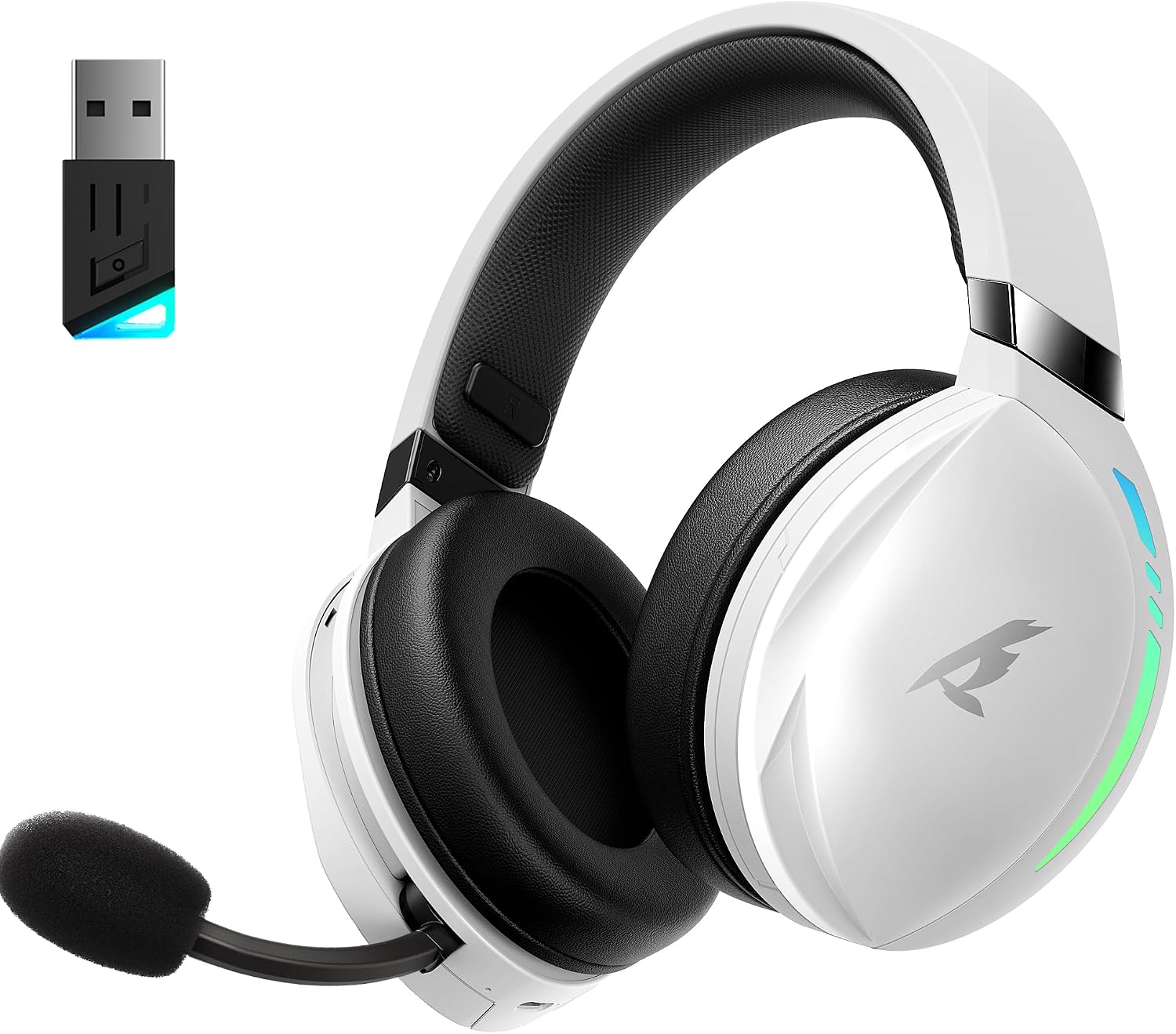
The KOFIRE UG-06 Wireless Gaming Headset in white and black, shown with its USB dongle.
- 1 x KOFIRE UG-06 Wireless Gaming Headset
- 1 x USB Dongle (2.4GHz Wireless Receiver)
- 1 x 0.8మీ TYPE-C ఛార్జింగ్ కేబుల్
- 1 x Foam Mic Cover
- 1 x 3.5mm ఆడియో కేబుల్
- 1 x యూజర్ మాన్యువల్ (ఈ పత్రం)
ఉత్పత్తి ముగిసిందిview మరియు ముఖ్య లక్షణాలు

A user wearing the headset, illustrating the immersive 3D spatial audio experience.

ఒక క్లోజప్ view of the retractable, hidden noise-canceling microphone.
- 50MM Driver & 3D Stereo Sound: Equipped with powerful 50mm drivers for excellent 3D stereo effects and high-fidelity sound, ensuring you hear every detail for an immersive gaming experience.
- 2.4Ghz Wireless Connection & Bluetooth 5.4: Advanced 2.4Ghz wireless technology and Bluetooth 5.4 provide a seamless and stable connection with ultra-low latency (15ms). Easily switch between Bluetooth and 2.4G dongle mode by triple-clicking the power button.
- Unmatched Comfort & Telescopic Noise Cancelling Mic: Ergonomic design with oversized, soft protein leather earmuffs for pressure reduction and effective noise isolation. The adjustable headband ensures a personalized fit. The noise-canceling microphone with a sponge cap blocks 80% of background noise, and its retractable design offers convenience.
- Extended Playtime & Cool RGB Design: Enjoy up to 65 hours of continuous play in music/video modes (lights off) or 40 hours with 2.4Ghz gaming. Dynamic breathing RGB lights enhance the gaming atmosphere. Note: RGB lighting doubles power consumption.
- బహుముఖ అనుకూలత: Supports three connection modes: lossless 2.4GHz USB dongle, Bluetooth 5.4, and 3.5mm wired connection. Compatible with PS4, PS5, PC, Switch, Mac, Phone, and tablet.

The headset demonstrating its compatibility with multiple gaming platforms and devices.
సెటప్ సూచనలు
1. ప్రారంభ ఛార్జింగ్
Before first use, fully charge your headset using the provided USB Type-C charging cable. Connect the Type-C end to the headset's charging port and the USB-A end to a compatible power source (e.g., computer USB port, USB wall adapter). The charging indicator light will show charging status.
2. Connecting via 2.4GHz USB Dongle (Recommended for Gaming)
- Insert the 2.4GHz USB dongle into an available USB port on your device (PS4, PS5, PC, Mac, Switch).
- Power on the headset by pressing and holding the Power button until you hear a confirmation tone or see the indicator light.
- The headset should automatically pair with the dongle. A solid indicator light on both the headset and dongle typically signifies a successful connection.
- Ensure the headset is selected as the audio output and input device in your system's sound settings.
3. బ్లూటూత్ 5.4 ద్వారా కనెక్ట్ అవుతోంది
- With the headset powered on, triple-click the Power button to switch to Bluetooth mode. The indicator light will flash, indicating pairing mode.
- On your device (phone, tablet, PC), go to Bluetooth settings and search for "KOFIRE UG-06" (or similar).
- జత చేయడానికి హెడ్సెట్ను ఎంచుకోండి. కనెక్ట్ చేసిన తర్వాత, సూచిక లైట్ ఘనమవుతుంది.
4. Connecting via 3.5mm Wired Connection
- 3.5mm ఆడియో కేబుల్ యొక్క ఒక చివరను హెడ్సెట్ యొక్క 3.5mm పోర్ట్కు కనెక్ట్ చేయండి.
- మరొక చివరను మీ పరికరంలోని 3.5mm ఆడియో జాక్కి కనెక్ట్ చేయండి.
- The headset will operate in passive mode, drawing no power from its internal battery.
ఆపరేటింగ్ సూచనలు
హెడ్సెట్ నియంత్రణలు

వివరంగా view of the control buttons and volume wheel on the headset's earcup.

The headset showcasing its dynamic breathing RGB lighting feature.
- పవర్ ఆన్/ఆఫ్: పవర్ బటన్ను 3 సెకన్ల పాటు నొక్కి పట్టుకోండి.
- వాల్యూమ్ నియంత్రణ: Use the scroll wheel on the earcup to adjust the volume up or down.
- మైక్రోఫోన్ మ్యూట్/అన్మ్యూట్: Press the dedicated Mute button on the earcup to toggle the microphone on or off.
- మోడ్ స్విచింగ్: Triple-click the Power button to switch between 2.4GHz wireless and Bluetooth modes.
- RGB లైటింగ్: Press the RGB button to cycle through lighting effects or turn them off. Note that turning off RGB lights extends battery life.
- మైక్రోఫోన్ వినియోగం: Pull the telescopic microphone down when speaking. Ensure the foam mic cover is in place to reduce plosives and background noise. Push the microphone back into the earcup when not in use.
నిర్వహణ
- శుభ్రపరచడం: Use a soft, dry cloth to clean the headset. Avoid harsh chemicals or abrasive materials.
- నిల్వ: హెడ్సెట్ను ప్రత్యక్ష సూర్యకాంతి మరియు తీవ్రమైన ఉష్ణోగ్రతలకు దూరంగా చల్లని, పొడి ప్రదేశంలో నిల్వ చేయండి.
- బ్యాటరీ సంరక్షణ: బ్యాటరీ జీవితకాలాన్ని పొడిగించడానికి, హెడ్సెట్ను తరచుగా పూర్తిగా డిశ్చార్జ్ చేయకుండా ఉండండి. నిరంతరం ఉపయోగంలో లేకపోయినా, దానిని క్రమం తప్పకుండా ఛార్జ్ చేయండి.
- మైక్రోఫోన్ కేర్: Handle the retractable microphone gently to prevent damage.
ట్రబుల్షూటింగ్
| సమస్య | పరిష్కారం |
|---|---|
| No sound/microphone not working (2.4GHz) |
|
| బ్లూటూత్ జత చేయడంలో సమస్యలు |
|
| తక్కువ బ్యాటరీ జీవితం |
|
| Sound quality issues (wired mode) |
|
స్పెసిఫికేషన్లు
| ఫీచర్ | వివరాలు |
|---|---|
| మోడల్ పేరు | UG-06 |
| కనెక్టివిటీ టెక్నాలజీ | 2.4Ghz Wireless, Bluetooth 5.4, 3.5mm Wired |
| ఆడియో డ్రైవర్ పరిమాణం | 50 మిల్లీమీటర్లు |
| బ్యాటరీ లైఫ్ | Up to 65 Hours (music/video, lights off), 40 Hours (2.4Ghz gaming) |
| ఛార్జింగ్ సమయం | 3 గంటలు |
| ఆడియో లాటెన్సీ | 15 మిల్లీసెకన్లు |
| నాయిస్ కంట్రోల్ | Sound Isolation, ENC Noise Canceling Mic |
| అనుకూల పరికరాలు | PS4, PS5, PC, Switch, Mac, Phone, Tablet |
| మెటీరియల్ | Leather, Plastic, Polycarbonate (PC), Soft Memory Sponge Cushions |
| వస్తువు బరువు | 1.19 పౌండ్లు |
| ఉత్పత్తి కొలతలు | 7.5 x 1 x 7.9 అంగుళాలు |
వారంటీ మరియు మద్దతు
KOFIRE provides a reliable 24-hour online service to ensure customer satisfaction. For any issues, questions, or support needs, please contact KOFIRE customer service through the retailer's platform or the official KOFIRE webసైట్.
Please refer to your purchase documentation for specific warranty details and duration.
Ask a question about this manual
Ask about setup, troubleshooting, compatibility, parts, safety, or missing instructions. Manuals+ will review the question and use this page’s manual context to help answer it.