
1. పరిచయం
Thank you for choosing the MESTEK TH11 Digital Temperature and Humidity Meter. This device is designed for precise measurement of ambient temperature, relative humidity, wet bulb temperature, and dew point temperature. Its portable and user-friendly design makes it suitable for a wide range of applications, from home environments to industrial and agricultural settings. Please read this manual thoroughly before use to ensure proper operation and to maximize the lifespan of your instrument.

Image 1.1: The MESTEK TH11 meter highlighting its multi-functional capabilities including ambient temperature, humidity, wet bulb, and dew point measurements.
2. భద్రతా సమాచారం
- పరికరాన్ని విడదీయడానికి లేదా సవరించడానికి ప్రయత్నించవద్దు.
- Keep the device away from water and high humidity environments to prevent damage.
- పరికరాన్ని అధిక ఉష్ణోగ్రతలు లేదా ప్రత్యక్ష సూర్యకాంతికి ఎక్కువ కాలం బహిర్గతం చేయకుండా ఉండండి.
- ఖచ్చితమైన రీడింగ్లను నిర్ధారించడానికి తక్కువ బ్యాటరీ సూచిక కనిపించినప్పుడు వెంటనే బ్యాటరీలను మార్చండి.
- స్థానిక నిబంధనల ప్రకారం ఉపయోగించిన బ్యాటరీలను పారవేయండి.
- పరికరాన్ని మృదువైన, పొడి వస్త్రంతో శుభ్రం చేయండి. రాపిడి క్లీనర్లను లేదా ద్రావకాలను ఉపయోగించవద్దు.
3. ఉత్పత్తి ముగిసిందిview
3.1. ప్యాకేజీ విషయాలు
ప్యాకేజీని తెరిచిన తర్వాత, దయచేసి అన్ని వస్తువులు ఉన్నాయని మరియు మంచి స్థితిలో ఉన్నాయని ధృవీకరించండి:
- 1 x MESTEK TH11 Digital Temperature and Humidity Meter
- 3 x AAA బ్యాటరీలు
- 1 x క్లాత్ బ్యాగ్
- 1 x స్క్రూడ్రైవర్
- 1 x వినియోగదారు మాన్యువల్

Image 3.1: The complete packing list for the MESTEK TH11, showing all included accessories.
3.2. పరికర భాగాలు
Familiarize yourself with the main parts of your MESTEK TH11 meter:
- ప్రోబ్ సెన్సార్: Located at the top, this high-precision Swiss SHT30 sensor measures temperature and humidity.
- డిస్ప్లే స్క్రీన్: A backlit LCD for clear reading of measurement values.
- ఫంక్షన్ కీలు: Buttons for power, mode selection, unit switching, and data hold.
- బ్యాటరీ కంపార్ట్మెంట్: AAA బ్యాటరీ ఇన్స్టాలేషన్ కోసం వెనుక భాగంలో ఉంది.

Image 3.2: Labeled diagram of the MESTEK TH11, indicating the probe sensor, display screen, and function keys, along with its dimensions.
3.3. డిస్ప్లే ఫీచర్లు
The backlit LCD provides clear readings and important indicators:
- ద్వంద్వ ప్రదర్శన: Shows both temperature and humidity simultaneously.
- బ్యాక్లైట్: తక్కువ కాంతి పరిస్థితుల్లో దృశ్యమానతను మెరుగుపరుస్తుంది.
- తక్కువ బ్యాటరీ సూచిక: An icon will appear when batteries need replacement.
- డేటా హోల్డ్ (హోల్డ్): Freezes the current measurement on the display.
- గరిష్టం/నిమి: Displays maximum or minimum recorded values.
- WB/DP: Indicates Wet Bulb or Dew Point temperature mode.
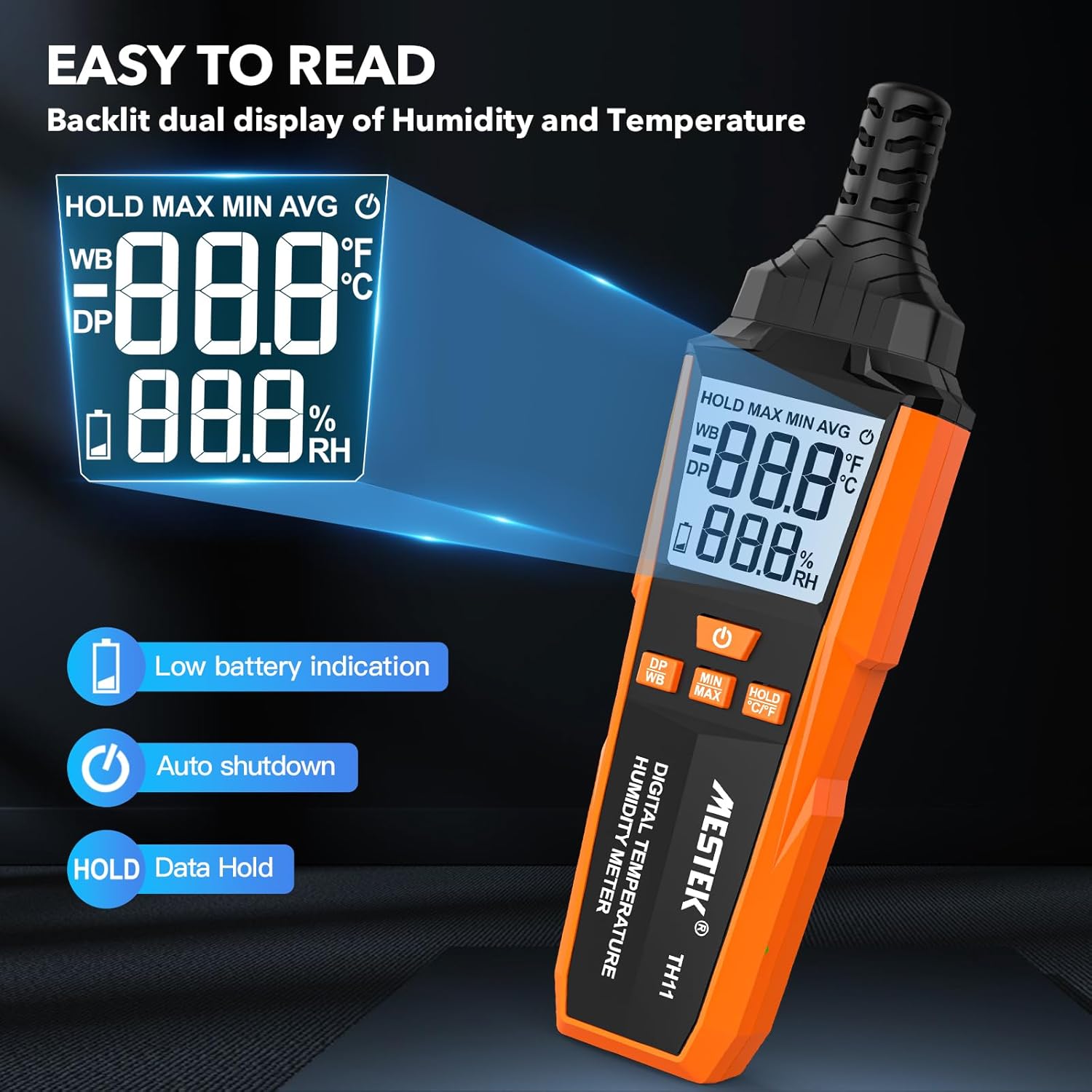
Image 3.3: The MESTEK TH11's backlit display, illustrating its clarity and indicators for low battery and data hold.
4. సెటప్
4.1. బ్యాటరీ ఇన్స్టాలేషన్
The MESTEK TH11 requires 3 AAA batteries for operation. Follow these steps to install them:
- పరికరం వెనుక భాగంలో బ్యాటరీ కంపార్ట్మెంట్ కవర్ను గుర్తించండి.
- Use the provided screwdriver to loosen the screw on the battery compartment cover.
- కవర్ తొలగించండి.
- కంపార్ట్మెంట్ లోపల సూచించిన విధంగా సరైన ధ్రువణత (+/-) ఉండేలా చూసుకుంటూ 3 AAA బ్యాటరీలను చొప్పించండి.
- బ్యాటరీ కంపార్ట్మెంట్ కవర్ను మార్చండి మరియు స్క్రూను బిగించండి.
5. ఆపరేటింగ్ సూచనలు
5.1. పవర్ ఆన్/ఆఫ్
- పరికరాన్ని ఆన్ చేయడానికి, నొక్కండి పవర్ బటన్ ().
- పరికరాన్ని పవర్ ఆఫ్ చేయడానికి, నొక్కి పట్టుకోండి పవర్ బటన్ for approximately 2 seconds. The device also features an automatic shutdown function after 30 minutes of inactivity to conserve battery life.

Image 5.1: The automatic shutdown feature of the MESTEK TH11, activating after 30 minutes of inactivity.
5.2. Unit Switching (°C/°F)
- To switch between Celsius (°C) and Fahrenheit (°F), press and hold the HOLD °C/°F button సుమారు 2 సెకన్లు.
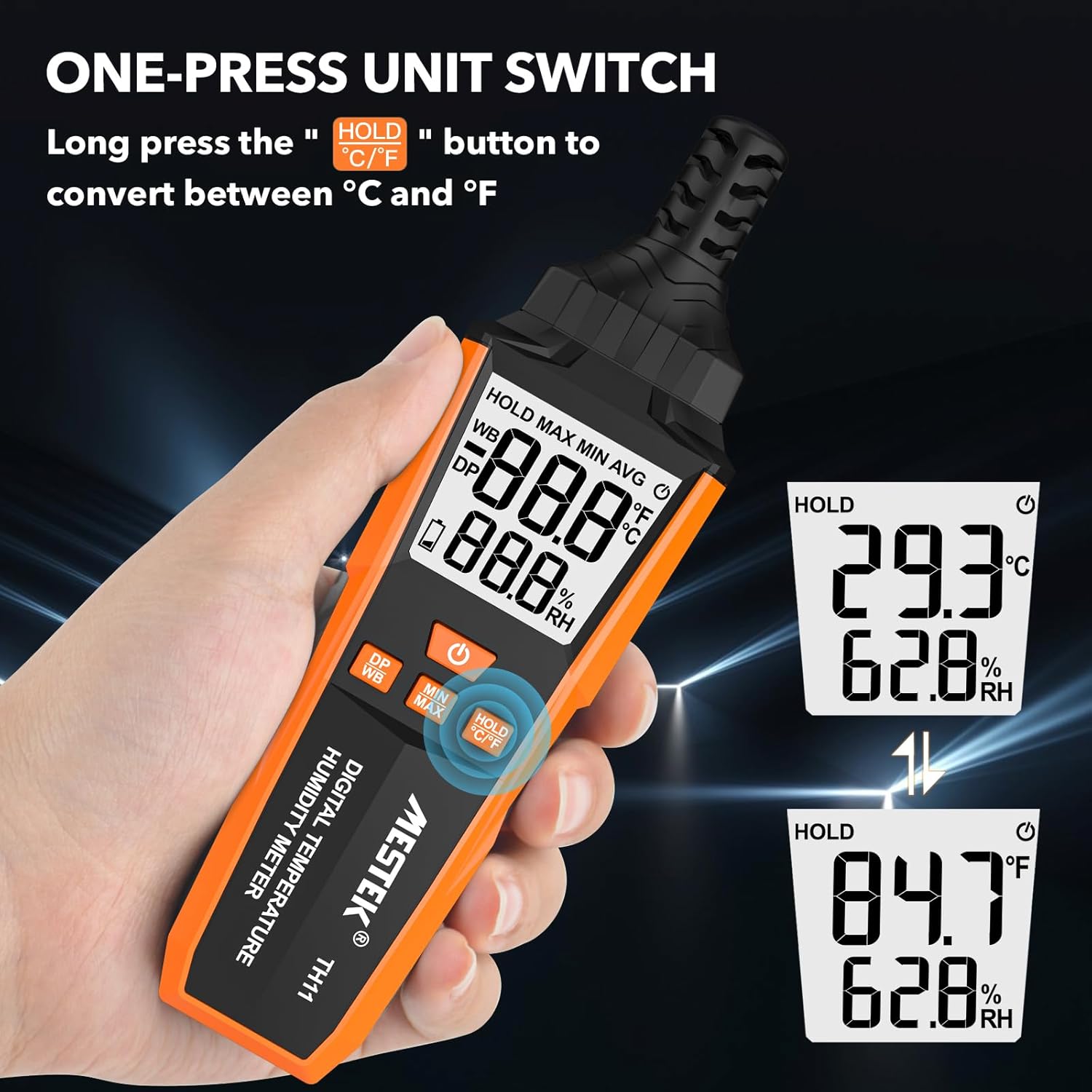
Image 5.2: The MESTEK TH11 showing how to switch between Celsius and Fahrenheit temperature units.
5.3. డేటా హోల్డ్ ఫంక్షన్
- To freeze the current measurement on the display, short press the HOLD °C/°F button. The "HOLD" icon will appear on the screen.
- Press the button again to exit the data hold mode.

Image 5.3: The MESTEK TH11 display indicating the active HOLD function.
5.4. Minimum/Maximum Value Measurement
- కు view the maximum recorded temperature and humidity, short press the MIN/MAX బటన్. The "MAX" icon will appear.
- నొక్కండి MIN/MAX బటన్ మళ్ళీ కు view the minimum recorded values. The "MIN" icon will appear.
- Press the button a third time to return to real-time measurement.

Image 5.4: The MESTEK TH11 displaying the maximum and minimum recorded temperature and humidity values.
5.5. Wet Bulb / Dew Point Mode
- To switch between Wet Bulb (WB) and Dew Point (DP) temperature display, short press the DP/WB button. The corresponding icon will be shown on the display.
6 అప్లికేషన్లు
The MESTEK TH11 Digital Temperature and Humidity Meter is versatile and can be used in various environments:
- హోమ్: Monitor indoor climate in bedrooms, children's rooms, and living areas for comfort and health.
- కార్యాలయం: Ensure optimal working conditions by monitoring office temperature and humidity.
- వ్యవసాయం: Ideal for gardens, greenhouses, and agricultural crops to maintain suitable growing conditions.
- పరిశ్రమ: Useful in warehouses, cellars, and facilities with air conditioning systems for environmental control.
- ప్రత్యేక వాతావరణాలు: Suitable for maternity wards and areas requiring precise climate control.

చిత్రం 6.1: ఉదాamples of the MESTEK TH11's diverse applications in home, plant, storage, and warehouse settings.
6.1. Ambient Temperature and Relative Humidity Reference Values
For optimal conditions in various environments, consider the following reference values:
| పర్యావరణం | ఉష్ణోగ్రత | సాపేక్ష ఆర్ద్రత (RH) |
|---|---|---|
| Human Body Comfort | 15-25°C | 45%-75% RH |
| Room Environment | 40%-70% RH | |
| Library/Art Gallery/Museum | 40%-60% RH | |
| Electronic Equipment/Communication Room | 45%-60% RH | |
| Agricultural/Cotton/Wool Textiles Storage | 40%-60% RH | |
| Dairy Products Storage | 50%-60% RH | |
| Fruit Storage | 60%-70% RH | |
| Best Convalescent Environment | 30%-50% RH |
Table 6.1: Reference values for ambient temperature and relative humidity in various settings.
7. స్పెసిఫికేషన్లు
| పరామితి | విలువ |
|---|---|
| మోడల్ సంఖ్య | TH11 |
| బ్రాండ్ | MESTEK |
| బరువు | 210 గ్రా |
| కొలతలు (L x W x H) | 18.8 x 5.4 x 3.4 సెం.మీ |
| రంగు | నారింజ రంగు |
| శైలి | ఆధునిక |
| శక్తి మూలం | బ్యాటరీ ఆధారితమైనది |
| బ్యాటరీ రకం | 3 x AAA ఆల్కలీన్ బ్యాటరీలు |
| Measurement Accuracy (Temperature) | ±0.1°C |
| ప్రదర్శన శైలి | డిజిటల్ |
| మౌంటు రకం | Handheld / Freestanding |
| ప్రత్యేక లక్షణాలు | High Accuracy, Backlit Display, Data Hold, Min/Max, Auto Shutdown, Low Battery Indicator |
| తేమ పరిధి | 0-99% RH |
| ఉష్ణోగ్రత పరిధి | -20°C ~ 60°C (-4°F ~ 140°F) |
| డ్యూ పాయింట్ ఉష్ణోగ్రత పరిధి | -50°C ~ 60°C (-58°F ~ 140°F) |
| వెట్ బల్బ్ ఉష్ణోగ్రత పరిధి | -20°C ~ 60°C (-4°F ~ 140°F) |
| సెన్సార్ రకం | Swiss SHT30 High-Precision Sensor |
| Sampలింగ్ రేటు | సుమారు 1 సెకను |
8. నిర్వహణ
- శుభ్రపరచడం: పరికరాన్ని మృదువైన, పొడి వస్త్రంతో తుడవండి. ద్రవ క్లీనర్లను ఉపయోగించవద్దు లేదా పరికరాన్ని నీటిలో ముంచవద్దు.
- నిల్వ: ఎక్కువసేపు ఉపయోగంలో లేనప్పుడు, లీకేజీని నివారించడానికి బ్యాటరీలను తీసివేయండి. పరికరాన్ని చల్లని, పొడి ప్రదేశంలో, ప్రత్యక్ష సూర్యకాంతి మరియు తీవ్రమైన ఉష్ణోగ్రతలకు దూరంగా నిల్వ చేయండి.
- సెన్సార్ కేర్: The probe sensor is delicate. Avoid touching it directly or exposing it to dust and debris.
9. ట్రబుల్షూటింగ్
- పరికరం పవర్ ఆన్ చేయదు:
Check if the batteries are installed correctly with the right polarity. Ensure the batteries are not depleted; replace them if necessary. - సరికాని రీడింగ్లు:
Ensure the device has been in the environment for at least 15 minutes to stabilize. Check for any obstructions around the sensor. Replace old batteries. - ప్రదర్శన మసకగా లేదా మినుకుమినుకుమంటోంది:
ఇది సాధారణంగా తక్కువ బ్యాటరీ పవర్ను సూచిస్తుంది. బ్యాటరీలను మార్చండి. - బటన్లు స్పందించడం లేదు:
Try powering off and on the device. If the issue persists, replace the batteries.
10. వారంటీ మరియు మద్దతు
The MESTEK TH11 Digital Temperature and Humidity Meter comes with a 24 నెలల వారంటీ from the date of purchase, covering manufacturing defects. Additionally, MESTEK provides జీవితకాల సాంకేతిక మద్దతు ఈ ఉత్పత్తి కోసం.
If you encounter any issues, have questions, or require assistance, please do not hesitate to contact our customer support team. We are committed to providing satisfactory solutions.
For support, please refer to the contact information provided on the MESTEK official webసైట్ లేదా మీ కొనుగోలు వేదిక.