
1. పరిచయం
Thank you for choosing the SUNCROWN 2-Drawer Metal Vertical File Cabinet. This manual provides essential information for the safe assembly, operation, and maintenance of your new file cabinet. Please read these instructions carefully before use and retain them for future reference.
ఈ file cabinet is designed for organizing and securing documents in home or office environments. It features two spacious drawers, a secure locking mechanism, and an anti-tilt design for enhanced safety.
2. భద్రతా సమాచారం
- Always place the cabinet on a flat, stable surface to prevent tipping.
- డ్రాయర్లపై ఓవర్లోడ్ వేయవద్దు. బరువును సమానంగా పంపిణీ చేయండి.
- యాంటీ-టిల్ట్ డిజైన్: This cabinet is equipped with an anti-tilt interlock system. Only one drawer can be opened at a time. This feature prevents the cabinet from tipping over when a drawer is fully extended, especially when loaded with heavy items. Do not attempt to force open both drawers simultaneously.
- Keep fingers clear of drawer slides when opening or closing drawers.
- Keep keys in a safe place, away from children.

Figure 1: Anti-Tilt Interlock System. Only one drawer can be extended at a time for safety.
3. ప్యాకేజీ విషయాలు
Please check that all components are present before beginning assembly. If any parts are missing or damaged, contact SUNCROWN customer support.
- Cabinet Body (1)
- Drawers (2)
- కీలు (2)
- Assembly Hardware (screws, drawer slides, hanging file బార్లు)
4. సెటప్ మరియు అసెంబ్లీ
దీనికి అసెంబ్లీ అవసరం file cabinet. Follow these general steps:
- అన్ని భాగాలను అన్ప్యాక్ చేసి, ప్యాకేజీ విషయాల జాబితాతో సరిచూసుకోండి.
- Attach the drawer slides to the cabinet body and drawers using the provided hardware. Ensure they are securely fastened and aligned for smooth operation.
- Carefully insert the assembled drawers into the cabinet body, aligning the drawer slides.
- Install the locking mechanism if it is not pre-installed. Ensure the lock functions correctly with the provided keys.
- Insert the adjustable hanging file bars into the drawers as needed for your file రకం.

Figure 2: Smooth Metal Glide System and Secure Lock for safe storage.

Figure 3: Adjustable Hanging Bar for efficient file నిర్వహణ.
5. ఆపరేటింగ్ సూచనలు
5.1 డ్రాయర్లను తెరవడం మరియు మూసివేయడం
Gently pull the drawer handle to open. Push the drawer firmly until it clicks into place to close. The smooth metal tracks ensure effortless sliding. Remember the anti-tilt mechanism allows only one drawer to be open at a time.
5.2 లాకింగ్ మరియు అన్లాకింగ్
To lock the cabinet, ensure both drawers are fully closed. Insert the key into the lock cylinder and turn it clockwise until the drawers are secured. To unlock, insert the key and turn counter-clockwise.
5.3 File సంస్థ
ప్రతి డ్రాయర్ అందిస్తుంది ample space for various file sizes. The adjustable hanging file bars accommodate Letter, Legal, A4, and F4 sized folders. Adjust the bars to fit your specific document requirements.

Figure 4: Drawer capacity for various file types including Letter/Legal, A4/B5/F4, and Box.
6. నిర్వహణ
The SUNCROWN file cabinet is constructed from high-strength rolled solid all-steel material with a smooth coating, making it durable and easy to maintain.
- శుభ్రపరచడం: బాహ్య ఉపరితలాలను మృదువైన, డితో తుడవండిamp వస్త్రం. ముగింపును దెబ్బతీసే రాపిడి క్లీనర్లు లేదా ద్రావకాలను నివారించండి.
- డ్రాయర్ స్లయిడ్లు: డ్రాయర్ స్లయిడ్లు సజావుగా పనిచేయడానికి క్రమానుగతంగా తనిఖీ చేయండి. అవి గట్టిగా మారితే, కొద్ది మొత్తంలో సిలికాన్ లూబ్రికెంట్ వేయవచ్చు.
- లాక్ మెకానిజం: లాక్ మెకానిజంలో శిథిలాలు లేకుండా చూసుకోండి. కీ ఇరుక్కుపోయినట్లు అనిపిస్తే బలవంతంగా దాన్ని లాక్కోకండి.
7. ట్రబుల్షూటింగ్
- Drawer is stuck or difficult to open/close:
- Check if the anti-tilt mechanism is engaged (i.e., another drawer is open). Close any open drawers.
- Ensure the drawer is not overloaded or unevenly weighted.
- Inspect the drawer slides for any obstructions or damage.
- Cabinet will not lock:
- Ensure both drawers are fully closed and pushed in completely.
- Check if the key is fully inserted and turning freely.
- మంత్రివర్గం అస్థిరంగా ఉంది:
- క్యాబినెట్ ఒక సమతల ఉపరితలంపై ఉంచబడిందని ధృవీకరించండి.
- Ensure all assembly hardware is tightened securely.
8. స్పెసిఫికేషన్లు
| బ్రాండ్ | SUNCROWN |
| మోడల్ | 15"W-2Drawer |
| రంగు | నలుపు |
| మెటీరియల్ | మెటల్ |
| ఉత్పత్తి కొలతలు (D x W x H) | 17.7" x 15" x 28.7" |
| వస్తువు బరువు | 33.1 పౌండ్లు |
| అసెంబ్లీ అవసరం | అవును |
| ప్రత్యేక ఫీచర్ | Lockable, Anti-tilt design |
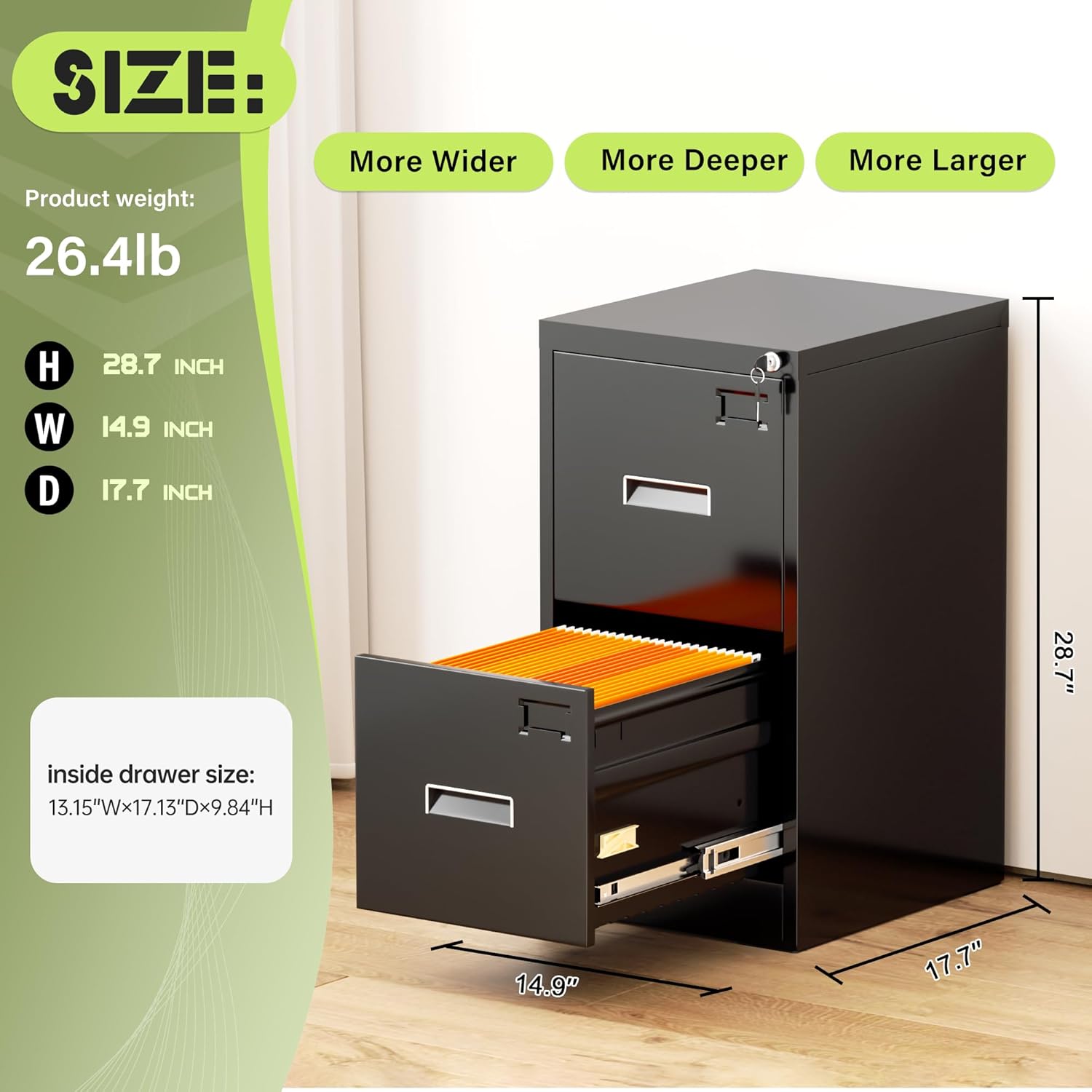
చిత్రం 5: ఉత్పత్తి కొలతలు.
9. వారంటీ మరియు మద్దతు
SUNCROWN is committed to providing quality products. For any questions, concerns, or assistance with your file cabinet, please contact SUNCROWN customer support. Please have your model number and purchase information ready when contacting support.
For the most up-to-date warranty information, please refer to the documentation included with your purchase or visit the official SUNCROWN webసైట్.