
Okin DS2.451.3W.01.WU.110
Okin Dual Motor Electric Standing Desk Frame
వినియోగదారు మాన్యువల్
1. పరిచయం
This manual provides detailed instructions for the assembly, operation, and maintenance of your Okin Dual Motor Electric Standing Desk Frame. Please read this manual thoroughly before installation and use to ensure proper function and safety.
The Okin Dual Motor Electric Standing Desk Frame is designed to enhance your workspace by allowing seamless transitions between sitting and standing positions. It features a robust steel construction, dual high-performance motors, and an intuitive memory controller for personalized height settings.
2. భద్రతా సమాచారం
- డెస్క్ ఒరిగిపోకుండా ఉండటానికి ఎల్లప్పుడూ నేలకు సరిగ్గా లంగరు వేయబడిందని నిర్ధారించుకోండి.
- గరిష్ట బరువు పరిమితి 270 పౌండ్లు (122.5 కిలోలు) మించకూడదు.
- ఆపరేషన్ సమయంలో పిల్లలు మరియు పెంపుడు జంతువులను డెస్క్ నుండి దూరంగా ఉంచండి.
- Ensure no obstacles are in the path of the desk frame during height adjustments.
- Do not open the motor housing or control box. Refer all servicing to qualified personnel.
- శుభ్రపరిచే ముందు లేదా ఏదైనా నిర్వహణ చేసే ముందు విద్యుత్తును డిస్కనెక్ట్ చేయండి.
3. భాగాల జాబితా
Before beginning assembly, verify that all components are present and undamaged. The package includes the following:
- Desk Frame (legs, crossbar, feet)
- మెమరీ కంట్రోలర్
- పవర్ అడాప్టర్ మరియు కేబుల్
- Motor Connection Cables
- Assembly Hardware (screws, washers, Allen wrenches)
- ఇన్స్టాలేషన్ మాన్యువల్
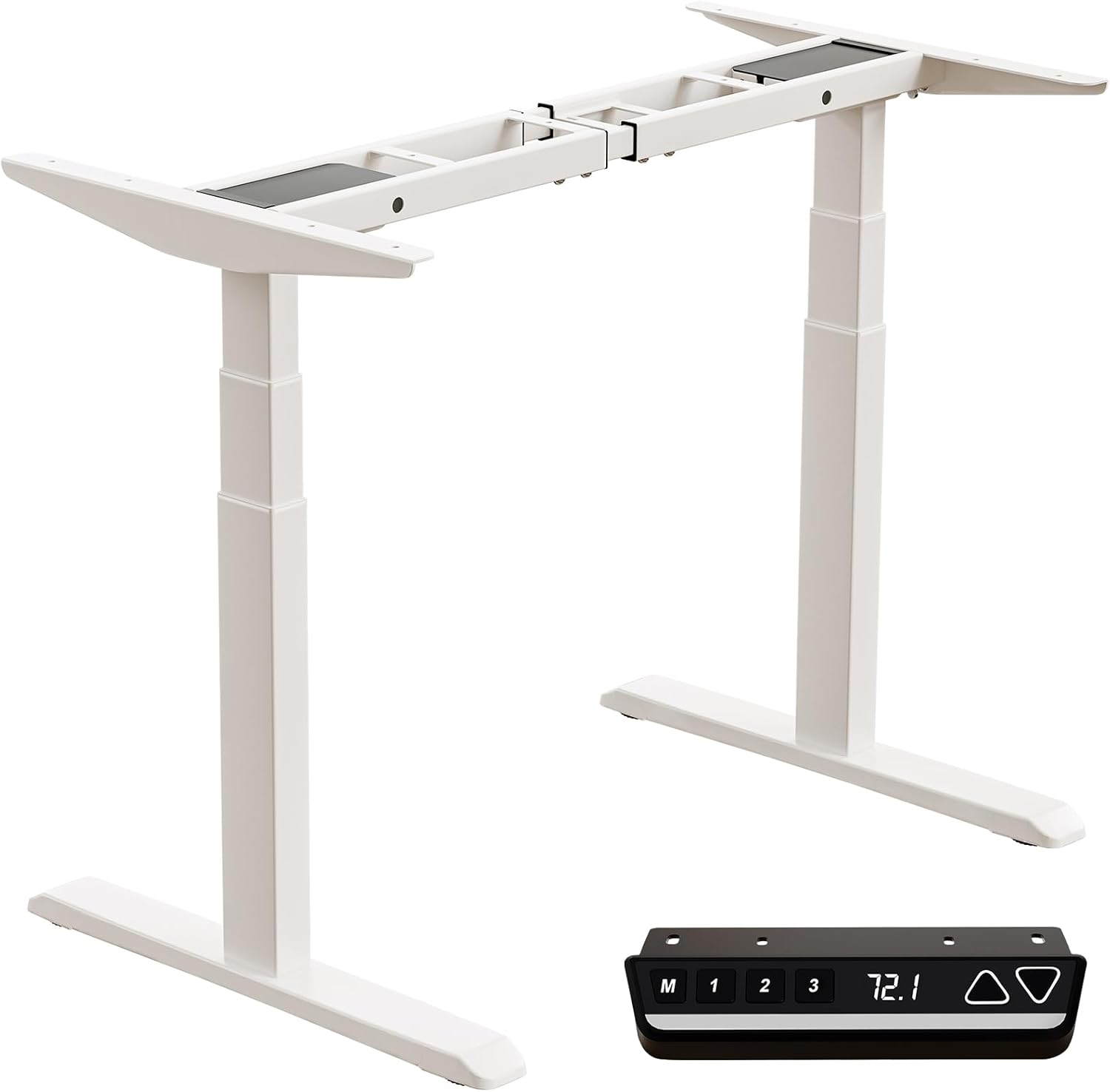
Image: All components of the Okin Dual Motor Electric Standing Desk Frame, including the white frame, feet, and the black memory controller.
4. సెటప్ మరియు అసెంబ్లీ
The Okin Dual Motor Electric Standing Desk Frame is designed for easy assembly. A complete installation manual is included with your product. Follow the steps below for a general overview:
- భాగాలను అన్ప్యాక్ చేయండి: ప్యాకేజింగ్ నుండి అన్ని భాగాలను జాగ్రత్తగా తీసివేసి, వాటిని శుభ్రమైన, చదునైన ఉపరితలంపై వేయండి.
- Assemble Legs and Feet: Attach the feet to the bottom of the desk legs using the provided hardware.
- క్రాస్బార్ను కనెక్ట్ చేయండి: Secure the adjustable crossbar between the two leg columns. Ensure it is extended to your desired width for your desktop.
- Install Motors and Controller: Connect the dual motors to the leg columns and the control box. Mount the memory controller to your preferred location on the desk frame, ensuring the extra-long cable provides flexibility for placement (left or right).
- డెస్క్టాప్ను అటాచ్ చేయండి (చేర్చబడలేదు): Place your chosen desktop (recommended sizes: 47.2"x23.6" to 78.8"x39.4", minimum thickness 0.6") onto the assembled frame and secure it using appropriate screws.
- కేబుల్ నిర్వహణ: Organize and secure all cables to prevent tangling and ensure smooth operation.

Image: Diagram illustrating the assembly of the desk frame and the placement of a desktop, with suggested desktop dimensions and minimum thickness.

చిత్రం: ఓవర్ హెడ్ view showing the flexible placement of the controller on either the left or right side of the desk frame, highlighting the 51.2-inch extra-long cable for convenience.
5. ఆపరేటింగ్ సూచనలు
The Okin Electric Standing Desk Frame features an intuitive control panel for easy height adjustment and memory functions.

Image: Close-up of the multi-function intelligent keypad, showing buttons for memory presets (M, 1, 2, 3), LED screen display, and up/down arrows.
- ఎత్తు సర్దుబాటు: ఉపయోగించండి పైకి (▲) మరియు డౌన్ (▼) arrow buttons to smoothly raise or lower the desk to your desired height. The current height is displayed on the LED screen. The desk operates at a quiet 48 dB.
- మెమరీ ప్రీసెట్లు: The controller allows you to save up to three favorite height settings.
- మీకు కావలసిన ఎత్తుకు డెస్క్ను సర్దుబాటు చేయండి.
- నొక్కండి M బటన్. డిస్ప్లే 'S-' ని చూపుతుంది.
- Within 3 seconds, press the desired memory button (1, 2, లేదా 3) to save the current height.
- సేవ్ చేసిన ఎత్తును రీకాల్ చేయడానికి, సంబంధిత మెమరీ బటన్ను నొక్కండి (1, 2, లేదా 3).
- Change Display Unit (CM/IN): The controller allows you to switch between centimeters (CM) and inches (IN) for height display. Refer to the detailed installation manual for specific instructions on how to toggle this setting.

Image: Visual representation of the desk frame adjusting from its minimum height of 23.7 inches to its maximum height of 49.3 inches.
6. నిర్వహణ
To ensure the longevity and optimal performance of your Okin Electric Standing Desk Frame, follow these simple maintenance guidelines:
- శుభ్రపరచడం: Wipe with a dry cloth. Avoid using abrasive cleaners or solvents that could damage the finish.
- సాధారణ తనిఖీలు: అన్ని స్క్రూలు మరియు కనెక్షన్లు బిగుతుగా ఉన్నాయని నిర్ధారించుకోవడానికి కాలానుగుణంగా వాటిని తనిఖీ చేయండి. అవసరమైతే తిరిగి బిగించండి.
- కేబుల్ నిర్వహణ: Ensure cables remain tidy and are not pinched or tangled, which could affect motor operation.
- బరువు పంపిణీ: Distribute weight evenly on the desktop to prevent strain on the motors and frame.
7. ట్రబుల్షూటింగ్
If you encounter any issues with your desk frame, please refer to the following common troubleshooting tips:
- డెస్క్ కదలడం లేదు:
- Check if the power cable is securely plugged into both the wall outlet and the control box.
- Ensure all motor connection cables are properly seated.
- If the display shows an error code, consult the detailed installation manual for specific error interpretations and solutions.
- అసమాన కదలిక:
- డెస్క్ ఒక స్థాయి ఉపరితలంపై ఉందని నిర్ధారించుకోండి.
- Verify that the weight on the desktop is evenly distributed and does not exceed the maximum capacity.
- అసాధారణ శబ్దాలు:
- While the desk operates quietly (48 dB), any new or loud noises may indicate an issue. Check for loose components or obstructions.
If the problem persists after attempting these solutions, please contact Okin customer support for assistance.
8. స్పెసిఫికేషన్లు
| ఫీచర్ | స్పెసిఫికేషన్ |
|---|---|
| మోడల్ సంఖ్య | DS2.451.3W.01.WU.110 |
| బ్రాండ్ | ఓకిన్ |
| రంగు | తెలుపు |
| బేస్ మెటీరియల్ | మిశ్రమం ఉక్కు |
| కనిష్ట ఎత్తు | 23.7 అంగుళాలు (60 సెం.మీ.) |
| గరిష్ట ఎత్తు | 49.3 అంగుళాలు (125 సెం.మీ.) |
| Crossbar Length (Adjustable) | 43.3 అంగుళాలు నుండి 70.9 అంగుళాలు (110 సెం.మీ నుండి 180 సెం.మీ.) |
| Crossbar Width (Fixed) | 19.1 అంగుళాలు (48.6 సెం.మీ.) |
| గరిష్ట బరువు సామర్థ్యం | 270 పౌండ్లు (122.5 కిలోలు) |
| వేగం | 1.4 అంగుళాలు/సెకను |
| శబ్దం స్థాయి | 48 డిబి |
| మోటార్ రకం | డ్యూయల్ మోటార్ |
| ఉత్పత్తి కొలతలు (D x W x H) | 42.52"D x 14.17"W x 8.66"H (packaged) |
| వస్తువు బరువు | 70.55 పౌండ్లు (32 కిలోలు) |

Image: Detailed dimensions of the adjustable steel frame, showing minimum and maximum lengths and heights.

Image: Illustration of the 3-stage sturdy frame design, emphasizing strong support and excellent durability.

Image: Visual representation highlighting the two high-performance motors and the 270 lbs weight capacity of the desk frame.
9. వారంటీ మరియు మద్దతు
Okin is committed to providing quality products and customer satisfaction. While specific warranty details are not provided in this manual, please refer to your purchase documentation or the product listing on Amazon for warranty information.
For any questions, concerns, or assistance with setup or operation, our dedicated support team is ready to help. You can typically find contact information for Okin America support on the product's Amazon page or through the Okin brand store: Okin Store on Amazon.
Ask a question about this manual
Ask about setup, troubleshooting, compatibility, parts, safety, or missing instructions. Manuals+ will review the question and use this page’s manual context to help answer it.