
1. పరిచయం
This manual provides detailed instructions for the installation, operation, and maintenance of the SODOLA 10Gb Ethernet Media Converter, model SL-10GE-XS. This device is designed to convert 10GBase-T RJ45 Ethernet signals to SFP+ fiber signals, enabling long-distance network extensions for data centers, campus networks, and remote sites.
1.1 ప్యాకేజీ విషయాలు
- 1 x SODOLA 10Gb Ethernet Media Converter (SL-10GE-XS)
- 1 x Power Adapter (DC input 5.5x2.1mm)
Note: Optical/electrical SFP+ modules are not included and must be purchased separately.
2. భద్రతా సమాచారం
- పవర్ అడాప్టర్ వాల్యూమ్ను నిర్ధారించుకోండిtagఇ పరికర అవసరాలకు సరిపోలుతుంది.
- పరికరాన్ని నీరు లేదా అధిక తేమకు గురిచేయవద్దు.
- వేడెక్కడాన్ని నివారించడానికి వెంటిలేషన్ ఓపెనింగ్లను నిరోధించడాన్ని నివారించండి.
- Do not attempt to open or repair the device. Refer to qualified personnel for service.
- Use only compatible SFP+ modules.
3. ఉత్పత్తి ముగిసిందిview
The SODOLA SL-10GE-XS is a robust 10GbE media converter featuring an all-metal housing for industrial durability and efficient heat dissipation. It supports wire-speed switching, jumbo frames, and port lightning protection.

చిత్రం: ముందు మరియు వెనుక view of the SODOLA 10Gb Ethernet Media Converter, highlighting the 10G RJ45 port, 10Gb SFP+ port, LED indicators, power supply input, and SFP+ 2.5G rate forcing switch.
3.1 పరికర భాగాలు
- 10G RJ45 Port: Supports 100M/1G/2.5G/5G/10G adaptive speeds with MDI/MDIX auto-crossover.
- 10Gb SFP+ పోర్ట్: Supports 1G/2.5G/10G adaptive SFP+ modules.
- LED సూచికలు: Provide real-time status monitoring for power, link, and activity.
- విద్యుత్ సరఫరా: DC 12V-1A input (5.5x2.1mm).
- SFP+ 2.5G Rate Forcing Switch: Allows manual selection of 2.5G or 10G mode for the SFP+ port.

Image: Key features of the media converter, including 6KV lightning protection, fanless design, 10Gbps high-speed transmission, and the SFP+ 2.5G rate forcing switch.
4. సెటప్ మరియు ఇన్స్టాలేషన్
The SODOLA 10Gb Ethernet Media Converter is designed for plug-and-play operation, requiring no complex configuration. However, critical considerations for SFP+ modules and speed synchronization are essential for proper function.
4.1 Essential Requirements
- Matching SFP+ Modules: Requires compatible SFP+ modules at రెండు చివరలు of the fiber link. These modules are sold separately.
- Speed Synchronization: Both connected devices (e.g., the media converter and the remote switch/device) must operate at identical speeds (e.g., 10G-10G or 2.5G-2.5G). Auto-negotiation functions only when speeds match.
4.2 సంస్థాపనా దశలు
- Insert SFP+ Module: Carefully insert a compatible SFP+ fiber module into the SFP+ port of the media converter. Ensure it is fully seated.
- ఫైబర్ కేబుల్ కనెక్ట్ చేయండి: Connect the fiber optic cable to the SFP+ module. Ensure the fiber cable type (single-mode/multi-mode, single-fiber/dual-fiber) matches the SFP+ module and the remote device.
- ఈథర్నెట్ కేబుల్ను కనెక్ట్ చేయండి: Connect a standard RJ45 Ethernet cable from your network device (e.g., switch, router, PC) to the 10G RJ45 port on the media converter.
- Set SFP Rate Switch (if needed): If your SFP+ module or connected device operates at 2.5G, use the rear SFP Rate Switch to force the media converter into 2.5G mode. For 10G operation, ensure the switch is set to 10G.
- శక్తిని వర్తింపజేయండి: Connect the provided power adapter to the DC input port and plug it into a power outlet. The device will power on automatically.

చిత్రం: ఉదాample application diagrams illustrating how the media converter can be used to extend network connections between routers, SFP switches, and non-SFP switches using fiber and network cables.
Note: Both the electrical (RJ45) and optical (SFP+) ports must be connected simultaneously for the device to operate correctly. If only the SFP+ port is connected, the unit may not function as expected.
5. పరికరాన్ని ఆపరేట్ చేయడం
Once powered on and connected, the media converter operates automatically. Monitor the LED indicators for status information.
5.1 LED సూచికలు
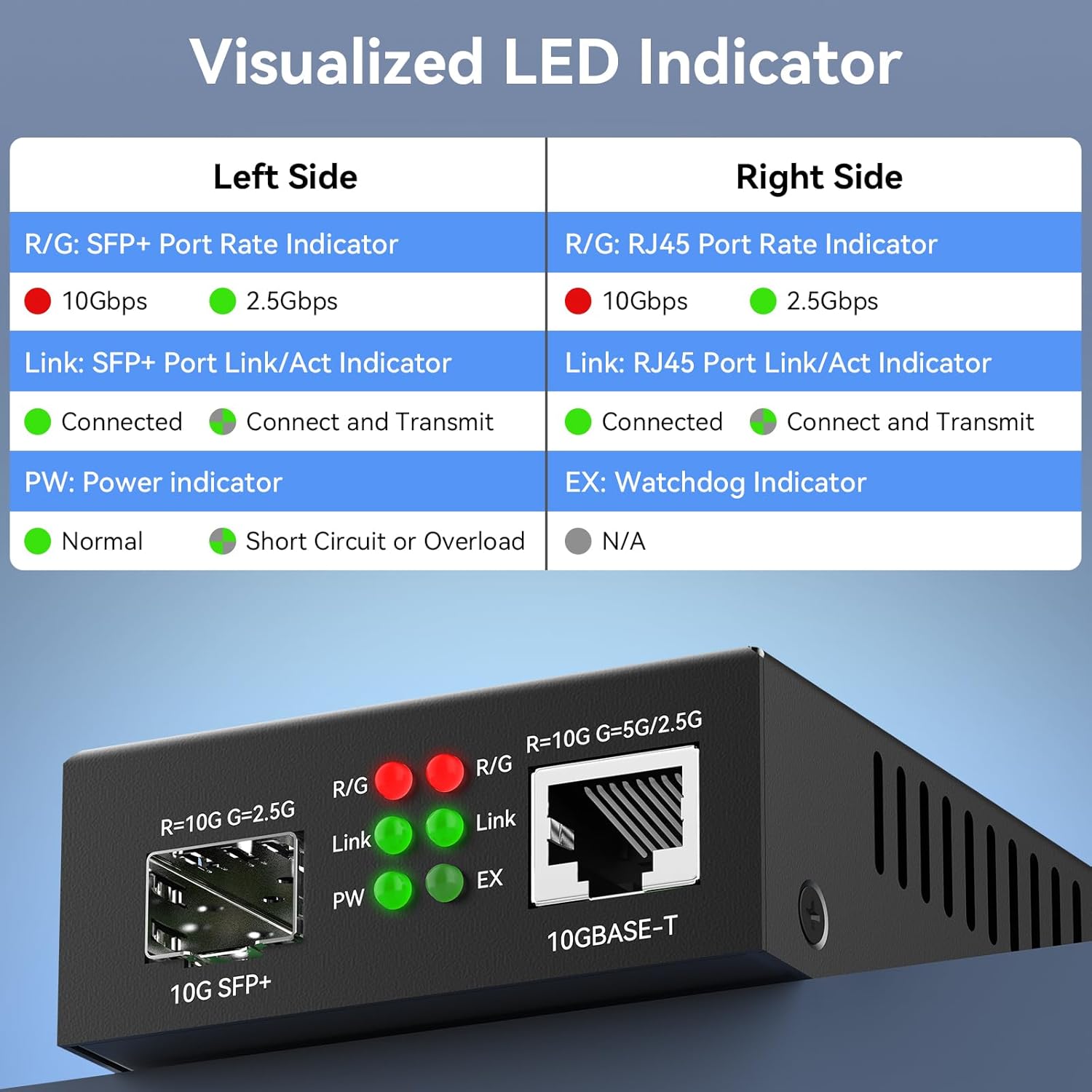
Image: A detailed table explaining the meaning of each LED indicator on the SODOLA media converter for both SFP+ and RJ45 ports.
| సూచిక | స్థితి | వివరణ |
|---|---|---|
| R/G (SFP+ Port) | ఎరుపు | 10Gbps speed detected on SFP+ port. |
| ఆకుపచ్చ | 2.5Gbps speed detected on SFP+ port. | |
| Link (SFP+ Port) | ఆకుపచ్చ (ఘన) | SFP+ port is connected. |
| ఆకుపచ్చ (మెరుస్తున్నది) | SFP+ port is connected and transmitting data. | |
| R/G (RJ45 Port) | ఎరుపు | 10Gbps speed detected on RJ45 port. |
| ఆకుపచ్చ | 5Gbps/2.5Gbps speed detected on RJ45 port. | |
| Link (RJ45 Port) | ఆకుపచ్చ (ఘన) | RJ45 port is connected. |
| ఆకుపచ్చ (మెరుస్తున్నది) | RJ45 port is connected and transmitting data. | |
| PW (Power) | ఆకుపచ్చ (ఘన) | పరికరం ఆన్ చేయబడి సాధారణంగా పనిచేస్తోంది. |
| ఎరుపు (ఘన) | Short circuit or overload detected. | |
| EX (Watchdog) | N/A | ఈ మోడల్కు వర్తించదు. |
6. నిర్వహణ
The SODOLA 10Gb Ethernet Media Converter is designed for reliable, low-maintenance operation.
- శుభ్రపరచడం: పరికరం యొక్క బాహ్య భాగాన్ని శుభ్రం చేయడానికి మృదువైన, పొడి వస్త్రాన్ని ఉపయోగించండి. ద్రవ లేదా ఏరోసోల్ క్లీనర్లను ఉపయోగించవద్దు.
- పర్యావరణం: Ensure the device is operated within its specified temperature range (-20°C to +60°C) and in a well-ventilated area.
- కేబుల్ నిర్వహణ: అన్ని కేబుల్స్ సురక్షితంగా అనుసంధానించబడి ఉన్నాయని మరియు ఒత్తిడికి గురికాకుండా చూసుకోండి.

Image: The media converter's robust metal housing and heat sinks allow for stable operation in a wide temperature range of -20°C to +60°C.
7. ట్రబుల్షూటింగ్
If you encounter issues with your media converter, refer to the following common problems and solutions:
- No Link/Activity on SFP+ or RJ45 Port:
- Verify that both the SFP+ module and the RJ45 cable are securely connected.
- Ensure the SFP+ module is compatible and correctly inserted.
- Confirm that the connected devices at both ends are operating at the same speed (e.g., 10G-10G or 2.5G-2.5G). Adjust the SFP Rate Switch if necessary.
- Check the fiber cable for damage and ensure it is the correct type for your SFP+ modules.
- Ensure both the electrical (RJ45) and optical (SFP+) ports have active connections.
- Power LED is Red or Off:
- Check the power adapter connection to the device and the power outlet.
- పవర్ అడాప్టర్ సరిగ్గా పని చేస్తుందని నిర్ధారించుకోండి.
- If the LED is red, it indicates a short circuit or overload. Disconnect and reconnect power. If the issue persists, contact support.
- తక్కువ వేగం లేదా అడపాదడపా కనెక్షన్:
- Confirm that all connected devices and SFP+ modules support the desired speed (e.g., 10Gbps).
- Check for cable damage or poor connections.
- Ensure the SFP Rate Switch is set correctly for the operating speed.
8. స్పెసిఫికేషన్లు
| ఫీచర్ | స్పెసిఫికేషన్ |
|---|---|
| మోడల్ సంఖ్య | SL-10GE-XS |
| ఇంటర్ఫేస్ రకం | 1 x RJ45, 1 x SFP+ |
| RJ45 పోర్ట్ స్పీడ్ | 100M/1G/2.5G/5G/10G Adaptive |
| SFP+ Port Speed | 1G/2.5G/10G Adaptive (with compatible SFP+ module) |
| పవర్ ఇన్పుట్ | DC 12V-1A (5.5x2.1mm) |
| ఉత్పత్తి కొలతలు | 2.76 x 3.66 x 1.1 అంగుళాలు |
| వస్తువు బరువు | 13.7 ఔన్సులు |
| ఆపరేటింగ్ ఉష్ణోగ్రత | -20°C నుండి +60°C |
| హౌసింగ్ మెటీరియల్ | మెటల్ |
| ఫీచర్లు | Wire-speed switching, Jumbo frame support, Port lightning protection, Fanless design |
9. వారంటీ మరియు మద్దతు
For warranty information and technical support, please refer to the official Sodola website or contact your vendor. Keep your purchase receipt for warranty claims.