
SONICAKE QKP-10
Sonicake QKP-10 Digital Electronic Piano Keyboard User Manual
Model: QKP-10
1. పరిచయం
Welcome to the user manual for your new SONICAKE QKP-10 Portable Digital Electronic Piano Keyboard. This manual provides essential information for setting up, operating, and maintaining your instrument. Please read it thoroughly to ensure proper use and to maximize your musical experience.
2. ఉత్పత్తి ముగిసిందిview
The SONICAKE QKP-10 is a versatile 61-key digital keyboard designed for beginners and aspiring musicians. It offers a wide array of features to enhance learning and creativity.
- Vast Range of Tones and Features: Includes 300 tones, 300 rhythms, and 80 demo songs, providing diverse sound options.
- స్టీరియో అనుభవం: Equipped with two built-in speakers and Bluetooth connectivity.
- హెడ్ఫోన్ కనెక్టివిటీ: Allows for private practice without disturbing others.
- రికార్డింగ్ మరియు ప్లేబ్యాక్: Built-in function to record and review మీ ప్రదర్శనలు.
- Practical Functions: Features vibrato, sustain, transpose, Dual-tone mode, 2 chord modes, and Split function.
- పోర్టబిలిటీ: Can be powered by six AA batteries (not included) or a 5V 1A USB connection for use anywhere.

చిత్రం 2.1: పైగాview of the SONICAKE QKP-10 Digital Electronic Piano Keyboard with music rest.
3. సెటప్
3.1 కీబోర్డ్కు శక్తినివ్వడం
The QKP-10 keyboard can be powered in two ways:
- ఎసి అడాప్టర్: Connect the included 5V 1A USB power adapter to the USB-C port on the back of the keyboard and plug it into a standard wall outlet.
- బ్యాటరీలు: For portable use, insert six AA batteries (not included) into the battery compartment located on the underside of the keyboard. Ensure correct polarity.

Figure 3.1: Keyboard dimensions and included power adapter and USB cable.
3.2 కనెక్టింగ్ యాక్సెసరీలు
- హెడ్ఫోన్లు: Connect standard 3.5mm headphones to the "PHONES" jack on the rear panel for private listening.
- సస్టైన్ పెడల్: Connect an optional sustain pedal (not included) to the "SUSTAIN" jack for extended note decay.

Figure 3.2: Rear panel showing Sustain, Phones, and USB-C ports.
4. ఆపరేటింగ్ సూచనలు
4.1 ప్రాథమిక ఆపరేషన్
- పవర్ ఆన్/ఆఫ్: నొక్కండి శక్తి కీబోర్డ్ను ఆన్ లేదా ఆఫ్ చేయడానికి బటన్.
- వాల్యూమ్ నియంత్రణ: ఉపయోగించండి MAIN VOL + / - buttons to adjust the overall volume.

Figure 4.1: User interacting with the keyboard and its control panel.
4.2 స్వరాలు మరియు లయలు
The QKP-10 features 300 tones and 300 rhythms.
- టోన్లను ఎంచుకోవడం: నొక్కండి టోన్ button, then use the number pad (0-9) to enter the desired tone number.
- లయలను ఎంచుకోవడం: నొక్కండి రిథమ్ button, then use the number pad (0-9) to enter the desired rhythm number.
- రిథమ్ వాల్యూమ్: Adjust rhythm volume using RHYTHM VOL + / - బటన్లు.
- టెంపో: Adjust the tempo of rhythms and demo songs using TEMPO + / - బటన్లు.
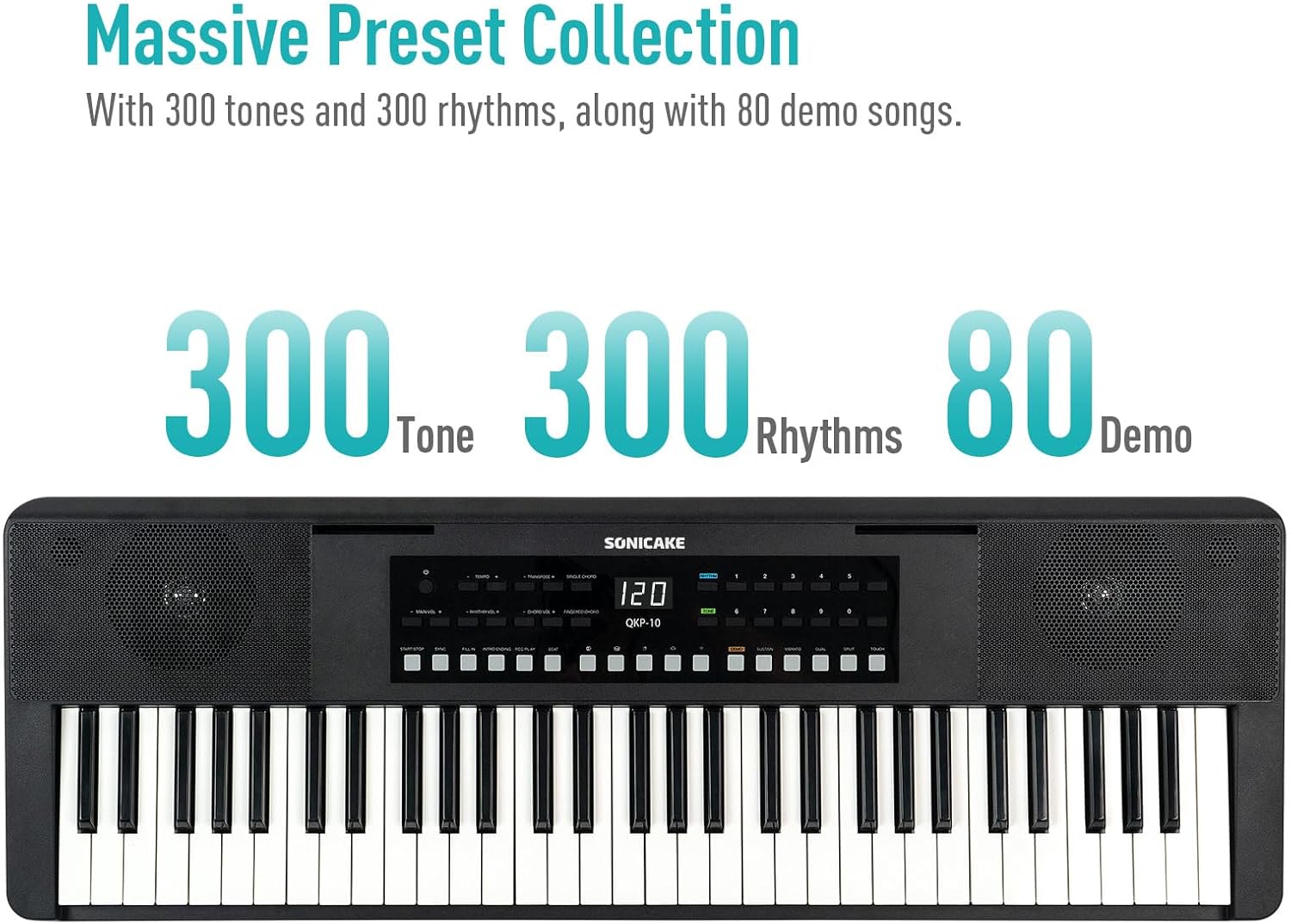
Figure 4.2: Control panel highlighting the 300 Tones, 300 Rhythms, and 80 Demo songs available.
4.3 డెమో పాటలు
The keyboard includes 80 demo songs for listening and learning.
- Playing Demos: నొక్కండి డెమో button to cycle through the demo songs.
4.4 రికార్డింగ్ మరియు ప్లేబ్యాక్
Record your performances and play them back to review మీ పురోగతి.
- రికార్డ్: నొక్కండి REC button to start recording. Play your desired melody.
- రికార్డింగ్ ఆపివేయి: నొక్కండి ఆడండి or ఆపు రికార్డింగ్ ముగించడానికి.
- ప్లేబ్యాక్: నొక్కండి ఆడండి మీ రికార్డ్ చేసిన పనితీరును వినడానికి బటన్.
4.5 బ్లూటూత్ కనెక్టివిటీ
Connect your smartphone or tablet via Bluetooth to play along with your favorite songs or accompaniment audio.
- బ్లూటూత్ని యాక్టివేట్ చేయండి: మీ బాహ్య పరికరంలో బ్లూటూత్ ప్రారంభించబడిందని నిర్ధారించుకోండి.
- జత చేయడం: The keyboard will appear as "SONICAKE QKP-10" (or similar) in your device's Bluetooth settings. Select it to pair.
- ప్లేబ్యాక్: Once paired, audio from your device will play through the keyboard's speakers.

Figure 4.3: Illustrates Bluetooth playback support, showing a smartphone wirelessly connected to the keyboard.
4.6 అధునాతన విధులు
Explore these functions to expand your musical expression:
- వైబ్రాటో: Adds a slight pitch variation to notes. Press విబ్రాటో.
- నిలబెట్టుకోండి: Extends the decay of notes. Press సస్టైన్.
- బదిలీ చేయండి: Shifts the pitch of the entire keyboard up or down. Use TRANSPOSE + / -.
- Dual-tone Mode: Layers two different tones simultaneously. Press ద్వంద్వ.
- స్ప్లిట్ ఫంక్షన్: Divides the keyboard into two sections, each with a different tone. Press స్ప్లిట్.
- తీగ మోడ్లు: Includes Single Chord and Fingered Chord modes.

మూర్తి 4.4: వివరంగా view of the control panel, showing buttons for various functions like Tempo, Transpose, Chord modes, Demo, Sustain, Vibrato, Dual, Split, and Touch.
5. నిర్వహణ
Proper care will ensure the longevity and performance of your keyboard.
- శుభ్రపరచడం: కీబోర్డ్ ఉపరితలాన్ని తుడవడానికి మృదువైన, పొడి వస్త్రాన్ని ఉపయోగించండి. మొండి ధూళి కోసం, కొద్దిగా dampగుడ్డను నీరు మరియు తేలికపాటి డిటర్జెంట్తో తడిపి, వెంటనే ఆరబెట్టండి. రాపిడి క్లీనర్లు లేదా ద్రావకాలను నివారించండి.
- నిల్వ: కీబోర్డ్ను ప్రత్యక్ష సూర్యకాంతి, విపరీతమైన ఉష్ణోగ్రతలు మరియు అధిక తేమ నుండి దూరంగా చల్లని, పొడి ప్రదేశంలో నిల్వ చేయండి.
- నిర్వహణ: కీబోర్డ్ను కింద పడేయడం లేదా బలమైన దెబ్బలకు గురిచేయడం మానుకోండి. దానిపై బరువైన వస్తువులను ఉంచవద్దు.
- బ్యాటరీ సంరక్షణ: If not using the keyboard for an extended period, remove the batteries to prevent leakage.
6. ట్రబుల్షూటింగ్
If you encounter any issues with your keyboard, please refer to the following common problems and solutions:
| సమస్య | సాధ్యమైన కారణం | పరిష్కారం |
|---|---|---|
| స్పీకర్లు/హెడ్ఫోన్ల నుండి శబ్దం లేదు. | Volume too low; power issue; headphones not fully inserted. | Increase MAIN VOL. Check power connection/batteries. Ensure headphones are fully plugged in. |
| కీబోర్డ్ పవర్ ఆన్ అవ్వదు. | No power supply; dead batteries; faulty adapter. | Check power adapter connection. Replace batteries. Try a different USB power source. |
| బ్లూటూత్ కనెక్షన్ సమస్యలు. | Keyboard not in pairing mode; device too far; interference. | Ensure Bluetooth is enabled on both devices. Move devices closer. Restart both devices. |
| కీలు స్పందించడం లేదు. | Keyboard frozen; internal issue. | Turn the keyboard off and on again. If problem persists, contact customer support. |
7. స్పెసిఫికేషన్లు
| ఫీచర్ | వివరాలు |
|---|---|
| మోడల్ పేరు | QKP-10 |
| కీల సంఖ్య | 61 |
| టోన్లు | 300 |
| లయలు | 300 |
| డెమో పాటలు | 80 |
| కనెక్టివిటీ | బ్లూటూత్, USB |
| కనెక్టర్ రకం | USB Type A, 3.5mm Jack |
| హెడ్ఫోన్స్ జాక్ | 3.5 మిమీ జాక్ |
| శక్తి మూలం | Battery Powered (6x AA), 5V 1A USB |
| వస్తువు బరువు | 10.47 పౌండ్లు (సుమారు 4.75 కిలోలు) |
| ప్యాకేజీ కొలతలు | 38.19 x 14.37 x 5.91 అంగుళాలు (సుమారు 97 x 36.5 x 15 సెం.మీ) |
| రంగు | నలుపు |
| తయారీదారు | సోనికేక్ |
8. వారంటీ మరియు మద్దతు
For warranty information and customer support, please refer to the documentation included with your purchase or visit the official SONICAKE webసైట్. ఏవైనా వారంటీ క్లెయిమ్ల కోసం మీ కొనుగోలు రుజువును ఉంచుకోండి.
If you require further assistance or have questions not covered in this manual, please contact SONICAKE customer service.
Ask a question about this manual
Ask about setup, troubleshooting, compatibility, parts, safety, or missing instructions. Manuals+ will review the question and use this page’s manual context to help answer it.