
పరిచయం
The Kisonli S9 Portable Bluetooth Speaker delivers impressive sound quality in a compact design, suitable for various environments. Featuring a powerful 5W output and an internal magnetic horn, this speaker produces clear and dynamic audio. Its 1200mAh battery provides 3-6 hours of playback, making it ideal for outdoor activities, gatherings, or personal listening. The S9 supports multiple playback options, including Bluetooth, USB, TF card, and AUX, offering versatile listening choices. Simple controls allow for easy mode switching, track selection, and volume adjustment. Small and easy to carry, the S9 is a convenient option for music enthusiasts on the go.
ఉత్పత్తి ముగిసిందిview
Familiarize yourself with the Kisonli S9 speaker's components and controls.
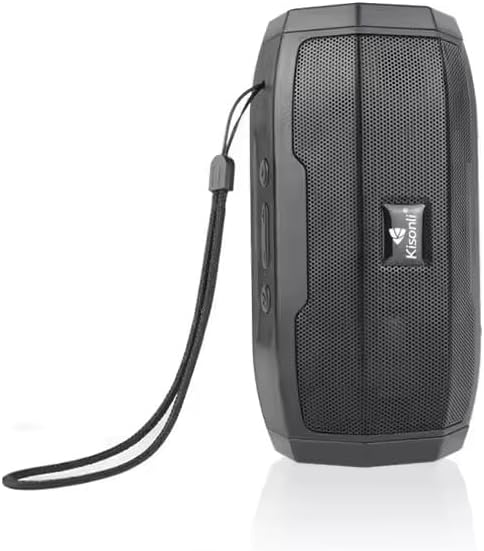
మూర్తి 1: ముందు view of the Kisonli S9 portable Bluetooth speaker, black color, with the Kisonli logo visible on the speaker grille. A wrist strap is attached to the side.
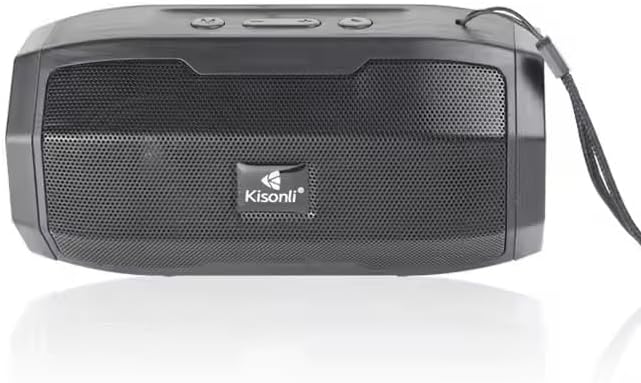
మూర్తి 2: పై నుండి క్రిందికి view of the Kisonli S9 speaker's control panel and ports, with labels indicating functions such as power switch, charging port, USB port, TF card slot, AUX input, and control buttons for volume, track, and mode.
నియంత్రణ విధులు:
- స్విచ్ ఆన్/ఆఫ్: Located at the back, slides to power the speaker on or off.
- Battery Charging DC-5V Port: స్పీకర్ ఛార్జింగ్ కోసం మైక్రో USB పోర్ట్.
- U Disk Playback / Intelligent Mobile Charging Interface: USB-A port for playing music from a USB drive or potentially charging a mobile device (check product specifications for charging capability).
- TF కార్డ్ ప్లేబ్యాక్: TF (మైక్రో SD) కార్డ్ నుండి నేరుగా సంగీతాన్ని ప్లే చేయడానికి స్లాట్.
- AUX and Audio Antenna: 3.5mm audio input for connecting external devices via an AUX cable. This port may also function as an antenna for FM radio if supported.
- ప్లే/పాజ్ బటన్: సంగీత ప్లేబ్యాక్ను నియంత్రిస్తుంది.
- Next Song / Volume Up Button: తదుపరి ట్రాక్ కోసం షార్ట్ ప్రెస్ చేయండి, వాల్యూమ్ పెంచడానికి లాంగ్ ప్రెస్ చేయండి.
- Last Song / Volume Down Button: మునుపటి ట్రాక్ కోసం షార్ట్ ప్రెస్ చేయండి, వాల్యూమ్ తగ్గించడానికి లాంగ్ ప్రెస్ చేయండి.
- BT/USB/AUX Modes Switch: Button to cycle through different playback modes (Bluetooth, USB, AUX, TF card).
సెటప్
1. స్పీకర్ను ఛార్జింగ్
- Connect the provided USB charging cable to the DC-5V charging port on the speaker.
- Connect the other end of the USB cable to a standard USB power adapter (5V DC) or a computer's USB port.
- స్పీకర్ ఛార్జింగ్ అవుతోందని చూపించడానికి ఛార్జింగ్ ఇండికేటర్ లైట్ వెలుగుతుంది (రంగు మారవచ్చు).
- Once fully charged, the indicator light may change color or turn off. A full charge typically takes a few hours.
2. పవర్ చేయడం ఆన్/ఆఫ్
- To power on, slide the ON/OFF switch to the 'ON' position. You will hear an audible prompt.
- పవర్ ఆఫ్ చేయడానికి, ఆన్/ఆఫ్ స్విచ్ను 'ఆఫ్' స్థానానికి స్లయిడ్ చేయండి.
ఆపరేటింగ్ సూచనలు
1. బ్లూటూత్ మోడ్
- Power on the speaker. It will automatically enter Bluetooth pairing mode, indicated by a flashing LED light and an audible prompt.
- మీ మొబైల్ పరికరంలో (స్మార్ట్ఫోన్, టాబ్లెట్, కంప్యూటర్), బ్లూటూత్ను ప్రారంభించి, అందుబాటులో ఉన్న పరికరాల కోసం శోధించండి.
- పరికరాల జాబితా నుండి "S9" ఎంచుకోండి.
- జత చేసిన తర్వాత, LED లైట్ ఫ్లాషింగ్ ఆగిపోతుంది మరియు మీరు నిర్ధారణ ధ్వనిని వింటారు.
- మీరు ఇప్పుడు మీ పరికరం నుండి స్పీకర్ ద్వారా ఆడియోను ప్లే చేయవచ్చు.
2. USB Playback Mode
- MP3 ఆడియో ఉన్న USB ఫ్లాష్ డ్రైవ్ను చొప్పించండి fileUSB పోర్ట్లోకి s.
- Press the Mode Switch button (BT/USB/AUX) until the speaker enters USB mode. It should automatically start playing music.
3. TF కార్డ్ ప్లేబ్యాక్ మోడ్
- Insert a TF (MicroSD) card containing MP3 audio fileTF కార్డ్ స్లాట్లోకి లు.
- Press the Mode Switch button (BT/USB/AUX) until the speaker enters TF card mode. It should automatically start playing music.
4. AUX ఇన్పుట్ మోడ్
- 3.5mm ఆడియో కేబుల్ యొక్క ఒక చివరను (చేర్చబడలేదు) స్పీకర్లోని AUX పోర్ట్కు కనెక్ట్ చేయండి.
- ఆడియో కేబుల్ యొక్క మరొక చివరను హెడ్ఫోన్ జాక్ లేదా మీ బాహ్య పరికరం యొక్క ఆడియో అవుట్పుట్కు కనెక్ట్ చేయండి.
- Press the Mode Switch button (BT/USB/AUX) until the speaker enters AUX mode.
- Play audio from your external device. Volume control may need to be adjusted on both the speaker and the external device.
5. Volume and Track Control
- ధ్వని పెంచు: Long press the 'Next Song / Volume Up' button.
- వాల్యూమ్ డౌన్: Long press the 'Last Song / Volume Down' button.
- తదుపరి ట్రాక్: Short press the 'Next Song / Volume Up' button.
- మునుపటి ట్రాక్: Short press the 'Last Song / Volume Down' button.
- ప్లే/పాజ్: 'ప్లే/పాజ్' బటన్ను షార్ట్ ప్రెస్ చేయండి.
నిర్వహణ
- శుభ్రపరచడం: స్పీకర్ బాహ్య భాగాన్ని శుభ్రం చేయడానికి మృదువైన, పొడి వస్త్రాన్ని ఉపయోగించండి. రాపిడి క్లీనర్లను లేదా ద్రావకాలను ఉపయోగించవద్దు.
- నిల్వ: స్పీకర్ను ప్రత్యక్ష సూర్యకాంతి మరియు తీవ్రమైన ఉష్ణోగ్రతలకు దూరంగా చల్లని, పొడి ప్రదేశంలో నిల్వ చేయండి.
- బ్యాటరీ సంరక్షణ: బ్యాటరీ జీవితకాలాన్ని పొడిగించడానికి, బ్యాటరీని తరచుగా పూర్తిగా డిశ్చార్జ్ చేయకుండా ఉండండి. బ్యాటరీ ఆరోగ్యాన్ని కాపాడుకోవడానికి, ఉపయోగంలో లేకపోయినా, స్పీకర్ను క్రమం తప్పకుండా ఛార్జ్ చేయండి.
- నీటి నిరోధకత: ఈ స్పీకర్ వాటర్ ప్రూఫ్ కాదు. నీటికి లేదా అధిక తేమకు గురికాకుండా ఉండండి.
ట్రబుల్షూటింగ్
| సమస్య | సాధ్యమైన కారణం | పరిష్కారం |
|---|---|---|
| స్పీకర్ పవర్ ఆన్ చేయదు. | బ్యాటరీ క్షీణించింది. | Charge the speaker for at least 2-3 hours. |
| శబ్దం లేదు. | వాల్యూమ్ చాలా తక్కువగా ఉంది లేదా మ్యూట్ చేయబడింది. తప్పు మోడ్ ఎంచుకోబడింది. | Increase volume on both speaker and connected device. Ensure correct playback mode (Bluetooth, USB, TF, AUX) is selected. |
| బ్లూటూత్ ద్వారా జత చేయడం సాధ్యం కాదు. | Speaker is not in pairing mode. Device Bluetooth is off. Too far from speaker. | Ensure speaker is in Bluetooth mode and flashing. Turn Bluetooth off and on again on your device. Move device closer to the speaker (within 10 meters). |
| USB/TF కార్డ్ ప్లే కావడం లేదు. | సరికాదు file ఫార్మాట్. కార్డ్/డ్రైవ్ సరిగ్గా చొప్పించబడలేదు. | ఆడియోను నిర్ధారించుకోండి files are in MP3 format. Reinsert the USB drive or TF card firmly. Ensure speaker is in the correct mode. |
స్పెసిఫికేషన్లు
| ఫీచర్ | స్పెసిఫికేషన్ |
|---|---|
| మోడల్ పేరు | S9 |
| అవుట్పుట్ పవర్ | 5W |
| బ్యాటరీ కెపాసిటీ | 1200mAh |
| ఆపరేటింగ్ వాల్యూమ్tage | DC 5V |
| కొలతలు (L x W x H) | 153 x 75 x 75 మిమీ |
| ప్లేబ్యాక్ ఎంపికలు | Bluetooth, USB (U disk), TF card, AUX |
| బ్యాటరీ లైఫ్ | 3-6 గంటలు (వాల్యూమ్ మరియు వాడకాన్ని బట్టి) |
| రంగు | నలుపు |
| వస్తువు బరువు | 100 గ్రాములు |
| చేర్చబడిన భాగాలు | త్వరిత ప్రారంభ గైడ్ |
| మూలం దేశం | చైనా |
వారంటీ మరియు మద్దతు
This product is provided without an explicit warranty as per the product specifications. For any operational issues or questions not covered in this manual, please refer to the retailer or point of purchase for further assistance.