
1. పరిచయం
Thank you for choosing the ORDRO G730 5K Digital Camera. This manual provides essential information for setting up, operating, and maintaining your camera. Please read it thoroughly before use to ensure optimal performance and longevity of your device.
పెట్టెలో ఏముంది
- 1 x ORDRO G730 Digital Camera
- 1 x 64GB మెమరీ కార్డ్
- 2 x పునర్వినియోగపరచదగిన బ్యాటరీలు
- 1 x Flexible Tripod Stand
- 1 x బాహ్య మైక్రోఫోన్
- 1 x రిమోట్ కంట్రోల్
- 1 x USB కేబుల్
- 1 x యూజర్ మాన్యువల్ (ఈ పత్రం)
2. భద్రతా సమాచారం
To prevent damage to your camera or injury to yourself or others, please observe the following safety precautions:
- కెమెరాను నీరు లేదా తేమకు బహిర్గతం చేయవద్దు.
- కెమెరాను కింద పడేయడం లేదా బలమైన దెబ్బలకు గురిచేయడం మానుకోండి.
- కెమెరాను బలమైన అయస్కాంత క్షేత్రాల నుండి దూరంగా ఉంచండి.
- కెమెరాను విడదీయడానికి లేదా సవరించడానికి ప్రయత్నించవద్దు.
- Use only ORDRO-approved accessories and power sources.
- ఉపయోగంలో లేనప్పుడు కెమెరాను చల్లని, పొడి ప్రదేశంలో నిల్వ చేయండి.
3. ప్రారంభించడం
3.1 బ్యాటరీ ఇన్స్టాలేషన్
- కెమెరా దిగువన ఉన్న బ్యాటరీ కంపార్ట్మెంట్ కవర్ను తెరవండి.
- Insert the rechargeable battery, ensuring the correct polarity.
- బ్యాటరీ కంపార్ట్మెంట్ కవర్ సురక్షితంగా క్లిక్ అయ్యే వరకు దాన్ని మూసివేయండి.
3.2 మెమరీ కార్డ్ చొప్పించడం
The camera supports SD cards. A 64GB card is included.
- Locate the SD card slot on the side of the camera.
- Insert the SD card with the metal contacts facing the front of the camera until it clicks into place.
- తీసివేయడానికి, కార్డు బయటకు వచ్చే వరకు సున్నితంగా నెట్టండి.
3.3 పవర్ చేయడం ఆన్/ఆఫ్
Press and hold the Power button to turn the camera on or off. The 3.2-inch IPS touch flip screen will illuminate upon startup.
4. ఉత్పత్తి ముగిసిందిview
కెమెరా యొక్క భాగాలు మరియు నియంత్రణలతో మిమ్మల్ని మీరు పరిచయం చేసుకోండి.
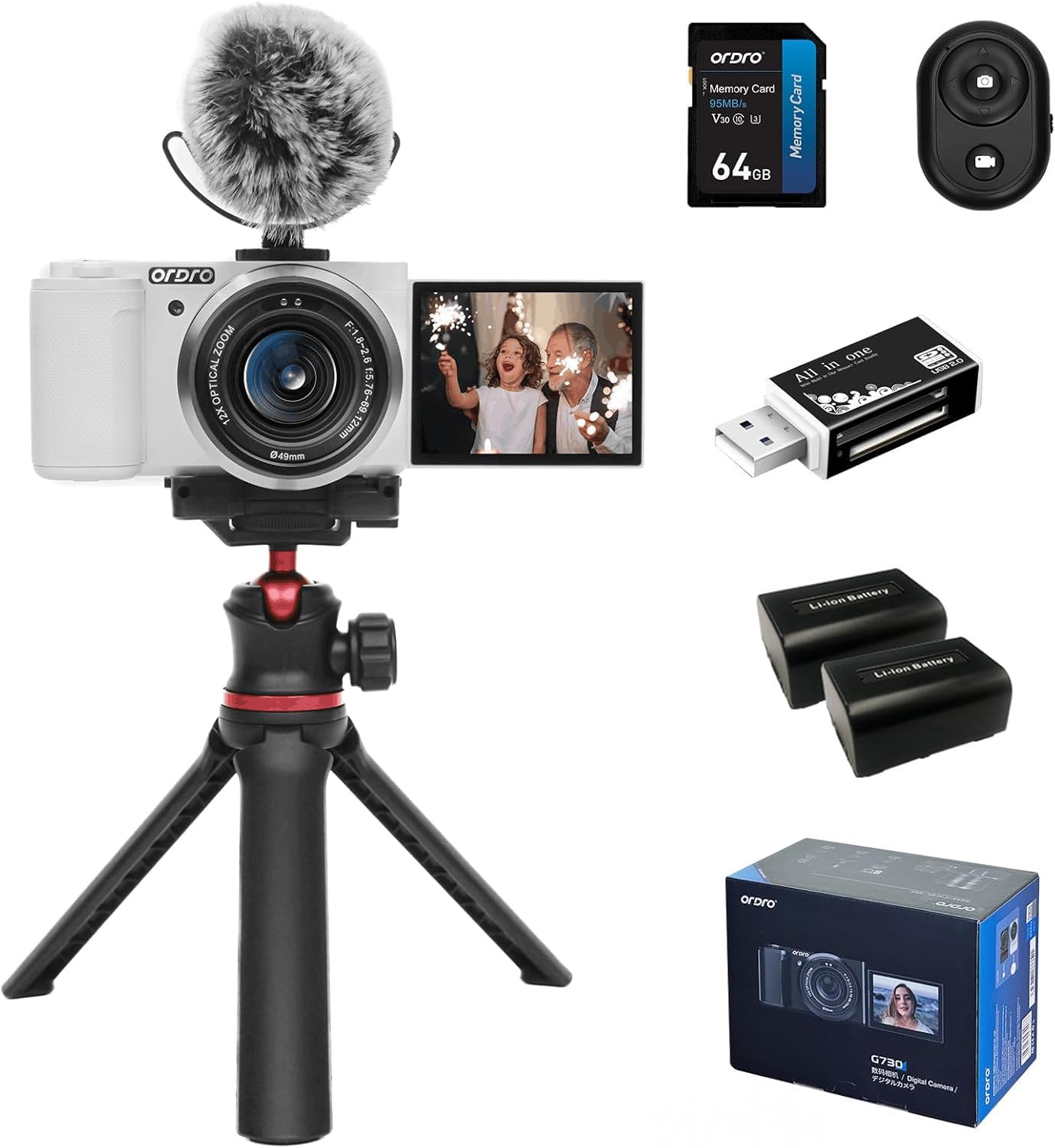
మూర్తి 4.1: ముందు view of the ORDRO G730 Digital Camera, showing the lens and ORDRO branding.
మూర్తి 4.2: వైపు view of the ORDRO G730 Digital Camera, illustrating the 3.2-inch IPS touch flip screen in an open position.

మూర్తి 4.3: వెనుకకు view of the ORDRO G730 Digital Camera, highlighting the control buttons and the touch screen interface.

Figure 4.4: The ORDRO G730 camera shown with an external microphone attached, demonstrating its expandability for audio recording.

Figure 4.5: The ORDRO G730 camera mounted on its flexible tripod, illustrating a stable setup for various shooting angles.
5. ఆపరేటింగ్ సూచనలు
5.1 షూటింగ్ మోడ్లు
The ORDRO G730 offers a variety of shooting modes to suit different scenarios:
- ఇంటెలిజెంట్ ఆటో: Automatically adjusts settings for optimal results.
- ప్రోగ్రామ్ ఆటో: Allows some manual control while the camera sets exposure.
- Aperture Priority: మీరు అపెర్చర్ సెట్ చేస్తే, కెమెరా షట్టర్ స్పీడ్ సెట్ చేస్తుంది.
- షట్టర్ ప్రాధాన్యత: మీరు షట్టర్ వేగాన్ని సెట్ చేస్తారు, కెమెరా ఎపర్చర్ను సెట్ చేస్తుంది.
- మాన్యువల్ ఎక్స్పోజర్: అపెర్చ్యుర్ మరియు షట్టర్ వేగంపై పూర్తి మాన్యువల్ నియంత్రణ.
- వీడియో: వీడియో రికార్డింగ్ కోసం ప్రత్యేక మోడ్.
- దృశ్య ఎంపిక: Pre-set modes for specific scenes (e.g., Landscape, Portrait).
- స్థూల: క్లోజప్ ఫోటోగ్రఫీ కోసం.
- ఇన్ఫ్రారెడ్ నైట్ విజన్: For shooting in low-light or dark conditions.
In most modes (except Intelligent Auto), you can adjust white balance, color temperature, saturation, and apply filters.
5.2 ఫోటోగ్రఫీ లక్షణాలు
- రిజల్యూషన్: 64MP వరకు స్టిల్ చిత్రాలను క్యాప్చర్ చేయండి.
- ఆప్టికల్ జూమ్: Utilize the 12x optical zoom (5.76mm to 69.12mm) for detailed shots from a distance.
- Focus Modes: Switch between AF (Autofocus) and MF (Manual Focus) for precise control. The camera supports face detection autofocus.
- వైట్ బ్యాలెన్స్: Adjust white balance settings (e.g., Auto) and use the White Balance Shift feature for accurate color representation.
- ఫిల్టర్లు: Apply from 15 creative filters to enhance your photos.
- WDR (వైడ్ డైనమిక్ రేంజ్): Improves detail in both bright and dark areas of an image.
- Face Beauty & Face Capture: Enhance portraits and automatically detect faces for optimal focus and exposure.
- నిరంతర షూటింగ్: Capture a sequence of photos rapidly.

చిత్రం 5.1: పైగాview of the ORDRO G730's video (5K 30fps, 4K 60fps, 2.7K 60fps, 1080p 60fps) and photo (64M, 56M, 48M, 36M, 30M) capabilities.

Figure 5.2: Demonstration of enhanced portrait beautification and white balance shift options for fine-tuning image appearance.

Figure 5.3: Visual representation of the 15 creative filters available to style your photos.
5.3 Video Recording Features
- వీడియో రిజల్యూషన్: Record videos in UHD 5K30p, 4K HDR, or Full HD at 60fps.
- స్లో మోషన్: Capture moments and play them back at a reduced speed.
- సమయం ముగిసిపోయింది: Create dynamic short videos of gradual changes.
- లూప్ రికార్డింగ్: Continuously record, overwriting older footagఇ మెమరీ కార్డ్ నిండినప్పుడు.
Video 5.4: An official product video demonstrating the ORDRO G730 digital camera's vlogging capabilities, including its 270° flip LCD screen, 4K video recording, and enhanced portrait beautification features. This video highlights the camera's ease of use for capturing unique moments and supports 4K HDR video recording and Full HD at 60fps, showcasing 5K Ultra HD image quality and a 3.2-inch touch screen with 1024x768 color gamut.
వీడియో 5.5: అధికారిక ఉత్పత్తి వీడియో ప్రదర్శనasing the ORDRO G730 digital camera's features for video and photo vlogging. It demonstrates the camera's manual focus, white balance shift, creative filters, and compact design, emphasizing its suitability for vlogging anywhere, anytime. The video also highlights the 270° flip LCD screen for easy self-recording.
5.4 Using the 3.2-inch IPS Touch Flip Screen
The camera features a 3.2-inch IPS touch flip screen with a resolution of up to 1024x768 pixels. This screen can be flipped 270 degrees, making it ideal for self-recording, vlogging, and shooting from various angles. Use the touch interface to navigate menus and adjust settings.
5.5 రిమోట్ కంట్రోల్ ఆపరేషన్
The included mini remote control allows you to operate the camera from a distance, preventing camera shake and enabling convenient self-portraits or group shots. Refer to the remote control's specific instructions for pairing and functions.

Figure 5.6: The mini remote control in use with the ORDRO G730 camera, providing convenient wireless operation.
6 కనెక్టివిటీ
6.1 Wi-Fi కనెక్షన్
The ORDRO G730 supports Wi-Fi connectivity for seamless content creation and sharing. Download the "OD Cam" app on your smartphone to remotely control photo shooting and video recording, and to transfer files.

Figure 6.1: The ORDRO G730 camera demonstrating Wi-Fi connectivity for instant photo and video sharing with a smartphone.
6.2 HDMI అవుట్పుట్
Connect your camera to a TV or monitor using an HDMI cable (not included) to view మీ ఫోటోలు మరియు వీడియోలు పెద్ద స్క్రీన్పై ఉంటాయి.
6.3 Webకామ్ కార్యాచరణ
కెమెరాను a గా ఉపయోగించవచ్చు webcam. Connect it to your computer via the USB cable and select "Webcam" mode. This is suitable for live streaming, video calls, and online teaching.
6.4 బాహ్య మైక్రోఫోన్
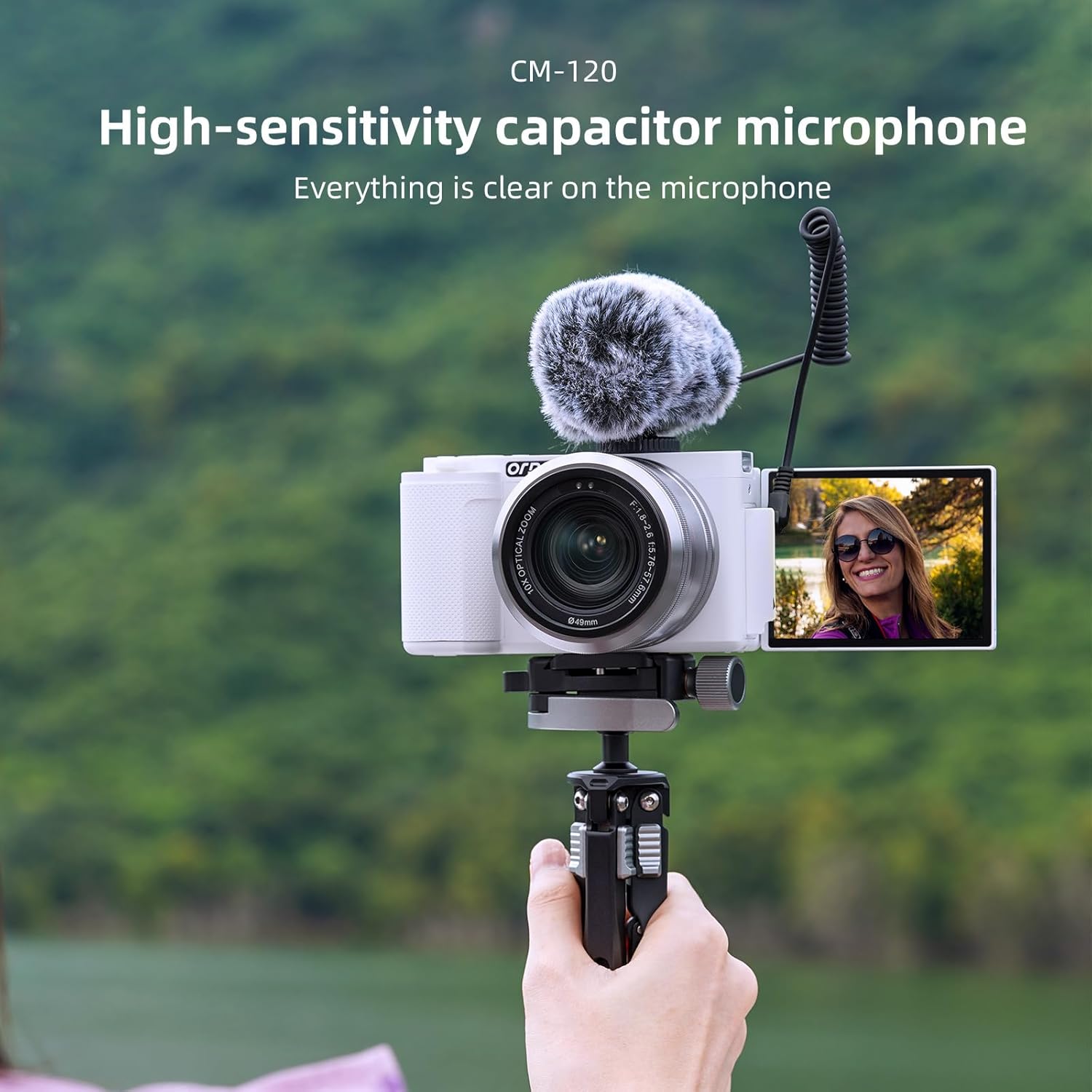
For enhanced audio quality, connect the included external microphone to the camera's 3.5mm jack.

Figure 6.2: The high-sensitivity capacitor microphone (CM-120) attached to the camera, ensuring clear audio capture.
6.5 ట్రైపాడ్ మౌంట్
The camera features a standard 1/4-inch tripod mount for stability and compatibility with various tripods, including the flexible tripod provided.
7. నిర్వహణ
7.1 కెమెరాను శుభ్రపరచడం
- కెమెరా బాడీని శుభ్రం చేయడానికి మృదువైన, పొడి వస్త్రాన్ని ఉపయోగించండి.
- For the lens, use a lens cleaning cloth and specialized lens cleaning solution.
- రాపిడి క్లీనర్లు లేదా ద్రావకాలు ఉపయోగించవద్దు.
7.2 బ్యాటరీ సంరక్షణ
- మొదటిసారి ఉపయోగించే ముందు బ్యాటరీలను పూర్తిగా ఛార్జ్ చేయండి.
- కెమెరాను ఎక్కువ కాలం ఉపయోగించకపోతే బ్యాటరీలను తీసివేయండి.
- చల్లని, పొడి ప్రదేశంలో బ్యాటరీలను నిల్వ చేయండి.
7.3 నిల్వ
When not in use, store the camera in its protective bag in a dry, dust-free environment, away from extreme temperatures.
8. ట్రబుల్షూటింగ్
If you encounter issues with your ORDRO G730 camera, refer to the following common problems and solutions:
| సమస్య | సాధ్యమైన కారణం | పరిష్కారం |
|---|---|---|
| కెమెరా పవర్ ఆన్ అవ్వదు. | తక్కువ లేదా ఛార్జ్ చేయని బ్యాటరీ; తప్పుగా చొప్పించిన బ్యాటరీ. | బ్యాటరీని పూర్తిగా ఛార్జ్ చేయండి. బ్యాటరీ సరిగ్గా చొప్పించబడిందని నిర్ధారించుకోండి. |
| చిత్రం/వీడియో నాణ్యత బాగాలేదు. | Incorrect settings; dirty lens; insufficient lighting. | Check shooting mode and settings. Clean the lens. Ensure adequate lighting or use Night Vision mode. |
| Wi-Fi కనెక్షన్ సమస్యలు. | Incorrect Wi-Fi settings; app not installed. | Ensure Wi-Fi is enabled on camera and smartphone. Download and install the "OD Cam" app. |
| కెమెరా స్తంభించిపోతుంది లేదా స్పందించడం మానేస్తుంది. | Software glitch; full memory card. | Remove and reinsert the battery to reset. Check memory card space. |
సమస్య కొనసాగితే, దయచేసి కస్టమర్ మద్దతును సంప్రదించండి.
9. స్పెసిఫికేషన్లు
Detailed technical specifications for the ORDRO G730 Digital Camera:
| ఫీచర్ | స్పెసిఫికేషన్ |
|---|---|
| మోడల్ పేరు | G730 |
| ఫోటో సెన్సార్ టెక్నాలజీ | CMOS (IMX415) |
| ఎఫెక్టివ్ స్టిల్ రిజల్యూషన్ | 64 ఎంపీ |
| వీడియో రిజల్యూషన్ | 5K30p, 2880p (4K) |
| ఆప్టికల్ జూమ్ | 12x |
| ఫోకల్ లెంగ్త్ | 5.76 మిమీ నుండి 69.12 మిమీ |
| గరిష్ట ఎపర్చరు | F.no 1.8 ~ 2.6 |
| స్క్రీన్ పరిమాణం | 3.2 అంగుళాలు |
| ప్రదర్శన రకం | IPS Touch Flip LCD |
| డిస్ప్లే రిజల్యూషన్ గరిష్టం | 1024*768 పిక్సెల్లు |
| చిత్రం స్థిరీకరణ | డిజిటల్ |
| కనెక్టివిటీ టెక్నాలజీ | Wi-Fi, USB 3.0, HDMI |
| మద్దతు ఇచ్చారు File ఫార్మాట్ | JPEG, MP4 |
| మెమరీ స్టోరేజ్ కెపాసిటీ | 64 GB (External-Memory Size) |
| బ్యాటరీ సెల్ రకం | లిథియం అయాన్ |
| వస్తువు బరువు | 1.18 Milligrams (Note: This value seems unusually low and may be a data entry error. Please refer to product packaging for accurate weight.) |
| ప్రత్యేక లక్షణాలు | Night Vision, WDR, Face Detection, Time-lapse, Slow Motion, Loop Recording, Filters |
10. వారంటీ మరియు మద్దతు
Your ORDRO G730 Digital Camera comes with a standard manufacturer's warranty. Please refer to the warranty card included in your package for specific terms and conditions. For technical support, service, or inquiries, please visit the official ORDRO webసైట్ లేదా వారి కస్టమర్ సేవా విభాగాన్ని సంప్రదించండి.