
Jonsbo D32 PRO
JONSBO D32 PRO మైక్రో-ATX PC కేస్ ఇన్స్ట్రక్షన్ మాన్యువల్
Model: D32 PRO
1. ఉత్పత్తి ముగిసిందిview
The JONSBO D32 PRO is a compact and highly compatible Micro-ATX PC case, designed to offer flexibility and optimized performance for various hardware configurations. Its innovative A/B mode allows for different motherboard layouts, catering to both standard and back-connect motherboards. This case is engineered for efficient cooling and easy installation, making it suitable for building powerful mini desktop systems.

మూర్తి 1.1: ముందు view of the JONSBO D32 PRO case with internal components illuminated.
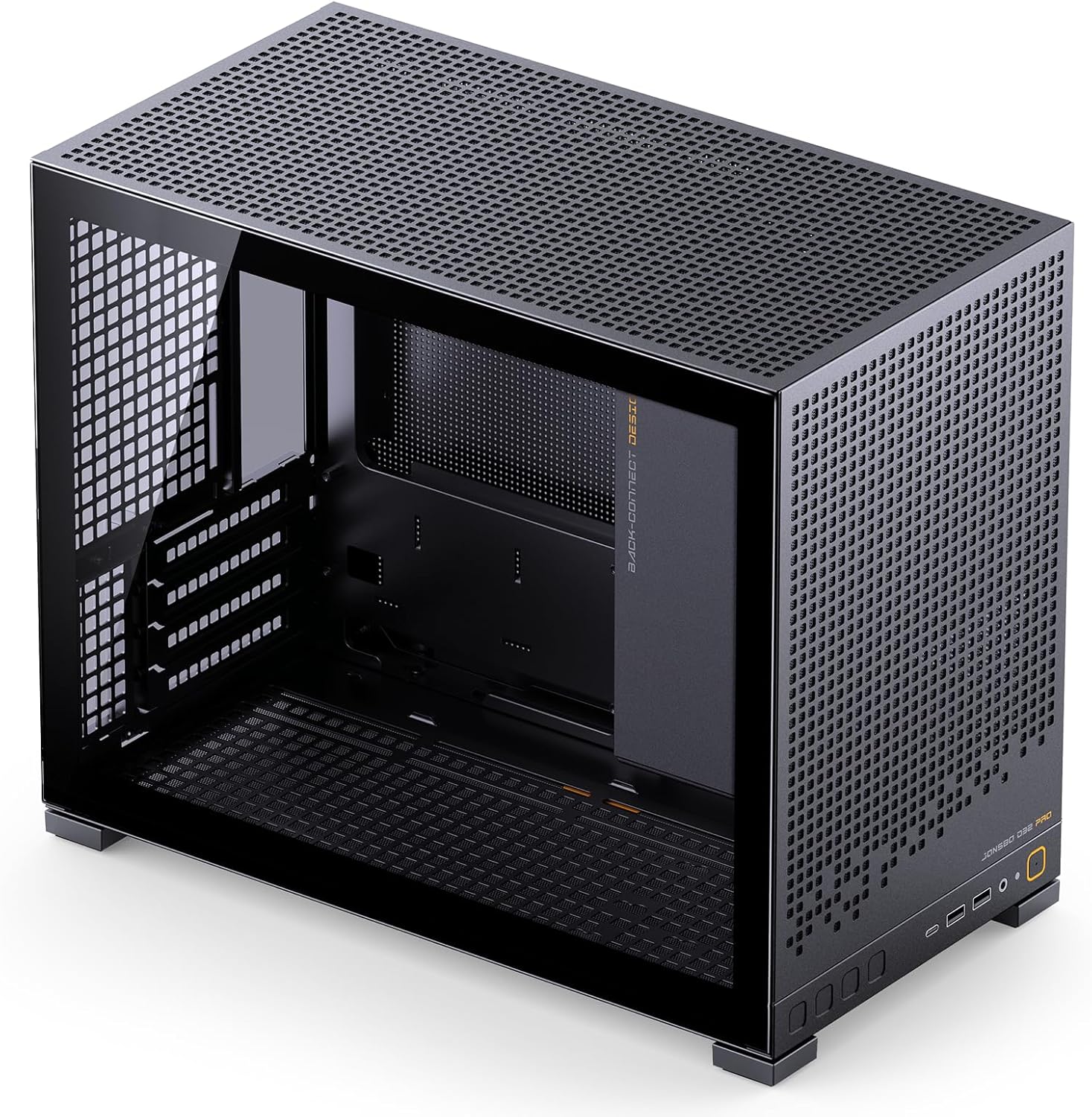
చిత్రం 1.2: కోణీయ view highlighting the internal structure and space of the D32 PRO case.
2 కీ ఫీచర్లు
- అధిక అనుకూలత: Supports Micro-ATX and Mini-ITX motherboards, including MATX back-connect/BTF motherboards.
- కాంపాక్ట్ డిజైన్: 24L volume mini desktop case with dimensions of D396×W207×H314mm (foot included).
- GPU క్లియరెన్స్: 365mm పొడవు వరకు గ్రాఫిక్స్ కార్డులను ఉంచుకోవచ్చు.
- శీతలీకరణ మద్దతు: Supports 240mm AIO liquid coolers and air coolers up to 163mm (AMD CPU) or 164mm (Intel CPU) in B mode, and 169mm (AMD CPU) or 170mm (Intel CPU) in A mode.
- PSU మద్దతు: Compatible with ATX/SFX-L/SFX PSUs (Max. L200mm, not compatible with 16A plugs).
- నిల్వ ఎంపికలు: Up to 4 x 2.5" drives or 2 x 2.5" + 2 x 3.5" drives (configurations depend on other hardware).
- ఆప్టిమైజ్ చేయబడిన వాయుప్రసరణ: Supports up to 6 cooling fans: Top (2x 120mm/140mm), Rear (1x 120mm), Bottom (3x 120mm/2x 140mm).
- ఫ్రంట్ I/O పోర్ట్లు: Includes 2x USB3.2 Gen1 Type-A, 1x USB3.2 Gen 2 Type-C, 1x AUDIO, 1x MIC.
- Visual Optimization: Tempered glass side panel and adjustable motherboard cable management cover for a clean interior.
- సులభమైన సంస్థాపన: Detachable PCI-E position for unobstructed graphics card insertion.

Figure 2.1: Internal component layout highlighting key areas for installation.
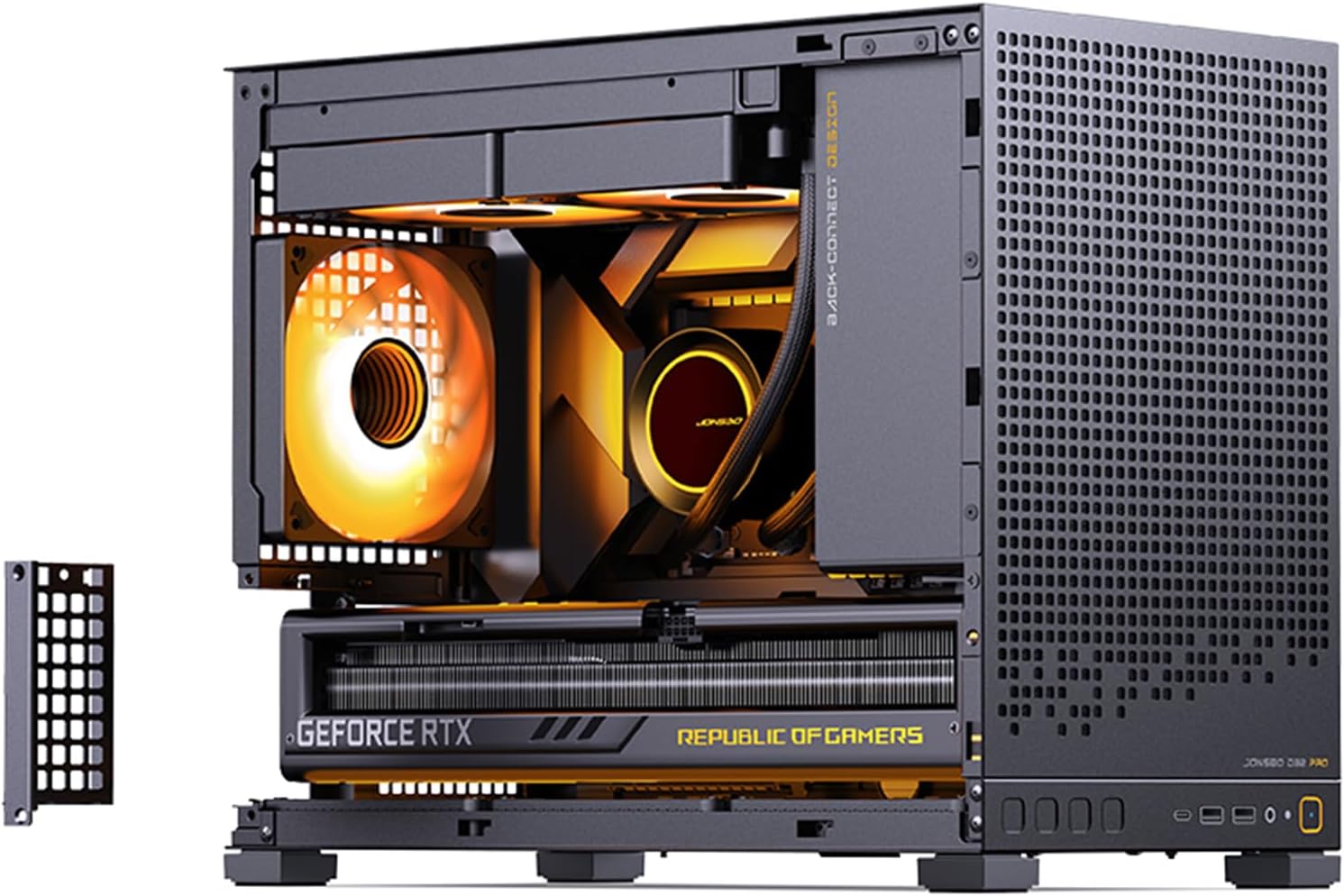
Figure 2.2: Detachable PCI-E bracket for simplified graphics card installation.

Figure 2.3: Included adjustable graphics card support bracket to prevent GPU sag.
3. సెటప్ మరియు ఇన్స్టాలేషన్
Careful planning is essential before beginning your PC build. The JONSBO D32 PRO offers two motherboard modes (A/B) to optimize compatibility and cable management. Ensure you select the correct mode for your motherboard type.
3.1. Motherboard Mode Selection (A/B Mode)
The D32 PRO features a switchable motherboard compartment to support both standard Micro-ATX and back-connect Micro-ATX motherboards. This affects the available space for CPU coolers and cable routing.
- A Mode (Factory Default): Compatible with ordinary motherboards, providing ample space for air-cooled heat sinks (up to 170mm Intel CPU / 169mm AMD CPU) and graphics cards. This mode is ideal for traditional builds.
- బి మోడ్: Designed for back-connect motherboards, offering increased space for rear-mounted cables. In this mode, CPU air cooler clearance is slightly reduced (up to 164mm Intel CPU / 163mm AMD CPU). Manual switching of the chassis structure is required for B mode.

Figure 3.1: A/B Mode diagram showing space differences for CPU cooler and cable management.
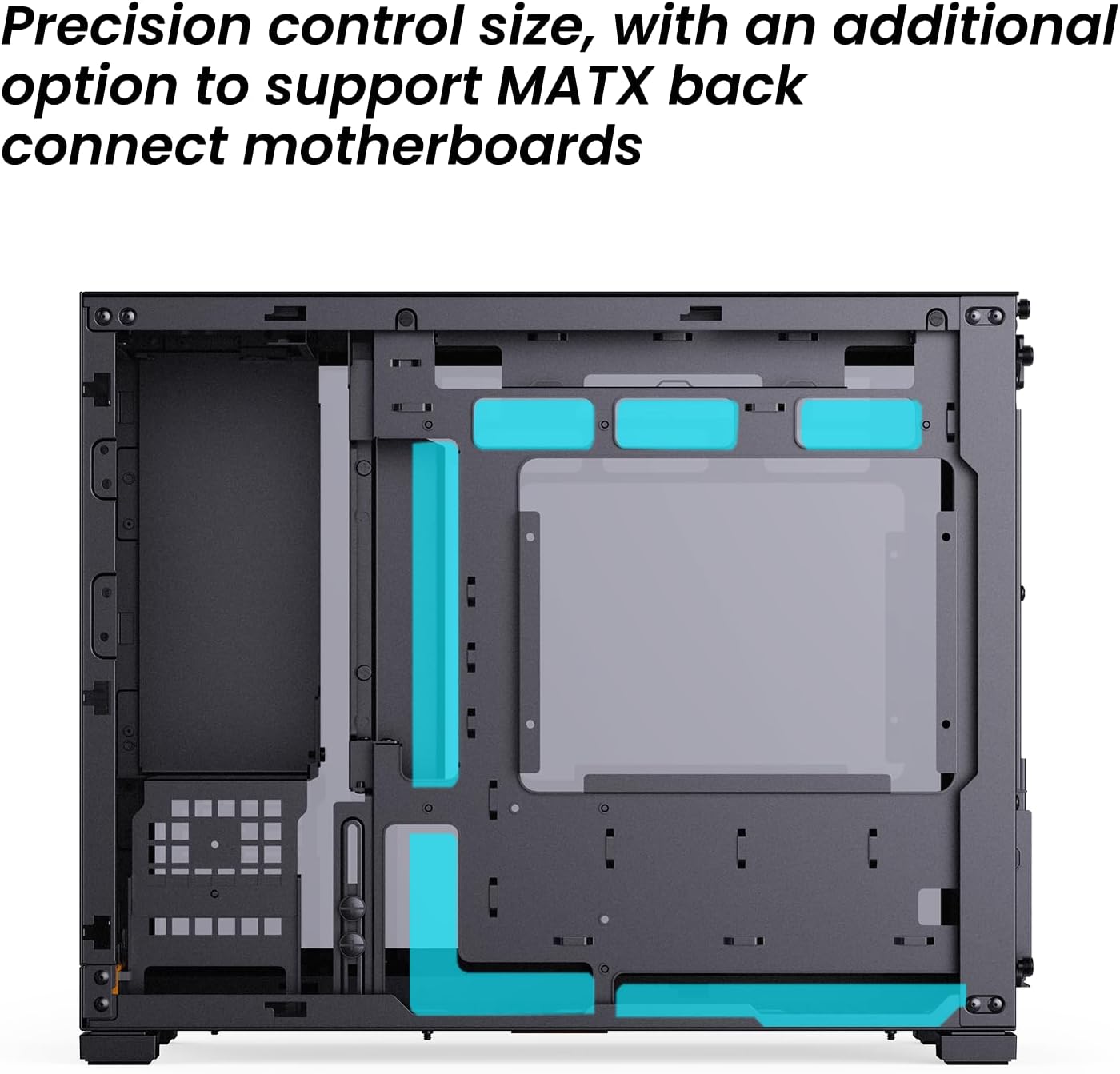
Figure 3.2: Precision control size with an additional option to support MATX back-connect motherboards.
3.2. కాంపోనెంట్ ఇన్స్టాలేషన్ దశలు
- కేసును సిద్ధం చేయండి: Remove side panels and any necessary internal brackets to facilitate installation.
- మదర్బోర్డ్ను ఇన్స్టాల్ చేయండి: Secure your Mini-ITX or Micro-ATX motherboard into the selected A or B mode position. Ensure all standoffs are correctly aligned.
- CPU కూలర్ను ఇన్స్టాల్ చేయండి: Depending on your chosen motherboard mode, install your air cooler or AIO radiator. For AIOs, the top supports up to 240mm radiators.
- పవర్ సప్లై (PSU) ఇన్స్టాల్ చేయండి: The D32 PRO supports ATX, SFX-L, and SFX PSUs. The power compartment partition is adjustable. If your GPU length is ≤ 286mm and the partition is removed, the PSU length is limited to 200mm. SFX power supplies require an SFX adapter bracket.
- గ్రాఫిక్స్ కార్డ్ (GPU) ఇన్స్టాల్ చేయండి: The case supports GPUs up to 365mm in length. Utilize the detachable PCI-E position for easier insertion. Use the included adjustable graphics card support bracket to prevent sag for longer cards.
- స్టోరేజ్ డ్రైవ్లను ఇన్స్టాల్ చేయండి: Install 2.5" SSDs or 3.5" HDDs in the designated drive bays. The case offers flexible storage configurations.
- Install Case Fans: Optimize airflow by installing fans in the top (2x 120mm/140mm), rear (1x 120mm), and bottom (3x 120mm/2x 140mm) positions.
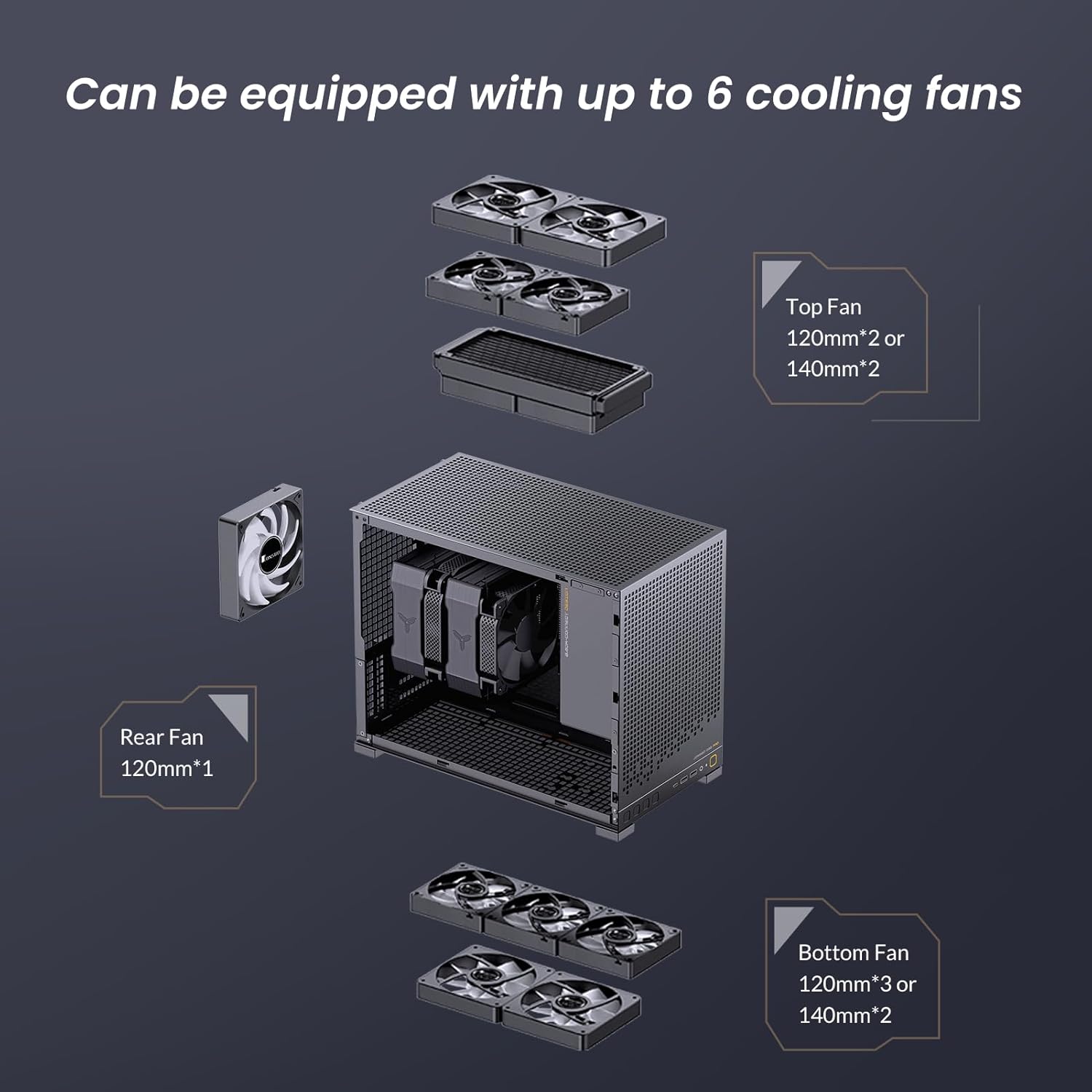
Figure 3.3: Fan configuration options for optimal cooling within the D32 PRO case.
3.3. కేబుల్ నిర్వహణ
The D32 PRO includes an adjustable motherboard cable management cover to conceal complex wires, enhancing the visual appeal of your build. Utilize cable ties and routing channels to maintain a tidy interior, which also improves airflow.
4. ఆపరేటింగ్ పరిగణనలు
Once assembled, ensure all connections are secure and the case panels are properly reinstalled. The perforated panels on the top, bottom, and side (depending on model) are designed for optimal airflow. Monitor component temperatures, especially during initial operation, to ensure adequate cooling.
5. నిర్వహణ
Regular maintenance helps prolong the life of your components and ensures optimal performance.
- దుమ్ము శుభ్రపరచడం: Periodically clean dust filters located on the top, bottom, and side panels. These can be removed and cleaned with compressed air or a soft brush.
- ఇంటీరియర్ క్లీనింగ్: Use compressed air to remove dust from internal components such as CPU cooler fins, GPU heatsinks, and fan blades. Ensure the system is powered off and unplugged before cleaning.
- ప్యానెల్ సంరక్షణ: Clean the tempered glass side panel with a soft, lint-free cloth and a mild glass cleaner. Avoid abrasive materials that could scratch the surface.
6. ట్రబుల్షూటింగ్
This section addresses common issues that may arise during or after building your PC in the JONSBO D32 PRO case.
- సరిపోని భాగాలు:
- GPU too long: Verify your GPU length does not exceed 365mm. Ensure the power compartment partition is adjusted or removed if necessary.
- CPU Cooler too tall: Check if you are in the correct A/B mode for your cooler height. A mode supports up to 170mm, B mode up to 164mm.
- PSU not fitting: Ensure your PSU length is within 200mm. Note that 16A plugs are not compatible.
- పేలవమైన గాలి ప్రవాహం/అధిక ఉష్ణోగ్రతలు:
- Verify all fans are installed correctly and spinning in the intended direction (intake/exhaust).
- Ensure dust filters are clean and not obstructing airflow.
- Check for proper cable management to avoid blocking airflow paths.
- ముందు I/O పోర్ట్లు పనిచేయడం లేదు:
- Confirm that all front I/O cables (USB, Audio) are securely connected to the correct headers on your motherboard.
7. స్పెసిఫికేషన్లు
| ఫీచర్ | స్పెసిఫికేషన్ |
|---|---|
| మోడల్ పేరు | D32 PRO |
| చట్రం కొలతలు (L×W×H) | 396mm × 207mm × 314mm (Foot included) |
| మదర్బోర్డు మద్దతు | MINI-ITX / MICRO-ATX standard / MICRO-ATX (Back-connect, requires B mode) |
| GPU క్లియరెన్స్ | Max. 365mm length |
| CPU Air Cooler Clearance (A Mode) | H170mm (Intel CPU) / 169mm (AMD CPU) |
| CPU Air Cooler Clearance (B Mode) | H164mm (Intel CPU) / 163mm (AMD CPU) |
| AIO రేడియేటర్ సపోర్ట్ | టాప్: 240mm వరకు |
| PSU క్లియరెన్స్ | Max. L200mm (not compatible with 16A plugs) |
| డ్రైవ్ బేస్ | 2.5": Up to 4 (depends on config), 3.5": Up to 2 (shared with 2.5" mounts, depends on config) |
| అభిమానుల మద్దతు | పైభాగం: 2x 120mm / 2x 140mm వెనుకవైపు: 1X 120mm Bottom: 3x 120mm / 2x 140mm |
| ముందు I/O పోర్ట్ | USB3.2 Gen1 Type-A*2 / USB3.2 Gen 2 Type-C*1 / AUDIO*1 / MIC*1 |
| చట్రం మెటీరియల్ | SPCC steel plate (thickness 0.7mm/0.8mm) |
| వస్తువు బరువు | 11.97 పౌండ్లు |
8. వీడియో ప్రదర్శన
Watch the official product video for a visual guide on the JONSBO D32 PRO Micro ATX PC Case features and design.
Video 8.1: Official JONSBO D32 PRO Micro ATX PC Case overview. This video demonstrates the case's features, compatibility, and design aspects.
9. వారంటీ మరియు మద్దతు
వారంటీ సమాచారం మరియు సాంకేతిక మద్దతు కోసం, దయచేసి అధికారిక JONSBO ని చూడండి. webసైట్లో లేదా వారి కస్టమర్ సర్వీస్ను నేరుగా సంప్రదించండి. ఏవైనా వారంటీ క్లెయిమ్లకు కొనుగోలు రుజువుగా మీ కొనుగోలు రసీదును ఉంచండి.
Official JONSBO Store: JONSBO Amazon Store
Ask a question about this manual
Ask about setup, troubleshooting, compatibility, parts, safety, or missing instructions. Manuals+ will review the question and use this page’s manual context to help answer it.