
Morelax MA303-1
Morelax Bluetooth Sleep Mask MA303-1 User Manual
1. పరిచయం
The Morelax Bluetooth Sleep Mask MA303-1 is designed to provide a comfortable and immersive sleep experience. This 3D contoured eye mask integrates wireless Bluetooth headphones, allowing users to enjoy audio while blocking out light for undisturbed rest. It is suitable for various situations including sleep, travel, meditation, and relaxation, offering a blend of comfort and functionality.
2. భద్రతా సమాచారం
- హెచ్చరిక: Only one Bluetooth connection is allowed. If connecting to another device, ensure the previous device is disconnected.
- 3 సంవత్సరాల కంటే తక్కువ వయస్సు ఉన్న పిల్లలకు తగినది కాదు.
- Do not use if you have difficulty breathing or cannot remove the mask by yourself.
- ఆటోమేటిక్ షట్డౌన్: If there is no activity after starting or disconnecting Bluetooth, the device will automatically shut down after 5 minutes to conserve battery.
3. ప్యాకేజీ విషయాలు
దయచేసి ఈ క్రింది అంశాల కోసం ప్యాకేజీని తనిఖీ చేయండి:
- 1 x Morelax Bluetooth Sleep Mask MA303-1
- 1 x USB ఛార్జింగ్ కేబుల్
- 1 x వినియోగదారు మాన్యువల్
4. ఉత్పత్తి ముగిసిందిview
The Morelax Bluetooth Sleep Mask MA303-1 features an ergonomic design for maximum comfort and functionality.
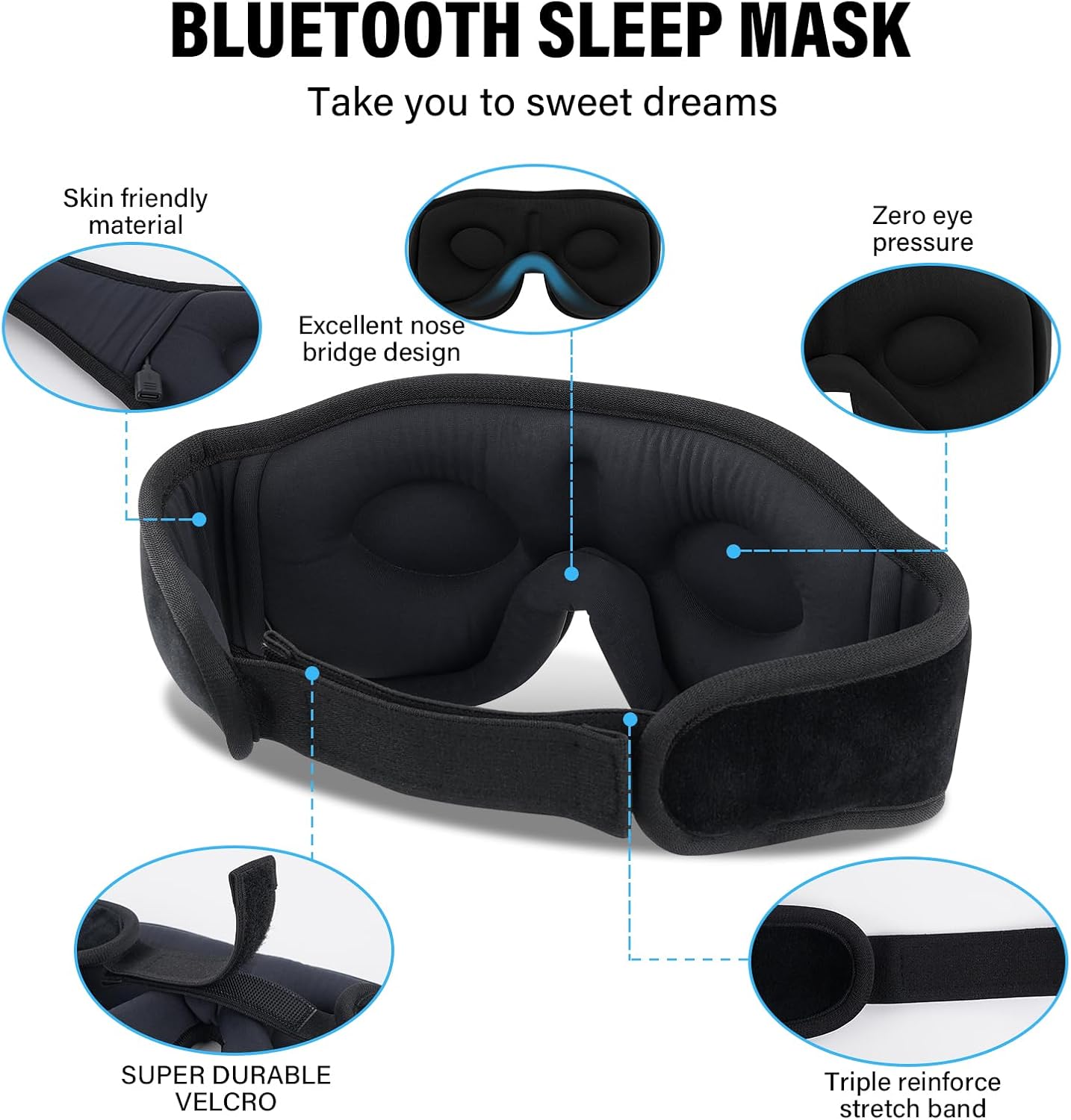
Figure 1: Morelax Bluetooth Sleep Mask MA303-1, highlighting skin-friendly material, excellent nose bridge design, zero eye pressure, super durable Velcro, and a triple reinforced stretch band.
- 3D Contoured Design: The mask features a 3D contoured cup design with a 15-degree tilt, providing ample space for eye movement and preventing pressure on the eyes, ideal for side sleepers.
- Premium Light Blocking: Deep eye pockets (0.4 inches) and an excellent nose bridge design effectively block out 100% of light from all angles, ensuring complete darkness.
- సౌకర్యవంతమైన పదార్థాలు: Crafted from skin-friendly memory foam and super-soft, breathable fabric, the mask is lightweight, hypoallergenic, and gentle on the face.
- Integrated Bluetooth Headphones: Equipped with Bluetooth 5.2 technology and 11MM drivers, the mask delivers high-fidelity stereo sound for an immersive audio experience.
- సర్దుబాటు పట్టీ: A super durable Velcro strap allows for easy adjustment to fit various head sizes comfortably without catching hair.

Figure 2: A user demonstrating the 3D contoured cup design of the sleep mask, ensuring a comfortable and pressure-free fit.

మూర్తి 3: వివరంగా view of the mask's deep eye pockets, designed to prevent light leakage and allow free eye movement.

Figure 4: The sleep mask showcasing its HiFi stereo sound capabilities with Bluetooth 5.2 and 11MM drivers.
5. సెటప్
5.1 Charging the Mask
Before first use, fully charge the sleep mask.
- Locate the charging port on the mask (usually near the control panel).
- Connect the provided USB charging cable to the mask and a suitable USB power source (e.g., computer USB port, wall adapter).
- సూచిక లైట్ ఛార్జింగ్ స్థితిని చూపుతుంది (ఉదా., ఛార్జింగ్ కోసం ఎరుపు, పూర్తిగా ఛార్జ్ అయినప్పుడు ఆఫ్).
- A full charge takes approximately 1 hour and provides up to 12 hours of playtime.

Figure 5: The sleep mask offers extended battery life, allowing for prolonged use on a single charge.
5.2 బ్లూటూత్ జత చేయడం
To connect your sleep mask to a Bluetooth-enabled device:
- Ensure the sleep mask is charged and turned off.
- Press and hold the power button on the mask for a few seconds until the indicator light flashes rapidly (e.g., blue/red alternating), indicating pairing mode.
- మీ పరికరంలో (స్మార్ట్ఫోన్, టాబ్లెట్, మొదలైనవి), బ్లూటూత్ను ప్రారంభించి, అందుబాటులో ఉన్న పరికరాల కోసం శోధించండి.
- Select 'Morelax' or 'BT-FAAH' from the list of found devices to pair.
- కనెక్ట్ చేసిన తర్వాత, సూచిక లైట్ మెరుస్తూ ఆగిపోతుంది మరియు ఘన నీలం రంగులో ఉంటుంది.
- గమనిక: The mask supports only one Bluetooth connection at a time. Disconnect from the current device before attempting to pair with a new one.
5.3 Wearing the Mask
For optimal comfort and light blocking:
- Place the mask over your eyes, ensuring the 3D contoured cups align with your eye sockets for zero pressure.
- Adjust the Velcro strap at the back of your head for a snug yet comfortable fit. Avoid overtightening.
- Gently slide the integrated speakers within the mask to align them directly with your ears for optimal sound quality.
6. ఆపరేటింగ్ సూచనలు
6.1 పవర్ ఆన్/ఆఫ్
- పవర్ ఆన్ చేయడానికి: సూచిక లైట్ ఆన్ అయ్యే వరకు పవర్ బటన్ను నొక్కి పట్టుకోండి.
- పవర్ ఆఫ్ చేయడానికి: సూచిక లైట్ ఆరిపోయే వరకు పవర్ బటన్ను నొక్కి పట్టుకోండి.
6.2 మ్యూజిక్ ప్లేబ్యాక్
- ప్లే/పాజ్: Press the Play/Pause button once to start or pause music playback.
- ధ్వని పెంచు: వాల్యూమ్ పెంచడానికి '+' బటన్ నొక్కండి.
- వాల్యూమ్ డౌన్: వాల్యూమ్ తగ్గించడానికి '-' బటన్ నొక్కండి.
- తదుపరి ట్రాక్: తదుపరి ట్రాక్కి వెళ్లడానికి '+' బటన్ను నొక్కి పట్టుకోండి.
- మునుపటి ట్రాక్: Press and hold the '-' button to skip to the previous track.
6.3 కాల్ నిర్వహణ
- సమాధానం కాల్: When a call comes in, press the Play/Pause button once to answer.
- కాల్ ముగించు: During a call, press the Play/Pause button once to end the call.
- కాల్ని తిరస్కరించండి: When a call comes in, press and hold the Play/Pause button to reject the call.
7. నిర్వహణ
Proper care ensures the longevity and hygiene of your sleep mask.
- Remove Electronics: The Bluetooth module and speakers are not washable. Before cleaning, carefully remove the Bluetooth module and speakers from their pockets within the mask.
- హ్యాండ్ వాష్ మాత్రమే: Hand wash the fabric portion of the sleep mask with water below 40°C (104°F). Do not use harsh detergents or bleach.
- గాలి పొడి: Gently squeeze out excess water and allow the mask to air dry completely in a well-ventilated area. Do not tumble dry or iron.
- మళ్లీ కలపండి: Once completely dry, carefully reinsert the Bluetooth module and speakers into their designated pockets.
8. ట్రబుల్షూటింగ్
If you encounter any issues with your Morelax Bluetooth Sleep Mask MA303-1, refer to the following common solutions:
| సమస్య | పరిష్కారం |
|---|---|
| పరికరం పవర్ ఆన్ చేయడం లేదు | Ensure the mask is fully charged. Connect it to a power source using the USB cable. |
| బ్లూటూత్ని జత చేయడం సాధ్యపడలేదు | Make sure the mask is in pairing mode (indicator light flashing). Ensure Bluetooth is enabled on your device. Disconnect the mask from any previously paired devices before attempting to pair with a new one. |
| Poor sound quality or no sound | Adjust the position of the speakers to align directly with your ears. Ensure the mask is properly charged and connected. |
| Light leakage around the edges | Adjust the mask's position on your face and tighten the strap for a snug fit. Ensure the nose bridge area is properly seated. |
| Automatic shutdown occurs too quickly | The mask has an automatic shutdown feature after 5 minutes of inactivity (no Bluetooth connection or audio playback). This is normal operation. |
9. స్పెసిఫికేషన్లు
| ఫీచర్ | వివరాలు |
|---|---|
| బ్రాండ్ | మోరెలాక్స్ |
| మోడల్ సంఖ్య | MA303-1 |
| బ్లూటూత్ వెర్షన్ | 5.2 |
| ఛార్జింగ్ సమయం | సుమారు 1 గంట |
| ఆట సమయం | 12 గంటల వరకు |
| మెటీరియల్స్ | Memory Foam, Super-soft breathable fabric |
| ప్రత్యేక లక్షణాలు | 3D Contoured Design, Zero Eye Pressure, Adjustable Strap, Built-in Microphone, Hypoallergenic |
| ఉత్పత్తి కొలతలు | 20.32 x 9.65 x 2.84 సెం.మీ (8 x 3.8 x 1.1 అంగుళాలు) |
| వస్తువు బరువు | 127.01 గ్రాములు (4.48 ఔన్సులు) |
| సంరక్షణ సూచనలు | Hand Wash Only (after removing electronics) |
| మూసివేత రకం | వెల్క్రో పట్టీ |
| వయస్సు పరిధి | పెద్దలు |
10. వారంటీ మరియు మద్దతు
For warranty information, technical support, or any inquiries regarding your Morelax Bluetooth Sleep Mask MA303-1, please contact Morelax customer service through your purchase platform or the official Morelax webవారంటీ క్లెయిమ్ల కోసం మీ కొనుగోలు రుజువును ఉంచండి.
Ask a question about this manual
Ask about setup, troubleshooting, compatibility, parts, safety, or missing instructions. Manuals+ will review the question and use this page’s manual context to help answer it.