
1. ఉత్పత్తి ముగిసిందిview
The JONSBO D32 STD Micro-ATX PC Case is a compact and highly compatible chassis designed for building high-performance desktop systems. It supports a wide range of hardware components, including back-connect motherboards, various cooling solutions, and long graphics cards, making it suitable for both gaming and business applications.
This manual provides detailed instructions for setting up, operating, maintaining, and troubleshooting your JONSBO D32 STD PC Case.

Figure 1: JONSBO D32 STD Micro-ATX PC Case, front view అంతర్గత భాగాలతో.
2 కీ ఫీచర్లు
- అధిక అనుకూలత: Supports MATX Back-Connect/BTF motherboards, 240mm AIO liquid coolers, 365mm GPUs, and ATX/SFX-L/SFX PSUs.
- కాంపాక్ట్ డిజైన్: Optimized for desktop use with a small footprint, featuring a magnetic dust-proof net at the bottom.
- Flexible Cooling Options: Accommodates up to 6 cooling fans (Top: 2x120mm/140mm, Bottom: 3x120mm/2x140mm, Rear: 1x120mm) and CPU air coolers up to 164mm (Intel) or 163mm (AMD).
- నిల్వ కాన్ఫిగరేషన్: Supports up to 3x 2.5" SSDs or 2x 2.5" SSDs + 1x 3.5" HDD.
- ముందు I/O: Includes USB3.2 Gen1 Type-A (x1), USB3.2 Gen2 Type-C (x1), and a combined HP MIC 2-in-1 port.
3. సెటప్ మరియు ఇన్స్టాలేషన్
3.1 అన్ప్యాకింగ్ మరియు తనిఖీ
Carefully remove the PC case from its packaging. Inspect the case for any signs of damage during transit. Ensure all accessories listed in the packing list are present. The case includes a plastic container with labeled bags for screws and zip ties for convenience.
3.2 కాంపోనెంట్ ఇన్స్టాలేషన్ మార్గదర్శకాలు
The D32 STD case is designed for efficient component installation. Follow these guidelines for optimal setup:
- మదర్బోర్డ్ ఇన్స్టాలేషన్: The case supports MINI-ITX and MICRO-ATX motherboards, including back-connect MICRO-ATX types. Ensure proper standoff alignment before securing the motherboard. For back-connect motherboards, the D32STD supports widths up to 207mm.
- విద్యుత్ సరఫరా యూనిట్ (PSU) సంస్థాపన: The case supports ATX, SFX-L, and SFX PSUs. A front power structure improves internal space utilization. For ATX PSUs, the recommended length varies based on GPU installation: 150mm (GPU in 1st PCI-E slot) or 170mm (GPU in 2nd PCI-E slot). A 14cm ATX PSU is generally easier to manage. Note: Internal power adapter cable is incompatible with 16A plug power supply.
- గ్రాఫిక్స్ కార్డ్ (GPU) ఇన్స్టాలేషన్: The D32 STD supports graphics cards up to 365mm in length. The total clearance from the GPU backplane to the bottom is 94mm (1st PCI-E slot) or 73mm (2nd PCI-E slot). Adjust bottom fan installation based on GPU thickness and position.
- శీతలీకరణ వ్యవస్థ సంస్థాపన:
- లిక్విడ్ కూలింగ్: The top of the case supports 240mm AIO integrated liquid coolers. It can also accommodate a 30mm thick radiator with 30mm fans.
- ఎయిర్ కూలింగ్: Compatible with high-performance dual tower air-cooled radiators with a height of up to 164mm (Intel CPU) or 163mm (AMD CPU).
- ఫ్యాన్ కాన్ఫిగరేషన్:
- Top: 2 x 120mm or 2 x 140mm fans
- Bottom: 3 x 120mm or 2 x 140mm fans (forms a high flow intake channel)
- Rear: 1 x 120mm fan
- స్టోరేజ్ డ్రైవ్ ఇన్స్టాలేషన్: The case offers flexible storage options. It supports up to three 2.5" SSDs or a combination of two 2.5" SSDs and one 3.5" HDD.
- కేబుల్ నిర్వహణ: Utilize the provided zip ties and the case's internal routing options to manage cables effectively. For back-connect motherboards, ensure sufficient space for stiffer power supply cables.

Figure 2: Motherboard tray with highlighted areas for back-connect motherboard support.

Figure 3: Power supply installation area and internal airflow design.

Figure 4: Graphics card length and clearance specifications.

Figure 5: Fan installation locations and sizes.

Figure 6: Storage drive installation options.
4. PC కేస్ను ఆపరేట్ చేయడం
Once all components are installed and secured, connect your peripherals and power cable. The front I/O panel provides convenient access to USB ports and audio jacks.
4.1 Front I/O Interface
- USB3.2 Gen1 Type-A: 1 port
- USB3.2 Gen2 Type-C: 1 port
- HP MIC 2 in 1 (Headphone & Microphone composite audio port): 1 port

Figure 7: Front I/O panel for easy connectivity.
4.2 పవర్ ఆన్
Press the power button located on the front panel to turn on your system. Ensure all cables are securely connected before powering on.
5. నిర్వహణ
క్రమం తప్పకుండా నిర్వహణ మీ PC భాగాల యొక్క ఉత్తమ పనితీరు మరియు దీర్ఘాయువును నిర్ధారించడంలో సహాయపడుతుంది.
- దుమ్ము నిర్వహణ: The case features a magnetic dust-proof net at the bottom. Regularly remove and clean this filter to prevent dust buildup inside the case, which can hinder airflow and component cooling.
- బాహ్య శుభ్రపరచడం: ఒక మృదువైన ఉపయోగించండి, డిamp cloth to clean the exterior surfaces of the case. Avoid abrasive cleaners or solvents.
- అంతర్గత శుభ్రపరచడం: Periodically open the side panels and use compressed air to remove dust from internal components like fans, heatsinks, and circuit boards. Ensure the system is powered off and unplugged before performing internal cleaning.

Figure 8: Magnetic dust filter for easy cleaning.
6. ట్రబుల్షూటింగ్
ఈ విభాగం మీ PC కేసుతో మీరు ఎదుర్కొనే సాధారణ సమస్యలను పరిష్కరిస్తుంది.
6.1 సిస్టమ్ ఆన్ చేయడం లేదు
- విద్యుత్ కనెక్షన్లను తనిఖీ చేయండి: Ensure the PSU is properly connected to the wall outlet and the motherboard. Verify the power button cable from the case is correctly connected to the motherboard's front panel header.
- PSU స్విచ్: Confirm the power switch on the PSU itself is in the "ON" position.
- Component Seating: Reseat the CPU, RAM, and GPU to ensure they are properly seated in their respective slots.
6.2 వేడెక్కడం సమస్యలు
- ఫ్యాన్ కాన్ఫిగరేషన్: Verify that all installed fans are spinning and configured for optimal airflow (e.g., intake at front/bottom, exhaust at top/rear).
- డస్ట్ బిల్డప్: Clean all dust filters and internal components as described in the Maintenance section.
- థర్మల్ పేస్ట్: Ensure CPU cooler has adequate thermal paste application.
6.3 USB పోర్ట్లు పనిచేయడం లేదు
- ముందు ప్యానెల్ హెడర్: Check that the USB cables from the front I/O panel are securely connected to the correct headers on your motherboard.
- డ్రైవర్ సమస్యలు: మీ మదర్బోర్డు చిప్సెట్ డ్రైవర్లు తాజాగా ఉన్నాయని నిర్ధారించుకోండి.
7. స్పెసిఫికేషన్లు
| ఫీచర్ | స్పెసిఫికేషన్ |
|---|---|
| ఉత్పత్తి మోడల్ | D32 STD |
| Chassis Size (excluding protruding parts) | 384mm (L) x 207mm (W) x 302mm (H) |
| Chassis Size (including footrest) | 395mm (L) x 207mm (W) x 314mm (H) |
| మదర్బోర్డు మద్దతు | MINI-ITX / MICRO-ATX / Back-connect MICRO-ATX |
| విస్తరణ స్లాట్లు | 4 |
| చట్రం మెటీరియల్ | SPCC steel plate (Thickness: 0.7mm-0.8mm) |
| CPU Air Cooler Height Limit | 164mm MAX (Intel CPU) / 163mm MAX (AMD CPU) |
| CPU Water-cooled Radiator Support | Top 240 AIO |
| GPU Compatible Length | 365 మిమీ వరకు |
| ATX PSU Length Limit | 150mm (GPU in 1st PCI-E slot) / 170mm (GPU in 2nd PCI-E slot) / 200mm (GPU length 288mm) |
| SFX PSU Support | SFX / SFX-L |
| డ్రైవ్ బేస్ | 3 x 2.5" SSD or 2 x 2.5" SSD + 1 x 3.5" HDD |
| ముందు I/O | 1x USB3.2 Gen1 Type-A, 1x USB3.2 Gen2 Type-C, 1x HP MIC 2-in-1 |
| అభిమానుల మద్దతు | Top: 2x120mm/2x140mm, Rear: 1x120mm, Bottom: 3x120mm/2x140mm |
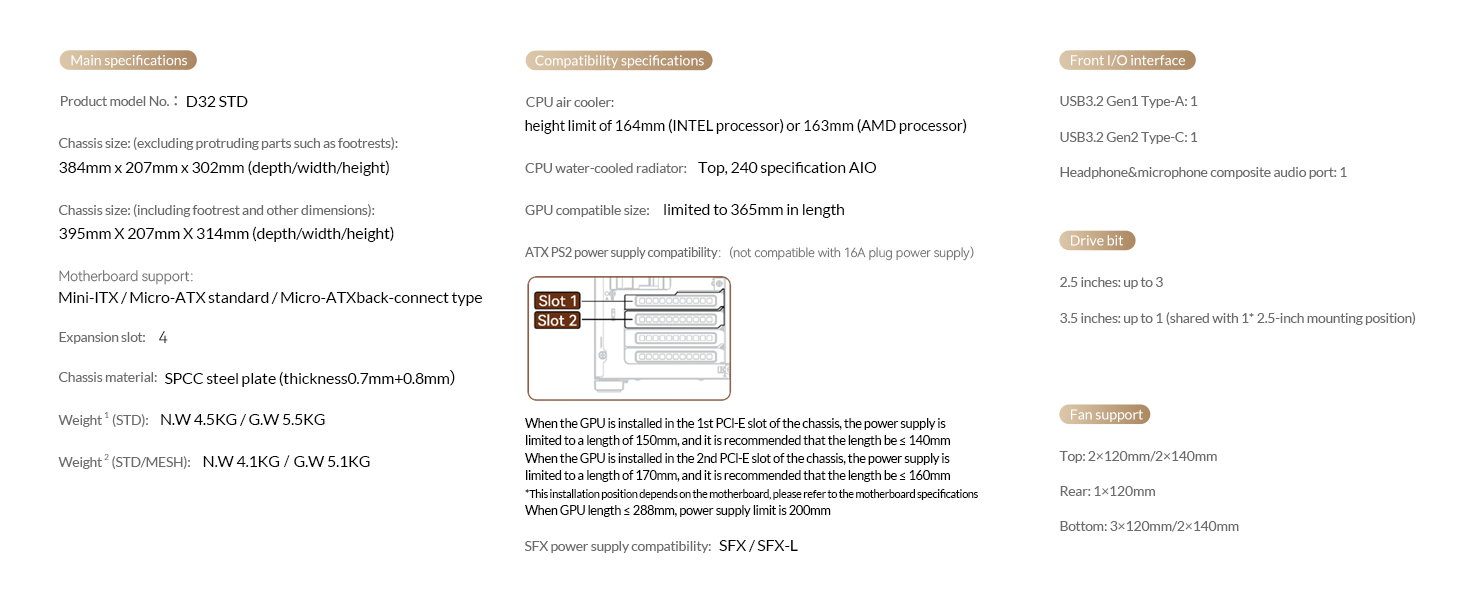
చిత్రం 9: సమగ్ర సాంకేతిక వివరణలు.
8. అధికారిక ఉత్పత్తి వీడియోలు
JONSBO D32 STD Micro ATX PC Case Overview
ఈ వీడియో సమగ్రంగా అందిస్తుందిview of the JONSBO D32 STD Micro ATX PC Case, highlighting its features, design, and compatibility. It showcases the case from various angles and demonstrates its compact size and internal layout.
9. వారంటీ మరియు మద్దతు
వారంటీ సమాచారం మరియు సాంకేతిక మద్దతు కోసం, దయచేసి అధికారిక JONSBO ని చూడండి. webసైట్లో లేదా వారి కస్టమర్ సర్వీస్ను సంప్రదించండి. వారంటీ క్లెయిమ్ల కోసం కొనుగోలు రుజువుగా మీ కొనుగోలు రసీదును ఉంచండి.
అదనపు మద్దతు కోసం, మీరు సందర్శించవచ్చు అమెజాన్లో జాన్స్బో స్టోర్.