
Ulefone Ulefone Note 18 Pro Phone Unlocked
Ulefone Note 18 Pro స్మార్ట్ఫోన్ యూజర్ మాన్యువల్
Model: Ulefone Note 18 Pro Phone Unlocked
పరిచయం
This manual provides detailed instructions for the proper use and maintenance of your Ulefone Note 18 Pro smartphone. Please read this manual carefully before using your device to ensure optimal performance and longevity. Keep this manual for future reference.
ప్యాకేజీ విషయాలు
Upon unboxing your Ulefone Note 18 Pro, please verify that all the following items are included:
- ఉలేఫోన్ నోట్ 18 ప్రో స్మార్ట్ఫోన్
- పవర్ అడాప్టర్
- USB టైప్-సి కేబుల్
- SIM ఎజెక్టర్ సాధనం
- Pre-applied Screen Protector
- TPU Protective Case
- త్వరిత ప్రారంభ గైడ్ (ఈ మాన్యువల్)

Image: Contents of the Ulefone Note 18 Pro retail package.
సెటప్
1. SIM కార్డ్ మరియు TF కార్డ్ ఇన్స్టాలేషన్
The Ulefone Note 18 Pro supports dual SIM cards or one SIM card and one TF (microSD) card for expanded storage. Use the provided SIM ejector tool to open the SIM tray.
- ఫోన్ పక్కన సిమ్ ట్రేని గుర్తించండి.
- ట్రే పక్కన ఉన్న చిన్న రంధ్రంలోకి సిమ్ ఎజెక్టర్ సాధనాన్ని చొప్పించి, ట్రే బయటకు వచ్చే వరకు సున్నితంగా నొక్కండి.
- Place your Nano-SIM card(s) and/or TF card into the designated slots on the tray, ensuring the gold contacts face downwards.
- పరికర బాడీతో ఫ్లష్ అయ్యే వరకు ట్రేని జాగ్రత్తగా ఫోన్లోకి నెట్టండి.

Image: Illustration of the dual SIM/TF card slot.
2. ప్రారంభ పవర్ ఆన్
Press and hold the Power button located on the side of the device until the Ulefone logo appears on the screen. Follow the on-screen prompts to complete the initial setup, including language selection, Wi-Fi connection, and Google account setup.
3. పరికరాన్ని ఛార్జ్ చేస్తోంది
Before first use, it is recommended to fully charge your Ulefone Note 18 Pro. Connect the USB Type-C cable to the phone's charging port and the other end to the provided power adapter. Plug the adapter into a wall outlet.
The device features an 18W fast charging capability for its 5450mAh battery. A full charge typically takes approximately 3.2 hours.

చిత్రం: బ్యాటరీ స్పెసిఫికేషన్లు మరియు ఛార్జింగ్ వివరాలు.
మీ పరికరాన్ని ఆపరేట్ చేస్తోంది
1. ప్రాథమిక నావిగేషన్
The Ulefone Note 18 Pro operates on Android 14 and utilizes a 6.78-inch HD+ LCD touchscreen for navigation. Use gestures such as tapping, swiping, pinching, and spreading to interact with the interface.
The device also features an Innovative Custom Key, which can be configured for various functions:
- ఒక క్లిక్: Start Sound Recording, Open Flashlight, etc.
- రెండుసార్లు నొక్కు: Take Screenshots, Open Zello, etc.
- లాంగ్ ప్రెస్: Open SOS, Open Game Mode, etc.
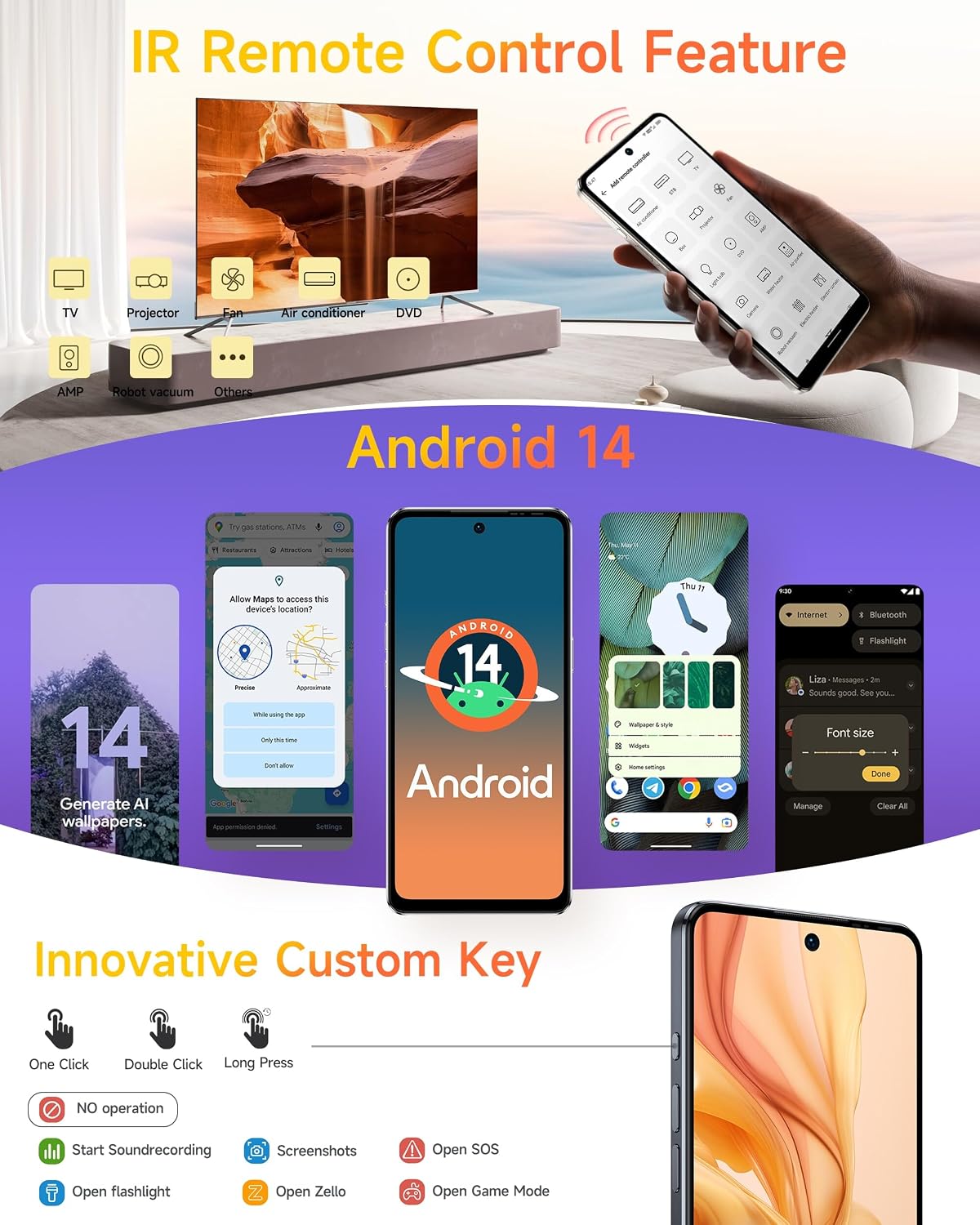
Image: Android 14 interface and Custom Key functionalities.
2. కెమెరా వినియోగం
The Ulefone Note 18 Pro is equipped with a versatile camera system:
- 64MP ప్రధాన కెమెరా: Sony IMX682 sensor with f/1.8 aperture.
- 50MP అల్ట్రా-వైడ్ కెమెరా: 1/2.8" sensor with 117.3° FOV and f/2.2 aperture.
- 32MP ఫ్రంట్ కెమెరా: For high-resolution selfies and video calls.
To access the camera, tap the Camera icon on your home screen or app drawer. Select your desired mode (Photo, Video, Portrait, etc.) and tap the shutter button to capture images or start/stop recording.

Image: Camera specifications and sample photography.
3 కనెక్టివిటీ
ఈ పరికరం వివిధ కనెక్టివిటీ ఎంపికలకు మద్దతు ఇస్తుంది:
- 4G LTE: హై-స్పీడ్ మొబైల్ డేటా కోసం.
- Wi-Fi: ఇంటర్నెట్ యాక్సెస్ కోసం వైర్లెస్ నెట్వర్క్లకు కనెక్ట్ అవ్వండి.
- బ్లూటూత్: హెడ్ఫోన్లు లేదా స్పీకర్ల వంటి వైర్లెస్ ఉపకరణాలకు కనెక్ట్ చేయడానికి.
- NFC: For contactless payments (G Pay supported) and quick pairing with other NFC-enabled devices.
- Global Navigation: Built-in GPS, GLONASS, BeiDou, and Galileo for accurate location services.
- హెడ్సెట్ లేని FM రేడియో: Enjoy FM radio without needing to plug in headphones as an antenna.

Image: Connectivity features including NFC, GPS, and FM Radio.
4. IR Remote Control Feature
The Ulefone Note 18 Pro includes an IR Blaster, allowing it to function as a universal remote control for various home appliances such as TVs, air conditioners, projectors, and more. Use the pre-installed IR remote app or download a compatible app to configure and control your devices.
Image: IR Remote Control functionality.
5. భద్రతా లక్షణాలు
For enhanced security, the Ulefone Note 18 Pro offers:
- ఫేస్ అన్లాక్: Register your face to unlock the device quickly and conveniently.
- వేలిముద్ర ID: The device features a side-mounted fingerprint sensor for secure and fast unlocking. Register your fingerprints in the Security settings.
Image: Face Unlock and Fingerprint ID security options.
నిర్వహణ
1. బ్యాటరీ సంరక్షణ
- Avoid exposing the device to extreme temperatures (below 0°C or above 45°C) as this can degrade battery performance.
- Use only the original charger and cable provided with your device to prevent damage and ensure optimal charging.
- Do not leave the device charging for extended periods after it has reached 100% to prolong battery lifespan.
2. మీ పరికరాన్ని శుభ్రపరచడం
- Gently wipe the screen and back of the phone with a soft, lint-free cloth.
- మొండి మచ్చల కోసం, కొద్దిగా dampనీటితో లేదా స్క్రీన్ క్లీనర్ ద్రావణంతో వస్త్రాన్ని తుడవండి. కఠినమైన రసాయనాలను నివారించండి.
- The device is splash-proof; however, avoid submerging it in water.
Image: Splash-proof design of the device.
3. సాఫ్ట్వేర్ నవీకరణలు
Regularly check for and install system updates to ensure your device has the latest features, security patches, and performance improvements. You can usually find this option in Settings > System > System update.
ట్రబుల్షూటింగ్
If you encounter issues with your Ulefone Note 18 Pro, refer to the following common solutions:
| సమస్య | సాధ్యమైన పరిష్కారం |
|---|---|
| పరికరం ఆన్ అవ్వదు | బ్యాటరీ ఛార్జ్ అయ్యిందని నిర్ధారించుకోండి. కనీసం 10 నిమిషాలు ఛార్జర్కు కనెక్ట్ చేసి, ఆపై మళ్లీ పవర్ ఆన్ చేయడానికి ప్రయత్నించండి. |
| యాప్లు క్రాష్ అవుతున్నాయి లేదా స్తంభించిపోతున్నాయి | Clear the app's cache (Settings > Apps > [App Name] > Storage > Clear cache). If the problem persists, try reinstalling the app or performing a factory reset (backup data first). |
| పేలవమైన బ్యాటరీ జీవితం | Reduce screen brightness, disable unused features (Wi-Fi, Bluetooth, GPS), close background apps, and check for power-intensive apps in battery usage settings. |
| Wi-Fiకి కనెక్ట్ చేయడం సాధ్యపడదు | Restart your router and the phone. Forget the network in phone settings and reconnect. Ensure Wi-Fi is enabled on the phone. |
| వేలిముద్ర సెన్సార్ పనిచేయడం లేదు | మీ వేలు శుభ్రంగా మరియు పొడిగా ఉందని నిర్ధారించుకోండి. సెట్టింగ్లు > భద్రత > వేలిముద్రలో మీ వేలిముద్రను తిరిగి నమోదు చేయండి. |
స్పెసిఫికేషన్లు
The Ulefone Note 18 Pro boasts impressive specifications for a smooth user experience:

Image: Processor and Memory details.
| ఫీచర్ | వివరాలు |
|---|---|
| మోడల్ పేరు | Ulefone Note 18 Pro Phone Android 14 Cell Phones Unlocked |
| ఆపరేటింగ్ సిస్టమ్ | ఆండ్రాయిడ్ 14 |
| ప్రాసెసర్ | మీడియాటెక్ హీలియో G91 ఆక్టా కోర్, 2 GHz |
| RAM | 12 GB (6GB భౌతిక + 6GB వర్చువల్) |
| అంతర్గత నిల్వ | 256 GB |
| విస్తరించదగిన నిల్వ | Yes, up to 2TB via TF card |
| ప్రదర్శించు | 6.78-inch HD+ LCD, 1512 x 720 resolution, Corning Gorilla Glass, 90Hz Refresh Rate |
| వెనుక కెమెరా | 64 MP Main (Sony IMX682) + 50 MP Ultra-Wide |
| ఫ్రంట్ కెమెరా | 32 ఎంపీ |
| వీడియో క్యాప్చర్ రిజల్యూషన్ | 4K |
| బ్యాటరీ కెపాసిటీ | 5450 mAh (లిథియం పాలిమర్) |
| ఛార్జింగ్ | 18W Fast Charging, USB Type-C |
| SIM కార్డ్ | డ్యూయల్ సిమ్ (నానో-సిమ్) |
| కనెక్టివిటీ | 4G LTE, Wi-Fi, Bluetooth, NFC, GPS, GLONASS, BeiDou, Galileo |
| ఇతర ఫీచర్లు | IR Remote Control, Fingerprint ID, Face Unlock, Custom Key, Splash Proof, Headset-free FM Radio |
| కొలతలు | 16.88 x 7.68 x 0.88 సెం.మీ |
| బరువు | 211 గ్రా |
వారంటీ మరియు మద్దతు
Your Ulefone Note 18 Pro comes with a standard manufacturer's warranty. For detailed warranty terms and conditions, please refer to the warranty card included in your package or visit the official Ulefone website. For technical support, troubleshooting assistance, or service inquiries, please contact Ulefone customer service through their official channels.
మీరు మరింత సమాచారం మరియు మద్దతు వనరులను ఇక్కడ కనుగొనవచ్చు అమెజాన్లో ఉలేఫోన్ స్టోర్.
Ask a question about this manual
Ask about setup, troubleshooting, compatibility, parts, safety, or missing instructions. Manuals+ will review the question and use this page’s manual context to help answer it.