
1. ఉత్పత్తి ముగిసిందిview
The JONSBO CR1000 EVO ARGB CPU Cooler is designed for efficient and quiet CPU cooling, featuring significant performance upgrades and a low-noise design. It incorporates a new fan iteration with a noise level of 22-32dB(A) for quiet operation.
This cooler utilizes 4 nickel-plated copper heat pipes to optimize heat transfer efficiency, providing a 25% improvement compared to previous models. Its compact dimensions (L120 * W71 * H154mm) ensure compatibility with most tower cases.
The CR1000 EVO ARGB model features an integrated top cover with elegant lighting effects and a 12cm PWM ARGB fan with 9 sickle-shaped blades and 8 shock-absorbing silicone pads. The 5V 3Pin Rainbow ARGB system allows for synchronization with motherboard PCB for various lighting modes, including colorful, breathing, monochrome, and audio linkage.
It supports a wide range of platforms, including Intel LGA1851/1700/1200/115X and AMD AM4/AM5 sockets.

Image: JONSBO CR1000 EVO ARGB CPU Cooler showcasing its vibrant lighting.
Video: Official product video demonstrating the JONSBO CR1000 EVO CPU Air Cooler's features and appearance.
2. పెట్టెలో ఏముంది
Upon opening your JONSBO CR1000 EVO ARGB CPU Cooler package, you should find the following components:
- CPU ఫ్యాన్
- Heatsink with 4 Copper Heat Pipes
- అల్యూమినియం రెక్కలు
- ఇంటెల్ మరియు AMD సాకెట్ల కోసం మౌంటు హార్డ్వేర్
- థర్మల్ పేస్ట్ (ముందుగా అప్లై చేయబడినది లేదా ట్యూబ్లో)
- వినియోగదారు మాన్యువల్ (ఈ పత్రం)
3. స్పెసిఫికేషన్లు
| ఫీచర్ | స్పెసిఫికేషన్ |
|---|---|
| ఉత్పత్తి కొలతలు | 4.72 x 2.8 x 6.06 అంగుళాలు (120mm L x 71mm W x 154mm H) |
| అంశం మోడల్ సంఖ్య | CR1000 EVO |
| బరువు | 1.57 పౌండ్లు (0.71 కిలోలు) |
| తయారీదారు | JONSBO |
| పవర్ కనెక్టర్ రకం | Fan 4-Pin PWM / LED 3-Pin ARGB |
| వాల్యూమ్tage | 12 వోల్ట్లు |
| వాట్tage | 1.92 వాట్స్ |
| శీతలీకరణ పద్ధతి | గాలి |
| అనుకూల పరికరాలు | డెస్క్టాప్ PCలు |
| శబ్దం స్థాయి | 32 dB (గరిష్టంగా) |
| మెటీరియల్ | అల్యూమినియం, ప్లాస్టిక్ |
| గరిష్ట భ్రమణ వేగం | 1500 RPM |
| వేడి పైపులు | 4 రాగి వేడి పైపులు |
| ఫ్యాన్ బ్లేడ్స్ | 9 Sickle-shaped blades |
| సాకెట్ మద్దతు | Intel: LGA1851/1700/1200/115X, AMD: AM4/AM5 |

Image: Detailed dimensions of the JONSBO CR1000 EVO CPU Cooler.
4. ఇన్స్టాలేషన్ గైడ్
This section provides general installation steps. Please refer to the specific mounting hardware instructions included in your package for detailed, platform-specific guidance (Intel LGA1851/1700/1200/115X or AMD AM4/AM5).
4.1. తయారీ
- Ensure your motherboard is compatible with the cooler's mounting system.
- మీ కంప్యూటర్ను ఆపివేసి, అన్ని పవర్ కేబుల్లను డిస్కనెక్ట్ చేయండి.
- Remove your existing CPU cooler and clean any old thermal paste from the CPU surface using isopropyl alcohol.
4.2. Installing the Backplate and Stand-offs
For most installations, you will need to install a backplate behind the motherboard and secure stand-offs from the front. Follow the instructions for your specific CPU socket type (Intel or AMD) to attach the correct backplate and stand-offs.
4.3. థర్మల్ పేస్ట్ దరఖాస్తు
Apply a small amount of thermal paste (pea-sized dot or thin line) to the center of your CPU's integrated heat spreader (IHS). The pressure from the cooler will spread it evenly.
4.4. Mounting the Heatsink
Carefully place the heatsink onto the CPU, aligning the mounting holes with the stand-offs. Secure the heatsink using the provided screws or retention clips. Tighten screws in a diagonal pattern to ensure even pressure.
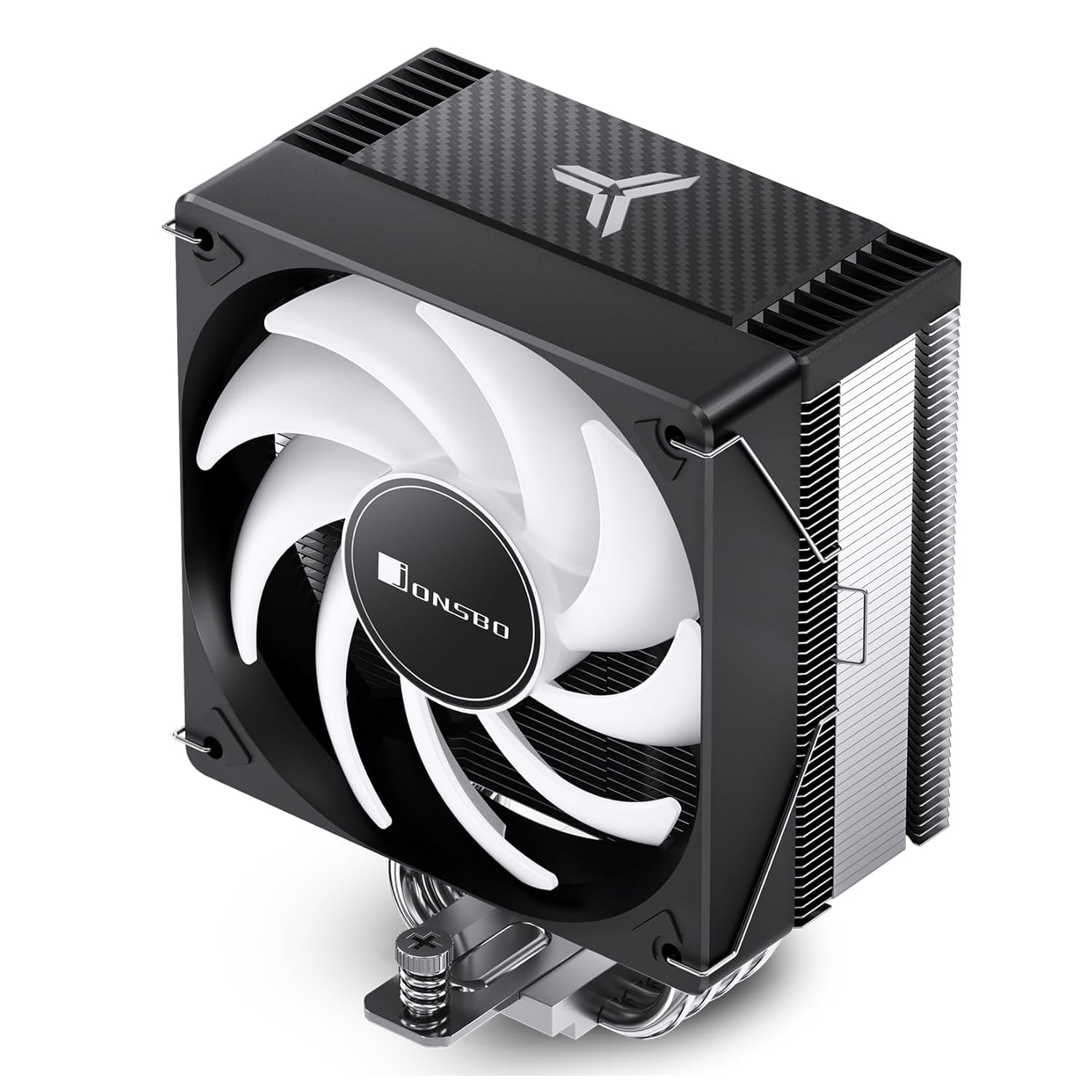
చిత్రం: వైపు view of the JONSBO CR1000 EVO CPU Cooler, showing the heatsink and fan.
4.5. Installing the Fan
Attach the 120mm fan to the heatsink using the included fan clips. Ensure the fan is oriented correctly to push air through the heatsink towards the rear or top of your case.

Image: The JONSBO CR1000 EVO CPU Cooler installed within a computer case, demonstrating its fit and appearance.
4.6. కేబుల్స్ కనెక్ట్
- మీ మదర్బోర్డ్లోని CPU_FAN హెడర్కు 4-పిన్ PWM ఫ్యాన్ కేబుల్ను కనెక్ట్ చేయండి.
- Connect the 3-pin ARGB cable to a compatible 5V ARGB header on your motherboard. Ensure it is a 5V header and not a 12V RGB header to prevent damage.
5. ఆపరేటింగ్ సూచనలు
5.1. Fan Control (PWM)
The 4-pin PWM fan allows your motherboard to dynamically control the fan speed based on CPU temperature. This ensures optimal cooling performance while minimizing noise. You can typically configure fan curves in your motherboard's BIOS/UEFI settings or through manufacturer-provided software.
5.2. ARGB లైటింగ్ నియంత్రణ
The 5V 3-pin ARGB lighting can be controlled and synchronized with other ARGB components through your motherboard's RGB software (e.g., ASUS Aura Sync, MSI Mystic Light Sync, GIGABYTE RGB Fusion, ASRock Polychrome Sync). Refer to your motherboard manual for specific software and control options.
6. నిర్వహణ
క్రమం తప్పకుండా నిర్వహణ మీ CPU కూలర్ యొక్క దీర్ఘాయువు మరియు సరైన పనితీరును నిర్ధారించడంలో సహాయపడుతుంది.
- దుమ్ము శుభ్రపరచడం: Periodically (every 3-6 months, or more frequently in dusty environments) use compressed air to clean dust from the heatsink fins and fan blades. Ensure the fan is held stationary while blowing air to prevent over-spinning and potential damage.
- థర్మల్ పేస్ట్: While not required frequently, consider reapplying thermal paste every 2-3 years, or if you notice a significant increase in CPU temperatures.
- ఫ్యాన్ తనిఖీ: Check the fan for any signs of wear, unusual noises, or wobbling. Replace the fan if necessary.
7. ట్రబుల్షూటింగ్
If you encounter issues with your JONSBO CR1000 EVO ARGB CPU Cooler, refer to the table below for common problems and solutions.
| సమస్య | సాధ్యమైన కారణం | పరిష్కారం |
|---|---|---|
| ఫ్యాన్ తిప్పడం లేదు | Loose or incorrect power connection | Check if the 4-pin PWM cable is securely connected to the CPU_FAN header. |
| అధిక CPU ఉష్ణోగ్రతలు | Insufficient thermal paste, improper heatsink mounting, dust buildup | Ensure heatsink is securely mounted with even pressure. Reapply thermal paste if necessary. Clean heatsink fins and fan. Check fan speed settings in BIOS. |
| ARGB లైటింగ్ పనిచేయడం లేదు | Incorrect ARGB header connection, software issue | Verify the 3-pin ARGB cable is connected to a 5V ARGB header (not 12V RGB). Check motherboard RGB software settings. Update motherboard BIOS/drivers. |
| ఫ్యాన్ అసాధారణ శబ్దం చేస్తోంది | Dust buildup, fan bearing issue, cable interference | Clean the fan blades. Ensure no cables are touching the fan blades. If noise persists, the fan may need replacement. |
8. వారంటీ మరియు మద్దతు
For warranty information, technical support, or service inquiries, please refer to the warranty card included with your product or visit the official Jonsbo webవారంటీ క్లెయిమ్ల కోసం మీ కొనుగోలు రుజువును ఉంచండి.
Jonsbo is committed to providing high-quality products and customer satisfaction. If you have any questions or require assistance, do not hesitate to contact their customer support.