
పరిచయం
This manual provides comprehensive instructions for the installation, operation, and maintenance of your Mount-It! Universal Projector Mount. This versatile mount offers three installation configurations: flush ceiling mount, telescoping arm ceiling mount, and wall mount. It is designed for compatibility with most LCD/DLP projectors, featuring adjustable arms, integrated cable management, and full-motion adjustability for optimal projection alignment.
Please read these instructions carefully before installation to ensure safe and correct usage. Retain this manual for future reference.
సెటప్ మరియు ఇన్స్టాలేషన్
1. ప్యాకేజీ విషయాలు
ఇన్స్టాలేషన్ ప్రారంభించే ముందు అన్ని భాగాలు ఉన్నాయని నిర్ధారించుకోండి:
- ప్రొజెక్టర్ మౌంటు బ్రాకెట్
- Mounting Hardware (various screws, anchors, washers)
2 సంస్థాపన ఎంపికలు
The Mount-It! Universal Projector Mount supports three primary installation methods:
- Flush Ceiling Mount: తక్కువ-ప్రో కోసంfile installation directly against the ceiling.
- Extension Arm Ceiling Mount: Utilizes the telescoping arm to adjust the projector's distance from the ceiling.
- వాల్ మౌంట్: Attaches the projector to a vertical wall surface using the adjustable arm.

Figure 1: Illustration of the three installation options: Flush Ceiling Mount, Extension Arm Ceiling Mount, and Wall Mount.
3. అనుకూలత తనిఖీ
Before installation, ensure your projector meets the following criteria:
- మౌంటు రంధ్రాలు: Your projector must have 3 or 4 mounting holes.
- రంధ్రం నమూనా: The mounting hole pattern on your projector must be between 8.85 inches (22.5 cm) and 12.44 inches (31.6 cm) in diameter.
- బరువు సామర్థ్యం: The projector's weight must not exceed 40 lbs (18.1 kg).
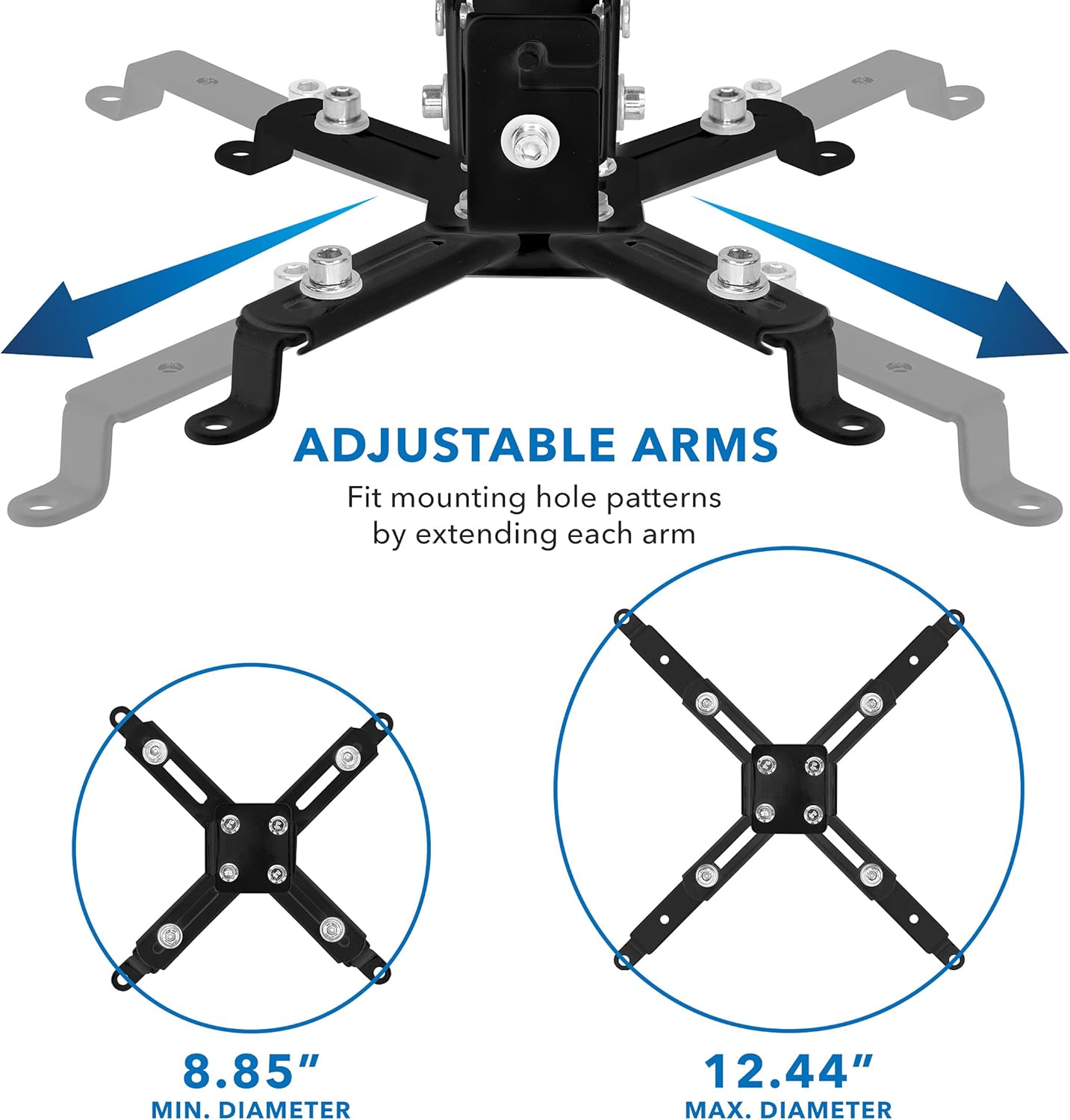
Figure 2: Adjustable mounting arms to fit projector hole patterns between 8.85 inches and 12.44 inches.
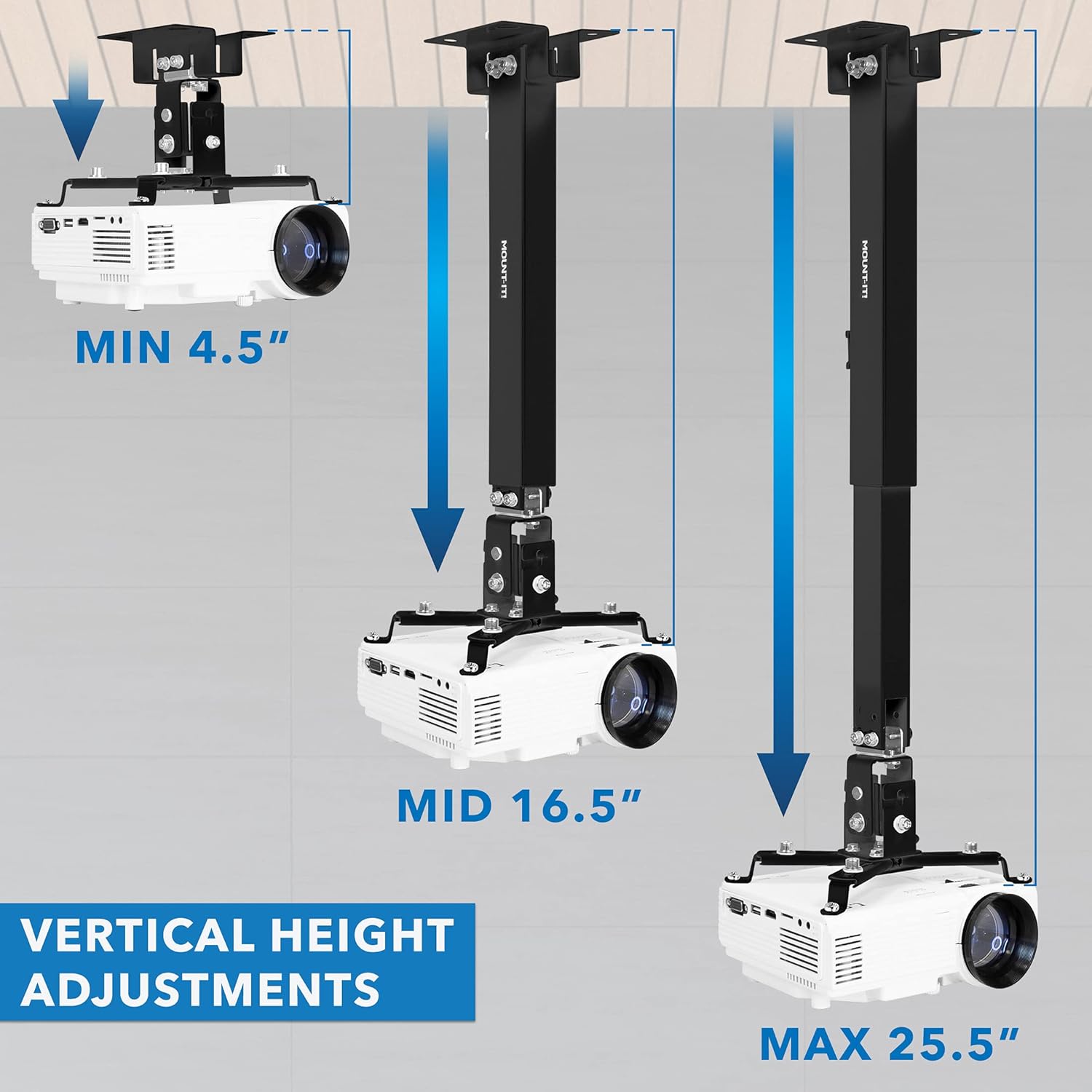
Figure 3: The mount supports projectors up to 40 lbs (18.1 kg).
4. Mounting Surface Requirements
This mount requires installation on solid surfaces. It is suitable for:
- చెక్క స్టుడ్స్
- Concrete ceilings/walls
- Flat ceilings
ముఖ్యమైన: Do not install on vaulted ceilings or drywall without proper reinforcement.
5. సంస్థాపనా దశలు (సాధారణం)
Detailed installation steps will vary based on your chosen configuration (ceiling flush, ceiling extension, or wall mount). Refer to the included hardware guide for specific instructions on attaching the mounting plate to your chosen surface and assembling the projector bracket.
- మౌంటు పాయింట్ను గుర్తించండి: Identify a suitable location on your ceiling or wall, ensuring it can support the weight of the mount and projector. Use a stud finder for wood studs.
- మౌంటు ప్లేట్ను అటాచ్ చేయండి: Secure the ceiling/wall plate using the appropriate hardware for your surface type. Ensure it is level and firmly attached.
- Assemble Projector Bracket: Attach the adjustable arms to your projector, matching the mounting hole pattern.
- Connect Projector to Mount: Secure the projector bracket assembly to the main mount structure.
ఆపరేటింగ్ మరియు సర్దుబాట్లు
Once installed, the mount allows for various adjustments to achieve the perfect projection angle and alignment.
1. Full-Motion Adjustability
The mount provides the following movement capabilities:
- Tilt (Pitch): +/-15 డిగ్రీలు
- Swivel (Roll): +/-8 డిగ్రీలు
- భ్రమణం: 360 డిగ్రీలు
These adjustments allow you to fine-tune the projector's position to align with your screen and correct for any minor installation imperfections.

Figure 4: Adjustments for pitch (+/-15 degrees) and roll (+/-8 degrees) to achieve optimal projection angles.
2. Vertical Height Adjustment (Ceiling Mount)
For ceiling installations using the extension arm, the projector height can be adjusted from 4.5 inches (11.4 cm) to 25.5 inches (64.8 cm) from the ceiling.
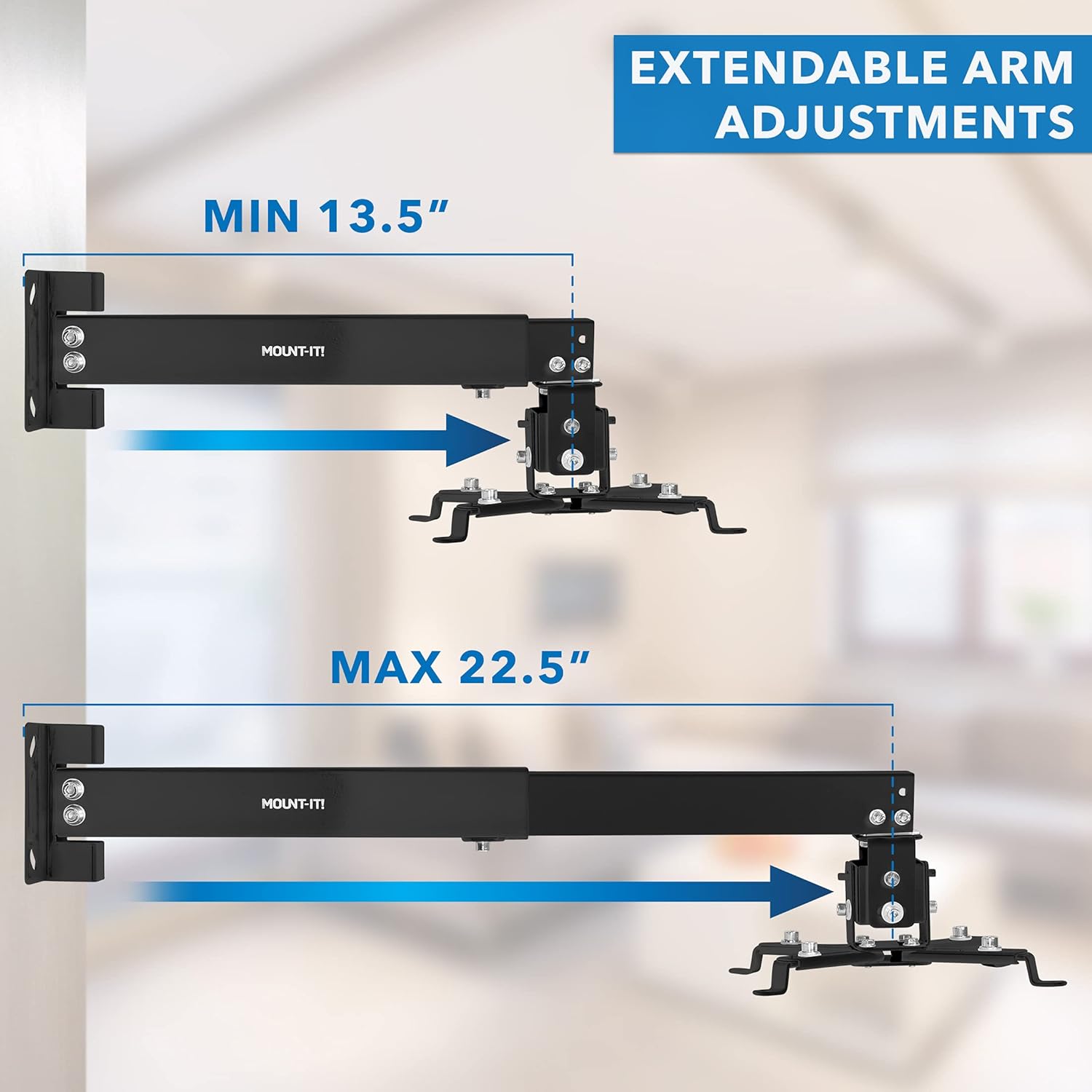
Figure 5: Vertical height adjustment for ceiling mounts, ranging from 4.5 inches to 25.5 inches.
3. Extendable Arm Adjustment (Wall Mount)
When configured as a wall mount, the arm extends from 13.5 inches (34.3 cm) to 22.5 inches (57.2 cm) from the wall.

Figure 6: Extendable arm adjustment for wall mounts, ranging from 13.5 inches to 22.5 inches.
4. కేబుల్ నిర్వహణ
The mount features an integrated cable management system. Route your projector's power and video cables through the mounting arm to maintain a clean and organized setup.

Figure 7: Integrated cable management system to conceal and organize cables within the mounting arm.
నిర్వహణ
To ensure the longevity and safe operation of your projector mount, follow these maintenance guidelines:
- రెగ్యులర్ క్లీనింగ్: Dust the mount periodically with a soft, dry cloth. Avoid abrasive cleaners or solvents.
- ఫాస్టెనర్లను తనిఖీ చేయండి: Annually, or if you notice any instability, check all screws and bolts to ensure they are securely tightened. Do not overtighten.
- దుస్తులు కోసం తనిఖీ చేయండి: Periodically inspect the mount for any signs of wear, damage, or corrosion. If any issues are found, contact customer support.
ట్రబుల్షూటింగ్
If you encounter issues with your Mount-It! Universal Projector Mount, refer to the following common problems and solutions:
- Projector Does Not Fit the Mount:
పరిష్కారం: Re-verify your projector's mounting hole pattern against the mount's compatibility range (8.85" to 12.44"). Ensure your projector has 3 or 4 mounting holes. - Mount Appears Unstable or Sags:
పరిష్కారం: Ensure the mount is installed on a solid surface (wood stud, concrete) and all fasteners are securely tightened. Avoid installing on drywall without proper reinforcement. Check that the projector weight does not exceed the 40 lb capacity. - Cannot Achieve Desired Projection Angle:
పరిష్కారం: Utilize the full-motion adjustability features (tilt +/-15°, swivel +/-8°, 360° rotation). For ceiling mounts, adjust the telescoping arm height. For wall mounts, adjust the extendable arm length. Ensure no adjustment knobs or screws are overtightened, restricting movement. - Cables are Visible/Cluttered:
పరిష్కారం: Utilize the integrated cable management system by routing cables through the designated channels within the mounting arm.
If these solutions do not resolve your issue, please contact Mount-It! technical support.
స్పెసిఫికేషన్లు
| ఫీచర్ | వివరాలు |
|---|---|
| మోడల్ సంఖ్య | 810164691118 |
| వస్తువు బరువు | 3.65 పౌండ్లు (1.66 కిలోలు) |
| ప్యాకేజీ కొలతలు | 12.48 x 4.21 x 2.44 అంగుళాలు (31.7 x 10.7 x 6.2 సెం.మీ.) |
| మౌంటు రకం | సీలింగ్ మరియు గోడ |
| అనుకూల పరికరాలు | Universal LCD/DLP Projectors |
| మౌంటు హోల్ నమూనా | 8.85" to 12.44" (22.5 cm to 31.6 cm) diameter |
| బరువు సామర్థ్యం | 40 పౌండ్లు (18.1 కిలోలు) |
| టిల్ట్ సర్దుబాటు | +/-15° |
| స్వివెల్ సర్దుబాటు | +/-8° |
| భ్రమణం | 360° |
| Ceiling Extension Arm Length | 4.5" నుండి 25.5" (11.4 సెం.మీ నుండి 64.8 సెం.మీ) |
| Wall Mount Arm Length | 13.5" నుండి 22.5" (34.3 సెం.మీ నుండి 57.2 సెం.మీ) |
| రంగు | నలుపు |
| ప్రత్యేక లక్షణాలు | Adjustable, Heavy Duty, Rotatable, Universal, Built-in Cable Management |
వారంటీ మరియు మద్దతు
జీవితకాల వారంటీ
Your Mount-It! Universal Projector Mount is backed by a lifetime manufacturer warranty. This warranty covers defects in materials and workmanship under normal use. Please retain your proof of purchase for warranty claims.
సాంకేతిక మద్దతు
For any questions, concerns, or technical assistance regarding your product, please contact our US-based technical support team. Contact information can be found on the official Mount-It! webసైట్ లేదా మీ ఉత్పత్తి ప్యాకేజింగ్.