
1. పరిచయం
Thank you for choosing the QDVOPHZA 10K 20MP Outdoor Wireless WiFi Security Camera. This advanced surveillance system is designed to provide comprehensive security monitoring with its ultra-high definition resolution, 10x optical zoom, automatic tracking, and multi-screen viewing capabilities. This manual will guide you through the installation, operation, and maintenance of your new security camera to ensure optimal performance and longevity.
2. భద్రతా సమాచారం
- విద్యుత్ సరఫరా వాల్యూమ్ నిర్ధారించుకోండిtage matches the camera's requirements (DC 12V). Incorrect voltage పరికరాన్ని దెబ్బతీస్తుంది.
- కెమెరాను తీవ్రమైన ఉష్ణోగ్రతలు, తేమ లేదా క్షయ వాతావరణాలకు గురిచేయవద్దు.
- Avoid direct exposure to sunlight for extended periods, as this may affect image quality and device lifespan.
- Install the camera in a secure location where it cannot be easily tampతో ered.
- కెమెరాను బలమైన విద్యుదయస్కాంత క్షేత్రాల నుండి దూరంగా ఉంచండి.
- ఏదైనా నిర్వహణ లేదా శుభ్రపరిచే ముందు విద్యుత్తును డిస్కనెక్ట్ చేయండి.
- తయారీదారు పేర్కొన్న ఉపకరణాలను మాత్రమే ఉపయోగించండి.
3. ప్యాకేజీ విషయాలు
ప్యాకేజీని అన్బాక్సింగ్ చేసిన తర్వాత దయచేసి దానిలోని విషయాలను తనిఖీ చేయండి. ఏవైనా వస్తువులు తప్పిపోయినా లేదా దెబ్బతిన్నా, మీ రిటైలర్ను సంప్రదించండి.
- QDVOPHZA 10K 20MP Outdoor Wireless WiFi Security Camera
- పవర్ అడాప్టర్ (DC 12V)
- మౌంటు స్క్రూ కిట్
- వినియోగదారు మాన్యువల్
4. ఉత్పత్తి ముగిసిందిview
Familiarize yourself with the components of your QDVOPHZA security camera.

మూర్తి 4.1: ముందు view of the QDVOPHZA 10K 20MP Outdoor Wireless WiFi Security Camera, showing the main PTZ camera, two side fixed cameras, and antennas.

మూర్తి 4.2: Diagram illustrating the four-screen camera system, with the main PTZ camera providing a zoomable view and three fixed lenses covering additional areas.
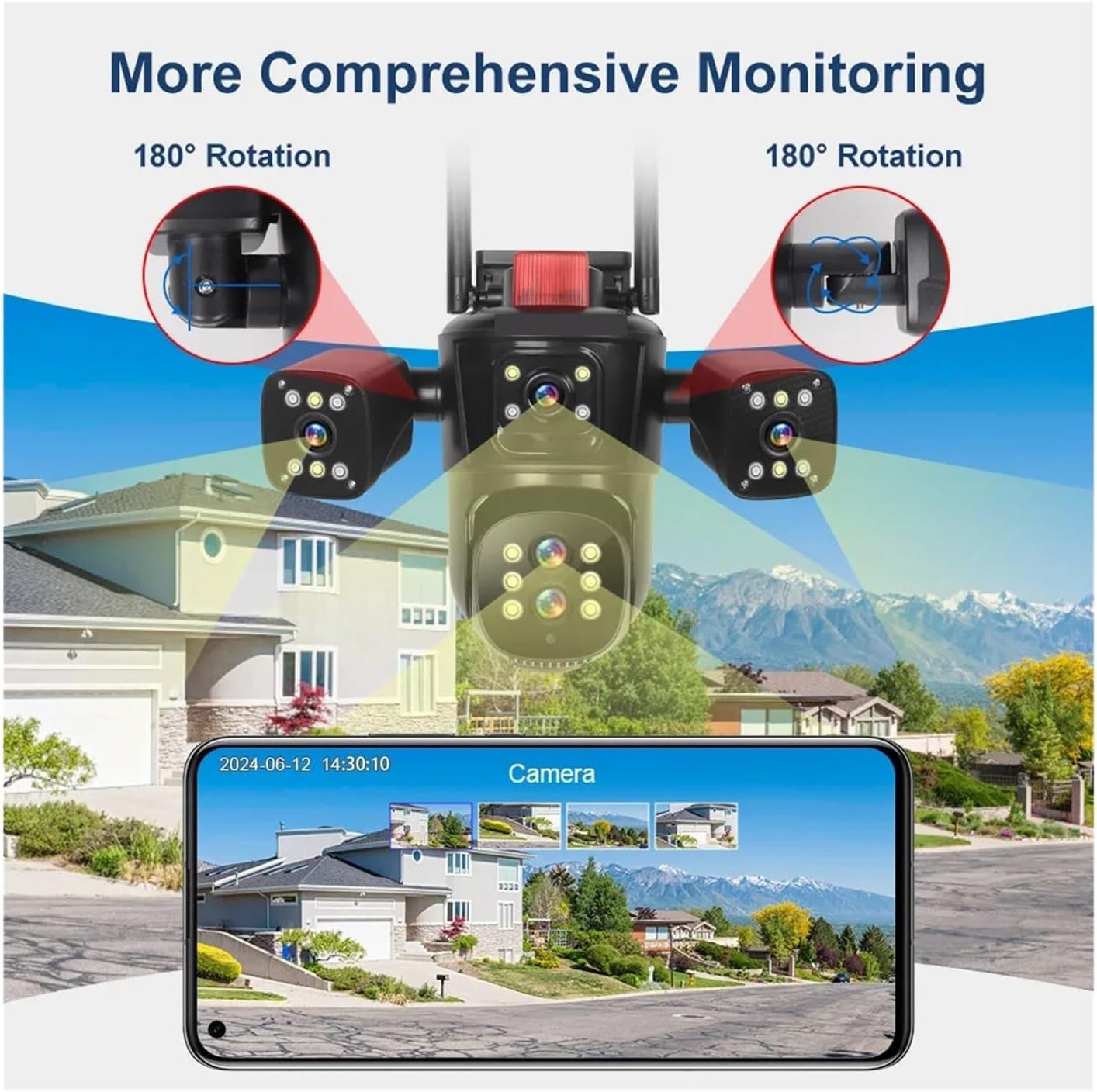
మూర్తి 4.3: Visual representation of the camera's comprehensive monitoring capabilities, including 180-degree rotation for the side cameras and a smartphone interface displaying multiple camera feeds.
5. సెటప్
5.1 సంస్థాపన
- ఒక స్థానాన్ని ఎంచుకోండి: కావలసిన వాతావరణాన్ని అందించే బహిరంగ ప్రదేశాన్ని ఎంచుకోండి. viewing angle and is within range of your Wi-Fi network or near an Ethernet port. The camera is IP66 waterproof, suitable for various weather conditions.
- మౌంటు: Use the provided screw kit to securely mount the camera to a wall or ceiling. Ensure the mounting surface is strong enough to support the camera's weight.
- కోణాన్ని సర్దుబాటు చేయండి: Loosen the adjustment screws (if applicable) to position the camera for optimal coverage. The main PTZ camera offers horizontal 0-360 degrees and vertical 0-90 degrees movement. The side cameras can rotate 180 degrees for broader coverage.
5.2 పవర్ కనెక్షన్
Connect the provided DC 12V power adapter to the camera's power input port and then plug it into a power outlet. The camera will power on and initiate its self-test sequence.
5.3 నెట్వర్క్ కనెక్షన్
The camera supports both 2.4G WiFi and RJ45 network port access.
- Wireless (WiFi): Download the recommended mobile application (refer to the packaging or quick start guide for app name). Follow the in-app instructions to add the camera and connect it to your 2.4GHz Wi-Fi network.
- వైర్డు (ఈథర్నెట్): Connect an Ethernet cable from your router to the camera's RJ45 port. The camera should automatically connect to the network. Then, use the mobile app to discover and add the camera.
6. ఆపరేటింగ్ సూచనలు
6.1 Mobile Application Usage
After successfully connecting your camera to the network, open the mobile application to access its features.
- ప్రత్యక్షం View: The app will display the live feeds from all four camera lenses simultaneously, providing a comprehensive overview మీ పర్యవేక్షణ ప్రాంతం.
- PTZ నియంత్రణ: Use the on-screen controls to pan (rotate horizontally) and tilt (rotate vertically) the main camera.
- ఆప్టికల్ జూమ్: Utilize the 10x optical zoom feature to magnify distant objects without losing image clarity.
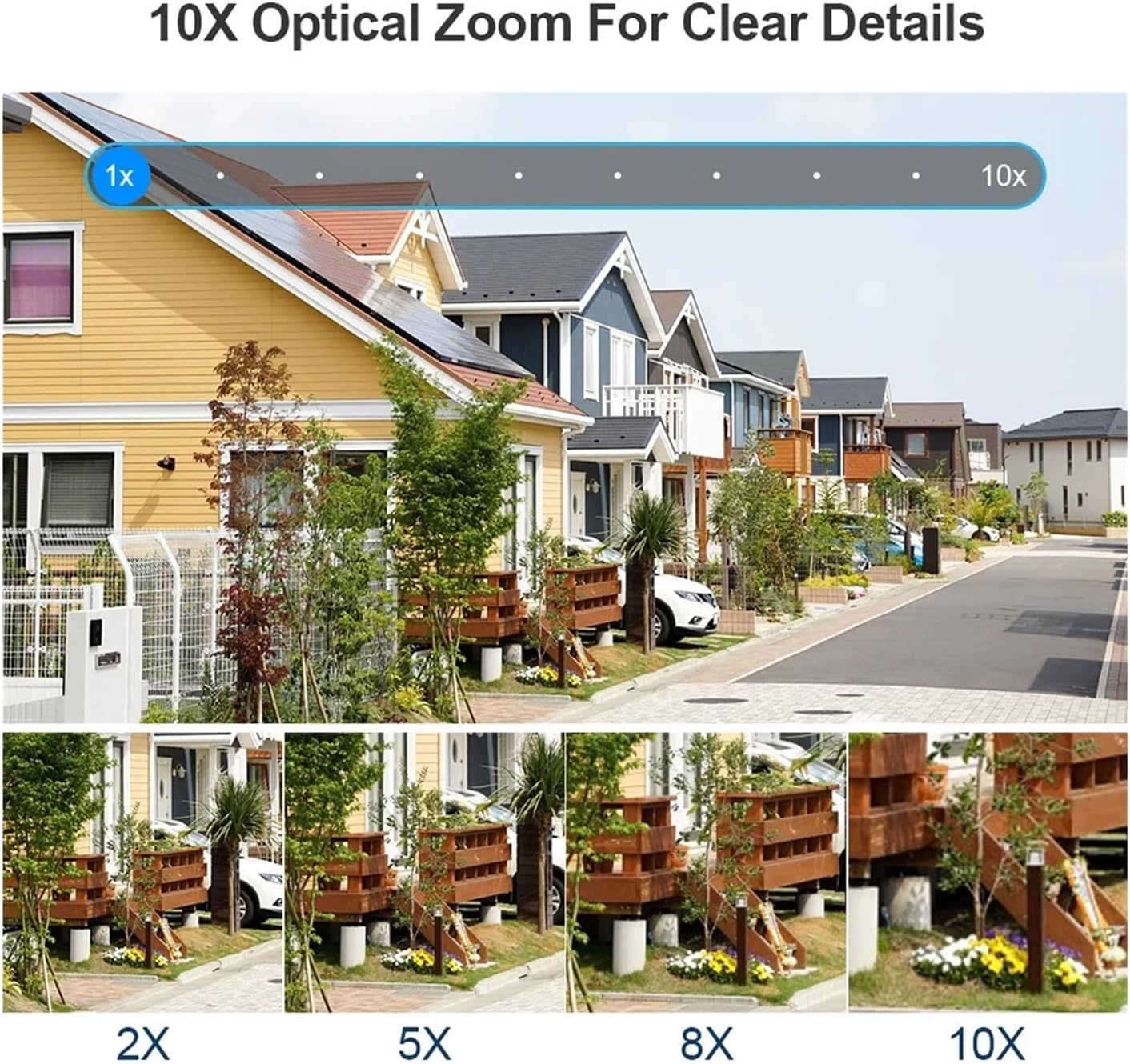
మూర్తి 6.1: Demonstration of the 10x optical zoom capability, showing progressive magnification from 1x to 10x while maintaining image clarity.

మూర్తి 6.2: Visual comparison highlighting the difference in detail captured by the 10x zoom camera versus a fixed focus camera, demonstrating the advantage of optical zoom.
6.2 Motion Detection and Auto Tracking
The camera features intelligent motion detection and automatic tracking.
- చలన గుర్తింపు: The camera can detect movement within its field of view and send instant alerts to your mobile device.
- ఆటో ట్రాకింగ్: When a moving target is detected, the camera will automatically adjust its pan/tilt to keep the target centered in the frame, ensuring continuous monitoring of suspicious activity.

మూర్తి 6.3: Illustration of the human detection and automatic tracking feature, showing the camera following a person and a mobile phone displaying an alarm notification.
6.3 రికార్డింగ్ మరియు నిల్వ
The camera supports multiple storage options for video recordings.
- TF కార్డ్ నిల్వ: Insert a TF (microSD) card (up to 128GB, not included) into the designated slot for local storage of recordings. The camera supports video synchronous recording and playback.
- క్లౌడ్ నిల్వ: Subscribe to the cloud storage service via the mobile app to securely save your video data online. This ensures your recordings are safe even if the camera is damaged or stolen.
6.4 Two-Way Audio and Night Vision
- రెండు-మార్గం ఆడియో: The built-in microphone and speaker allow for two-way communication, enabling you to listen in and speak through the camera via the app.
- కలర్ నైట్ విజన్: The camera is equipped with advanced night vision technology, providing clear, full-color video even in low-light conditions.
7. నిర్వహణ
- శుభ్రపరచడం: స్పష్టమైన చిత్ర నాణ్యతను నిర్ధారించడానికి కెమెరా లెన్స్ను మృదువైన, పొడి వస్త్రంతో క్రమం తప్పకుండా శుభ్రం చేయండి. కఠినమైన రసాయనాలు లేదా రాపిడి పదార్థాలను ఉపయోగించవద్దు.
- ఫర్మ్వేర్ నవీకరణలు: Check the mobile application periodically for available firmware updates. Keeping your camera's firmware up-to-date ensures optimal performance, security, and access to new features.
- పవర్ సైకిల్: If the camera experiences issues, try power cycling it by disconnecting and reconnecting the power adapter.
8. ట్రబుల్షూటింగ్
| సమస్య | సాధ్యమైన కారణం | పరిష్కారం |
|---|---|---|
| కెమెరా పవర్ ఆన్ చేయడం లేదు | No power, faulty adapter, loose connection | Check power outlet, ensure adapter is securely connected, try a different outlet. |
| Wi-Fiకి కనెక్ట్ చేయడం సాధ్యపడలేదు | Incorrect Wi-Fi password, camera too far from router, 5GHz network selected | Verify Wi-Fi password, move camera closer to router, ensure you are connecting to a 2.4GHz network. |
| చిత్ర నాణ్యత తక్కువగా ఉంది | Dirty lens, low network bandwidth, insufficient lighting | Clean the camera lens, ensure stable internet connection, check lighting conditions. |
| Auto tracking not working | Feature disabled in app, obstruction in view, slow movement | Enable auto tracking in the app settings, ensure clear line of sight, ensure movement is detectable. |
| ఆడియో లేదు లేదా ఆడియో నాణ్యత బాగాలేదు | Microphone/speaker blocked, app volume low, network issues | Ensure microphone/speaker are clear, adjust app volume, check network stability. |
9. స్పెసిఫికేషన్లు
| బ్రాండ్ | QDVOPHZA |
| మోడల్ సంఖ్య | w0u5903wei |
| హై డెఫినిషన్ | 20 Megapixels (10K resolution, 5 lenses x 4MP each) |
| కనెక్టివిటీ | WIFI (2.4G), RJ45 Ethernet Port |
| నిల్వ | TF Card (Up to 128GB), Cloud Storage |
| IP రేటింగ్ | IP66 (జలనిరోధిత / వాతావరణ నిరోధకత) |
| కదలిక పరిధి (పాన్) | 0°-360° |
| కదలిక పరిధి (వంపు) | 0°-90° |
| ఆప్టికల్ జూమ్ | 10x |
| ఆడియో అవుట్పుట్ | టూ వే ఆడియో |
| ప్రత్యేక లక్షణాలు | Color Night Vision, Motion Detection, Auto Tracking, Four Screens |
| విద్యుత్ సరఫరా | DC 12V |
| వస్తువు బరువు | 50 గ్రాములు |
10. వారంటీ మరియు మద్దతు
ఈ ఉత్పత్తి ప్రామాణిక తయారీదారు వారంటీతో వస్తుంది. దయచేసి మీ ప్యాకేజీలో చేర్చబడిన వారంటీ కార్డును చూడండి లేదా నిర్దిష్ట వారంటీ నిబంధనలు మరియు షరతుల కోసం మీ రిటైలర్ను సంప్రదించండి.
For technical support, troubleshooting assistance, or any questions regarding your QDVOPHZA security camera, please contact the customer support team through the contact information provided on the product packaging or the official brand webసైట్.