
Xiaomi CW300
Xiaomi అవుట్డోర్ కెమెరా CW300 యూజర్ మాన్యువల్
మోడల్: CW300
పరిచయం
The Xiaomi Outdoor Camera CW300 is a high-performance security camera designed for outdoor surveillance. It features 2.5K ultra-clear image quality, 4MP resolution, smart full-color night vision, bidirectional gimbal movement, and IP66 water and dust resistance. Equipped with AI human tracking and two-way audio, it provides comprehensive monitoring and communication capabilities for your property.

Image: Xiaomi Outdoor Camera CW300 highlighting its 2.5K ultra-clear picture quality.
భద్రతా సమాచారం
- Ensure the power adapter is suitable for your local power supply and meets the camera's specifications (12V 1A).
- Do not expose the camera to extreme temperatures outside its operating range (-30℃ to 60℃).
- Avoid placing the camera near strong electromagnetic interference sources.
- For outdoor installation, ensure all connections, especially the Ethernet port, are properly sealed with the provided waterproof kit and tape to maintain IP66 rating.
- Do not attempt to disassemble or repair the camera yourself. Contact qualified service personnel for assistance.
- కెమెరా మరియు దాని ఉపకరణాలను పిల్లలకు అందకుండా ఉంచండి.
ప్యాకేజీ విషయాలు
మీ ప్యాకేజీలో అన్ని అంశాలు ఉన్నాయని ధృవీకరించండి:
- Xiaomi CW300 Outdoor Camera x1
- అడాప్టర్ x1
- మౌంటు బ్రాకెట్ x1
- Ethernet Port Waterproof Kit x1
- Mounting Template Sticker x1
- Waterproof Tape x1
- Mounting Screw Bag x1
- యూజర్ మాన్యువల్ x1 (ఈ పత్రం)
- హెచ్చరిక స్టిక్కర్ x1
- Warranty Notice x1
ఉత్పత్తి ముగిసిందిview
Familiarize yourself with the components of your Xiaomi Outdoor Camera CW300.

చిత్రం: ముందు భాగం view of the Xiaomi Outdoor Camera CW300, showing the lens, IR lights, and white lights.
- కెమెరా లెన్స్: వీడియో fooని సంగ్రహిస్తుందిtage.
- Infrared Lights (850nm): నలుపు మరియు తెలుపు రాత్రి దృష్టి కోసం.
- తెల్లని కాంతులు: Illuminate for full-color night vision when human figures are detected.
- మైక్రోఫోన్: ఆడియో ఇన్పుట్ మరియు టూ-వే కమ్యూనికేషన్ కోసం.
- స్పీకర్: For audio output and alarm functions.
- గింబాల్: Allows for horizontal (pan) and vertical (tilt) movement.
- మౌంటు బేస్: For attaching the camera to the wall or ceiling.
- పవర్ పోర్ట్: పవర్ అడాప్టర్ను కనెక్ట్ చేయడానికి.
- ఈథర్నెట్ పోర్ట్ (RJ45): వైర్డు నెట్వర్క్ కనెక్షన్ కోసం.
- మైక్రో SD కార్డ్ స్లాట్: For local video storage (supports up to 256GB).
- రీసెట్ బటన్: కెమెరాను ఫ్యాక్టరీ సెట్టింగ్లకు రీసెట్ చేయడానికి ఉపయోగించబడుతుంది.
సెటప్
1. కెమెరాను మౌంట్ చేయడం
కెమెరాను గోడకు లేదా పైకప్పుకు అమర్చవచ్చు. సరైన స్థలాన్ని అందించే స్థానాన్ని ఎంచుకోండి viewing coverage and is within reach of a power outlet.
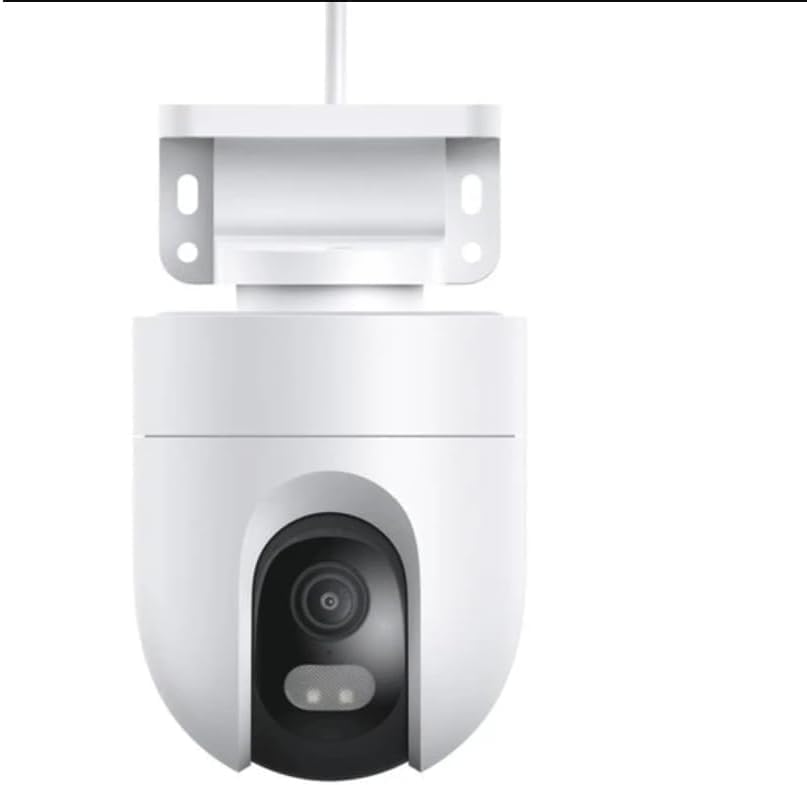
Image: Xiaomi Outdoor Camera CW300 showing the detachable mounting bracket.
- మౌంటు ఉపరితలాన్ని సిద్ధం చేయండి: Use the mounting template sticker to mark the drill holes on the wall or ceiling.
- డ్రిల్ రంధ్రాలు: Drill holes at the marked positions. Insert wall plugs if necessary.
- మౌంటు బ్రాకెట్ను అటాచ్ చేయండి: అందించిన స్క్రూలను ఉపయోగించి మౌంటు బ్రాకెట్ను గోడ/పైకప్పుకు భద్రపరచండి.
- కేబుల్స్ కనెక్ట్ చేయండి: Before attaching the camera body, connect the power cable and, if using, the Ethernet cable. Ensure the Ethernet port waterproof kit is properly installed for wired connections to maintain IP66 rating. Use the waterproof tape around connections as needed.
- Attach Camera Body: Align the camera body with the mounting bracket and twist to lock it securely in place.
2. పవర్ కనెక్షన్
Connect the provided power adapter to the camera's power port and then plug it into a power outlet. The camera will power on and initiate its startup sequence.
3. Network Connection (Wi-Fi or Wired RJ45)
The CW300 supports both Wi-Fi and wired Ethernet connections.
- Wi-Fi: The camera will automatically enter Wi-Fi pairing mode upon first power-on or after a reset. Follow the instructions in the Mi Home/Xiaomi Home app to connect to your 2.4GHz Wi-Fi network (IEEE 802.11b/g/n).
- Wired RJ45: Connect an Ethernet cable from your router to the camera's RJ45 port. Ensure the waterproof kit is used for outdoor installations. The camera will automatically attempt to establish a wired connection.
4. యాప్ ఇన్స్టాలేషన్ మరియు జత చేయడం
నియంత్రించడానికి మరియు view your camera, download the Mi Home/Xiaomi Home app.
- అనువర్తనాన్ని డౌన్లోడ్ చేయండి: కోసం వెతకండి "Mi Home" or "Xiaomi Home" in your device's app store (compatible with Android 8.0 or iOS 12.0 or later).
- ఖాతాను సృష్టించండి: Open the app and create a Xiaomi account or log in if you already have one.
- పరికరాన్ని జోడించండి: Tap the "+" icon in the top right corner to add a new device. Select "Xiaomi Outdoor Camera CW300" from the list or scan the QR code on the camera/manual.
- ఆన్-స్క్రీన్ సూచనలను అనుసరించండి: The app will guide you through the pairing process, which may involve scanning a QR code displayed on your phone with the camera's lens or confirming network settings.
కెమెరాను ఆపరేట్ చేస్తోంది
1. లైవ్ View మరియు రికార్డింగ్
Once paired, open the Mi Home/Xiaomi Home app and select your camera to access the live view. From here, you can manually record video, take snapshots, and monitor your property in real-time.
2. నైట్ విజన్
The CW300 features smart full-color night vision. In low light, the camera uses its 850nm infrared lights for clear black and white vision. When a human figure is detected in dark surroundings, the camera's white lights automatically activate to provide a colored image.
3. Bidirectional Gimbal Movement
Control the camera's pan (horizontal) and tilt (vertical) movement directly from the app to adjust the viewing angle. This allows for a wider surveillance area and flexible monitoring.

Image: Xiaomi Outdoor Camera CW300 illustrating its 360-degree horizontal rotation capability.
4. AI Human Detection and Tracking
The camera uses an advanced AI algorithm to accurately detect human figures. When a person is detected, the camera can automatically record alert videos, send notifications to your smartphone, and intelligently track the human movement, recording their path.
5. టూ-వే ఆడియో
Utilize the built-in microphone and high-quality speaker for two-way communication. You can speak through the camera to visitors or deter intruders, even in noisy outdoor environments, thanks to the AI noise cancellation algorithm.
6. నిల్వ ఎంపికలు
The camera supports two storage methods for recorded footage:
- మైక్రో SD కార్డ్: Insert a MicroSD card (minimum 8GB, maximum 256GB) into the camera's slot for local storage. Footagఇ రీ కావచ్చుviewయాప్ ద్వారా అప్లోడ్ చేయబడింది.
- క్లౌడ్ నిల్వ: Xiaomi offers cloud storage services (subscription may be required) for secure off-site storage of your recordings.
7. వాయిస్ కంట్రోల్ ఇంటిగ్రేషన్
The Xiaomi Outdoor Camera CW300 is compatible with Amazon Alexa and Google Assistant, allowing for convenient voice control of certain functions.

Image: Xiaomi Outdoor Camera CW300 demonstrating compatibility with Amazon Alexa and Google Assistant for voice control.
- Link your Mi Home/Xiaomi Home account to your Amazon Alexa or Google Home app.
- Use commands like "OK Google, start the camera" or "Alexa, open the camera" to view the live feed on compatible smart displays.
నిర్వహణ
- శుభ్రపరచడం: Regularly wipe the camera lens and body with a soft, dry cloth to remove dust and dirt. Do not use harsh chemicals or abrasive cleaners.
- ఫర్మ్వేర్ నవీకరణలు: Keep your camera's firmware updated through the Mi Home/Xiaomi Home app. Firmware updates often include performance improvements, new features, and security enhancements.
- పర్యావరణ పరిరక్షణ: While IP66 rated, periodically check the integrity of the waterproof seals and connections, especially after severe weather conditions.
ట్రబుల్షూటింగ్
| సమస్య | సాధ్యమైన కారణం | పరిష్కారం |
|---|---|---|
| కెమెరా ఆన్ కావడం లేదు. | విద్యుత్ సరఫరా లేదు; అడాప్టర్ తప్పు. | Check power connection. Ensure adapter is plugged in and working. Try a different outlet. |
| Wi-Fiకి కనెక్ట్ చేయడం సాధ్యపడదు. | Incorrect Wi-Fi password; camera too far from router; 5GHz network selected. | సరైన 2.4GHz Wi-Fi పాస్వర్డ్ను నిర్ధారించుకోండి. కెమెరాను రూటర్కు దగ్గరగా తరలించండి. కెమెరాను రీసెట్ చేసి, మళ్లీ జత చేయడానికి ప్రయత్నించండి. |
| చిత్ర నాణ్యత తక్కువగా ఉంది. | Dirty lens; poor network connection. | Clean the camera lens. Check network stability and signal strength. |
| మోషన్ డిటెక్షన్ హెచ్చరికలు లేవు. | Detection settings disabled; sensitivity too low. | Check motion detection settings in the app. Adjust sensitivity. Ensure notifications are enabled on your phone. |
| MicroSD card not recognized. | Card not inserted correctly; unsupported card; faulty card. | Reinsert the MicroSD card. Ensure it's within the supported size (8GB-256GB) and format. Try formatting the card in the app or with a computer. |
స్పెసిఫికేషన్లు
| ఫీచర్ | వివరాలు |
|---|---|
| మోడల్ | CW300 |
| రేట్ చేయబడిన ఇన్పుట్ | 12V 1A |
| ఉత్పత్తి కొలతలు | 168 x 100 x 123 మిమీ (6.6 x 3.93 x 4.85 అంగుళాలు) |
| రిజల్యూషన్ | 2560 x 1440 (2.5K Ultra) |
| ఎఫెక్టివ్ స్టిల్ రిజల్యూషన్ | 4 ఎంపీ |
| వీడియో కోడింగ్ | H.265 |
| నైట్ విజన్ లైట్ | 2 x 850nm infrared lights, 2 x white lights |
| ఆపరేటింగ్ ఉష్ణోగ్రత | -30℃ నుండి 60℃ (-22°F నుండి 140°F) |
| వైర్లెస్ కనెక్టివిటీ | Wi-Fi IEEE 802.11b / g / n 2.4GHz |
| వైర్డు కనెక్టివిటీ | RJ45 ఈథర్నెట్ పోర్ట్ |
| తో అనుకూలమైనది | Android 8.0 లేదా iOS 12.0 లేదా తరువాత |
| నిల్వ | MicroSD card (min. 8GB, Max. 256GB), Cloud storage |
| నీరు మరియు ధూళి నిరోధకత | IP66 |
| నియంత్రణ పద్ధతి | App (Mi Home/Xiaomi Home), Voice (Amazon Alexa, Google Assistant) |
| ప్రత్యేక లక్షణాలు | Local Recording, HD Resolution, 2-Way Audio, Night Vision, AI Human Tracking, Bidirectional Gimbal Movement |
వారంటీ మరియు మద్దతు
Your Xiaomi Outdoor Camera CW300 comes with a standard manufacturer's warranty. Please refer to the "Warranty Notice" included in your package for detailed terms and conditions.
For technical support, troubleshooting assistance, or warranty claims, please contact Xiaomi customer service through the Mi Home/Xiaomi Home app or visit the official Xiaomi support website. Ensure you have your product model number (CW300) and purchase information ready when contacting support.
ఆన్లైన్ వనరులు:
Ask a question about this manual
Ask about setup, troubleshooting, compatibility, parts, safety, or missing instructions. Manuals+ will review the question and use this page’s manual context to help answer it.