1. పరిచయం
Thank you for choosing the Generic G1200 Digital Microscope. This device is designed for detailed observation, inspection, and analysis of various objects, offering a 12-megapixel camera and a 7-inch LCD display with 1-1200X continuous magnification. This manual provides essential information for the safe and effective use of your microscope.
2. భద్రతా సమాచారం
- Keep the microscope away from water and other liquids to prevent electric shock or damage.
- Do not disassemble or modify the device. Repairs should only be performed by qualified personnel.
- పరికరాన్ని ప్రత్యక్ష సూర్యకాంతి లేదా అధిక ఉష్ణోగ్రతలకు గురిచేయకుండా ఉండండి.
- Handle the lens and screen with care to prevent scratches.
- This product is not a toy; keep it out of reach of children without adult supervision.
3. ప్యాకేజీ విషయాలు
అన్బాక్సింగ్ తర్వాత ప్యాకేజీ కంటెంట్లను తనిఖీ చేయండి:
- G1200 Digital Microscope Unit (with 7-inch LCD)
- Adjustable Stand and Base
- USB పవర్ కేబుల్
- వినియోగదారు మాన్యువల్ (ఈ పత్రం)
- Calibration Ruler (may vary by package)
4. ఉత్పత్తి ముగిసిందిview
The G1200 Digital Microscope features a robust design for stable observation and a clear display for detailed viewing.

మూర్తి 4.1: ముందు view of the G1200 Digital Microscope displaying a circuit board.
The microscope consists of a main unit with an integrated 7-inch LCD screen, a high-resolution lens, and an adjustable stand. The stand allows for precise positioning and stable observation of specimens.

Figure 4.2: The adjustable stand allows for flexible viewing కోణాలు.
The 7-inch LCD provides a large, clear viewing area, enhancing the user experience for prolonged observation and group viewing.
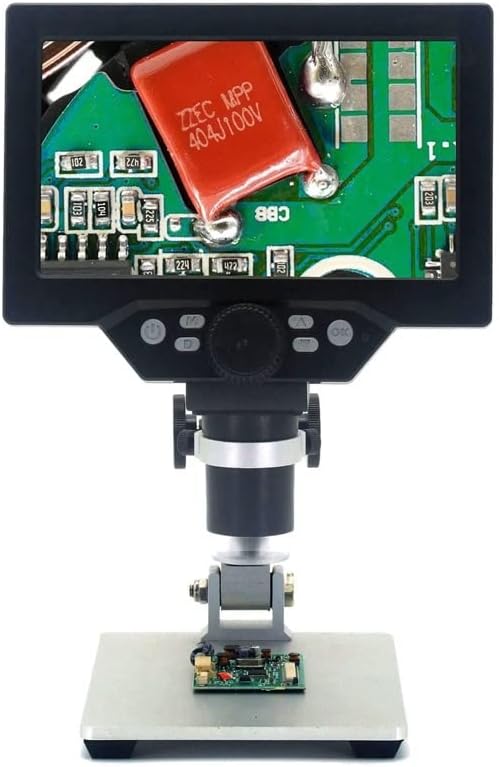
Figure 4.3: The G1200 features a 7-inch display for enhanced viewస్పష్టత.
5. సెటప్
- అన్ప్యాక్: ప్యాకేజింగ్ నుండి అన్ని భాగాలను జాగ్రత్తగా తొలగించండి.
- స్టాండ్ను సమీకరించండి: Attach the microscope unit to the adjustable stand. Ensure all screws are tightened securely to prevent wobbling.
- పవర్ కనెక్షన్: Connect the USB power cable to the microscope's power input port and then to a suitable USB power adapter (not included) or a powered USB port. For the Bluit Battery Model, ensure the internal battery is charged before first use.
- ప్రారంభ పవర్ ఆన్: Press and hold the power button located on the microscope unit until the LCD screen illuminates.
6. ఆపరేటింగ్ సూచనలు
6.1 పవర్ చేయడం ఆన్/ఆఫ్
- పవర్ ఆన్: పవర్ బటన్ను సుమారు 3 సెకన్ల పాటు నొక్కి పట్టుకోండి.
- పవర్ ఆఫ్: Press and hold the power button again for approximately 3 seconds until the screen turns off.
6.2 Placing a Specimen
Place the object you wish to observe directly on the base plate beneath the microscope lens. Ensure it is centered for optimal viewing.
6.3 Adjusting Focus and Magnification
- ఎత్తు సర్దుబాటు: Use the knob on the stand to raise or lower the microscope unit, bringing the lens closer or further from the specimen.
- Fine Focus: Rotate the focus wheel on the microscope unit to achieve a clear image.
- మాగ్నిఫికేషన్: The G1200 offers 1-1200X continuous amplification. Adjust the distance between the lens and the object, and then fine-tune the focus to change the magnification level.
6.4 Using the LCD Display and Controls
The 7-inch LCD displays the live view from the microscope camera. Buttons on the unit typically include:
- మెనూ బటన్: Accesses settings for image resolution, video resolution, date/time, language, etc.
- మోడ్ బటన్: Switches between photo, video, and playback modes.
- క్యాప్చర్/రికార్డ్ బటన్: Takes a photo or starts/stops video recording.
- అప్/డౌన్ బటన్లు: Navigate menus or adjust digital zoom (if available).
Refer to the on-screen menu for specific functions and settings.
7. నిర్వహణ
- లెన్స్ శుభ్రపరచడం: ఆప్టికల్ లెన్స్ల కోసం ప్రత్యేకంగా రూపొందించిన మృదువైన, మెత్తటి రహిత వస్త్రాన్ని ఉపయోగించండి. రాపిడి పదార్థాలు లేదా కఠినమైన రసాయనాలను ఉపయోగించవద్దు.
- స్క్రీన్ క్లీనింగ్: Wipe the LCD screen gently with a soft, dry microfiber cloth.
- నిల్వ: Store the microscope in a clean, dry, and dust-free environment when not in use.
- Battery Care (Bluit Battery Model): బ్యాటరీ జీవితకాలం ఎక్కువగా ఉండాలంటే, తరచుగా బ్యాటరీని పూర్తిగా డిశ్చార్జ్ చేయకండి. ఎక్కువసేపు ఉపయోగించకపోయినా, పరికరాన్ని క్రమం తప్పకుండా ఛార్జ్ చేయండి.
8. ట్రబుల్షూటింగ్
- శక్తి లేదు: Ensure the USB power cable is securely connected and the power source is active. For battery models, check if the battery is charged.
- అస్పష్టమైన చిత్రం: Adjust the height of the microscope unit and rotate the focus wheel until the image is clear. Ensure the specimen is flat and well-lit.
- స్క్రీన్ కనిపించడం లేదు: Check power connection. If the device is on but no image appears, try restarting the microscope.
- బటన్లు స్పందించలేదు: Power off the device and restart it. If the issue persists, ensure no debris is obstructing the buttons.
9. స్పెసిఫికేషన్లు
| ఫీచర్ | స్పెసిఫికేషన్ |
|---|---|
| మోడల్ పేరు | G1200 (EENKNDXQA-BLUITBATTERYMODEL-1-1200X) |
| ప్రదర్శించు | 7-అంగుళాల LCD |
| మాగ్నిఫికేషన్ రేషియో | 1-1200X Continuous Ampలిఫికేషన్ |
| కెమెరా రిజల్యూషన్ | 12 మెగాపిక్సెల్స్ |
| మెటీరియల్ | ప్లాస్టిక్ |
| వస్తువు బరువు | 2.2 పౌండ్లు (1000 గ్రాములు) |
| ప్యాకేజీ కొలతలు | 1.18 x 0.79 x 0.39 అంగుళాలు |
| శక్తి మూలం | USB Powered / Built-in Battery (Bluit Battery Model) |
10. వారంటీ మరియు మద్దతు
For warranty information and customer support, please refer to the documentation provided at the time of purchase or contact your retailer. The manufacturer is committed to providing high-quality after-sales service.


