
1. పరిచయం
Thank you for choosing the Anmite A160W03T 16-inch Portable Touch Monitor. This manual provides essential information for the safe and efficient use of your new monitor. Please read it thoroughly before operation and retain it for future reference.
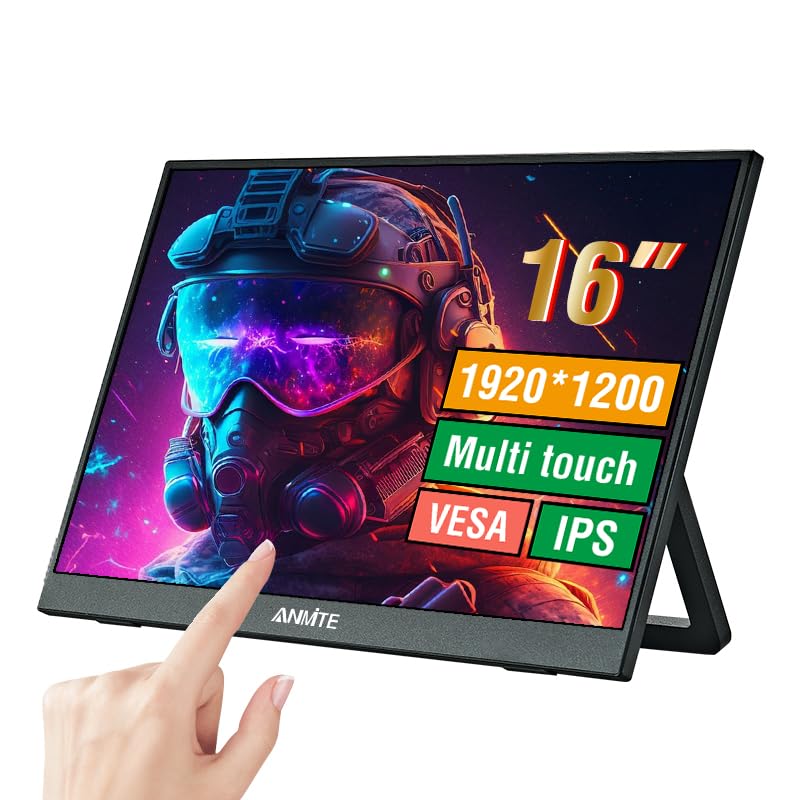
Image 1.1: Anmite 16-inch Portable Touch Monitor. This image displays the monitor's front view, highlighting its 16-inch screen, 1920x1200 resolution, 16:10 aspect ratio, 100% sRGB color gamut, VESA mount compatibility, touch functionality, 1200P resolution, and IPS panel technology. A hand is shown interacting with the touch screen.
2. ముఖ్యమైన భద్రతా సమాచారం
- Do not expose the monitor to rain or moisture to prevent fire or electric shock.
- ప్రత్యక్ష సూర్యకాంతిలో లేదా వేడి మూలాల దగ్గర మానిటర్ను ఉంచడం మానుకోండి.
- తయారీదారు అందించిన పవర్ అడాప్టర్ మరియు కేబుల్లను మాత్రమే ఉపయోగించండి.
- మానిటర్ను విడదీయడానికి లేదా సవరించడానికి ప్రయత్నించవద్దు. అన్ని సర్వీసింగ్లను అర్హత కలిగిన సిబ్బందికి సూచించండి.
- బలమైన అయస్కాంత క్షేత్రాల నుండి మానిటర్ను దూరంగా ఉంచండి.
- మానిటర్ చుట్టూ సరైన వెంటిలేషన్ ఉండేలా చూసుకోండి.
3. ప్యాకేజీ విషయాలు
అన్బాక్సింగ్ తర్వాత ప్యాకేజీ కంటెంట్లను తనిఖీ చేయండి. ఏవైనా వస్తువులు తప్పిపోయినా లేదా దెబ్బతిన్నా, కస్టమర్ సపోర్ట్ను సంప్రదించండి.
- Anmite Portable Monitor x 1
- Mini-HDMI to HDMI cable x 1
- టైప్-సి నుండి టైప్-సి కేబుల్ x 1
- Type-C to USB-A cable x 1
- వినియోగదారు గైడ్ x 1

Image 3.1: Contents of the Anmite Portable Monitor package. This image shows the monitor lying next to its retail box, which displays various product labels and certifications.
4. ఉత్పత్తి లక్షణాలు మరియు లక్షణాలు
ముఖ్య లక్షణాలు:
- 16-inch IPS Panel with 1920x1200 Resolution
- 16:10 కారక నిష్పత్తి
- టచ్ స్క్రీన్ ఫంక్షనాలిటీ
- Multiple Connectivity Options: Mini-HDMI, Full-Function Type-C
- Built-in Speakers (1W*2)
- Lightweight Metal Enclosure
సాంకేతిక లక్షణాలు:
| స్పెసిఫికేషన్ | విలువ |
|---|---|
| నికర బరువు | 0.81kg (28.57oz) |
| కొలతలు | 355 x 237 x 5-13 mm (13.97 x 9.33 x 0.51 inches) |
| స్క్రీన్ పరిమాణం | 16 అంగుళాలు |
| ప్యానెల్ రకం | IPS |
| కారక నిష్పత్తి | 16:10 |
| రిజల్యూషన్ | 1920 x 1200 |
| డిస్ప్లే రంగు | 16.7M |
| కాంట్రాస్ట్ రేషియో | 1000:1 |
| ప్రకాశం | 300cd/m² |
| రంగు స్వరసప్తకం | 100% sRGB |
| రిఫ్రెష్ రేట్ | 60Hz |
| ప్రతిస్పందన సమయం | 5 మిల్లీసెకన్లు |
| ఇన్పుట్ ఇంటర్ఫేస్ | Mini-HDMI, Type-C (Full Function), Type-C (Power) |
| అవుట్పుట్ ఇంటర్ఫేస్ | 3.5mm ఆడియో ఇంటర్ఫేస్ |
| వక్తలు | Built-in (1W*2) |
| వాల్యూమ్tage | 5 వోల్ట్లు (DC) |

Image 4.1: Product dimensions. This diagram illustrates the physical measurements of the monitor, including width, height, and thickness, in both centimeters and inches.
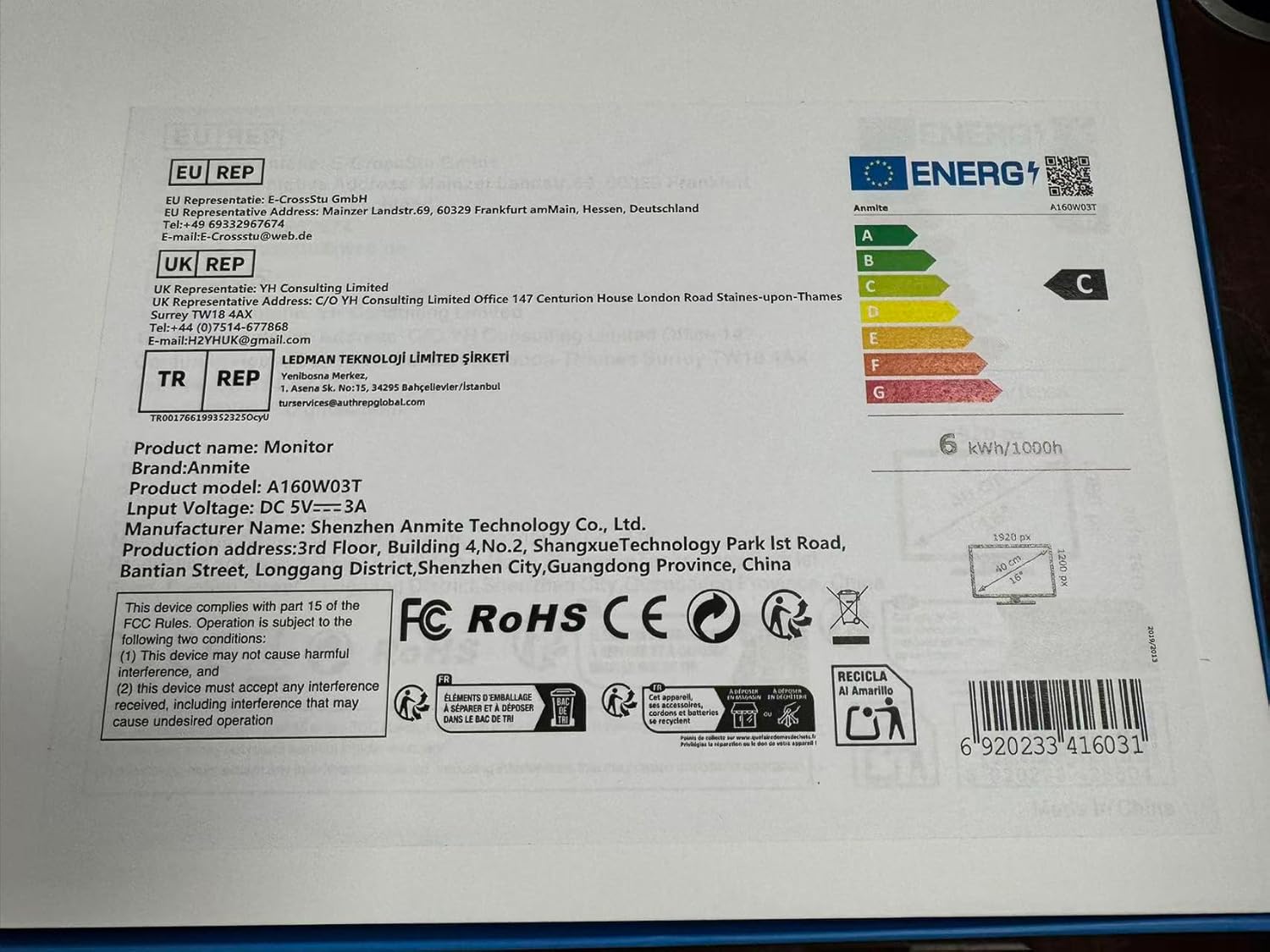
Image 4.2: Product label details. This close-up shows the product name, brand, model number (A160W03T), input voltage (DC 5V-3A), manufacturer information, and various compliance logos.
5. సెటప్
5.1 పరికరానికి కనెక్ట్ చేస్తోంది
The Anmite A160W03T monitor supports connectivity via Type-C (Full Function) and Mini-HDMI.
- పవర్ కనెక్షన్: Connect the monitor to a power source using the provided Type-C to USB-A cable and a compatible power adapter (not always included, typically 5V/3A). Alternatively, if your device provides sufficient power via a full-function Type-C port, a separate power connection may not be needed.
- Type-C Connection (Full Function):
- Ensure your device's Type-C port supports video output (DisplayPort Alternate Mode) and power delivery.
- Connect one end of the Type-C to Type-C cable to your device's full-function Type-C port and the other end to the monitor's full-function Type-C port.
- This single cable can transmit video, audio, touch signals, and power.
- Mini-HDMI Connection:
- Connect one end of the Mini-HDMI to HDMI cable to the monitor's Mini-HDMI port and the other end to your device's HDMI port.
- For power, use the Type-C to USB-A cable connected to the monitor's dedicated power Type-C port and a power adapter.
- For touch functionality with HDMI, an additional USB-A to Type-C cable (provided) must be connected from your device's USB-A port to the monitor's full-function Type-C port.

చిత్రం 5.1: వెనుక view of the monitor. This image shows the integrated stand and the location of the various input/output ports on the side and back of the monitor.
5.2 Stand Adjustment
The monitor features an integrated stand. Gently pull out the stand from the back of the monitor to adjust it to your desired viewing angle. Ensure the stand is stable on a flat surface.
6. ఆపరేటింగ్ సూచనలు
6.1 పవర్ ఆన్/ఆఫ్
- To power on the monitor, press the power button located on the side or back of the monitor.
- To power off, press and hold the power button for a few seconds until the screen turns off.
6.2 ఆన్-స్క్రీన్ డిస్ప్లే (OSD) మెనూ
The monitor includes an OSD menu for adjusting settings such as brightness, contrast, color, and input source. Use the control buttons (typically located on the side or back) to navigate the menu:
- OSDని తెరవడానికి మెనూ బటన్ను నొక్కండి.
- Use the navigation buttons (up/down or +/-) to select options.
- Press the Enter button to confirm selections.
- OSD ని మూసివేయడానికి నిష్క్రమించు బటన్ను నొక్కండి.
6.3 టచ్ స్క్రీన్ కార్యాచరణ
The monitor features a 10-point capacitive touch screen. When connected via a full-function Type-C cable or an HDMI + USB-A to Type-C cable, the touch function will be enabled automatically. Ensure your operating system supports touch input.
6.4 ఆడియో అవుట్పుట్
The monitor has built-in speakers. You can also connect external headphones or speakers to the 3.5mm audio output interface for private listening or higher quality audio.
7. నిర్వహణ
7.1 మానిటర్ను శుభ్రపరచడం
- Always power off the monitor and unplug all cables before cleaning.
- మెత్తని, మెత్తని బట్టను తేలికగా ఉపయోగించండి డిampనీరు లేదా రాపిడి లేని స్క్రీన్ క్లీనర్తో శుభ్రం చేయండి.
- క్లీనర్ను నేరుగా స్క్రీన్పై పిచికారీ చేయవద్దు.
- కఠినమైన రసాయనాలు, ఆల్కహాల్ లేదా రాపిడి పదార్థాలను ఉపయోగించడం మానుకోండి.
7.2 నిల్వ
When not in use for extended periods, store the monitor in a cool, dry place, preferably in its original packaging, to protect it from dust and physical damage.
8. ట్రబుల్షూటింగ్
మీ మానిటర్తో మీకు సమస్యలు ఎదురైతే, ఈ క్రింది సాధారణ సమస్యలు మరియు పరిష్కారాలను చూడండి:
- సంకేతం లేదు:
- Ensure all cables (video and power) are securely connected.
- Verify that your device's Type-C port supports video output if using Type-C.
- Try a different cable or port on your device.
- Select the correct input source in the monitor's OSD menu.
- శక్తి లేదు:
- Check if the power adapter is properly connected and the power outlet is functional.
- Ensure the Type-C power cable is connected to the correct power input port on the monitor.
- టచ్ ఫంక్షన్ పనిచేయడం లేదు:
- For Type-C connection, ensure it's a full-function Type-C port on your device.
- For HDMI connection, ensure the additional USB-A to Type-C cable is connected from your device to the monitor's full-function Type-C port for touch data.
- మీ కనెక్ట్ చేయబడిన పరికరాన్ని పునఃప్రారంభించండి.
- ధ్వని లేదు:
- Check the volume settings on both the monitor and your connected device.
- మీ కంప్యూటర్లో సరైన ఆడియో అవుట్పుట్ పరికరాన్ని ఎంచుకున్నారని నిర్ధారించుకోండి.
- If using HDMI, ensure the HDMI cable supports audio transmission.
9. వారంటీ మరియు మద్దతు
This Anmite portable monitor is manufactured by Shenzhen Anmite Technology Co., Ltd. For warranty information and technical support, please refer to the documentation provided with your purchase or contact your retailer. Please have your model number (A160W03T) and UPC (6920233416031) available when seeking support.