
GTRACING GT901-NEW
GTRACING Gaming Chair with Footrest Instruction Manual
Model: GT901-NEW
1. పరిచయం
Thank you for choosing the GTRACING Gaming Chair with Footrest. This manual provides detailed instructions for assembly, operation, maintenance, and troubleshooting to ensure you get the most out of your new chair. Designed for both gaming and office use, this chair offers ergonomic support and comfort for extended periods.
2. భద్రతా సమాచారం
MAXIMUM WEIGHT CAPACITY: Do not exceed 300 lbs (136 kg).
అస్సెంబ్లి: Follow the provided instructions carefully to ensure safe and proper assembly. Incorrect assembly can lead to instability and potential injury.
వాడుక: Avoid standing on the chair or using it as a step stool. Do not lean excessively to one side, as this may cause the chair to tip over. Keep children and pets away from the chair during assembly and adjustment.
3. ప్యాకేజీ విషయాలు
Please verify that all components are present before beginning assembly. If any parts are missing or damaged, please contact GTRACING customer support.
- బ్యాక్రెస్ట్
- ఆర్మ్రెస్ట్లతో కూడిన సీట్ కుషన్
- స్టార్ బేస్
- కాస్టర్లు (5x)
- గ్యాస్ లిఫ్ట్ సిలిండర్
- గ్యాస్ లిఫ్ట్ కవర్
- మెకానిజం ప్లేట్
- హెడ్రెస్ట్ పిల్లో
- లంబార్ సపోర్ట్ పిల్లో
- Retractable Footrest Assembly
- హార్డ్వేర్ ప్యాక్ (స్క్రూలు, వాషర్లు, అలెన్ రెంచ్)
- ఇన్స్ట్రక్షన్ మాన్యువల్
4. అసెంబ్లీ సూచనలు
Assembly is straightforward and typically takes about 30-60 minutes. It is recommended to assemble the chair on a soft, clean surface to prevent damage.
4.1. Attach Casters to Base
స్టార్ బేస్ యొక్క ప్రతి కాలు చివర ఉన్న రంధ్రాలలోకి ఐదు క్యాస్టర్లను చొప్పించండి. అవి స్థానంలో క్లిక్ అయ్యే వరకు గట్టిగా నెట్టండి.
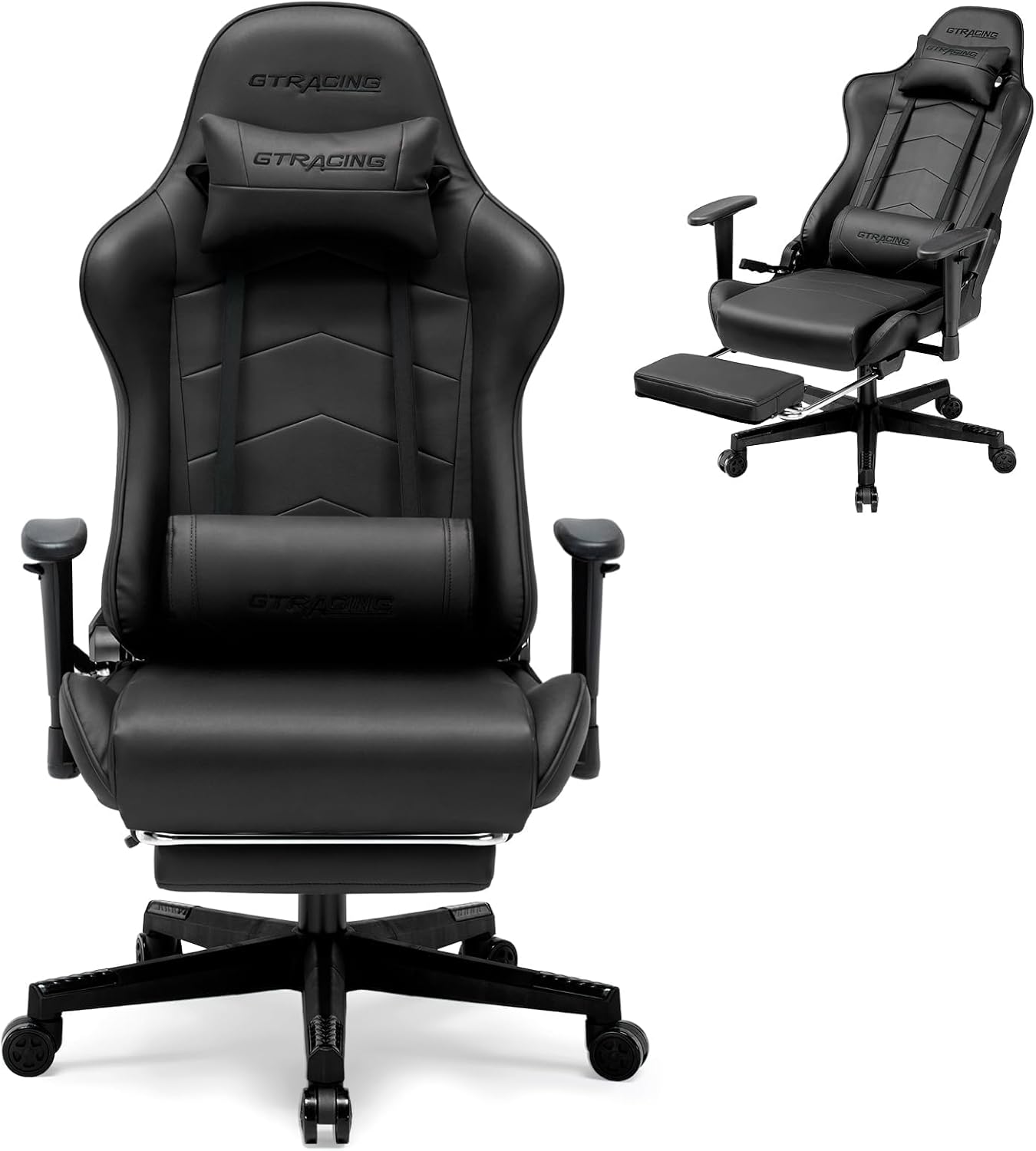
చిత్రం: ప్రధాన view of the GTRACING Gaming Chair, showing the star base with casters.
4.2. Install Gas Lift
గ్యాస్ లిఫ్ట్ సిలిండర్ను స్టార్ బేస్ మధ్య రంధ్రంలో ఉంచండి. దానిని గ్యాస్ లిఫ్ట్ కవర్తో కప్పండి.
4.3. Attach Mechanism to Seat
Align the mechanism plate with the screw holes on the underside of the seat cushion. Secure it using the provided screws. Ensure the front of the mechanism faces the front of the seat.
4.4. Attach Backrest to Seat
Align the backrest with the metal brackets on the seat cushion. Secure it using the appropriate screws. Make sure all screws are tightened evenly.
4.5. Attach Assembled Seat to Gas Lift
Carefully place the assembled seat onto the gas lift cylinder. The tapered end of the gas lift should fit securely into the mechanism on the seat.
4.6. Attach Pillows
Attach the headrest pillow to the top of the backrest using its straps. Position the lumbar support pillow on the lower backrest, adjusting its height for optimal comfort.

Image: The GTRACING Gaming Chair in a reclined position with the footrest extended, demonstrating its comfort features.
4.7. అసెంబ్లీ వీడియో గైడ్
For a visual guide on the assembly process, please refer to the official video below:
Video: Official GTRACING video demonstrating the assembly and features of the gaming chair with footrest.
5 కీ ఫీచర్లు
- Ergonomic Racing Style: Inspired by racing seats, this gaming chair features a wrap-around design that fully supports your lumbar, shoulders, and back. It reduces pressure from long sitting, minimizes fatigue, and supports better spinal health.
- ప్రీమియం క్వాలిటీ మెటీరియల్స్: Made with high-grade PVC leather and high-density foam, this gaming chair delivers a luxurious look and exceptional comfort. The durable and soft materials ensure a cozy seating experience, easy maintenance and long-lasting performance for gaming and office use.
- Heavy-Duty Build for Maximum Support: Built with a sturdy metal frame and reinforced base, this office chair provides superior stability and durability. It supports up to 300 lbs, offering reliability and safety during long gaming or work hours.
- Adjustable Reclining Backrest: The backrest reclines from 90° to 160°, offering customizable comfort to suit your needs. Paired with a retractable footrest, it’s perfect for working, gaming, or relaxing. Adjust to your ideal position with ease.
- సర్దుబాటు చేయగల నడుము మద్దతు: The included lumbar pillow can be adjusted to provide targeted support for your lower back, enhancing comfort during prolonged use.
- సర్దుబాటు చేయగల హెడ్రెస్ట్: The headrest pillow can be positioned to support your neck and head, promoting a natural sitting posture.
- ముడుచుకునే ఫుట్రెస్ట్: A convenient pull-out footrest allows for full recline and relaxation.
- సర్దుబాటు చేయదగిన ఆర్మ్రెస్ట్లు: The armrests can be adjusted to your preferred height for optimal arm and shoulder support.

Image: Detailed dimensions and 300 lbs maximum weight capacity of the GTRACING Gaming Chair.

చిత్రం: క్లోజప్ view of the adjustable 2D armrests on the GTRACING Gaming Chair, highlighting their height adjustment feature.
6. ఆపరేటింగ్ సూచనలు
6.1 ఎత్తు సర్దుబాటు
To adjust the chair's height, locate the lever on the right side, beneath the seat. Pull the lever up while sitting on the chair to lower it, or stand up and pull the lever to raise it. Release the lever at your desired height.
6.2. Reclining Backrest
To recline the backrest, pull the lever on the left side of the chair upwards. Lean back to your desired angle (90° to 160°). Release the lever to lock the backrest in place. To return to an upright position, pull the lever and lean forward.
6.3. ముడుచుకునే ఫుట్రెస్ట్
To use the footrest, pull it out from underneath the seat. Extend it fully for maximum comfort when reclining. Push it back in when not in use.
6.4. ఆర్మ్రెస్ట్ సర్దుబాటు
The armrests can be adjusted vertically. Locate the button or lever on the side of each armrest. Press or pull it and move the armrest up or down to your preferred height. Release to lock.
6.5. ఆపరేషనల్ వీడియో గైడ్
See the chair's features and adjustments in action:
Video: Official GTRACING video showcasing the racing style and various adjustable features of the gaming chair.
7. నిర్వహణ
To ensure the longevity and appearance of your GTRACING Gaming Chair, follow these simple maintenance tips:
- శుభ్రపరచడం: ప్రకటనతో శుభ్రంగా తుడవండిamp cloth. Avoid harsh chemicals or abrasive cleaners, as they may damage the PVC leather.
- సాధారణ తనిఖీలు: అన్ని స్క్రూలు మరియు బోల్ట్లు బిగుతుగా ఉన్నాయని నిర్ధారించుకోవడానికి కాలానుగుణంగా వాటిని తనిఖీ చేయండి. అవసరమైతే మళ్ళీ బిగించండి.
- కాస్టర్ కేర్: మృదువైన రోలింగ్ ఉండేలా చూసుకోవడానికి క్యాస్టర్లను శిధిలాలు (జుట్టు, దుమ్ము) లేకుండా ఉంచండి.
- ప్రత్యక్ష సూర్యకాంతిని నివారించండి: ప్రత్యక్ష సూర్యకాంతికి ఎక్కువసేపు గురికావడం వల్ల పదార్థం వాడిపోవచ్చు లేదా పగుళ్లు ఏర్పడవచ్చు.
8. ట్రబుల్షూటింగ్
మీ కుర్చీతో మీకు ఏవైనా సమస్యలు ఎదురైతే, దయచేసి ఈ క్రింది సాధారణ సమస్యలు మరియు పరిష్కారాలను చూడండి:
- Chair Sinks or Won't Stay Up: The gas lift cylinder may be faulty. Contact customer support for a replacement.
- కుర్చీలు తడబడటం: Ensure all screws are securely tightened, especially those connecting the mechanism to the seat and the backrest to the seat.
- సజావుగా తిరగని కాస్టర్లు: Check for hair or debris wrapped around the caster wheels and remove them.
- Difficulty Reclining/Adjusting: Ensure the adjustment levers are fully engaged or disengaged. Check for any obstructions.
For persistent issues, please contact GTRACING customer support.
9. స్పెసిఫికేషన్లు
| ఫీచర్ | వివరాలు |
|---|---|
| బ్రాండ్ | GTRACING |
| మోడల్ పేరు | GT901-NEW |
| రంగు | నలుపు |
| ఉత్పత్తి కొలతలు | 27.95"డి x 27.26"వా x 48.8"హ |
| వస్తువు బరువు | 41.9 పౌండ్లు |
| గరిష్ట బరువు సిఫార్సు | 300 పౌండ్లు |
| మెటీరియల్ | PVC Leather, High-Density Foam, Metal Frame |
| రిక్లైనింగ్ యాంగిల్ | 90° నుండి 160° |
| ప్రత్యేక లక్షణాలు | Adjustable Lumbar, Adjustable Height, Adjustable Headrest, Adjustable Backrest, Retractable Footrest |
10. వారంటీ & సపోర్ట్
GTRACING is committed to customer satisfaction. This gaming chair includes a detailed installation guide for easy setup. If you have any questions, the GTRACING support team is ready to assist and will respond within 24 hours to ensure your satisfaction.
For specific warranty details and to contact support, please refer to the warranty card included in your package or visit the official GTRACING webసైట్.
Ask a question about this manual
Ask about setup, troubleshooting, compatibility, parts, safety, or missing instructions. Manuals+ will review the question and use this page’s manual context to help answer it.