
1. పరిచయం
This manual provides essential information for the safe and efficient installation, operation, and maintenance of the LCRHLCNC 400W Servo Motor Kit. This kit is designed for industrial automation applications requiring high precision and reliability, such as CNC machining, medical equipment, and robotic arms. Please read this manual thoroughly before using the product.
2. భద్రతా సమాచారం
హెచ్చరిక: సరికాని ఇన్స్టాలేషన్ లేదా ఆపరేషన్ తీవ్రమైన గాయం లేదా పరికరాల నష్టానికి దారితీయవచ్చు. ఎల్లప్పుడూ భద్రతా మార్గదర్శకాలను అనుసరించండి.
- Ensure all power is disconnected before installation, wiring, or maintenance.
- Only qualified personnel should perform installation and wiring procedures.
- సరైన సంపుటాన్ని ధృవీకరించండిtagవిద్యుత్తును కనెక్ట్ చేయడానికి ముందు e మరియు ప్రస్తుత రేటింగ్లు.
- Ground the equipment properly to prevent electrical shock.
- ఆపరేషన్ సమయంలో తిరిగే భాగాలను తాకడం మానుకోండి.
- Operate the servo motor within its specified environmental conditions (-10°C to 40°C).
3. ఉత్పత్తి భాగాలు
The LCRHLCNC 400W Servo Motor Kit includes the following components:
- 1 x 400W 60AST-A1C01330 Servo Motor (17-bit absolute encoder)
- 1 x T3DL-V30A AC Servo Driver
- 1 x 3M Encoder Cable
- 1 x 3M Power Line
- 1 x Control Signal Cable
- 2 x 2K 1/4W Resistors
- 1 x RS485 కమ్యూనికేషన్ కేబుల్

చిత్రం: పైగాview of the LCRHLCNC 400W Servo Motor Kit components, including the servo motor, servo driver, and various cables and resistors.
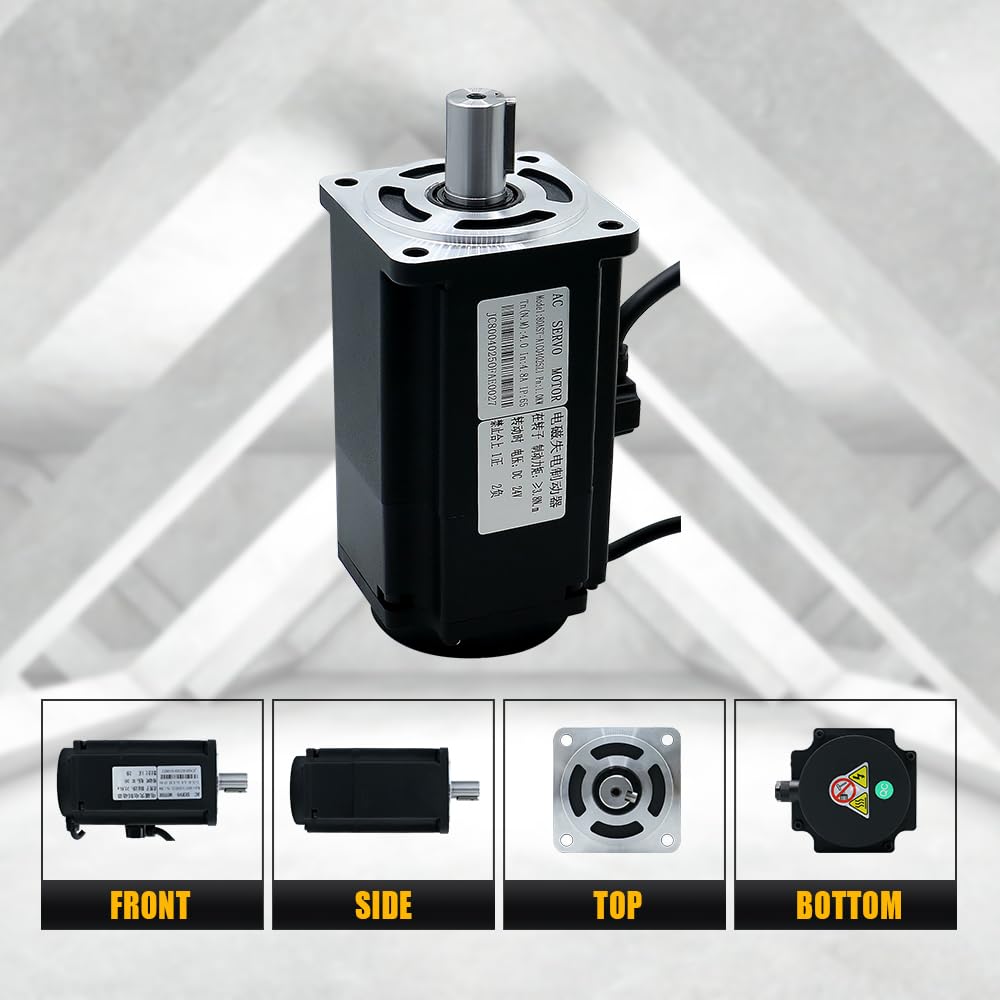
చిత్రం: వివిధ views of the 400W servo motor, showing its front, side, top, and bottom perspectives.
4. సాంకేతిక లక్షణాలు
4.1. Servo Motor (60AST-A1C01330)
| స్పెసిఫికేషన్ | విలువ | స్పెసిఫికేషన్ | విలువ |
|---|---|---|---|
| వాల్యూమ్ రేట్ చేయబడిందిtagఇ (వి) | 110 | Instantaneous Max Torque (N.m) | 3.82 |
| రేట్ చేయబడిన శక్తి (W) | 400 | Rated Speed/Max Speed (rpm) | 3000/6000 |
| Rotor Pole Pairs (P) | 5 | Rated Current (A(rms)) | 3.4 |
| రేట్ చేసిన టార్క్ (Nm) | 1.27 | బరువు (KG) | 1.22 ± 10% |

Image: Detailed dimensions and specifications table for the 60AST-A1C01330 servo motor.
4.2. Servo Driver (T3DL-V30A)
| మోడల్ | HL-T3DL-V30A-RABF-B | ఫ్రీక్వెన్సీ | 50/60 Hz |
|---|---|---|---|
| వాల్యూమ్tage | 110 VAC | మాక్స్ కరెంట్ | 15 ఎ |
| దశ | 3PH/1PH | బరువు | 1.23 కి.గ్రా |

Image: Dimensions and parameter table for the T3DL servo drive.
5. సంస్థాపన మరియు వైరింగ్
Proper wiring is critical for the functionality and safety of the servo system. Refer to the wiring diagram below for connections.
5.1. General Wiring Overview
- పవర్ కనెక్షన్: Connect the 110V AC power supply to the L1, L2, L3 terminals for 3-phase or L1, L2 for single-phase. Ensure proper grounding to the PE terminal.
- మోటార్ కనెక్షన్: Connect the servo motor's power cable to the U, V, W, PE terminals on the driver.
- Encoder Connection: Connect the encoder cable from the servo motor to the CN2A/CN2B encoder port on the driver.
- నియంత్రణ సిగ్నల్: Connect the control signal cable to the CN1 port for communication with a computer, PLC, or other upper-level device.
- RS485 కమ్యూనికేషన్: The CN3/CN4 ports are for RS485 communication, allowing daisy-chaining.
- Braking Resistor: If a braking resistor is required, connect it to the P and D terminals. Do not connect if not required, as this can cause damage.

Image: Detailed wiring diagram illustrating connections between the servo motor, servo driver, control board (e.g., computer), and power supply. Includes labels for various ports and cables.
చిత్రం: క్లోజప్ view of the T3DL-V30A servo driver, highlighting the various input/output ports and their functions, including CN1, CN2A/CN2B, CN3/CN4, and power terminals.
6. ఆపరేటింగ్ సూచనలు
The T3DL-V30A driver features a main menu system for status monitoring, parameter settings, and management. Use the control buttons to navigate and adjust settings.
6.1. Driver Display and Button Functions
| చిహ్నం | పేరు | ఫంక్షన్ |
|---|---|---|
| POW | Power light (none) | The decimal point of the second digital tube from the left lights up to indicate that the servo is under voltage. |
| రన్ | Running light (none) | The decimal point of the first digital tube from the left lights up to indicate that the servo is enabled. |
| ▲ ▲ తెలుగు | కీని జోడించండి | Increase the serial number or value; long press has repeat effect. |
| ▼ | కీని తగ్గించు | Decrease the serial number or value; long press has repeat effect. |
| ◄ | నిష్క్రమణ కీ | Menu exit, operation canceled. |
| సెట్ | నమోదు చేయండి | Menu entry, parameter modification confirmation or operation confirmation. |

Image: Diagram illustrating the main menu structure and button functions for the T3DL-V30A servo driver, showing navigation between Tier 1 (Main Menu) and Tier 2 settings.
7. నిర్వహణ
Regular maintenance ensures the longevity and optimal performance of your servo motor kit.
- శుభ్రపరచడం: Keep the motor and driver free from dust and debris. Use a soft, dry cloth for cleaning. Avoid using solvents or abrasive cleaners.
- కనెక్షన్లు: అన్ని విద్యుత్ కనెక్షన్లను బిగుతు మరియు అరిగిపోయిన లేదా తుప్పు పట్టిన సంకేతాల కోసం కాలానుగుణంగా తనిఖీ చేయండి.
- పర్యావరణం: Ensure the operating environment remains within the specified temperature and humidity ranges. The IP65 rating provides dust and moisture resistance, but extreme conditions should be avoided.
- తనిఖీ: Visually inspect cables for damage. Replace any damaged components immediately.
8. ట్రబుల్షూటింగ్
If you encounter issues with your servo motor kit, consider the following general troubleshooting steps:
- శక్తి లేదు: Check all power connections, circuit breakers, and fuses. Verify the input voltage.
- మోటారు కదలడం లేదు: Ensure the motor is enabled via the driver. Check control signal connections and parameters. Verify encoder feedback.
- Abnormal Noise/Vibration: Check for mechanical obstructions. Verify motor mounting. Review driver parameters for tuning issues.
- వేడెక్కడం: Ensure adequate ventilation around the motor and driver. Check for excessive load or incorrect operating parameters.
- కమ్యూనికేషన్ లోపాలు: Verify RS485 cable connections and communication settings (baud rate, parity).
For complex issues or advanced tuning, it is recommended to consult the manufacturer's detailed technical documentation or contact customer support.
9. వారంటీ మరియు మద్దతు
For warranty information, technical support, or to obtain additional resources such as tuning software or detailed parameter guides, please contact LCRHLCNC directly through their official channels or the retailer from whom the product was purchased.
Manufacturer: Lishui Hengli Automation Technology Co., Ltd