
పరిచయం
Welcome to your new SPC Gravity 5 Tablet. This manual provides essential information for setting up, operating, maintaining, and troubleshooting your device. Please read it carefully to ensure optimal performance and longevity of your tablet.
The SPC Gravity 5 features an 11-inch IPS InCell display, an Octa-Core processor, 4GB of RAM, 128GB of expandable storage, WiFi 6 connectivity, and runs on Android 13. It also includes a 6000 mAh battery for extended use and reverse charging capability, all encased in a sleek metallic body.
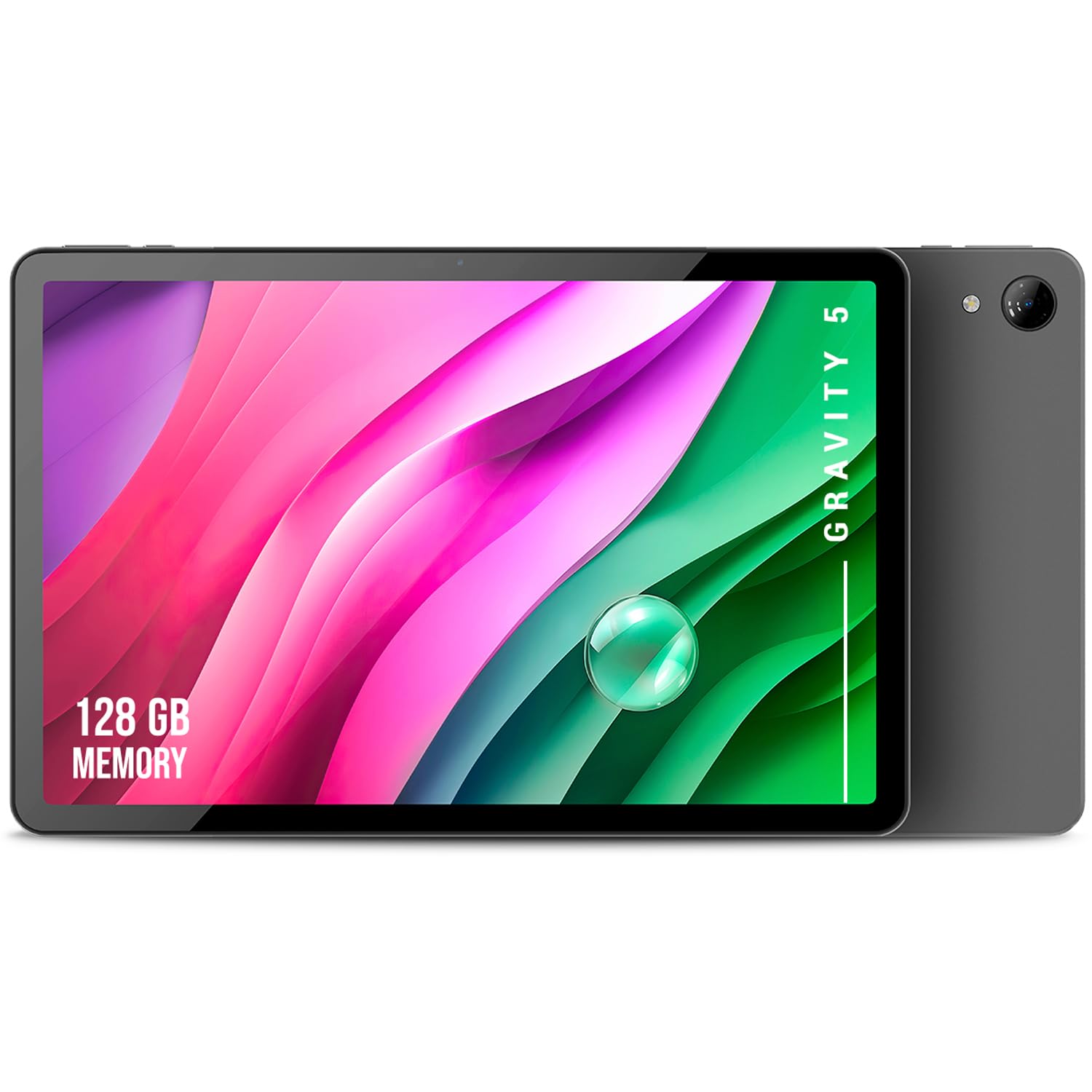
Image: The SPC Gravity 5 Tablet, showcasing దాని 11-అంగుళాల డిస్ప్లే.
పెట్టెలో ఏముంది
Upon unpacking your SPC Gravity 5 Tablet, please ensure all the following items are present:
- SPC Gravity 5 Tablet
- USB కేబుల్
- త్వరిత ప్రారంభ గైడ్
సెటప్
1. ప్రారంభ ఛార్జ్
Before first use, it is recommended to fully charge your tablet. Connect the provided USB cable to the tablet's USB-C port and to a compatible power adapter (not included). The charging indicator will show the battery status.

Image: The SPC Gravity 5 Tablet connected via USB cable, illustrating the charging process. The tablet also supports reverse charging for other devices.
2. పవర్ చేయడం ఆన్/ఆఫ్
- పవర్ ఆన్ చేయడానికి: Press and hold the power button (located on the side) until the SPC logo appears on the screen.
- పవర్ ఆఫ్ చేయడానికి: Press and hold the power button, then select "Power off" from the on-screen options.
3. ప్రారంభ ఆకృతీకరణ
Upon first startup, follow the on-screen wizard to configure your tablet. This includes selecting your preferred language, connecting to a Wi-Fi network, and setting up your Google account. A Google account is required to download apps from the Google Play Store.
4. మైక్రో SD కార్డ్ని చొప్పించడం (ఐచ్ఛికం)
The SPC Gravity 5 supports storage expansion up to 512GB using a Micro SD card. Locate the card slot on the side of the device. Carefully insert the Micro SD card with the gold contacts facing down until it clicks into place. To remove, gently press the card until it springs out.

Image: An icon depicting a Micro SD card, indicating expandable storage capability.
ఆపరేటింగ్ సూచనలు
1. టచ్స్క్రీన్ నావిగేషన్
Your tablet's primary interaction is through its touchscreen. Common gestures include:
- నొక్కండి: ఒక అంశాన్ని ఎంచుకోండి లేదా యాప్ను తెరవండి.
- స్వైప్: పేజీలు లేదా జాబితాల ద్వారా స్క్రోల్ చేయండి.
- జూమ్ చేయడానికి పించ్ చేయండి: ఫోటోలను జూమ్ ఇన్ లేదా అవుట్ చేయండి మరియు web పేజీలు.
- లాంగ్ ప్రెస్: సందర్భోచిత మెనూలను యాక్సెస్ చేయండి లేదా చిహ్నాలను తరలించండి.
2. Wi-Fi కనెక్టివిటీ
To connect to the internet, navigate to సెట్టింగ్లు > నెట్వర్క్ & ఇంటర్నెట్ > Wi-Fi. Select your desired network from the list and enter the password if prompted. The tablet supports WiFi 6 for faster and more stable connections.
3. కెమెరా వినియోగం
The SPC Gravity 5 is equipped with a 7-megapixel rear camera and a front camera, suitable for capturing photos, recording videos, and making video calls. Open the Camera app from your home screen or app drawer to access camera functions.

Image: A person holding the SPC Gravity 5 Tablet, engaged in a video call with several people, demonstrating the front camera's use.

Image: A woman holding the SPC Gravity 5 Tablet, with a magnified view of the rear camera module, highlighting its design.
4. Reverse Charging
The SPC Gravity 5 supports reverse charging, allowing you to use its powerful 6000 mAh battery to charge other compatible devices. Connect the tablet to another device using a USB-C to USB-C cable (not included) to initiate charging.
Image: The SPC Gravity 5 Tablet connected to a smartphone via a USB cable, demonstrating its reverse charging capability.
5. మల్టీమీడియా అనుభవం
Enjoy an immersive multimedia experience on the 11-inch HD+ display. The tablet's 6000 mAh battery provides up to 7.5 hours of continuous use, ideal for watching movies, browsing the web, or playing games.

Image: A man relaxing with headphones while the SPC Gravity 5 Tablet plays media on a nearby table, illustrating its entertainment use.
నిర్వహణ
1. శుభ్రపరచడం
Use a soft, lint-free cloth to gently wipe the screen and body of the tablet. For stubborn smudges, slightly dampen the cloth with water. Avoid using abrasive materials, alcohol, or harsh chemical cleaners, as these can damage the screen and finish.
2. బ్యాటరీ సంరక్షణ
To prolong the lifespan of your tablet's battery, avoid exposing it to extreme temperatures (hot or cold). Do not frequently allow the battery to fully discharge to 0%. It is best to keep the charge level between 20% and 80% when possible.
3. సాఫ్ట్వేర్ నవీకరణలు
Regularly check for and install system updates to ensure your tablet has the latest features, security patches, and performance improvements. You can usually find this option under సెట్టింగ్లు > సిస్టమ్ > సిస్టమ్ అప్డేట్.
4. నిల్వ నిర్వహణ
క్రమానుగతంగా రీview మరియు అనవసరమైన వాటిని తొలగించండి files, photos, videos, and applications to free up internal storage space. This helps maintain the tablet's performance. Consider moving large media files to an inserted Micro SD card.
ట్రబుల్షూటింగ్
This section addresses common issues you might encounter with your SPC Gravity 5 Tablet.
పరికరం ఆన్ చేయడం లేదు
- Ensure the battery is charged. Connect the tablet to a charger for at least 30 minutes before attempting to power it on again.
- Try a forced restart by holding the power button for 10-15 seconds.
Wi-Fi కనెక్షన్ సమస్యలు
- మీ Wi-Fi రౌటర్ మరియు టాబ్లెట్ను పునఃప్రారంభించండి.
- ఇతర పరికరాలు ఒకే Wi-Fi నెట్వర్క్కి కనెక్ట్ కాగలవో లేదో తనిఖీ చేయండి.
- మీరు సరైన Wi-Fi పాస్వర్డ్ను నమోదు చేస్తున్నారని ధృవీకరించండి.
- టాబ్లెట్ సెట్టింగ్లలో నెట్వర్క్ను మర్చిపోయి, తిరిగి కనెక్ట్ చేయండి.
స్లో పనితీరు
- నేపథ్యంలో నడుస్తున్న ఉపయోగించని అప్లికేషన్లను మూసివేయండి.
- Clear cache data from frequently used apps via సెట్టింగ్లు > యాప్లు > [యాప్ పేరు] > నిల్వ & కాష్ > కాష్ను క్లియర్ చేయండి.
- Uninstall rarely used applications to free up RAM and storage.
- Ensure you have sufficient free storage space (at least 10-15% of total storage).
ఫ్యాక్టరీ రీసెట్ (చివరి ప్రయత్నం)
If persistent issues occur and cannot be resolved by other troubleshooting steps, you may perform a factory reset. Warning: This action will erase all data on your tablet, including apps, photos, and settings. Ensure you back up all important data before proceeding. To perform a factory reset, go to సెట్టింగ్లు > సిస్టమ్ > రీసెట్ ఎంపికలు > మొత్తం డేటాను తొలగించండి (ఫ్యాక్టరీ రీసెట్) మరియు ఆన్-స్క్రీన్ ప్రాంప్ట్లను అనుసరించండి.
స్పెసిఫికేషన్లు
Detailed technical specifications for the SPC Gravity 5 Tablet:
| ఫీచర్ | వివరాలు |
|---|---|
| మోడల్ పేరు | గ్రావిటీ 5 |
| ఉత్పత్తి మోడల్ సంఖ్య | 97874128N |
| బ్రాండ్ | SPC |
| స్క్రీన్ పరిమాణం | 11 అంగుళాలు |
| Maximum Screen Resolution | 1280x800 Pixels (HD+) |
| స్క్రీన్ రకం | IPS InCell |
| ప్రాసెసర్ | Allwinner Octa-Core 1.8 GHz |
| ఇన్స్టాల్ చేసిన RAM | 4 GB |
| అంతర్గత నిల్వ సామర్థ్యం | 128 GB |
| విస్తరించదగిన నిల్వ | 512 GB వరకు (MicroSD) |
| ఆపరేటింగ్ సిస్టమ్ | ఆండ్రాయిడ్ 13 |
| బ్యాటరీ కెపాసిటీ | 6000 mAh (లిథియం అయాన్) |
| సగటు బ్యాటరీ జీవితం | 7.5 గంటల వరకు |
| వైర్లెస్ టెక్నాలజీ | Bluetooth, Wi-Fi (802.11ax / WiFi 6) |
| కెమెరాలు | Rear 7 MP, Front for video calls |
| కనెక్టివిటీ టెక్నాలజీ | USB Type-C (supports reverse charging), 3.5mm Audio Jack |
| Product Dimensions (L x W x T) | 25.6 x 16.7 x 0.8 సెం.మీ |
| ఉత్పత్తి బరువు | 515 గ్రాములు |
| రంగు | నలుపు |
| మెటీరియల్ | మెటాలిక్ బాడీ |
వారంటీ మరియు మద్దతు
వారంటీ సమాచారం
This SPC Gravity 5 Tablet is covered by a product warranty in accordance with current applicable law. Please refer to your purchase documentation, such as the receipt or invoice, for specific terms, conditions, and the duration of your warranty. Keep your proof of purchase in a safe place.
కస్టమర్ మద్దతు
For technical assistance, product inquiries, or to make a warranty claim, please contact SPC customer support. You can typically find contact information on the official SPC webసైట్ (www.spc.es, or relevant regional site) or through the retailer where you purchased the product. When contacting support, please have your product model number (GRAVITY 5, 97874128N) and proof of purchase readily available.